1
System Protect Software User Manual
4 Installation and configuration for SPS in the VMware ESX
4.1 Configuring for VMware ESX
4.1.1 Configuring VMs startup/shutdown automatically
•
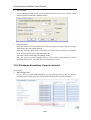
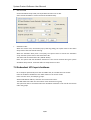
Start VMware Client, select Configuration -> Virtual Machine Startup/Shutdown->Properties
•
Select Allow virtual machines to start and stop automatically with the system checkbox.
Enter the settings as shown on the Virtual Machine Startup and Shutdown window:
For each virtual machine, set delay startup for 10 seconds
For each virtual machine, set delay shutdown for 30 seconds
Move up the virtual machines to the Automatic Startup list.
The virtual machines will start/stop when the host start/shutdown automatically.
18/33