1
System Protect Software User Manual
:
•
SPS client side
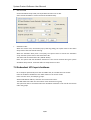
Set the Shutdown Delay to 60s, set Script Max Execution Time to 40s, unselect Cancel
Shutdown if events restored in Shutdown Delay.
•
Shutdown order:
When the events occur, the SPS will pop up warning dialog, the system start to shut down
delay counter after 30 seconds warning.
When the shutdown delay time is met (60s), the system starts to execute the shutdown
script. And the system starts to shut down after 40s.
The UPS will be shut down after 20s (120-60-40=20).
Note: The system and UPS shutdown continue if the events restored during the system
shutdown delay interval. It will take effect to sleep function as also.
7.3.2 Shutdown discontinue if events restored
:
For example
•
NMC webpage side
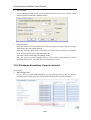
Set the action to Client &UPS Shutdown, set the warning period to 30s, set the UPS
shutdown Delay to 120s. Select the Cancel UPS shutdown if event restored checkbox.
:
31/33