1
System Protect Software User Manual
VMware Server
VMware ESXi 4.0/4.1 (paid version)
VMware ESXi 5.0 (paid version)
VMware ESXi 5.1 (paid version)
VMware ESX 4.0/4.1
Unix
Solaris 10 for Intel/Sparc
FreeBSD 7.X, 8.X, 9.X
1.2 Quickly setup
•
Install and start the SPS in the different system platform according to section 1 to 6. The SPS
service will be started automatically at the system boot.
•
•
•
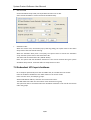
Open the SPS user interface; enter the NMC IP address to add the device.
Select the alarm events from Events list. All the alarm events will be selected by default.
To check the setting, you could simulate the system shutdown by SPS, according to section
7.5.
5/33