1
Table of Contents
Contact & IRIS Information…..…………………………………………………..………………………1
Navigating the Website…………………………………………………………………..…………….2-4
Broadcasting an Alert…….………………………………………….………………………………... 5-6
Alert Degrees (Yellow, Orange, Red)...………………………………………………….……….…..6-8
Frequently Asked Questions…………………………………………………………….……..….…8-10
Dos and Don’ts……………………………………………………………………………………….10-11
Navigating the Website
Whether you are new to IRIS or have sent five alerts, we suggest you take time to get to know
the IRIS website (www.irisdispatch.com) because there are many useful features.
Start out by learning what each tab has to offer.
Home
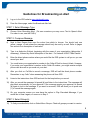
This is the alerts summary page.
•
Alerts in Progress are the alerts
currently scheduled and/or going out.
•
Under Activity Details these are the
alerts currently being sent out.
•
IRIS News and Systems Updates are
the updates made, by date, to the IRIS
website.
•
Under Options, the IRIS User’s Manual
contains a document with detailed
instructions
•
The Comments/Feedback lets you
submit any comments you wish.
2