1
Operator Prompt (P_Prompt)
The data type is P_PromptCfg[1].
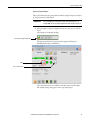
5. Type a number into the square bracket to create the number of prompt
configuration instances you need for your sequence, and click OK.
6. Attach the pins from the P_Prompt instruction to the P_Seq instruction
as shown on page 21.
7. Save and download the file.
8. If you make modifications from the HMI, save the .acd file again.
Prompt Configuration Faceplates
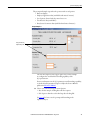
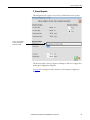
Configure the prompts through a set of FactoryTalk View dialog boxes that let
you select individual prompts in the prompt array. The Engineering tab of the
P_Seq instruction contains checkboxes and buttons to configure a prompt with a
step in a sequence.
For details on configuring steps in a sequence, see the Rockwell Automation
Sequencer Object Reference Manual, publication PROCES-RM006.
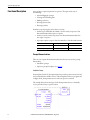
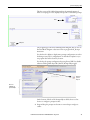
Enable Prompt Check Box
Step-By-Step Sequence Configuration
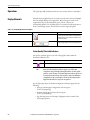
You have the ability to display many prompt configurations, stored in the
Prompts array, depending on what type of action is required from the operator in
a given step of a sequence. But, in general, the procedures are similar for
configuring the prompts.
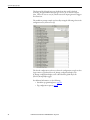
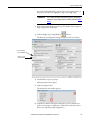
1. On the Engineering tab, check The sequencer has an Operator Prompt
Queue.
22
Rockwell Automation Publication SYSLIB-RM046B-EN-P - August 2014