1
In order to get certain criteria to be evaluated before others, groups of criteria can be combined
into a single criteria. Groups are shown in the filter criteria list within a pair of brackets (‘[’
and ‘]’), one at the beginning and one at the end of the group. If no groups are present, the
criteria are evaluated and combined from the first to the last (i.e., left to right). If groups are
present, the groups are evaluated into one truth value first, then the items are combined from
first to last (as if the group were a single criteria). It is possible to nest groups (i.e., have a
group inside of another group).
• Grouping two or more criteria:
1.)
Select the criteria to be grouped. Shift-click to select more than one.
2.)
If the “Group” button is enabled, the items may be grouped.
“Group” button to group the criteria.
Click on the
• Ungrouping criteria:
1.)
Select the criteria within the list which make up a group.
2.)
If the “Ungroup” button is enabled, the items are indeed in a group and may
be ungrouped. Click on the “Ungroup” button to ungroup the items.
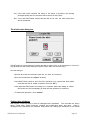
Automatic item filter creation
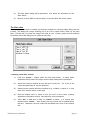
DiskTracker has an automatic item filter generation system - given a selected item, the
generator will produce an item filter based on the characteristics of that file. Choose which
criteria to base this filter on as well as where to store the filter (either in a new filter or in
the untitled filter) in the “Auto-Filter Options” dialog box.
• To set the automatic filter generator options:
1.)
Select “Auto Filter Options…” from the Search menu.
Options dialog will be presented.
The Auto Filter
2.)
Check the criteria for the filter to include.
3.)
Choose whether the generator should save the filter as the untitled filter or as
a new filter.
4.)
Click “OK” to commit the settings or “Cancel” to abort.
• To produce an item filter automatically:
1.)
Select the one item to base the filter on.
2.)
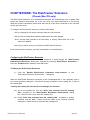
Select “Make Filter From Item” from the Search menu (or press
). An
item filter containing the specified criteria will be created and saved into
DiskTracker User Manual
Page 39