1
User's Manual (rev. 2011-09-15)
Importing/Exporting UTDF Files
Tru-Traffic can import and export text files in the UTDF (Universal Traffic Data Format), either
2006 "combined file" or the older (5-file) version 2.1. These files can be used to transfer diagram
parameters to and from other programs supporting the UTDF, such as Synchro and traffic signal control
systems from Naztec, Gardner, Eagle, and Peek. See also “Importing/Exporting UTDF Files with
Synchro” in the help file for tips on working with these files in Synchro.
Import/Export UTDF 2006
When sharing information specifically between Tru-Traffic and Synchro, you'll generally prefer
the newer, "combined" file, as the procedure is simpler, and the file contents are more complete and
clearly defined. To import a UTDF 2006 file (the single, combined file), use the File: Open command or
toolbar button and change the File Type to UTDF 2006. To export the currently selected timing plan to a
UTDF 2006 file, use the File: Save As... command and change the File Type to UTDF 2006.
Import/Export UTDF 2.1
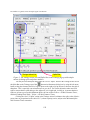
To work with the older (5-file) version 2.1 UTDF, use the Import/Export UTDF command of the
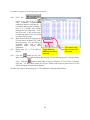
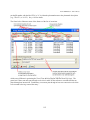
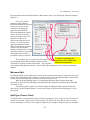
File menu to open the Universal Traffic Data Format Files dialog. In this dialog box you may specify the
names of the various UTDF files: Layout, Lanes, Timing, Phasing, and Volume. Use the
button
next to each file name to browse for an existing file or to simply choose the desired directory for your
files. You may leave a file name blank to exclude it from the importing or exporting of data.
Once you've specified the UTDF file names, use the
button to import the data from
the files, replacing any arterial timings diagram file currently in memory. The Merge button is similar,
but rather than replacing any diagrams currently in memory, it instead extracts from the UTDF files the
parameters for just the intersections already in diagrams, skipping any intersections that aren’t already
represented in both the UTDF files and the diagrams. Use the
button to export the currently
open arterial diagram file to the UTDF files. When you've finished and are satisfied that the files have
been properly imported or exported, use the to exit the dialog box.
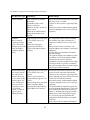
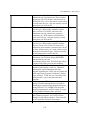
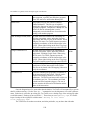
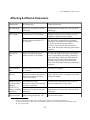
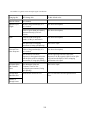
Each of the UTDF files can be one of two different styles with different extensions, as described
in the table below.
UTDF File Extension
Description
Comments
.CSV
Comma-delimited
variables
These files are usually a bit smaller. In the case of the
Layout data, this file style can contain the names of
streets.
.DAT
Column-aligned
These files are easier for a human to read in a word
189