1
User's Manual (rev. 2011-09-15)
Table of Contents
Introduction to Tru-Traffic..............................................................................................................9
License Information.......................................................................................................................11
Getting Started...............................................................................................................................12
Operating Tru-Traffic....................................................................................................................13
Pull Down Menus......................................................................................................................13
The Help System.......................................................................................................................13
Creating a Network........................................................................................................................14
How to Perform a Travel Time and Delay Study..........................................................................17
Diagram Windows.........................................................................................................................21
Understanding the Diagram Symbols.......................................................................................25
Add Diagram Window..............................................................................................................26
Delete Diagram Window...........................................................................................................27
Duplicate Diagram Window.....................................................................................................27
Joining Diagram Windows........................................................................................................27
Splitting Diagram Windows......................................................................................................27
Tile Diagram Windows.............................................................................................................28
Editing in Diagram Windows....................................................................................................28
Zoom in on Diagram Window..................................................................................................29
Annotate Diagram Window......................................................................................................30
Outline View..................................................................................................................................31
Network View................................................................................................................................35
Adjusting the Network View....................................................................................................37
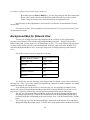
Background Map for Network View.........................................................................................38
Annotate Network View...........................................................................................................39
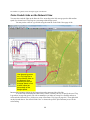
Color-Coded Links on the Network View................................................................................40
Timings Report..............................................................................................................................42
GPS Receiver and Trip Tracking...................................................................................................43
Tracking with the GPS Receiver...............................................................................................43
GPS Clocks Page.......................................................................................................................45
GPS Trip Logs Page..................................................................................................................46
Trip Log Properties...................................................................................................................51
Playback Trip Logs...................................................................................................................52
Importing and Exporting Trip Logs..........................................................................................53
Trip Log Details Table..............................................................................................................54
Trip Log Filter...........................................................................................................................55
GPS Options Page.....................................................................................................................57
Mark Current GPS Position as.............................................................................................57
Size (pixels)..........................................................................................................................57
Mark all positions at current time with a horizontal line......................................................57
Mark all times at current position with a vertical line..........................................................57
1