1
Controlling the Instrument
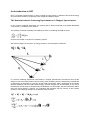
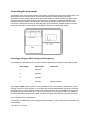
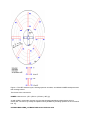
The terminal in the cabin usually displays five windows, conventionally arranged as shown below. The
dashboard at the top left hand corner of the screen provides a display of all the instrument
parameters, including sample temperature goniometer angles etc. Where possible, the HET control
window should only be used for control commands such as beginning, updating and ending runs,
changing incident energies or temperatures, and starting instrument control command files. If this
convention is adhered to it is easy to follow the status of the instrument. All data analysis should be
performed in the HET terminal window. The GENIE windows are used for data display.
Selecting a Chopper Slit Package and Frequency
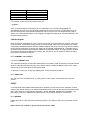
Four chopper slit packages are used on HET, and their specification are given in the following table.
Slit package
Optimum Ei
A
500 meV
B
250 meV
C
100 meV
S
500 meV
Comments
relaxed resolution
The program CHOP, written by Toby Perring, calculates the flux and resolution expected for a given
chopper running at a given frequency. It has been well documented elsewhere and will only be briefly
described here. To run the program use the HET Terminal window, and type CHOP. You will then be
prompted to give the instrument name. The chopper frequency is often given in terms of multiples of
the ISIS pulse (50Hz). At the arrow prompt you select a chopper and frequency using the command
> s c <frequency/isis> <slit package>
For example, s c 10b selects the B chopper spinning at 500Hz. To plot out the flux and resolution use
the command
> p c <Ei min> <Ei max>