1
Note: If users are not assigned a security group, they will have NO options after logging in to the
program.
Security Groups are pre-installed in the software. These vary from state to state. The most common groups are as
follows:
•
Managers: Employees assigned to this security group have full access to the software for managing records in
their school only. Managers have full access to student records and managing the STISETS software in their
school.
•
Teachers: This security group was designed for classroom teachers, providing the ability to manage all
students in the teacher’s caseload. Whether employees serve in the capacity of case manager, related service
provider, special education teacher, psychometrist, etc., all student records may be managed from one work
area.
•
General Ed. Teachers: This group will be created if the Create Gen Ed Teachers box was checked in the
System File. This Group has read-only rights by default.
•
Administrators: Administrators have full user access for all schools in the district. Typically, board office
personnel would be assigned to this security group.
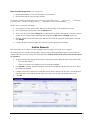
Security Group Edit Commands
The following options may be used when working with security groups:
•
Insert: Insert new security role names and descriptions.
•
Change: Change the name and the description of security roles.
•
Delete: Delete a security role from the list.
•
Copy: Create a duplicate of the group selected. In creating a new group, a user may look at the existing groups
and determine which group has rights that are most similar to the group to be created. In this case, select a
group and click the Copy button to copy the current permissions from the model group. Then rename the new
group.
•
Print: Print the effective permissions for a selected group. To view the current rights for a group, select the
group and click the Print button.
•
Members: Add or remove users from the highlighted Security Group list, or view the current members of a
selected group.
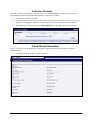
Other Security Group Items
•
•
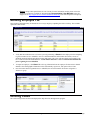
Effective Permissions: A tool for viewing individual user permissions. No modifications to permissions are
allowed from this menu option. Search by:
o
Object Types: Three different classifications of security in STISETS.
o
Groups: Group whose permissions are to be viewed. For more information on this, please refer to the
STISETS User Manual, available for download under Documentation | User Manuals on the STI
Support site at http://support.sti-k12.com/documentation/default.asp (user name and password required).
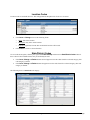
Edit Permissions: A tool for locking down and editing permissions for entire groups of users. This will allow
the System Administrator to edit the permissions of a particular group. Search by:
o
Object Types: Three different classifications of security in STISETS.
Quick Reference Guide
STI_0620121322
STISETS MO – Utilities • 2