1
User Manual
BlackStar SPLURF for Cinema 4D
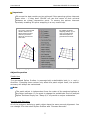
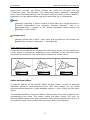
Without any offset the
Spline Surface reaches
to the intersection
points of the assigned
splines.
Offset values specify the
distance from the
assigned spline. Each
spline has 2 offset values:
the start (default 0) and
the end (default 1).
… bloed…??
For applying offsets
simultaneously to
opposing splines select
"Lock L/R" or "Lock U/D".
The "Allow Flipping" option does not prevent
offset start-values to be
greater than the end
ones causing shapes
like shown left.
[Fig. 3: Different offset adjustments]
Accuracy
As determining the intersection of the splines is very expensive you can specify
the accuracy of the approximation by yourself. Lower values are way faster but
generate less accurate Spline Surfaces, higher values produce better quality but
need more time to calculate. For most cases the default value should fit,
changing it depends on your individual needs and your system.
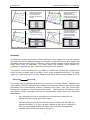
The option "Limit intersections" provides an advanced method for complicated
spline surface shapes and to achieve even more enhanced precision. For each
spline (or instance) there are four handles specifying two colored ranges like this:
The colors can be changed with the color pickers in the tab "Offset". Without the
limit option, SPLURF automatically detects intersections between the splines and
generates the corresponding surface. Enabling this option, you can restrict the
intersection ranges to the colored spline parts – just drag the handles to mark
the desired range. Manually limiting the intersection range offers the following
advantages:
•
Less calculation time is needed since intersections must only be
determined within the specified ranges
•
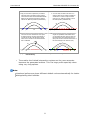
Spline Surfaces normally not being able to create with SPLURF can
become possible (I. e. you can use a spline as well as an instance of
itself for generating a Spline Surface with normally unsupported
multiple intersections as seen in figure 4).
7