1
User Manual
BlackStar SPLURF for Cinema 4D
Important:
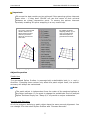
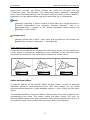
Of course the best results can be achieved if the spanning splines intersect
each other – if they don't SPLURF will use the center of their minimal
distance as virtual intersection point. To ensure the splines intersect
precisely enabling 3D spline snapping is a very useful help.
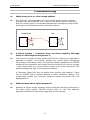
The center of the minimal
distance between two
splines is being used as
reference point if the
splines do not intersect
each other.
By enabling 3D Spline
Snapping (Hotkey "p") it's
easy to provide clearly
intersected splines to
generate best surfaces.
[Fig. 1: Snapping and the behaviour with intersecting and non-intersecting splines]
Object Properties
Subdivision
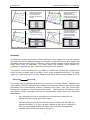
The generated Spline Surface is parametrically subdividable both in x- and ydirection. Changing these values only affect the patch object itself, the splines'
accuracy will always be maintained.
Note:
The patch object is independent from the order of the assigned splines in
the object manager. If you want to change the subdivision level of multiple
Spline Surfaces simply use "Swap X/Y" to provide a unique orientation.
Normals and Extrusion
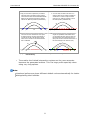
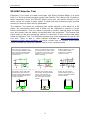
All of the polygons defining a patch object have the same normal alignment. You
can change it for the whole Spline Surface with "Reverse Normals".
5