1
PLFUR6ZLWFK7HFKQLFDO0DQXDO
,167$//$7,21
&KDSWHU Installation
2.1
Pre-Installation Checks
Before unpacking the MicroSwitch exchange, check the packing carton for signs of damage.
Any damage to the carton should be reported to the supplier before proceeding.
Open the carton, carefully remove the contents and check for any signs of mechanical
damage.
Check that the documentation is present:
MicroSwitch User Manual
2.2
Physical Installation
The MicroSwitch should be installed in a location away from electrical noise and excess
vibration. Where possible the equipment should be located in a well ventilated area where it
will not be adversely affected by salt water and extremes of heat.
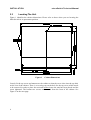
When locating the unit make sure you can access the modules and cable connectors.
Clearance should be allowed on each side of the case to avoid contact with neighbouring
equipment through vibration and shock.
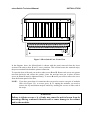
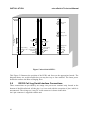
The unit is supplied with the lid unsecured. This is to allow you to fit the lid so that it opens
either right handed or left handed depending on which is most convenient. In Figure 2-2 the
lid is hinged to the left.
5