1
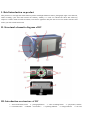
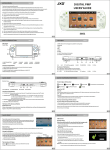
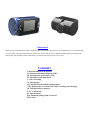
slot 10 – USB port 11 - Photosensitive device 12-screen
infrared night vision light
16 -loudspeaker 17 –bracket slot
13- MIC (microphone)
18 - camera lens
14 -lens
15-
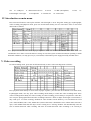
IV. Introduction on main menu
Press turn on/off button to start up the machine. The blue light is on for long after starting up; in photographs,
video recording and playback mode, press turn on/off button shortly for two consecutive times to enter main
menu mode as follows:
Press playback button to select item in proper sequence. Press turn on/off button to exit from menu. Press turn
on/off button for a while to turn off and save settings. In case that system is halted for unusual operating or under
abnormal conditions, user may press key 6 (reset button) to disconnect power supply forcefully and shut down.
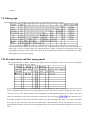
V. Video recording
In video recording mode, press turn on/off button shortly to enter video recording menu as follows:
Press playback button shortly to select items in proper sequence, press the turn on/off button to exit from menu;
in photograph mode, user may press video recording mode shortly to switch into video recording mode. Press
video recording button shortly for video recording. In video recording, press it shortly to stop and save video file;
user can press photograph button and video recording button for a while to adjust focal length. At maximum, it
may reach up to 3.95 times zooming; methods for video formats switch: Slide key 5 to switch between VGA
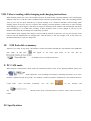
(720 * 480) and HD (1280 * 720); Motion dect (motion detection) is defaulted as close. When menu selection is
open, if the machine finds that the object in lens sensing area is moving, machine will automatically enter the
state of motion detection video recording. The time for motion detection video recording is 30 seconds per