1
segment.
VI. Photograph
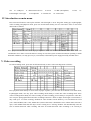
In photograph mode, press the turn on/off button shortly to enter photograph menu as follows:
Press playback button shortly to select menu in turn. After confirming OK, press the turn on/off button to exit
from menu; in video recording mode, press photograph button shortly to switch into photograph mode, press
photograph key shortly to take photos; user can press photograph button and video recording button to adjust
focal length up to 3.95 times zooming.
VII. Playback mode and files management
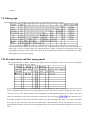
Press playback button for three seconds to enter playback mode. In playback mode, press the turn on/off button
shortly to enter playback menu as follows:
Press playback button shortly to select menu in turn. After confirming OK, press the turn on/off button to exit from
menu; in playback mode, user can press photograph button (previous tune) and video recording key (next tune) to
select file; select to view photos, pictures can be enlarged by pressing playback shortly up to 8 times zoom. After
photos are enlarged, press the turn on/off button, and then the screen will display
. Press function key to
move photo and then press the turn on/off button again to exit; when selecting to play video, user can press playback
key to play or pause operation; press the turn on/off button to fast forward by 1X, 2X, 4X, 8X successively; press
playback button for three seconds to exit from playback mode; press the turn on/off button shortly to exit in screen
saver.