1
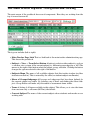
The Function Button Row
You can hover (place your mouse icon/pointer on a certain screen location and don’t move it for
a few seconds) over any of these functions to see their roles. The lower rows function similarly.
• Add Item Add Item is used to add new assessment items like tests or quizzes. This
moves you to a screen to enter information about this item (ie. name, description, etc.
as outlined above).
• Del/Ed Item Delete/Edit Item is used to remove an assessment item (and it’s associated
student scores) or to change something about the item (ie. maximum score, group membership, etc.). It can also remove a custom sortorder for student names (which is stored
as a assessment item called “sortorder”).
• Rpt A Report Menu that allows printing a variety of reports including a couple of student
marks reports, an empty marks sheet (for recoring mark entries) and a password report
for printing/viewing student passwords.
• Weight Item Weight by Item is used to adjust the weighting of assessment items within
their group, which used in determing the students’ average. It allows any item to have
it’s weight changed. This is used to adjust the weighting of an individual item within its
group or subgroup.
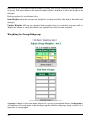
• Weight Grp Weight by Group is used to adjust the relative weightings of groups of
(assessment) items on the student average. It does not allow reweighting within a group
(since this is done with the item weight adjust function above).
• Post is used to copy student averages from the gradebook into the report card system.
Marks may be changed, if desired, during this process (ie. promote to 50%, etc.). The
posting process can insert a value into any of the subject objectives. There may be up to
20 objectives defined per subject in the report card system.
• Exp Export is used to export information about this subject into a format that may be
stored locally on a teacher’s computer. This designed to help allay any fears about data
8