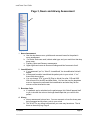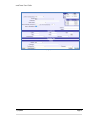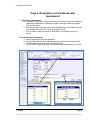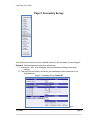
1
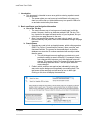
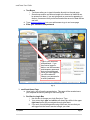
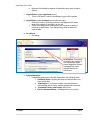
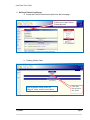
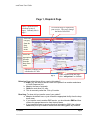
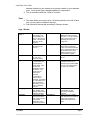
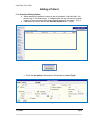
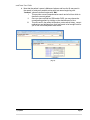
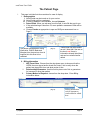
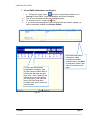
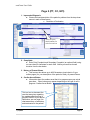
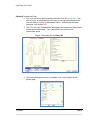
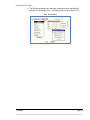
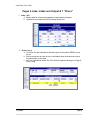
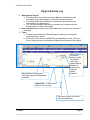
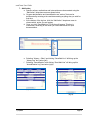
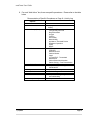
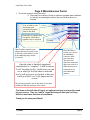
EMSCHARTS.COM emsCharts New User Handbook emsCharts User Guide emsCharts User Guide EMSCHARTS.COM emsCharts New User Manual emsCharts 600 Mifflin Road, Suite 102 Pittsburgh, PA 15207 Phone 866.647.8282 • Fax 412.461.3270 v. 1.0.0, 7/17/2012 Content Provided by: Deborah McCoy-Freeman Linda Coene emsCharts User Guide emsCharts User Guide 1. Introduction a. This document is intended to serve as a guide to entering a patient record into emsCharts. i. The screen shots you see here may look different to the way your chart is or will be set up. Administrators may turn specific fields of or on and also control many lists shown. 2. Basic emsCharts.com Navigation Information a. Use of the Tab Key i. The most common way of moving around a web page is with the mouse. However, there is an alternate method in the Tab key. This key, located in the upper left-hand section of your keyboard, lets you move from one page element to the next. ii. Also, if you go past the element you were trying to reach, you can hold the Shift key and press Tab to move backwards through the page elements. b. Search Boxes i. Searches are used to look up hospital names, public safety agencies (EMS, Fire, Police, Communication Centers), users, services, and command facilities. The reason for these searches is so that the database can store the ID number associated with an object rather than the name. 1. This will eliminate incorrect spellings, poor data entry, and provide the ability to search efficiently. For example, when a user changes their last name, only the displayed name will change. The number “behind” the name will remain the same, thus allowing searches across the time span when the name changed. ii. Fields in which searches are required are indicated by having the same color as the background immediately surrounding them. The text boxes will be read-only and will have an icon to their right. Clicking on this icon will display the search box. (Fig. 1) 7/17/2012 Page 1 emsCharts User Guide c. Text Boxes i. Text boxes allow you to type information directly into the web page. i. Some boxes enforce a maximum length to the amount of data that can be entered into them, if you are typing and no more text is appearing in the box, chances are that you have exceeded the amount of data the box can hold. d. Type www.emscharts.com into your web browser to go to our home page e. Enter your username and password Type in your username and password. If you have never logged in before, use the username and temporary password that you were assigned. Once you have logged in, you will be asked to change your password to a secure password. (Fig. 2) 3. emsCharts Home Page a. Upon log-in, you will see the screen below. This page will be revealed once you complete the security setting for first-time log-ins. b. Red Service Login Box i. Use this box to change your login Service or Type ii. Your current login type and service will always be visible in the upper right hand corner as you navigate through emsCharts iii. If you work for multiple agencies using emsCharts, be sure that you are logged into the correct service to begin your chart 7/17/2012 Page 2 emsCharts User Guide iv. Base and Unit should be entered for automatic entry when a chart is started. c. Logout Button (upper right hand corner) i. This is a “kill switch” and will immediately log you off the system d. Home Button (upper left hand corner under our logo) i. Clicking on “home” will bring you back to this page and the home page menu options in the column on the left ii. These home page menu options allow you to access a variety of functions for emsCharts. Your features may differ as many are customizable. e. At a Glance i. See below (Fig. 3) f. 7/17/2012 At A Glance: This section will display the number of your incomplete charts, charts flagged for QA and messages from other optional features of emsCharts. System Messages i. If messages appear here, they will always be in the following order: 1. emCharts Status: anything we need to communicate to our users will be here 2. State/region: If your state or region uses emsCharts to communicate with its users, those messages will come next 3. Command Facility (emsCharts): will be next 4. Service Announcements – Messages from your service Page 3 emsCharts User Guide 5. Writing a Patient Care Report a. Access the Patient Record menu option from the home page To start a new chart, choose “Patient Records” (Fig. 4) b. Creating a Blank Chart Your incomplete charts and/or QA “flagged” charts would be listed above Click this box to start a new chart. (Fig. 5) 7/17/2012 Page 4 emsCharts User Guide 7/17/2012 Page 5 emsCharts User Guide Page 1, Dispatch Page Notice a patient record is broken up into 9 pages. Currently this is page 1. A record ID may be required by your service. They may change the label of this field. Select the category from the drop down menu. Select the appropriate outcome from the drop down menu. Odometer readings can be calculated to 0.1 mile (Fig. 6) When finished with this page, click “add patient” to continue. Referring: From whom/where did you receive this patient? a. EMS if you are called to assume care of the patient from another ambulance or Quick Response Unit, b. Hosp in the case of a transfer c. Other for most other 911 calls. d. This is commonly called the “Pick up” location Receiving: To whom did you transfer care of your patient? a. Hosp is the default here, so just choose the appropriate facility from the drop down menu. b. If you transfer care to another EMS service, you should select EMS and then choose the appropriate service from the drop down. c. If you transferred care to anyone other than a hospital or EMS, then choose Other and you may be able to choose from the looking glass, any common 7/17/2012 Page 6 emsCharts User Guide address entered into your system for a common location in your response area. You may also type a complete address if not provided. d. This is commonly called the “Taken to” location Times a. This area allows you to enter times. By clicking the box to the left of each time, you can select or deselect that time. b. Some times will be required according to Outcome chosen Page 1 Details Fields at the top of page 1: Basesite and unit Response Type of Service Category Outcome Some fields at the top of page 1 are customizable; you may or may not see them. Use whatever IDs your service requires. Customizable according to the service. Crew Members Crew members entered in EMS charts will be found in the menu. You can manually enter other personnel from assisting services in the “other” box. Referring Customizable based on your local dispatch system “Scene” and “unscheduled” are the defaults for these fields. Other choices are available from the drop down. The most common, however for transfers “interfacility” or “other” can be selected. Scheduled or unscheduled can also be selected depending on a 911 call or scheduled transfer. Category should be the condition most closely related to the patient’s condition. This should reflect the outcome of the call, choices can be customized depending on the needs of the service. Mode Referring is “who called”; most often you will select “other” and enter the address of the residence/location but for situations like an ALS assist or transfer you can select EMS or hospital. How you responded to the scene Receiving Most often you will select “hospital” however if you transfer care to another EMS unit you could select “EMS” or “other” for a transfer. Comment This is the first of many opportunities to write comments and build a narrative. When page 1 is complete, click this button at the bottom of the page to add your patient information to the chart. Add Patient (Table 1) 7/17/2012 Page 7 emsCharts User Guide Adding a Patient Click Search for Existing Patient a. When searching for patients, be sure to use our program’s “wild card code”: the percent sign %, as shown below. It is helpful when you are not sure how to spell a name or how a name may have been originally entered in the system. (Fig. 7) b. If no results are found, then choose Add New Patient button. (Fig.8) (Fig. 7) (Fig. 8) c. Enter the new patient’s information in this window and save. (Fig.9) (Fig. 9) 7/17/2012 Page 8 emsCharts User Guide d. Note that the patient’s name is Marianne Jackson and how the % was used in the search to retrieve all possible entries with last names beginning with “Jackson”, whose first name begins with “Mar”. I. This provides a more comprehensive search and a list from which to choose the correct patient. II. Once you have verified her SSN and/or DOB, you may choose the corresponding patient by clicking on the desired name in blue. III. This will result in the patient information, past medical history, current medications and allergies from their last record to be brought forth for you to use in this new patient care record. (Fig. 10) 7/17/2012 Page 9 emsCharts User Guide The Patient Page I. This page is divided into three sections for ease of display 1. Demographics i. Not all fields may be turned on for your service ii. Not all fields must be completed iii. If name or address is not available, choose Unknown iv. Date of Birth: When you tab away from this field, it auto-fills the age for you. v. If the calculated age is less than 19, some pediatric assessment fields will be available. vi. Choose Female as appropriate to open an OB/Gyne assessment box on Page 5 The patient demographics, billing information, PMHX, Meds and Allergies from the previous chart is imported into this chart to be validated (Fig. 11) These fields may be available as well. Note that if the text on the box is red, there is information already listed there and can be reviewed and/or edited 2. Billing Information i. NPP Form Given: Choose from the drop down menu to document that the HIPPA form was signed and/or check the “history” link to verify when the patient last signed this form and what version it was. ii. Relationships/Guarantors: Use this field to place next of kin or guarantors for insurance if other than patient iii. Primary Method of Payment: choose from the drop down. Enter Billing Information below. (Fig. 12) 7/17/2012 Billing information such as insurances can be added or edited here. Page 10 emsCharts User Guide 3. Current PMHX, Medications and Allergies a. Clicking the “chart” icons will open a box (below) to allow you to look up Current PMHX, Current Medications and Current Allergies. The “X” icon will delete entries after highlighting them To document “none”, choose the icon If you chose the wrong patient in the search window and need to replace it or add a new patient instead, click Replace Patient. i. ii. iii. iv. (Fig. 13) To look up medical history, medications or allergies, type the first couple of letters here or choose the first letter and pick from a list. Also, if what you are looking for is not in the look up list, then type it in the free text area, click “add” and when finished, click “done” to save all entries made. Once done with patient information, billing information and past medical history, click Next to progress to Page 2 and save your entries on this page (Fig. 14) 7/17/2012 Page 11 emsCharts User Guide Page 2 (PT, CC, HPI) 1. Impression/Diagnosis a. Choose the best description of the patient’s problem from the drop down menus in each of these areas b. Condition at Destination 1 5 2 These are spellcheck buttons for each free text box 3 6 4 7 (Fig. 15) 2. Complaints a. Enter Chief Complaint and Secondary Complaint (an optional field) using no more than 50 characters for each field. Notice you can also choose duration from the box below. 3. History of Present Illness a. This free-text box allows up to 4000 characters (equivalent to 2 type written pages) for your description of the patient’s history of present illness. 4. Cardiac Arrest Button a. Information about the cardiac arrest that is in progress upon your arrival goes here. Other buttons may appear depending on the type of call in progress. Cardiac Arrest Button This is a box to document the care that was given regarding the cardiac arrest that was in progress PRIOR to your arrival. Remember, we use page 8 to chart our actions, medications, and treatments for16)the patient! (Fig. 7/17/2012 Page 12 emsCharts User Guide 5. Scene Description a. Use this box to describe the crash scenes. You should describe the damage to all the vehicles involved and any hazards on the scene. You can also document the condition of the house on routine medical calls. (4000 characters here also) 6. Patient Belongings and Patient Movement a. Free text box (2000 characters) to describe patients’ belongings as well as a section below to choose how your patient was moved though out the call. 7. Forms and Factors a. The forms section is optional depending on the types of calls your service runs b. The factors affecting care section includes drop down menus with the most common factors affecting each part of the call. 7/17/2012 Page 13 emsCharts User Guide Page 3, Neuro and Airway Assessment (Fig. 17) 1. Neuro Assessment a. Use the drop down menus, picklists and comment boxes for the patient’s neuro assessment. b. If a Stroke Scale was used, indicate what type, and your result from that drop down menu. c. Pupillary, Motor and Sensory assessments. d. Upper right hand corner to document findings and brief comments for all. 2. Immobilization a. If you answered “yes” to, “Was Pt. Immobilized”, the immobilization field will appear b. to document how/who immobilized the patient prior to your arrival. If “no” these fields do not show. c. You can choose “PTA” to auto fill (Prior to Arrival) for collar, CID and LBB; N/A will auto fill in the KED and Mast fields. You can then use the dropdown menu to choose who performed the immobilization and what they felt the outcome of that intervention was. 3. Broselow Color a. If a pediatric age is calculated on the patient page, this field will present itself to you to choose the color on the length based tape that you used for this patient. 4. Airway a. Airway assessment is done here. You can comment on how the airway was being managed and by whom, prior to your arrival b. This is NOT for any airway interventions your crew may have done. That is done on the activity log: Page 8 7/17/2012 Page 14 emsCharts User Guide (Fig. 18) 7/17/2012 Page 15 emsCharts User Guide Page 4, Respiratory and Cardiovascular Assessment 1. Respiratory Assessment a. Choose from drop down menus and comment fields to document the patient’s respiratory assessment including any oxygen that might have been in place prior to your arrival. b. Note the Ventilator Settings button and associated box on the bottom left (will be available when the level of care of the chart is ALS). c. This is used for when the patient is ALREADY on a ventilator upon your arrival. 2. Cardiovascular Assessment a. Most of these fields are self-explanatory. b. Note the Pacemaker button and associated box on the bottom right (will be available when the level of care of the chart is ALS). c. This is used for when the patient is ALREADY being paced upon your arrival. (Fig. 19) 7/17/2012 Page 16 emsCharts User Guide Page 5, Secondary Survey (Fig. 20) Your service has chosen one of two available options for the Secondary Survey on page 5: Option #1: Picklist/drop down and text box assessment 1. Clicking the “chart” icon will display common assessment findings under each category. 2. There are free text fields to document your assessment of the extremities in the example below Page 5 - Secondary Survey Option #1 (Fig. 21) 7/17/2012 Page 17 emsCharts User Guide Option #2: Anatomical Exam 1. Run your cursor over each anatomical area and it will turn it GREEN. Then click on it and an assessment box will open to the right with picklists and/or free text fields for injuries or assessment values. Once an area has been assessed, it will remain RED. 2. The RED text in the “External/Skin” assessment box means that there is data already documented there. The “Unspecified” box contains more assessment values. Page 5 - Secondary Survey Option #2 (Fig. 22) 3. The Obstetrics assessment box is available if you chose Female on the patient page. (Fig. 23) 7/17/2012 Page 18 emsCharts User Guide 4. The Burns assessment box has been enhanced to allow two different methods of calculating burns: Total Body Surface Area or Rule of 9’s. Burn Assessment (Fig. 24) 7/17/2012 Page 19 emsCharts User Guide Pages 6 Labs; Intake and Output & 7 “Priors” 1. Labs, I & O a. Mostly used for critical care transport or long distance transport. b. Optional for most services NOT providing critical care (Fig. 25) 3. Priors (below) a. For those IVs and medications that were given to the patient PRIOR to your arrival. b. Able to document as much as you’re told about these interventions to have the information on the chart. c. NOT for medications and/or IVs YOU did for the patient (those go on Page 8: Activity Log) (Fig. 26) 7/17/2012 Page 20 emsCharts User Guide Page 8 Activity Log 4. What goes on Page 8? a. Everything about your patient encounter after their initial primary and secondary survey (chart pages 2-7) should be documented here b. You will document ALL medications, interventions and treatments you performed on your patient here. c. You can add comments individually or combine your comment with the documentation of other interventions 5. Each comment instance allows up to 4000 characters to continue your narrative, if necessary 6. Times a. Times are imported from the Dispatch page to assist you in accurately documenting your entries b. Each entry on the Activity Log MUST be accompanied by a time. We won’t let you forget the time, as a reminder will appear when the time field is blank! (Fig. 27) Note fields for blood glucose, GCS pain scale and customizable vitals/labs Click these buttons to autofill previous vitals (then change what is different) or document “no change in patient condition” “Add Action” is described in detail on the next page Save each item as you wish to add more detail lines 7/17/2012 Page 21 emsCharts User Guide 7. Add Action: a. Specific actions, medications and interventions are documented using the “Add Action” drop-down menu as shown below. b. Oxygen administration and immobilization are “actions” that can be documented by entering a time and documenting anything else you wish for that time. c. At the bottom of the log box, click the “Add Action” drop down menu to choose which action you are logging. d. Once you click “Save/Add Line” a new box will appear. This box is customized according to the action you chose and allows for quick documentation. (Fig. 28) e. Selecting “Airway – Other” and clicking “Save/Add Line” will bring up the “Airway Log” box below (left) f. Selecting “Immobilization” and clicking “Save/Add Line” will bring up this “Immobilization Log” box below (right) (Fig. 29) (Fig. 30) 7/17/2012 Page 22 emsCharts User Guide 8. For each “Add Action” box, there are specific procedures. Please refer to the table below Documentation of Specific Procedures on Page 8 – Activity Log Add Action Menu Options Medication Intubation Airway (Other) Cardiac Medical Consult Child Birth/OB Rescue Extrication Operations Wound Care Hospital Notify 7/17/2012 Procedures that can be entered Medication Administration Any type of Intubation/Advanced Airway Abdominal Thrusts Foreign Body Removal Bag Valve Mask Oxygen Suction Oral Airway Nasal Airway Impedance Threshold Device Respirator Operation CPAP BiPAP CPR CPR/AED Mechanical CPR Cardiac Monitor Vagal 12-Lead EKG - Transmitted Defibrillation Chilled Saline Administration Patient Cooing – Post Resuscitation Contacting Command All procedures pertaining to Childbirth/OB Rescue Operation procedures Extrication types Other issues All procedures regarding care of wounds/bleeding Hospital Notification Page 23 emsCharts User Guide Page 9 Miscellaneous Forms 1. This is the “wrap-up” area of the chart a. There may be a variety of forms or options to complete here in addition to “locking” or advancing the chart to the next QA level when it is finished. You are able to scan documents and electronically attach them to the chart. Remember to sign the chart if required. More than 1 signature may be required. Chart Toolbox contains some utilities that may be useful, such as deleting a chart while it is still in the authoring stage (before it’s locked) Printing choices (Fig. 31) Once the chart is finished, signed and considered to be “complete”, it will be time to “Lock” the chart for QA. In this area, you can see at what QA level the chart is and what level it will go to once it is locked, in this case it will go to QA Level 1 QA Supervisor for review. Once the chart is locked, you can use the addendum feature to make your late entry. This will auto date/time stamp and adds your name to a 4000 character max notation box for each addendum instance. The locking procedure checks the chart for any data validations and then packages it for export. The items on the left side of Page 9 are optional and may or may not be used by your service. They are “add in” items that they will train you on if they decide to use these functions of emsCharts. Thank you for using emsCharts! 7/17/2012 Page 24