1
How to Backup and Restore Profile
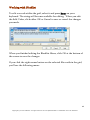
G-Lock SpamCombat provides you with a quick and easy way to backup
and restore your profile (accounts and filters settings). It is very useful
option if you would like to move the program on another computer or
simply re-install it. You can save a backup of all your data and restore it
in the new program installation at any time.
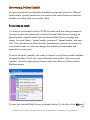
To backup the profile:
1. Click on File menu.
2. Select Backup Profile.
3. Specify the file on the disk to save a backup.
4. Click Backup.
5. Click Close when finished.
To restore the profile:
1. Click on File menu.
2. Select Restore Profile.
3. Specify the file on the disk with the data backup.
4. Click Restore.
5. Click Close when finished.
Important! The Restore operation has no Undo option. If you use the
Restore operation, your current workplace in G-Lock SpamCombat will
be overwritten by the data from backup.
10
Copyright © G-Lock Software. All rights reserved. G-Lock SpamCombat is a trademark of G-Lock Software.