1
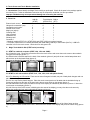
3.2.1.5. Must apply the Velcro at bottom of the screen (picture 7) to secure the mounting. Use the cable clips to secure
the touch screen cable (picture 8).
7
5
6
8
Continue to section B. Controller & Driver Installation.
3.2.2. For mounting on CRT monitor:
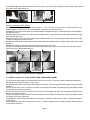
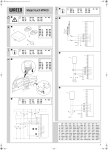
3.2.2.1. Measure the top frame of the monitor (picture 1). If it is 1.5 inches (3.8 cm) or less, use the top holes on the
plastic hangers to screw into the touch screen panel. Otherwise, use the bottom holes.
3.2.2.2. Place the touch screen panel on a flat table with the backside facing up. Screw two hangers into the back of
the panel (picture 2).
3.2.2.3. Hang the touch screen onto the monitor in center position. Use a pencil to mark the hangers’ position on top
of the monitor (picture 3).
3.2.2.4. Remove the touch screen from the monitor. Adhere two pieces of Velcro strips (provided) onto the top of the
monitor near the pencil marks (picture 4).
3.2.2.5. Mount the touch screen panel as close to the monitor as possible with the hangers aligned to the Velcro strips
(picture 5).
3.2.2.6. Press down the hangers firmly to fasten the Velcro strips (picture 6).
3.2.2.7. You must apply the Velcro at bottom of the screen (picture 7) to secure the mounting. Use the cable clips to
secure the touch screen cable (picture 8).
4
1
2
3
5
6
7
8
It is very important to follow the above procedures to avoid accidental damage.
Continue to section B. Controller & Driver Installation.
3.3. KTMT for widescreen display (KTMT-1700W, 1900W, 2200W, 2400W)
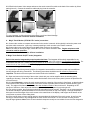
3.3.1. There are two hangers to be assembled on the top of the frame. There are 4 ways to assemble the hangers
depending on the top frame width of your monitor.
3.3.2. Screw through the top 2 holes of the hangers to the frame. This mounting should be suitable for most monitors
(picture 1).
3.3.3. If the top frame of your monitor is very wide, you can drop touch screen by screwing through the bottom 2 holes
of the hangers to the frame (picture 2).
3.3.4. If the top frame of your monitor is narrow, you can turn the hanger over and screw through the top holes of the
hanger to the frame (picture 3).
3.3.5. If the top frame of your monitor is extremely narrow, turn the hanger over and screw through the bottom holes of
the hanger to the frame (picture 4).
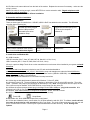
3.3.6. Adhere the Velcro pads to the bottom of the hangers. Remove the wax film from Velcro. Unbuckle the bottom
Velcro straps.
3.3.6. Align and hang the touch screen on the monitor. Press the hangers down to make the Velcro adhere to the top
of the monitor (picture 5).
Page 2