1
2
On Red Hat Linux, you must also install the modeltech-gcc-3.2.3-rhe21.tar.gz file which is available at the same
location from where you download ModelSim. It contains the version of gcc already configured to work with
ModelSim. This version of gcc is what ModelSim calls automatically to compile and link SystemC code. We strongly
recommend against the use of other gcc versions.
3
On HP-UX, ModelSim automatically uses aCC from /opt/aCC. If aCC is installed somewhere else in your environment, you may specify the full path to aCC using the “CppPath” variable in the modelsim.ini file.
4
ModelSim 6.0 is the first release that supports SystemC on Windows. The required C++ compiler is MinGW gcc
3.2.3 which is automatically installed when you install ModelSim.
Note that SystemC is supported on the 32-bit mode only. Please contact your System
Administrator if you do not have the required operating systems or compiler versions installed.
Use Model
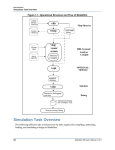
ModelSim provides a unified kernel for SystemC, Verilog, and VHDL. Figure 1 illustrates the
use model.
Figure 1: SystemC Use Model
vlog and vcom are the Verilog and VHDL compilers, respectively. The compilers compile the
Verilog or VHDL source code into machine-independent executables (.asm), which are stored
in the work library. When you load your design in ModelSim, as soon as an instantiation statement is encountered the work library is searched for a matching design unit. Once it is found it
is pulled into elaboration. This methodology remains practically unchanged for SystemC
2
SystemC Verification with ModelSim