1
Video Configuration Panel
thus will be useful for troubleshooting issues with cameras or connections to cameras. New Cameras contain channels
which did not exist during the last connection. VPMC will also automatically group cameras by their IP address.
Adding and Removing Collections
You have the option of saving selected videos as a Collection. Alternatively, click All Result to save all the channels found
as a result of your search. You can also save the search criteria, rather than the search results under Query. (For example,
if you typed "doors" and filtered by orange channels, saving a Collection as a query will save the 'doors' keyword and
orange tag. The results will change depending on which video names contain 'doors' and which videos are orange
colored.)
In any of the cases, type the name of your new collection and click OK to save it.
Managing and sorting your Collections
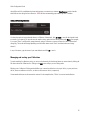
To make searching for collections easier, you can sort the channels, edit the channel names or remove them by clicking the
Edit button above the Collections list. Clicking on the Edit button will put you into Editing mode.
Mousing over a Collection in Editing mode will allow you to move the collection to the top of the list, up one position on
the list, down one collection on the list, or down to the bottom of the list, respectively.
Custom made collections can be renamed or removed. In the example below, 'Offices' is a custom made collection.
18