1
The Basics
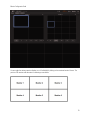
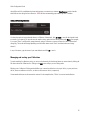
Clicking on the symbol on the upper-left hand corner will maximize the channel so that it fills the entire monitor.
Click Select to put Call Focus on this channel.
Click Remove to remove this channel from the monitor display.
Click Move to move the channel to another position in your monitor display.
Changing screen divisions
The current screen division displays either too many video channels or not enough video channels.
Some of the videos on display are too small or too large. I need to change how they appear.
Read this section if: You need to change how the screens/how many video channels are displayed.
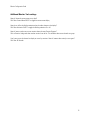
You can use the Control Bar to quickly and conveniently change screen divisions. The screen division layouts are presented
Select from the screen displays on the control bar. The division layouts including the number of channels displayed using
that division will appear as shown.
Click on one of the layouts to assign a new screen division to the monitor. This can be done to each monitor individually so
that each monitor has a different screen division.
7