1
Hardware Setup
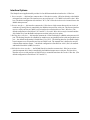
The Simple Sensor Application Kit Getting Started instructions included with the Application Kit show
how to set up and program the RCM4300
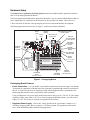
The Prototyping Board included in the Application Kit makes it easy to connect an RCM4300 module to a
power supply and a PC workstation for development. It also provides four sample 1-Wire devices, a
1-Wire sensors RJ-45 interface, and a prototyping area for more advanced hardware development.
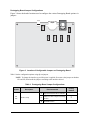
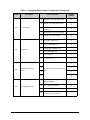
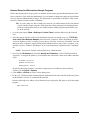
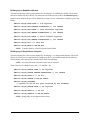
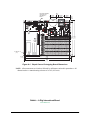
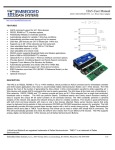
The Prototyping Board is shown below in Figure 1, with its main features identified.
Power
Input
Backup
Optional A/D Converter
Battery
Inputs Header
Power
1-Wire Sensors
LED
RJ-45 Jack
Optional
Pin-Compatible
1-Wire Device
DS18B20
Temperature
Sensor
RCM4300
Module
Connector
DS2406
SPST Addressable
Switch
(U1) DS2406
Indicator LED
Reset
Switch
RCM4300
Standoff
Mounting
+5 V, 3.3 V, and
GND Buses
Through-Hole
Prototyping Area
RCM4300
Module
Extension Header
DS2480B
Line Driver
DS2450
4-channel
A/D Converter
Figure 1. Prototyping Board
Prototyping Board Features
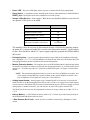
• Power Connection—A a 3-pin header is provided for connection to the power supply. Note that the
3-pin header is symmetrical, with both outer pins connected to ground and the center pin connected to
the raw V+ input. The universal AC adapter provided with the Application Kit is terminated with a
header plug that connects to the 3-pin header in either orientation.
Users providing their own power supply should ensure that it delivers 8–24 V DC at 8 W. The voltage
regulators will get warm while in use. If you want to program the DS2406 memory, you will need to
supply 12 V DC. This feature is currently not supported in the software.
• Regulated Power Supply—The raw DC voltage provided at the 3-pin header is routed to a 5 V
switching voltage regulator, then to a separate 3.3 V linear regulator. The regulators provide stable
power to the RCM4300 module and the Prototyping Board.
022-0141 Rev. B
3