1
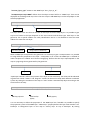
<!DOCTYPE html>
<html>
tag)
this tag defines the page as HTML
starting the script with. All the script lies under this tag.(Beginning
<body>
content of the page resides under this tag. (Beginning tag)
<h1>My First Heading</h1>
this tag is for heading on the web page (Both tags)
<p>My first paragraph. </p>
this tag is for a paragraph on the web page. (Both tags)
</body>
this tag in the script closes the beginning tag <body> (Close tag)
</html>
this tag in the script closes the beginning tag <html> (Close tag)
CSS standards for “Cascading Style Sheet”. It defines the style of HTML objects on the web page.
Using CSS, it is possible to display or adjust the position of different objects like table, paragraph,
heading, copyright etc. on the web page. A simple style for a paragraph in a web page below
(W3Schools, CSS Tutorial).
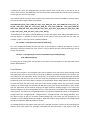
<p style="color:sienna;margin-left:20px">This is a paragraph.</p>
Defines color of the paragraph.
It defines the paragraph should be 20 pixels distant from the left
margin.
JQuery is a client side JavaScript library that can be used to create dynamic web pages. With JQuery it
is possible to navigate to the web page and to e.g. create animations on the page. The simple JQuery
script shows below.
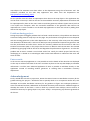
$(document).ready(function() {
$("#p").click(function() {
$("h1").css("background-color","red");
});
});
When user click on the paragraph on the page, JQuery triggers background color to red for h1
heading on the web pagen (W3Schools, JQuery Tutorial).
Geoserver:
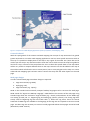
Geoserver is a Java based server that can allow map creating and data sharing. It is completely open
source and work under OGC standards. It can allow display/sharing the well-spatial data to the world
through the web. Geoserver comes with a WMS that can fit into other Java applications like
OpenLayers and can create maps of different formats. It comes with inbuilt “Geotools” which is an
open source Java GIS toolkit that allows GIS operations on the map. Geoserver can display data on
the any popular modern mapping applications like “Google Maps”, “Google Earth”, “Yahoo Maps”
etc.; even it can connect to the traditional desktop GIS tools like ESRI ArcGIS. Complete instruction of
the Geoserver installation is provided in the appendix of this report (Geoserver).