1
Detail explanation of Script:
The web map application is designed by using HTML, CSS and Jquery. In this section a detailed
explanation of the script will be given.
<div id="map" style="height:500px;width:500px;float:left;">
The above block tag will create the “Map Object “on the web application. Inside this “div” element
Java scripting was written using OpenLayers library. When creating the map object it is required to
define the map controls. There are two ways to define controls to the map object one way is to give
basic default controls to the map object controls like zooming and panning around the map. The
second way is to define user specific controls to the map, only controls that are defined will apply to
the map object. In this project map object were given default controls in the beginning to make sure
that it contains minimum controls and later specific controls were defined like “Scalebar”, “Panel”,
“Layer”, “Mouse Position” etc. map object with default controls can be created like below.
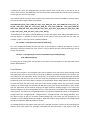
var map = new OpenLayers.Map('map', { controls: []});
In OpenLayers to
create a new object
you need to say
“var” before the
object name on the
left side followed
by the name of the
object need to be
created.
This is the
OpenLayer
code to create
map object on
the web map
application.
Name of map
object. It can
be anything
not
necessarly
”map”
This is the
control
secton for
map object.
Controls []
means apply
default
controls to
the map.
Note: it is very important to keep an eye on comma, colon and apostpie in the script. They are very
important and without them the script won’t work.
After the map object created layers need to be added to the map. There is no limit to the number,
any number of vector data or raster data or even both together can be added to the map. Similar like
creating the map object, layers follow the same rules as below. For better understanding the script
was written in different rows.
var wms_layer_0_Kr = newOpenLayers.Layer.WMS
('0_Kr','http://130.237.175.39:8080/geoserver/wms/land_upplift',
{layers: '0_Kr', transparent: "true", format: "image/png"}
,{maxExtent: new OpenLayers.Bounds(585000, 6600000, 740000, 6722500), maxResolution: 'auto',
projection:"EPSG:3006", units: "m"},{isBaseLayer: false},{visibility: true});