1
Can I use external controllers with Ai?......................................................................113
Do I have to use an Avolites console to control AI?..................................................113
My screen outputs come up in the wrong order – how can I fix this?.......................113
Hardware.......................................................................................................................114
What are the minimum requirements to run the Ai software?...................................114
Graphics................................................................................................................114
Storage..................................................................................................................114
What are the delays on the BMD or LFG cards?......................................................114
The software works with OpenGL, will cards like Quadro FX 6000/5000 help the
performance? In other words, will a customized very heavy system be worth the
money? We noticed in Fusion that a double Quadro 600 setup could be limiting.... 114
Will CUDA be implemented for certain effects?........................................................115
What are the ways of controlling the server besides the Avolites consoles, is it all
DMX and MIDI triggerable?.......................................................................................115
How do I make new screen shapes?.........................................................................115
Which 3d model formats can I use in Ai?..................................................................115
Can I use audio in Ai?................................................................................................115
What is the best audio format for Ai?.........................................................................115
Where Can I get further information?........................................................................116
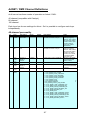
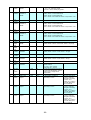
ArtNET / DMX Channel Definitions...........................................................117
40 channel personality................................................................................................117
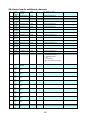
80 channel mode: additional channels.....................................................................120
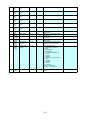
100 channel mode: additional channels...................................................................122
Module Definitions.....................................................................................123
Audio.............................................................................................................................124
Master Volume Adjust................................................................................................124
Sync Offset................................................................................................................124
Capture.........................................................................................................................125
Active Silicon Phoenix...............................................................................................125
Dalsa Genie Camera.................................................................................................125
Color..............................................................................................................................126
HSBA.........................................................................................................................126
Hue Rotate Matrix......................................................................................................126
Image Color...............................................................................................................126
RGBA.........................................................................................................................127
RGB Color Curves.....................................................................................................127
Controller......................................................................................................................128
Ai Controller...............................................................................................................128
Auto Select................................................................................................................128
Buffer Select..............................................................................................................129
Calender Trigger........................................................................................................129
Camera......................................................................................................................130
Constant....................................................................................................................130
Constant With Text....................................................................................................130
CV To Clock...............................................................................................................130
5