1
Getting Started
User's Guide
Powering ON the Netbook PC
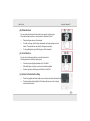
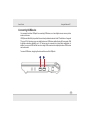
Use power button to turn ON the PC. If you need to run the BIOS Setup to set or modify the system
configuration, press (Del) upon boot up to enter the BIOS Setup. To view post screen press Tab key during
logo screen and press Esc to go to bootable devices.
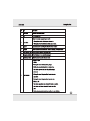
To stop in this mode
Do this
To start up or resume again
Off
Press the power
Follow the shutdown procedure of your
operating system. This can prevent loss of button.
unsaved data or damage to your software
programs.
If the system is locked up because of
hardware or software problems, press the
power button to turn off the computer.
Standby
Depending on your settings in Windows,
you can put the computer in Standby
mode by:
Closing the display cover
Pressing the Fn+F1 function key
Pressing the power button
Press power button.
Hibernation
Depending on your settings in Windows,
you can put the computer in
Hibernation mode by:
Closing the display cover
Pressing the Fn+F1 function key
Pressing the power button
Press the power
button.
If you choose to stop in Standby or Hibernation mode, you can return to where you left off the next time
you start up the computer.
3-4