1
Installation Guide
The T23 Series should then be mounted at the side of the windscreen where there is sometimes a special
zone free of the metallization.
If this does not work, then you can place the T23 and T23 Fleet external GPS antenna under the windshield
wipers, front or rear bumpers, or any location where only plastic covers the antenna. If you need to run the
GPS antenna cable through the engine compartment, use a standard plastic automotive grade shrouding to
protect the cable.
TIPS: T23 and T23 Fleet GPS antenna comes with a FAKRA connector and may not fit on smaller holes during
the installation. You have the option to remove it so the GPS antenna would still fit according the desired
location then after the installation, return back the FAKRA connector in reverse steps of how you removed it.
7.1
How to remove FAKRA from GPS antenna:
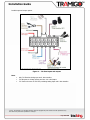
1. Pull out the Fakra lock (black) using a pair of tweezers.
2. Gently pull the GPS cable out from the Fakra connector.
Note: Only with T23 and T23 Fleet.
Window Tinting
GPS signals are blocked by metal surfaces which can include some brands of window film that contain metal
particles. To ensure that GPS, cell phone, smart tag, and radio reception is not affected either:
1. Use a non-metallic tint.
2. Avoid tinting the front windshield where the T23 Series unit is located (Worldwide legislative trend is
to ban windshield tinting due to increased risk of accidents).
3. Leave a 15 cm gap at the bottom of the windshield and place the T23 Series by this opening. This
still provides security for vehicle occupants.
4. With T23 and T23 Fleet Use the External GPS Antenna and place the GPS antenna under the front
bumper or under the windshield wipers – as long as the antenna is not covered by metal.
The list of good quality non-metallic film includes the 3M film, Madico CharcOOl (not Madico CharcOAl), Huper
Optik Ceramic (Stark), and FormulaOne Pinnacle (ceramic film). Costs for good quality metallic film is similar
to non-metallic film.
© 2007 - 2014Tramigo™ Ltd. All rights reserved. Under the copyright laws, this manual cannot be reproduced in any
form without the prior written permission of Tramigo™.
Page 23 of 30