1
CFD-ACE+ 2003 : Integrated Circuit (IC) Thermal Analysis Tutorial
____________________________________________________________________________________
Viewing the Generated 3D Computational Mesh (DTF file)
27. Select the CFD-VIEW button [
] from the toolbar.
This button invokes the CFD-VIEW program installed on your machine as part of the CFDRC software. The
DTF file just generated by CFD-Micromesh is opened automatically in CFD-VIEW. Please refer to the CFDVIEW Manual from CFDRC for all the details of operation of this program.
•
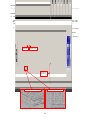
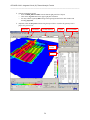
In CFD-VIEW (as shown in image below):
In the bottom right panel, select all the interfaces (holding shift or ctrl key enables multiple selections)
Along the top toolbar, check the Grid On [ ] and Surface On [ ] buttons.
The grid is visible on all interfaces in the geometry. Note that interfaces were selected so that the
internal geometry could be visualized with relative ease.
The grid may be inspected in detail by rotating (LB), zooming (MB), and panning (RB) the geometry.
Grid On
Surface On
Select All
Interfaces
Rotate and Zoomed 3D View
Zoomed Top-Down View
21