1
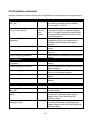
2.5.4 Interface command
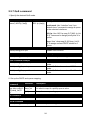
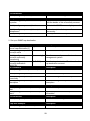
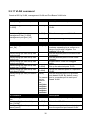
Use this command to set up various port configurations of discontinuous or a range of ports.
Command
Switch(config)# interface
[port_list]
Parameter Description
[port_list]
Enter several port numbers separating by
a comma or a range of port numbers.
For example: 1,3 or 2-4
Switch(config-if)# speed [1000 |
100 |10 | auto-sense]
[1000 |
100 |10 |
autosense]
Switch(config-if)# autonegotiation
Switch(config-if)# duplex [full]
[full]
Switch(config-if)# flowcontrol
Switch(config-if)# shutdown
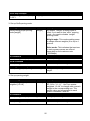
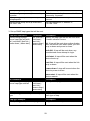
No command
Switch(config-if)# no autonegotiation
Switch(config-if)# no duplex
Set up the selected interfaces’ speed.
“auto-sense” option is used for fiber port
only. This option allows the Smart Switch
to automatically detect fiber speed of the
connected device.
Set the selected interfaces’ to autonegotiation. When auto-negotiation is
enabled, speed configuration will be
ignored.
Set the selected interfaces’ to full duplex
mode.
Enable the selected interfaces’ flow control
function.
Administratively disable the selected ports’
status.
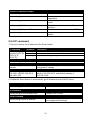
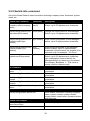
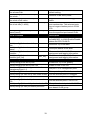
Set auto-negotiation setting to the default
setting.
Set the selected ports’ duplex mode to the
default setting.
Set the selected ports’ flow control
function to the default setting.
Administratively enable the selected ports’
status.
Set the selected ports’ speed to the default
setting.
Switch(config-if)# no flowcontrol
Switch(config-if)# no shutdown
Switch(config-if)# no speed
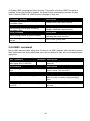
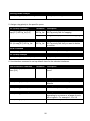
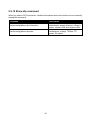
Show command
Switch(config)# show interface
Show each interface’s port configurations.
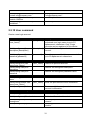
Switch(config)# show interface
[port_list]
Switch(config)# show interface
status
[port_list]
Switch(config)# show interface
status [port_list]
[port_list]
20
Show the specified interfaces’ port
configurations.
Show each interface’s port status including
media type, forwarding state, speed,
duplex mode, flow control and link
up/down status.
Show the specified interface’s port status
including media type, forwarding state,
speed, duplex mode, flow control and link
up/down status.