1
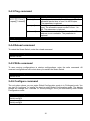
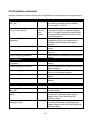
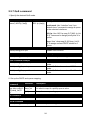
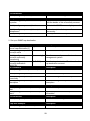
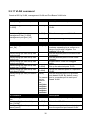
Interface command example
Switch(config)# interface 1-3
Enter port 1 to port 3’s interface mode.
Switch(config-if)# auto-negotiation
Set the selected interfaces’ to autonegotiation.
Set the selected interfaces’ to full duplex
mode.
Enable the selected interfaces’ flow control
function.
Set the selected ports’ speed to 100Mbps.
Switch(config-if)# duplex full
Switch(config-if)# flowcontrol
Switch(config-if)# speed 100
Switch(config-if)# shutdown
Administratively disable the selected ports’
status.
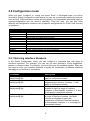
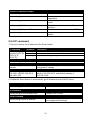
2.5.5 IP command
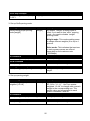
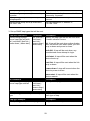
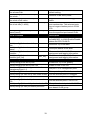
1. Set up or remove the IP address of the Smart Switch.
IP command
Parameter
Switch(config)#ip [A.B.C.D]
address [A.B.C.D] [255.X.X.X]
[255.X.X.X]
[A.B.C.D]
[A.B.C.D]
No command
Switch(config)# no ip address
Show command
Switch(config)# show ip
address
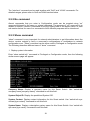
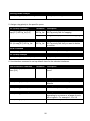
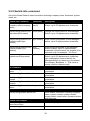
IP command example
Switch(config)# ip address
192.168.1.198 255.255.255.0
192.168.1.254
Description
Enter the desired IP address for your Smart Switch.
Enter subnet mask of your IP address.
Enter the default gateway address.
Remove the Smart Switch’s IP address.
Show the current IP configurations or verify the
configured IP settings.
Set up the Smart Switch’s IP to 192.168.1.198, subnet
mask to 255.255.255.0, and default gateway to
192.168.1.254.
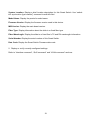
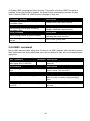
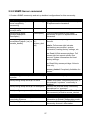
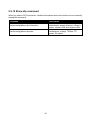
2. Enable the Smart Switch to automatically get IP address from the DHCP server.
Command / Example
Description
Switch(config)# ip address dhcp
Enable DHCP mode.
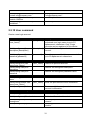
No command
Switch(config)# no ip address dhcp
Disable DHCP mode.
Show command
Switch(config)# show ip address
Show the current IP configurations or verify
the configured IP settings.
21