1
Operation Mode
3 Operation Mode
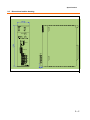
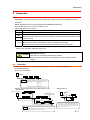
3.1. Machine No. setting
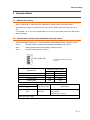
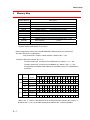
Set the machine No. of this unit by the “Machine No. setting switch” (rotary dip switch).
Since this unit occupies 4 machines by one unit, set the number within the range from “0” to
“92.”
For example, “04” to “07” are occupied when “04” is set. Do not set this number for other unit(s)
within this range.
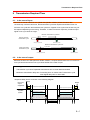
3.2. Specification selection (Operation Mode setting 2 switch)
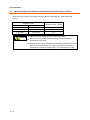
Select transmission distance etc., with the operation mode setting 2 switch (quad dip switch).
SW-1, 2
Sets transmission distance by combination of ON/OFF with 1 and 2.
SW-3
Setting switch for Bit mode operation. Use this in OFF.
SW-4
System reserve (Use this in OFF.)
ON on right side
* All the default switch positions are
at “OFF.”
Operation mode 2 switch
Specification
1
2
2kHz 3km
OFF
OFF
7.8kHz 1km
OFF
ON
31.3kHz 200m
ON
OFF
125kHz 50m
ON
ON
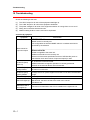
Operation mode 2 switch
3
OFF
Operation mode
Bit mode
Specification
Carry out double collation for data every
bit (1 point).
Use Bit type for slave.
Turn OFF when using.
3-1