1
Back panel features
DMX implementation
Colour/Gobo continued...
Back panel features
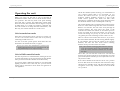
1. DMX output socket (pin 3 cold, pin 2 hot, pin 1 grounded).
Other DMX devices can be linked in to the system through
this socket. In stand alone mode the unit outputs its own
DMX through this socket.
2. DMX input plug (pin 3 cold, pin 2 hot, pin 1 screen). A
dedicated controller or DMX lighting desk can be connected
to this plug. The unit buffers the DMX signal, so you must
make sure you get the
connectors the right
way round.
3. Power on LED (red).
This
LED
is
lit
whenever the unit is
powered up.
4. DMX present / Audio
beat LED (green). This
LED is on constantly
when DMX is being
received and goes out
when DMX is not
received. If the LED is
not lit, then the unit is
in stand alone mode
and the LED will flash
when an audio beat is
detected.
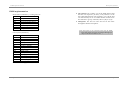
DMX
226
230
234
238
242
246
250
254
Result
Slow strobe
Strobe 2
Strobe 3
Strobe 4
Strobe 5
Strobe 6
Strobe 7
Fast strobe
Note: Intermediate values will give ‘mixed’ colours.
Special functions
If all control channels are zero for longer than 10 seconds, the
unit will turn off its lamp and go into ‘standby’ mode. Normal
operation is restored by moving any control channel to a nonzero position.
5
4
3
6
2
1
Page 3
Page 16