1
Operating the unit
Compatibility with other units
This unit is compatible with all units in the Abstract CE
range, even those which have more features.
The whole range of products has been designed to operate
in synchronisation with each other when in ‘stand-alone’
mode. However, if you are using a mixture of units you
should use the most complex unit as the controller.
For example, if you are using 2 Galactic Moons and 2
Futurescans, use one of the Futurescans as the controller by
putting it first in the DMX chain.
In DMX controlled mode you will probably want to use the
more complex units on different DMX channels to this unit.
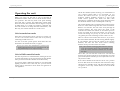
Connecting up the unit
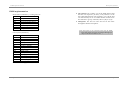
You can change the dipswitches while the units are
running, and the new settings will take effect immediately.
You don’t need to reset the unit.
Auto Channel Setting
The ‘Auto Channel Set’ feature of the units takes away all
the fuss and confusion of fiddling with dip switches and
working out binary numbers. Simply switch all the dip
switches to ‘off’, connect up the DMX cables, turn on the
power and the units will automatically number themselves;
the first unit will operate on channels 1-2, the second on 3-4,
and so on.
Make sure that the DMX cabling is all connected and that
the first unit in the DMX line is turned on last. If it doesn’t
work, turn the first unit in the DMX line off and on again,
or change its dipswitches.
If you don’t want the numbering to start at channel 1, set
the dipswitches on the first unit to the channel you want it
to start at. All the other units will then set themselves to the
correct channels following that one.
Note: If any unit cannot determine what channel it should
set itself to, it will choose channel 1. You can force the
‘Auto Channel Set’ to be repeated by changing the
switches on the first unit in the DMX line or by
turning it off and on again.
Once running, if you change the dip switches on the first
unit, the ‘Auto Set’ is repeated. All units further down the
DMX line which are in ‘Auto Set’ mode will be
reconfigured. If any unit in the DMX line is not in ‘Auto Set’
mode, the numbering will restart at that unit.
If you change the dip switches on a unit which was in auto
set mode (switches were all ‘off’), the unit will immediately
take on the new channel you set. If you then go back to the
auto set mode, the unit will remain at the channel it was
previously set to until it receives an ‘Auto Set’ command
from further up the DMX line.
Page 11
Page 8