1
SmartLAN
Ethernet interface
Features
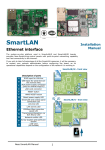
Both boards allow you to configure the control
panel parameters via the LAN using the
SmartLeague software.
The SmartLAN/G allows you (the user) to:
Technical
specifications
SmartLAN/SI
SmartLAN/G
Power supply
12 V=
voltage
MAX current
70 mA
90 mA
draw
Operating
-5 / +40 °C
temperature
Dimensions
81 x 54 x 25 mm
MAX capacity of
2 Gb
SD-card
Security protocol 8 bit encryption
AES-128 bit
• Send panel-event related e-mails with
attachments
• Interact with the control panel via browser
(Explorer, Firefox, Opera, Safari, etc.) from
any computer with a web-server. After
authentication, the web-server will show:
- zones
- partitions
- timers
- events log
- a virtual keypad (similar to the one actually connected to the control panel).
From the virtual keypad, you (the user) can arm/disarm partitions, bypass/unbypass zones, activate/
deactivate outputs or reset the alarm and tamper memories.
For more details about the use of the web-server, please refer to the User Manual of the control panel
connected to the SmartLAN.
Configuring the SmartLAN/G board (from PC only)
The SmartLAN/G board can be programmed from any
computer with SmartLeague software.
To install a SmartLAN/G board on a SmartLiving control
panel, work carefully through the following steps.
1. From the User menu on the keypad, go to:
Activations > Internet access
then press
to enable the option.
2. Using the SmartLeague software, access Settings Application Settings.
3. In the Communication type section, select SmartLAN/G.
4. In the IP Address section, type-in the parameters of
the LAN board the SmartLeague application must communicate with:
• IP address
Insert the IP address followed by “:” and the number of
the programming port, when this is not “5004”.
• User Name
• Password
5. Press
.
6. The SmartLeague application will establish a connection to the control panel through the SmartLAN/G
board.
2
Programming
parameters
SmartLAN/G default
values
IP address
Subnet-mask
User name
Password
Programming port
Web server port
Gateway
DNS
192.168.1.92
255.255.255.0
admin
pass
5004
80
192.168.1.92
192.168.1.92