1
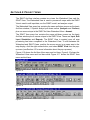
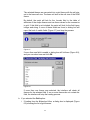
ARCVIEW INTERFACE
FOR SWAT2000
USER’S GUIDE
M. DI LUZIO, R. SRINIVASAN, J.G. ARNOLD,
S.L. NEITSCH
2002
BLACKLAND RESEARCH & EXTENSION CENTER
TEXAS AGRICULTURAL EXPERIMENT STATION
720 EAST BLACKLAND ROAD ○ TEMPLE, TEXAS 76502
GRASSLAND, SOIL AND WATER RESEARCH LABORATORY
USDA AGRICULTURAL RESEARCH SERVICE
808 EAST BLACKLAND ROAD ○ TEMPLE, TEXAS 76502
Blackland Research and Extension Center, Temple, Texas
BRC Report 02-07
Grassland, Soil & Water Research Laboratory, Temple, Texas
GSWRL Report 02-03
Published 2002 by Texas Water Resources Institute, College Station, Texas
TWRI Report TR-193
CONTENTS
Section 1: Introduction
1
Section 2: Installing the ArcView Interface
6
Section 3: Preparing ArcView Input
10
10
12
13
3.1: Required ArcView Map Themes
3.2: Optional ArcView Map Themes
3.3: ArcView Tables and Text Files
Section 4: Start ArcView Interface
4.1: Main Interface Commands
4.1.1: New Project
4.1.2: Open Project
4.1.3: Copy/Import Project
4.1.4: Delete Project
4.1.5: Exit ArcView
4.1.6: Edit SWAT Databases
4.1.7: Save Current Project
4.1.8: Environmental Variables
4.1.9: Return to Current Project
4.2: Project Views
4.2.1: The Avswat Menu
4.2.2: The Input Menu
4.2.3: The Edit Input Menu
4.2.4: The Simulation Menu
4.2.5: The Reports Menu
4.3: Pop-Up Menu
Section 5: Watershed Delineation
5.1: Watershed Delineation Dialog Box
5.2: DEM Setup
5.3: Stream Definition
5.4: Outlet and Inlet Definition
5.5: Main Watershed Outlet Selection and Definition
5.6: Reservoirs—Optional
Section 6: Land Use/Soil Characterization
6.1: Land Use/Soil Definition and Overlay
6.1.1: Get Started
6.1.2: Land Use Data Layer
6.1.3: Soil Data Layer
36
38
38
39
40
41
42
42
44
44
46
47
48
49
51
52
53
55
61
62
63
78
79
86
92
95
95
96
97
108
6.1.4: Overlay of Land Use and Soil Maps
6.2: HRU Distribution
119
120
Section 7: Import Weather Data
128
Section 8: Creation of Input
135
136
141
8.1: Write All
8.2: Individual Write Commands
Section 9: Input Modification—Point Sources
146
Section 10: Input Modification—Inlet Discharges
154
Section 11: Input Modification—Reservoirs
162
Section 12: Input Modification—Subbasins
171
173
179
183
186
190
193
197
200
217
223
227
12.1: Edit Soil Physical Data (.sol)
12.2: Edit Weather Generator Input Data (.wgn)
12.3: Edit General Subbasin Input Data (.sub)
12.4: Edit General HRU Input Data (.hru)
12.5: Edit Main Channel Input Data (.rte)
12.6: Edit Groundwater Input Data (.gw)
12.7: Edit Consumptive Water Use Input Data (.wus)
12.8: Edit Management Input Data (.mgt)
12.9: Edit Soil Chemical Input Data (.chm)
12.10: Edit Pond/Wetland Input Data (.pnd)
12.11: Edit Stream Water Quality Input Data (.swq)
Section 13: SWAT Output
13.1: Run SWAT
13.2: Read Results
13.3: Calibration Tool
13.4: Create Delivered Load Table
13.5: Reports: Map-Chart
Section 14: SWAT Databases
14.1: User Soils Database
14.2: User Weather Stations Database
14.3: Land Cover/Plant Growth Database
14.4: Fertilizer Database
14.5: Pesticide Database
14.6: Tillage Database
14.7: Urban Database
231
231
246
248
254
257
261
263
270
278
287
293
299
304
Section 15: The Example Data Set
15.1: Create SWAT Run with Example Dataset
15.1.1: Processing the Elevation Map Grid
15.1.2: Processing the Land Use/Soil Map Grids
15.1.3: Land Use/Soil Distribution
15.1.4: Weather Stations
15.1.5: Create ArcView Databases & SWAT Input Files
15.1.6: Run SWAT
15.1.7: View Results
313
314
319
329
335
336
338
339
340
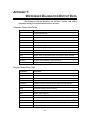
Appendix 1: Watershed Delineation Output Data
343
Appendix 2: State FIPS Codes
345
SECTION 1: I NTRODUCTION
Purpose
AVSWAT-2000 (version 1.0) (Di Luzio et al., 2002) is an ArcView
extension and a graphical user interface for the SWAT (Soil and Water
Assessment Tool) model (Arnold et al., 1998). SWAT is a river basin, or
watershed, scale model developed to predict the impact of land management
practices on water, sediment, and agricultural chemical yields in large, complex
watersheds with varying soils, land use, and management conditions over long
periods of time. The model is physically based and computationally efficient,
uses readily available inputs, and enables users to study long-term impacts. For
a detailed description of SWAT, see Soil and Water Assessment Tool Theoretical
Documentation and User's Manual, Version 2000 (Neitsch et al., 2001a; 2001b),
published by the Agricultural Research Service and the Texas Agricultural
Experiment Station, in Temple, Texas.
The SWAT model can be applied to support various watershed and water
quality modeling studies. Examples of such studies include the following:
Ÿ
National and regional scale water resource assessment considering both
current and projected management conditions.
Ÿ
Bosque River TMDL in Erath County, Texas. The project determined
sediment, nitrogen, and phosphorus loadings to Lake Waco from various
sources including dairy waste application areas, waste treatment plants,
urban areas, conventional row crops, and rangeland. Numerous land
management practices were simulated and analyzed (Saleh et al., 2000).
Ÿ
Poteau River TMDL in Oklahoma/Arkansas. This project determined
sediment, nitrogen, and phosphorus loadings in Wister Lake and dissolved
oxygen, temperature, algae, and CBOD in the river. Management
scenarios regarding poultry waste were analyzed (Srinivasan et al., 2000).
Ÿ
DDT in the Yakima River basin, Washington. SWAT was used to simulate
past and future sediment contamination by DDT in the Yakima River
basin.
Ÿ
The EPA office of pesticide registration is evaluating SWAT for use in
landscape/watershed scale evaluation for pesticide registration.
Ÿ
SWAT is being used extensively in the U.S. and Europe to assess the
impact of global climate on water supply and quality (Rosenberg et al,
1999).
1
The AVSWAT-2000 ArcView extension evolved from AVSWAT, an
ArcView extension developed for an earlier version of SWAT (Di Luzio et al.,
1998). Important functional components and the analytical capability of ArcView
GIS are implemented in several sets of customized and user friendly tools
designed to: (1) generate specific parameters from user-specified GIS
coverages; (2) create SWAT input data files; (3) establish agricultural
management scenarios; (4) control and calibrate SWAT simulations; (5) extract
and organize SWAT model output data for charting and display. The most
relevant components of the system are: (1) a complete and advanced watershed
delineator, (2) a tool for the definition of the Hydrologic Response Units, and (3)
the latest version of the SWAT model with a relative interface. AVSWAT software
is developed as an extension of ArcView GIS for the Personal Computer (PC)
environment.
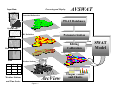
Within this system (Figure 1.1) ArcView provides both the GIS
computation engine and a common Windows-based user interface. AVSWAT is
organized in a sequence of several linked tools grouped in the following eight
modules: (1) Watershed Delineation; (2) HRU Definition; (3) Definition of the
Weather Stations; (4) AVSWAT Databases; (5) Input Parameterization, Editing
and Scenario Management; (6) Model Execution; (7) Read and Map-Chart
Results; (8) Calibration tool. Once AVSWAT is loaded, the modules get
embedded into ArcView, and the tools are accessed through pull-down menus
and other controls, which are introduced in various ArcView graphical user
interfaces (or GUIs) and custom dialogs. The basic map inputs required for the
AVSWAT include digital elevation, soil maps, land use/cover, hydrography
(stream lines), and climate. In addition, the interface requires the designation of
land use, soil, weather, groundwater, water use, management, soil chemistry,
pond, and stream water quality data, as well as the simulation period, to ensure a
successful simulation.
This tool is being applied worldwide and can support water quality analysis
at the watershed level as well as at single stream segments, scales required for
the support of most Total Maximum Daily Load (TMDL) programs.
2
Processing and Display
Input Data
AVSWAT
Watershed Delineation
DEM
SWAT Databases
Mask
Hydrography
HRU Definition
Parameterization
Land Use
Run
Editing
Calibration
Raw GIS Data
Output Maps
Soils
x
Weather Stations
y
ArcView
Weather Stations
and Time Series
Figure 1.1
Output Tables
and Charts
SWAT
Model
Application
SWAT can be used to simulate a single watershed or a system of multiple
hydrologically connected watersheds. Each watershed is first divided into
subbasins and then into hydrologic response units (HRUs) based on the land use
and soil distributions.
Procedures
Key Procedures
Ÿ
Load or select the AVSWAT2000 extension
Ÿ
Delineate the watershed and define the HRUs
Ÿ
(Optional) Edit SWAT databases
Ÿ
Define the weather data
Ÿ
Apply the default input files writer
Ÿ
(Optional) Edit the default input files
Ÿ
Set up (requires specification of simulation period, PET calculation
method, etc.) and run SWAT
Ÿ
(Optional) Apply a calibration tool
Ÿ
(Optional) Analyze, plot and graph SWAT output
4
References
Arnold, J.G., R. Srinivasan, R.S. Muttiah, and J.R. Williams. 1998. Large area
hydrologic modeling and assessment part I: model development. J.
American Water Resources Association 34(1):73-89.
Di Luzio, M., R. Srinivasan, and J.G. Arnold. 2002. A GIS-Hydrological Model
System for the Watershed Control of Agricultural Nonpoint and Point
Sources of Pollution. Submitted to Transaction of the ASAE.
Di Luzio, M., R. Srinivasan, and J.G. Arnold. 1998. Watershed oriented non-point
pollution assessment tool. In: Computers in Agriculture - 7th international
conference. October 26-30th 1998, Orlando, FL. ASAE. 233-241.
Neitsch, S.L., J.G. Arnold, J.R. Kiniry and J.R. Williams. 2001a. Soil and Water
Assessment Tool Theoretical Documentation, Version 2000.
Neitsch, S.L., J.G. Arnold, J.R. Kiniry and J.R. Williams. 2001a. Soil and Water
Assessment Tool User’s Manual, Version 2000.
Rosenberg, N.J., D.L. Epstein, D. Wang, L. Vail, R. Srinivasan, and J.G. Arnold.
1999. Possible impacts of global warming on the hydrology of the Ogallala
aquifer region. J. of Climate 42:677-692.
Saleh, A., J.G. Arnold, P.W. Gassman, L.W. Hauck, W.D. Rosenthal, J.R.
Williams, and A.M.S. McFarland. 2000. Application of SWAT for the upper
north Bosque watershed. Transactions of the ASAE 43(5):1077-1087.
Srinivasan, R., J.G. Arnold, T.S. Ramanarayanan, and S.T. Bednarz. 2000.
Modeling Wister lake watershed with the soil and water assessment tool
(SWAT) J. American Water Resources Association (in review)
5
SECTION 2: I NSTALLING THE ARCV IEW INTERFACE
System Requirements
The SWAT2000/Arcview Interface requires:
v Personal computer using a Pentium I processor or higher, which
runs at 166 megahertz or faster
v 64 megabytes RAM minimum
v Microsoft Windows 95, 98, NT 4.0 or Win2000 operating system
with most recent kernel patch∗
v VGA graphics adapter and monitor. The interface works best when
the resolution is set to 800 x 600 or 1024 x 768 pixels, the color
palette is set to 8-bit (256 colors) or 16-bit (32768 colors) and the
display font size is set to small fonts.
v 50 megabytes free memory on the hard drive for minimal
installation and up to 300 megabytes for a full installation
v ArcView 3.1 or 3.2 (software)
v Spatial Analyst 1.1 or later (software)
v Dialog Developer 3.1 or later (software)
While 50 MB is adequate memory for installing the interface, you may need
considerably more memory to store the tables generated when the interface
processes the map layers.† We have found that a 2 gigabyte hard drive works
very well for storing ArcView, the SWAT/ArcView interface, and project maps and
tables.
∗
Microsoft constantly updates the different versions of windows. This interface was developed with the latest
version of Windows and may not run with earlier versions. Patches are available from Microsoft.
†
The space required to create a SWAT project with the SWAT/ArcView interface depends on the resolution of the
maps used. While testing the interface, a 10-meter resolution DEM map layer taking up only 6 MB of space was
processed. At one point in the analysis of the map, the interface had filled 350 MB of storage with data.
6
To install the interface
The ArcView interface for SWAT2000 has been formatted to create a
separate directory structure from that used by the ArcView interface for
SWAT99.2. This allows users to keep both versions installed on their machine.
1. If you have not done so, turn on your computer. Download the archive file and
extract ArcView interface installation files.
2. Start ArcView.
3. On the File menu, click Open Project.
4. Move to the directory containing the installation files.
5. Choose setup.apr and click OK.
6. The installation program for the SWAT2000 ArcView interface will be
activated.
7. Soils data for Texas, Pennsylvania, and Wisconsin is automatically installed
with the interface. If you want to use the soils data for another state, you will
need to install the additional data separately.
To install the data:
a. In the directory drive:/Installation dir/AvSwatDB/AllUs/statsgo, create a
directory for each state of interest using the 2-letter alpha code for the
state (e.g. TX for Texas, MS for Mississippi, etc.). Appendix 2 lists numeric
and alpha codes for all states.
b. From the CD or the web site, copy the zip file containing the soils data for
the state to the directory created in step a.
c. Unzip the soils data using WinZip or pkunzip.
If you have installed the SWAT2000/ArcView interface on your machine
and wish to upgrade the interface to a new version, please perform the
following steps prior to installing the new version:
1) Uninstall the old version of the interface.
2) Make sure the Installation dir directory and all subdirectories are
removed from your machine.
3) Delete :/ESRI/Av_gis30/ArcView/Ext32/avswat.avx.
7
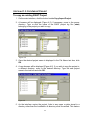
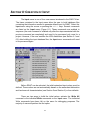
The directory structure created by the interface is displayed in Figure 2.1.
Figure 2.1
The Installation dir directory is created during installation and initially contains 3
subdirectories: AvSwatDB, AvSwatPr, and GenScn. When projects are created
by the user, the interface will by default make a directory for each project in the
Installation dir directory (new1 and new2 are project directories in Figure 2.1).
However, the user can also specify a different location for the project directory if
desired.
The AvSwatDB directory contains all the databases. The default U.S. soils
data is stored in AvSwatDB/AllUS/statsgo while the default U.S. weather
generator database is stored in AvSwatDB/AllUS/weather. The AvSwatDB
directory also contains the example data sets, help documents, and
management scenarios created for use in more than one project.
The AvSwatPr directory contains the swat2000 executable and the dll used to
calculate the number of total potential heat units for a plant in an HRU.
The GenScn directory contains documentation and installation files for
GenScn, an output analyzer. This output processor currently doesn’t work
properly.
8
The project directory contains all files generated during the course of creating
and running the project. Two subdirectories are created within the project
directory: scenarios and watershed. The watershed directory contains all
ArcView maps, tables, and reports generated during the project. The
scenarios directory contains the default subdirectory. Within the default
directory, four subdirectories are created: scen (stores scenario runs created
with the Calibration tool in the interface); tablesin (stores all .dbf tables that
contain SWAT input variables); tablesout (stores .dbf tables created when
SWAT output is loaded in the interface); txtinout (contains ASCII files read
and written by the SWAT2000 executable).
9
SECTION 3: PREPARING ARCV IEW INPUT
To create a SWAT dataset, the interface will need to access ArcView map
themes and database files, which provide certain types of information about the
watershed. The necessary maps and database files need to be prepared prior to
running the interface. Examples of each of the different types of maps and tables
can be viewed in the demonstration dataset.
SECTION 3.1: REQUIRED ARC VIEW MAP T HEMES
v ArcInfo-ArcView GRID—Digital Elevation Model (DEM)
The interface allows the DEM to use integer or real numbers for elevation
values. The units used to define the map resolution and the elevation are
not required to be identical. For example, the map resolution may be in
meters while the elevation may be in feet.
The map resolution must be defined in one of the following units: meters,
kilometers, feet, yards, miles, decimal degrees.
The elevation must be defined in one of the following units: meters,
centimeters, yards, feet, inches.
v ArcInfo-ArcView GRID or Shape—Land Cover/Land Use
The categories specified in the land cover/land use map will need to be
reclassified into SWAT land cover/plant types. The user has three options
for reclassifying the categories.
The first option is to use USGS category codes when creating the map (or
use a USGS land use/land cover map). The interface contains an
ArcView table that identifies the different SWAT land cover/plant types
used to model the various USGS land uses.
The second option is to select the SWAT land cover/plant type or urban
code for each category when the land cover/land use map theme is
loaded in the interface.
The third option is to create a look up table that identifies the 4-letter
SWAT code for the different categories of land cover/land use on the
map. The format of the look up table is described in Section 3.3.
v ArcInfo-ArcView GRID or Shape—Soil
The categories specified in the soil map will need to be linked to the soil
database (U.S. soils data only) included with the interface or to the User
Soils database, a custom soil database designed to hold data for soils not
included with the U.S. soil database. The user has four options for linking
10
the map to the U.S. soil database.
One method is to use the STATSGO polygon (MUID) number. Because
the soils database contains information for the entire U.S., the 3-digit
state STATSGO number must be prefixed with the 2-digit numeric code
for the state. (The 2-digit numeric codes are listed in Section 8.) For every
polygon, the soil database contains data for all soil phases found within
the polygon.
When the "Stmuid" option is chosen, data for the dominant soil phase in
the polygon is used for the map category. The "Stmuid + Seqn" option
allows the user to specify the polygon number and the soil sequence
number. This allows the user to choose a soil other than the dominant
within the polygon. For example, if Seqn is set to 3, data for the third most
common soil phase will be used to represent the map category. The
"Name + Stmuid" option allows the user to specify a soil series within the
STATSGO polygon by name. The interface will use data for the dominant
phase of the soil series to represent the map category.
The user may also link the soils map to the database via Soils5ID
number. When the "S5id" option is chosen, data for the specified soil
series is used to represent the map category. In order to use the "S5id"
option, the soil database for the entire US must be installed.
The final option, "Name", is chosen when soils data from the User Soils
database are to be utilized. The user will import SWAT soil files (.sol) or
type the soil data into the User Soils database for each of the map
categories prior to creating the project. The "Name" specified for each of
the map categories is the name of the soil in the User Soils database.
To reclassify the map categories, the information may be manually
entered within the interface. Alternatively, a look up table may be loaded
which has this information listed. Section 3.3 summarizes the format of
the look up table used to specify the soils information.
The map themes may be created in any projection (the same projection
must be used for all maps). The user will identify the type of projection and the
projection settings within the interface when the working DEM is loaded.
Note: All of the input maps listed above and below must
be located in the computer disk. None should be
located in the local network.
11
SECTION 3.2: OPTIONAL A RC VIEW MAP THEMES
v ArcInfo-ArcView GRID or Shape or Draw Manually—DEM Mask
The interface allows a mask to be superimposed on the DEM. The
interface differentiates the mask grid into areas classified as category 0
(no data) and areas classified as any category > 0. Areas of the DEM grid
for which the Mask grid has a value of 0 will not be processed for stream
delineation.
v ArcInfo-ArcView Shape—Stream Delineation
The interface allows a polyline shape file with the stream delineation to be
superimposed on the DEM. The stream delineation shape file is needed
for areas where the relief is so low the DEM map grid is unable to
accurately predict the location of the streams.
12
SECTION 3.3: ARC VIEW T ABLES AND TEXT F ILES
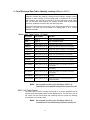
v Subbasin Outlet Location Table (dBase Table)
The subbasin outlet location table is used to specify the location of:
additional subbasin outlet locations (for example, stream gaging
locations).
The use of a location table to import locations for subbasin outlets is
recommended when the user plans to compare observed or measured
data with SWAT results.
Table Format: Preferred (5 fields)
Field name
Field format
Definition
XPR
floating point
X coordinate in the defined projection
YPR
floating point
Y coordinate in the defined projection
LAT
floating point
Latitude in decimal degrees
LONG
floating point
Longitude in decimal degrees
TYPE
string 1 char
“O” should always be entered in this
field
Only the subbasin outlets (Type "O") are allowed.
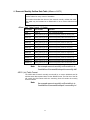
v Watershed Inlet Location Table (dBase Table)
The watershed inlet location table is used to specify the location of: point
sources and drainage watershed inlets.
Table Format: Preferred (5 fields)
Field name
Field format
Definition
XPR
floating point
X coordinate in the defined projection
YPR
floating point
Y coordinate in the defined projection
LAT
floating point
Latitude in decimal degrees
LONG
floating point
Longitude in decimal degrees
TYPE
string 1 char
“D” for Point Source
“I” Draining Watershed Inlet
Only the point source (Type "D") or draining watershed inlet (Type “I”)
are allowed.
13
v Land Use Look Up Table (dBase or ASCII)
The land use look up table is used to specify the SWAT land cover/plant
code or SWAT urban land type code to be modeled for each category in
the land use map grid. Because this information can be entered manually,
this table is not required to run the interface.
This table may be formatted as a dBase table or as a comma delimited
text table.
The first row of the land use look up table must contain the field names.
The remaining rows will hold the required data. An example land use look
up table can be found in the included dataset.
dBase Table Format (2 fields)
Field name
†
Field format
Definition
VALUE
String
Number of map category
LANDUSE
string 4 chars
Corresponding SWAT land use or
urban code
Note: Land use codes starting with a numerical
character are not allowed.
ASCII (.txt) Table Format
An example land use look up file is:
"Value","Landuse"
1,RNGE
2,PAST
3,FRSD
4,WATR
5,AGRL
6,URBN
†
Specific field names must be used in all tables for the interface to properly access the information.
14
v Soil Look Up Table (dBase or ASCII)
The soil look up table is used to specify the type of soil to be modeled for
each category in the soil map grid. The format of the table will vary
depending on the option chosen to link the soil data to the soil map.
Because this information can be entered manually, this table is not
required to run the interface.
The first row of the soil look up table must contain the field names. The
remaining rows will hold the required data. An example soil look up table
can be found in the included dataset.
dBase Table Format: Stmuid option (2 fields)
Field name
Field format
Definition
VALUE
string
Number of map category
STMUID
string 5 chars
5-digit number: digits 1-2: numeric
code for state; digits 3-5:STATSGO
polygon number
dBase Table Format: S5id option (2 fields)
Field name
Field format
Definition
VALUE
string
Number of map category
S5ID
string 6 chars
6-character alpha-numeric code for
SOILS-5 data for the soil series
dBase Table Format: Name option (2 fields)
Field name
Field format
Definition
VALUE
string
Number of map category
NAME
string
Name of the soil. The name entered
into this field must correspond with
the name of a soil in the User Soils
database.
(30 chars max)
Note: Soil names starting with a numerical character are not
allowed.
15
dBase Table Format: Stmuid + Seqn option (3 fields)
Field name
Field format
Definition
VALUE
string
Number of map category
STMUID
string 5 chars
5-digit number: digits 1-2: numeric
code for state; digits 3-5:STATSGO
polygon number
SEQN
string
Sequence number of soil within the
nd
STATSGO polygon. (2
most
rd
dominant soil, SEQN=2; 3 most
dominant soil, SEQN=3, etc.)
dBase Table Format: Stmuid + Name option (3 fields)
Field name
Field format
Definition
VALUE
string
Number of map category
STMUID
string 5 chars
5-digit number: digits 1-2: numeric
code for state; digits 3-5:STATSGO
polygon number
NAME
string
Name of soil within the STATSGO
polygon
(30 chars max)
ASCII (.txt) Table Format
An example soil look up file for the Stmuid option is:
"Value","Stmuid"
1,48047
2,48236
3,48357
4,48619
5,48620
6,48633
ASCII look-up tables for other options will contain data for the joining
attributes listed in the dBase format summaries for the different linkage
options.
16
v Weather Generator Gage Location Table (dBase)
A database included with the interface has weather generator data
summarized for 1,041 weather stations across the United States. If this
database will not be used in the simulation, a location table is required to
provide the location of custom weather generator stations. Custom
weather generator data should be entered into the User Weather Stations
database prior to creating the project (see Section 14).
dBase Table Format: Preferred (4 fields)
Field name
Field format
Definition
ID
integer
Gage identification number
NAME
string max 8 chars
Corresponding gage name string
XPR
floating point
X coordinate in the defined projection
YPR
floating point
Y coordinate in the defined projection
‡
dBase Table Format: Alternative ∗ (4 fields)
This format can be used only if the projection is defined in the project.
Field name
Field format
Definition
ID
integer
Gage identification number
NAME
string max 8 chars
Corresponding gage name string
LAT
floating point
Latitude in decimal degrees
LONG
floating point
Longitude in decimal degrees
dBase Table Format: Alternative ∗ (6 fields)
This format must be used if the projection is not defined in the project.
Field name
Field format
Definition
ID
integer
Gage identification number
NAME
string max 8 chars
Corresponding gage name string
XPR
floating point
X coordinate in the defined projection
YPR
floating point
Y coordinate in the defined projection
LAT
floating point
Latitude in decimal degrees
LONG
floating point
Longitude in decimal degrees
The user will provide a record for each station to be used: the
"Name" field will contain the string used as the station name in the
User Weather Stations database.
‡
The gage name must be the same as the gage name listed for the weather generator data in the User Weather
Stations database.
∗
When using the alternative table format, the projection of the maps used in the interface must be defined in order
for the interface to convert the latitude and longitude to the proper coordinate values.
∗
When using the alternative table format, the projection of the maps used in the interface must be defined in order
for the interface to convert the latitude and longitude to the proper coordinate values.
17
Note: Station names starting with a numerical
character are not allowed.
18
v Precipitation Gage Location Table (dBase)
When measured precipitation data are to be used, a table is required to
provide the locations of the rain gages. The precipitation gage location
table is used to specify the location of rain gages.
dBase Table Format: Preferred (5 fields)
Field name
Field format
Definition
ID
integer
Gage identification number
(not used by interface)
NAME
string max 8 chars
Corresponding table name string
XPR
floating point
X coordinate in the defined projection
YPR
floating point
Y coordinate in the defined projection
ELEVATION
integer
Elevation of rain gage (m)
‡
dBase Table Format: Alternative ∗ (5 fields)
This format can be used only if the projection is defined in the project.
‡
Field name
Field format
Definition
ID
integer
Gage identification number
(not used by interface)
NAME
string max 8 chars
Corresponding table name string
LAT
floating point
Latitude in decimal degrees
LONG
floating point
Longitude in decimal degrees
ELEVATION
integer
Elevation of rain gage (m)
The name of the table which holds the precipitation data is “NAME”.dbf or “NAME”.txt.
When using the alternative table format, the projection of the maps used in the interface must be defined in order
for the interface to convert the latitude and longitude to the proper coordinate values.
19
∗
dBase Table Format: Alternative ∗ (7 fields)
This format must be used if the projection is not defined in the project.
Field name
Field format
Definition
ID
integer
Gage identification number
(not used by interface)
NAME
string max 8 chars
Corresponding table name string
XPR
floating point
X coordinate in the defined projection
YPR
floating point
Y coordinate in the defined projection
LAT
floating point
Latitude in decimal degrees
LONG
floating point
Longitude in decimal degrees
ELEVATION
integer
Elevation of rain gage (m)
The user will provide a record for each station to be used: the "Name" field
will contain the string used to name the linked precipitation data table.
Note: Station names starting with a numerical character
are not allowed.
∗
When using the alternative table format, the projection of the maps used in the interface must be defined in order
for the interface to convert the latitude and longitude to the proper coordinate values.
20
v Precipitation Data Table (dBase or ASCII)
The precipitation data table is used to store the daily precipitation for an
individual rain gage. This table is required if the raingage option is chosen
for rainfall in the weather data dialog box. There will be one precipitation
data table for every location listed in the rain gage location table.
The name of the precipitation data table is "name.dbf" or “name.txt” where
name is the character string entered for NAME in the rain gage location
table.
This table may be formatted as a dBase table or as a comma delimited
text table.
dBase (.dbf) Table Format: (2 fields)
Field name
Field format
Definition
DATE
date (yyyymmdd)
Day of precipitation
PCP
floating point (f5.1)
Amount of precipitation (mm)
Note: An example precipitation table is in
\Installation dir\avswatdb\exinputs\precip.dbf
ASCII (.txt) Table Format:
Line
Field format
Definition
First
Yyyymmdd string
Starting day of precipitation
All other lines
Floating
point
(f5.1)
string
Amount of precipitation (mm)
number
The daily records must be listed in sequential order.
Note: An example precipitation table is in
\Installation dir\avswatdb\exinputs\precip.txt
The precipitation data tables must be placed in the User Data directory
(see Section 4.1.8).
21
v Temperature Gage Location Table (dBase)
When measured temperature data are to be used, a table is required to
provide the locations of the temperature gages. The temperature gage
location table is used to specify the location of temperature gages.
dBase Table Format: Preferred (5 fields)
Field name
Field format
Definition
ID
Integer
Gage identification number
(not used by interface)
NAME
string max 8 chars
Corresponding table name string
XPR
floating point
X coordinate in the defined projection
YPR
floating point
Y coordinate in the defined projection
ELEVATION
Integer
Elevation of temperature gage (m)
‡
dBase Table Format: Alternative ∗ (5 fields)
This format can be used only if the projection is defined in the project.
Field name
Field format
Definition
ID
Integer
Gage identification number
(not used by interface)
NAME
string max 8 chars
Corresponding table name string
LAT
floating point
Latitude in decimal degrees
LONG
floating point
Longitude in decimal degrees
ELEVATION
Integer
Elevation of temperature gage (m)
dBase Table Format: Alternative ∗ (7 fields)
‡
The name of the table which holds the temperature data is “NAME”.dbf or “NAME”.txt.
When using the alternative table format, the projection of the maps used in the interface must be defined in order
for the interface to convert the latitude and longitude to the proper coordinate values.
∗
When using the alternative table format, the projection of the maps used in the interface must be defined in order
for the interface to convert the latitude and longitude to the proper coordinate values.
22
∗
This format can be used only if the projection is defined in the project.
Field name
Field format
Definition
ID
Integer
Gage identification number
(not used by interface)
NAME
string max 8 chars
Corresponding table name string
XPR
floating point
X coordinate in the defined projection
YPR
floating point
Y coordinate in the defined projection
LAT
floating point
Latitude in decimal degrees
LONG
floating point
Longitude in decimal degrees
ELEVATION
Integer
Elevation of temperature gage (m)
The user will provide a record for each station to be used: the
"Name" field will contain the string used to name the linked
temperature data table.
Note: Station names starting with a numerical
character are not allowed.
23
v Temperature Data Table (dBase or ASCII)
The temperature data table is used to store the daily maximum and
minimum temperatures for a weather station. This table is required if the
climate station option is chosen for temperature in the weather data dialog
box. There will be one temperature data table for every location listed in
the climate station location table.
The name of the temperature data table is "name.dbf" or “name.txt” where
name is the character string entered for NAME in the temperature gage
location table.
This table may be formatted as a dBase table or as a comma delimited
text table.
dBase Table Format: (3 fields)
Field name
Field format
Definition
DATE
date (yyyymmdd)
Day of measure
MAX
floating point (f5.1)
Daily maximum temperature (°C)
MIN
floating point (f5.1)
Daily minimum temperature (°C)
Note: An example temperature data table is in
\Installation dir\avswatdb\exinputs\temper.dbf
ASCII (.txt) Table Format:
Line
Field format
Definition
First
yyyymmdd string
Starting day of data
All other lines
floating point (f5.1), floating point
(f5.1) string numbers
use comma to separate values
Daily
maximum
and
minimum temperature (°C)
The daily records must be listed in sequential order.
Note: An example temperature data table is in
\Installation dir\avswatdb\exinputs\temper.txt
The temperature data tables must be placed in the User Data directory
(see Section 4.1.8).
24
v Solar Radiation, Wind Speed, or Relative Humidity Gage Location Table (dBase)
When measured solar radiation, wind speed, or relative humidity data are to be
used, a table is required to provide the locations of the gages. The location table
format described below may be used for any of these three types of records.
Remember, a separate location table is used for each type of weather data.
dBase Table Format: Preferred (4 fields)
Field name
Field format
Definition
ID
Integer
Gage identification number
(not used by interface)
NAME
string max 8 chars
Corresponding table‡ name string
XPR
floating point
X coordinate in the defined projection
YPR
floating point
Y coordinate in the defined projection
dBase Table Format: Alternative ∗ (4 fields)
This format can be used only if the projection is defined in the project.
Field name
Field format
Definition
ID
integer
Gage identification number
(not used by interface)
NAME
string max 8 chars
Corresponding table name string
LAT
floating point
Latitude in decimal degrees
LONG
floating point
Longitude in decimal degrees
dBase Table Format: Alternative ∗ (6 fields)
This format must be used if the projection is not defined in the project.
Field name
Field format
Definition
ID
integer
Gage identification number
(not used by interface)
NAME
string max 8 chars
Corresponding table name string
XPR
floating point
X coordinate in the defined projection
YPR
floating point
Y coordinate in the defined projection
LAT
floating point
Latitude in decimal degrees
LONG
floating point
Longitude in decimal degrees
The user will provide a record for each station to be used: the "Name" field
will contain the string used to name the linked solar radiation, wind speed,
or relative humidity data table.
‡
The name of the table which holds the solar radiation, wind speed or relative humidity data is “NAME” .dbf or
“NAME”.txt.
∗
When using the alternative table format, the projection of the maps used in the interface must be defined in order
for the interface to convert the latitude and longitude to the proper coordinate values.
∗
When using the alternative table format, the projection of the maps used in the interface must be defined in order
for the interface to convert the latitude and longitude to the proper coordinate values.
25
Note: Station names starting with a numerical
character are not allowed.
26
v Solar Radiation Data Table (dBase or ASCII)
The solar radiation data table is used to store the total daily amounts of
solar radiation reaching the ground that are recorded at a specific weather
station. This table is required if the Solargages option is chosen for solar
radiation in the weather data dialog box. There will be one solar radiation
data table for every location listed in the solar radiation location table.
The name of the solar radiation data table is "name.dbf" or “name.txt”
where name is the character string entered for NAME in the solar
radiation gage location table.
This table may be formatted as a dBase table or as a comma delimited
text table.
dBase Table Format: (2 fields)
Field name
Field format
Definition
DATE
date (yyyymmdd)
Day of measure
SLR
floating point (f8.3)
Daily solar radiation (MJ/m /day)
2
ASCII (.txt) Table Format:
Line
Field format
Definition
First
yyyymmdd string
Starting day of data
All other lines
floating point (f8.3) string number
Daily solar radiation
(MJ/m 2/day)
The daily records must be listed in sequential order.
The solar radiation data tables must be placed in the User Data
directory (see Section 4.1.8).
27
v Wind Speed Data Table (dBase or ASCII)
The wind speed data table is used to store the average daily wind speeds
recorded at a specific weather station. This table is required if the
Windgages option is chosen for wind speed data in the weather data
dialog box. There will be one wind speed data table for every location
listed in the wind speed location table.
The name of the wind speed data table is "name.dbf" or “name.txt”, where
name is the character string entered for NAME in the wind speed gage
location table.
This table may be formatted as a dBase table or as a comma delimited
text table.
dBase Table Format: (2 fields)
Field name
Field format
Definition
DATE
date (yyyymmdd)
Day of measure
WND
floating point (f8.3)
Daily average wind speed (m/s)
ASCII (.txt) Table Format:
Line
Field format
Definition
First
yyyymmdd string
Starting day of data
All other lines
floating point (f8.3) string number
Daily average wind speed
(m/s)
The daily records must be listed in sequential order.
The wind speed data tables must be placed in the User Data directory
(see Section 4.1.8).
28
v Relative Humidity Data Table (dBase or ASCII)
The relative humidity data table is used to store the fraction relative
humidity recorded at a specific weather station. This table is required if
the Rel. Humidity gages option is chosen for relative humidity data in the
weather data dialog box. There will be one relative humidity data table for
every location listed in the relative humidity location table.
The name of the relative humidity data table is "name.dbf" or “name.txt”,
where name is the character string entered for NAME in the relative
humidity gage location table.
This table may be formatted as a dBase table or as a comma delimited
text table.
dBase Table Format: (2 fields)
Field name
Field format
Definition
DATE
date (yyyymmdd)
Day of measure
HMD
floating point (f8.3)
Daily relative humidity (fraction)
ASCII (.txt) Table Format:
Line
Field format
Definition
First
yyyymmdd string
Starting day of data
All other lines
floating point (f8.3) string number
Daily relative humidity
(fraction)
The daily records must be listed in sequential order.
The relative humidity data tables must be placed in the User Data
directory (see Section 4.1.8).
29
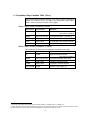
v Point Discharge Data Table—Annual Loadings (dBase or ASCII)
Point source or inlet discharge data may be summarized in one of four
methods: constant daily loadings, average annual loadings, average monthly
loadings, or daily loadings. If the discharge data is summarized as constant
daily loadings, the data will be entered in the Point Discharges Data dialog
box. For the other three methods, the interface requires a file to be previously
created that contains the point discharge data.
This section describes the format of the point discharge data table for annual
loadings. The table may be formatted as a dBase table or as a comma
delimited text table.
dBase (.dbf) Table Format: (14 fields)
Field name Field format
Definition
YEAR
integer i4
Year of measured data
FLOYR
floating point (f12.3) Average daily water loading for year (m3/day)
SEDYR
floating point (f12.3) Average daily sediment loading for year (kg/day)
ORGNYR
floating point (f12.3) Average daily organic N loading for year (kg/day)
ORGPYR
floating point (f12.3) Average daily organic P loading for year (kg/day)
NO3YR
floating point (f12.3) Average daily nitrate loading for year (kg/day)
MINPYR
floating point (f12.3) Average daily soluble P loading for year (kg/day)
NH3YR
floating point (f12.3) Average daily ammonia loading for year (kg/day)
NO2YR
floating point (f12.3) Average daily nitrite loading for year(kg/day)
CMTL1YR
floating point (f12.3) Average daily loading of conservative metal # 1 for
year (kg/day)
CMTL2YR
floating point (f12.3) Average daily loading of conservative metal # 2 for
year (kg/day)
CMTL3YR
floating point (f12.3) Average daily loading of conservative metal # 3 for
year (kg/day)
BACTPYR
floating point (f12.3) Average daily loading of persistent bacteria for year (#
bact/100ml)
BACTLPYR floating point (f12.3) Average daily loading of less persistent bacteria for
year (# bact/100ml)
Note: An example annual point discharge table is in
\Installation dir\avswatdb\exinputs\pointsyearly.dbf
ASCII (.txt) Table Format
The ASCII table format for yearly records will be a comma delimited text file with
the same data reported above for the dBASE format. The first line of the file will
contain the field names while the remaining lines will contain the loadings
summarized on an annual basis.
Note: An example annual point discharge table is in
\Installation dir\avswatdb\exinputs\ pointsyearly.txt
30
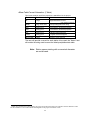
v Point Discharge Data Table—Monthly Loadings (dBase or ASCII)
Point source or inlet discharge data may be summarized in one of four
methods: constant daily loadings, average annual loadings, average monthly
loadings, or daily loadings. If the discharge data is summarized as constant
daily loadings, the data will be entered in the Point Discharges Data dialog
box. For the other three methods, the interface requires a file to have been
previously created that contains the point discharge data.
This section describes the format of the point discharge data table for monthly
loadings. The table may be formatted as a dBase table or as a comma
delimited text table.
dBase (.dbf) Table Format: (15 fields)
Field name
Field format
Definition
MONTH
integer i2
Month of measured data
YEAR
integer i4
Year of measured data
FLOMON
floating point (f12.3) Average daily water loading for month (m3/day)
SEDMON
floating point (f12.3) Average daily sediment loading for month (kg/day)
ORGNMON
floating point (f12.3) Average daily organic N loading for month (kg/day)
ORGPMON
floating point (f12.3) Average daily organic P loading for month (kg/day)
NO3MON
floating point (f12.3) Average daily nitrate loading for month (kg/day)
MINPMON
floating point (f12.3) Average daily soluble P loading for month (kg/day)
NH3MON
floating point (f12.3) Average daily ammonia loading for month (kg/day)
NO2MON
floating point (f12.3) Average daily nitrite loading for month (kg/day)
CMTL1MON
floating point (f12.3) Average daily loading of conservative metal # 1 for
CMTL2MON
floating point (f12.3) Average daily loading of conservative metal # 2 for
CMTL3MON
floating point (f12.3) Average daily loading of conservative metal # 3 for
BACTPMON
floating point (f12.3) Average daily loading of persistent bacteria for month (#
month (kg/day)
month (kg/day)
month (kg/day)
bact/100ml)
BACTLPMON floating point (f12.3) Average daily loading of less persistent bacteria for
month (# bact/100ml)
Note: An example monthly point discharge table is in
\Installation dir\avswatdb\exinputs\pointsmonthly.dbf
ASCII (.txt) Table Format
The ASCII table format for monthly records will be a comma delimited text file
with the same data reported above for the dBASE format. The first line of the file
will contain the field names while the remaining lines will contain the loadings
summarized on a monthly basis.
Note: An example monthly point discharge table is in
\Installation dir\avswatdb\exinputs\pointsmonthly.txt
31
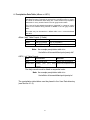
v Point Discharge Data Table—Daily Loadings (dBase or ASCII)
Point source or inlet discharge data may be summarized in one of four methods:
constant daily loadings, average annual loadings, average monthly loadings, or daily
loadings. If the discharge data is summarized as constant daily loadings, the data
will be entered in the Point Discharges Data dialog box. For the other three methods,
the interface requires a file to have been previously created that contains the point
discharge data.
This section describes the format of the point discharge data table for daily loadings.
The table may be formatted as a dBase table or as a comma delimited text table.
dBase (.dbf) Table Format: (14 fields)
Field name
Field format
Definition
DATE
date (yyyyMMdd)
Day of measured data
FLODAY
floating point (f12.3) Average daily water loading for the day (m3/day)
SEDDAY
floating point (f12.3) Average daily sediment loading for the day (kg/day)
ORGNDAY
floating point (f12.3) Average daily organic N loading for the day (kg/day)
ORGPDAY
floating point (f12.3) Average daily organic P loading for the day (kg/day)
NO3DAY
floating point (f12.3) Average daily nitrate loading for the day (kg/day)
MINPDAY
floating point (f12.3) Average daily soluble P loading for the day (kg/day)
NH3DAY
floating point (f12.3) Average daily ammonia loading for the day (kg/day)
NO2DAY
floating point (f12.3) Average daily nitrite loading for the day (kg/day)
CMTL1DAY
floating point (f12.3) Average daily loading of conservative metal # 1 for the
CMTL2DAY
floating point (f12.3) Average daily loading of conservative metal # 2 for the
CMTL3DAY
floating point (f12.3) Average daily loading of conservative metal # 3 for the
BACTPDAY
floating point (f12.3) Average daily loading of persistent bacteria for year (#
BACTLPDAY
floating point (f12.3) Average daily loading of less persistent bacteria for the
day (kg/day)
day (kg/day)
day (kg/day)
bact/100ml)
day (# bact/100ml)
Note:
An example daily point discharge table is in
\Installation dir\avswatdb\exinputs\ pointsdaily.dbf
ASCII (.txt) Table Format
Line
Field format
Definition
First
yyyymmdd string
Starting day of data
All other lines
13 floating point (f12.3)
string numbers, comma
delimited
Set of daily discharge data. From left to right: FLODAY,
SEDDAY, ORGNDAY, ORGPDAY, NO3DAY,
MINPDAY, NH3DAY, NO2DAY,CMTL1DAY,
CTML2DAY, CMTL3DAY, BACTPDAY, BACTLPDAY
The daily records must be listed in sequential order.
Note:
An example daily point discharge table is in
\Installation dir\avswatdb\exinputs\pointsdaily.txt
32
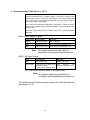
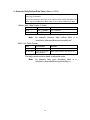
v Reservoir Monthly Outflow Data Table (dBase or ASCII)
One option allowed to define reservoir outflow is to provide average daily
outflow values for every month of simulation.
This section describes the format of the reservoir monthly outflow data table.
The table may be formatted as a dBase table or as a comma delimited text
table.
dBase (.dbf) Table Format: (13 fields)
Field name
Field format
Definition
YEAR
integer i4
Year of measured data
RESOUT1
floating point (f10.1) Measured average daily outflow for January (m3/s)
RESOUT2
floating point (f10.1) Measured average daily outflow for February (m3/s)
RESOUT3
floating point (f10.1) Measured average daily outflow for March (m3/s)
RESOUT4
floating point (f10.1) Measured average daily outflow for April (m3/s)
RESOUT5
floating point (f10.1) Measured average daily outflow for May (m3/s)
RESOUT6
floating point (f10.1) Measured average daily outflow for June (m3/s)
RESOUT7
floating point (f10.1) Measured average daily outflow for July (m3/s)
RESOUT8
floating point (f10.1) Measured average daily outflow for August (m3/s)
RESOUT9
floating point (f10.1) Measured average daily outflow for September (m3/s)
RESOUT10
floating point (f10.1) Measured average daily outflow for October (m3/s)
RESOUT11
floating point (f10.1) Measured average daily outflow for November (m3/s)
RESOUT12
floating point (f10.1) Measured average daily outflow for December (m3/s)
Note:
An example reservoir monthly outflow table is in
\Installation dir\avswatdb\exinputs\resmonthly.dbf
ASCII (.txt) Table Format
The ASCII table format for monthly records will be a comma delimited text file
with the same data reported above for the dBASE format. The first line of the file
will contain the field names while the remaining lines will contain the monthly
reservoir outflow.
Note:
An example reservoir monthly outflow table is in
\Installation dir\avswatdb\exinputs\ resmonthly.txt
33
v Reservoir Daily Outflow Data Table (dBase or ASCII)
One option allowed to define reservoir outflow is to provide outflow values for
every day of simulation.
This section describes the format of the reservoir daily outflow data table. The
table may be formatted as a dBase table or as a comma delimited text table.
dBase (.dbf) Table Format: (2 fields)
Field name
Field format
Definition
DATE
date (yyyyMMdd)
Day of measure
RESOUTFLOW
floating point (f8.2) Water release rate for the day (m /s)
Note:
3
An example reservoir daily outflow table is in
\Installation dir\avswatdb\exinputs\resdaily.dbf
ASCII (.txt) Table Format
Line
Field format
Definition
First
Yyyymmdd string
Starting day of data
All other lines
Floating point (f8.2)
string number
Water release rate for the day (m /s)
3
The daily records must be listed in sequential order.
Note:
An example daily point discharge table is in
\Installation dir\avswatdb\exinputs\resdaily.txt
34
v Potential ET Data Table (dBase or ASCII)
One option allowed for defining potential evapotranspiration is to provide
values for every day of simulation.
This section describes the format of the potential ET daily data table. The
table may be formatted as a dBase table or as a comma delimited text table.
dBase (.dbf) Table Format: (2 fields)
Field name
Field format
Definition
DATE
date (yyyyMMdd)
Day of measure
RESOUTFLOW
floating point (f5.1) Potential evapotranspiration (mm)
ASCII (.txt) Table Format
Line
Field format
Definition
First
yyyymmdd string
Starting day of data
All other lines
floating point (f5.1)
string number
Potential evapotranspiration (mm)
The daily records must be listed in sequential order.
35
SECTION 4: START ARCVIEW INTERFACE
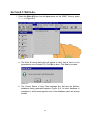
To start the ArcView Interface from Windows
1. Start ArcView.
2. On the File menu, click Extensions.
3. Scroll the list of available extensions until you locate AVSWAT2000. Click the
box beside AVSWAT2000—a check mark will appear in the box.
4. Click OK.
Note:
Do not check the Make Default option on the ArcView Extension
dialog box. This option has a bug that prevents ArcView from starting
once you have exited the program after turning on this option.
Once the extension is loaded, the SWAT ArcView main interface screen
will be displayed (Figure 4.1).
Figure 4.1
36
The main interface offers the user 8 options:
v
v
v
v
v
v
v
v
Create a new SWAT project
Open an existing SWAT project
Copy/Import an existing SWAT project
Delete an existing SWAT project
Exit ArcView
Edit SWAT Databases
About
Help
Three additional options are displayed on the main interface once a project has
been opened or created (Figure 4.2).
v Save the active project
v Set environmental variables
v Return to current project
Figure 4.2
37
SECTION 4.1: MAIN INTERFACE C OMMANDS
The following sections describe the use of the command buttons listed on the main
interface screen.
SECTION 4.1.1: NEW PROJECT
To create a new SWAT Project
1. On the main interface, click the button beside New Project.
2. A browser will be displayed requesting a name for the new project (Figure
4.3). The browser shows the directory tree where the data associated with the
new project will be stored. The interface will default the project directory
location to the Installation dir directory. The default project name and directory
location may be used or a new name/directory entered.
Figure 4.3
3. (Optional) Move to the target directory in the disk.
4. Type a project name in the text box called File Name (a default name for the
project is provided).
5. Change the project directory location if desired.
6. Once the desired project name is displayed in the browser, click OK.
Within the directory specified in the browser, the SWAT ArcView
interface creates a subdirectory to store the project files generated for
SWAT. The subdirectory has the same name as the project. A project
management file or log file is also created for the project and is stored
in the main directory. The log file is of the file type SWAT project.
The log file name is the project name with the extension .swat.
5. A project window for the new SWAT will be displayed.
38
SECTION 4.1.2: OPEN PROJECT
To open an existing SWAT Project
1. On the main interface, click the button beside Open Project.
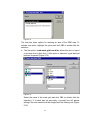
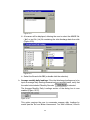
2. A browser will be displayed (Figure 4.4). If necessary, move to the proper
directory. Click on the name of the SWAT project log file (.swat) belonging to
the project you wish to open.
Figure 4.4
3. Once the desired project name is displayed in the text box called File Name,
click OK.
4. A prompt box will be displayed which offers the option of making a backup
copy of the project. If you wish to make a backup copy of the project, click
Yes. If not, click No.
5. The project window for the SWAT project will be displayed. The layout of the
window is recreated from the last time the project was saved.
The user may also open a project without loading the
AVSWAT2000 extension. To open a project directly from
ArcView, select Open Project on the ArcView File menu. A
browser will be displayed. Use the directory tree to open the
project directory. Within the project directory, an ArcView project
(.apr) file is stored. Select this file and click OK. ArcView will
load the SWAT interface and open the project in one step.
39
SECTION 4.1.3: COPY/IMPORT PROJECT
To copy an existing SWAT Project
1. On the main interface, click the button beside Copy/Import Project.
2. A browser will be displayed (Figure 4.5). If necessary, move to the proper
directory. Type or click the name of the SWAT project log file (.swat)
belonging to the project you wish to copy.
Figure 4.5
3. Once the desired project name is displayed in the File Name text box, click
OK.
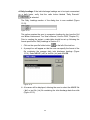
4. A new browser will be displayed (Figure 4.6). If you wish to copy the project to
a different directory, move to the desired directory. Type the new project
name in the text box and click OK.
Figure 4.6
5. As the interface copies the project, links to any maps or data stored in a
directory other than the Installation dir directory must be verified. This feature
40
allows path information to be altered when a project has been moved from
one computer to another. Browsers will be displayed for every unique file path
the interface encounters as it copies a project. Set the path to the proper
directory and click OK.
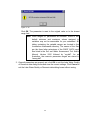
6. A prompt box will be displayed once the copy process is complete. Click OK.
SECTION 4.1.4: DELETE PROJECT
To delete an existing SWAT project
1. On the main interface, click the button beside Delete Project.
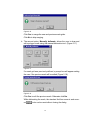
2. A browser will be displayed (Figure 4.7). If necessary, move to the proper
directory. Type or click the name of the SWAT project log file (.swat)
belonging to the project you wish to delete.
Figure 4.7
3. Once the desired project name is displayed in the File Name text box, click
OK.
4. A prompt box will appear to verify the delete command. To continue with the
delete process, click Yes. To abandon the delete process, click No.
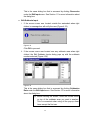
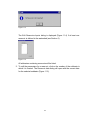
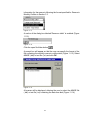
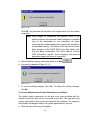
5. The selection mouse pointer will be replaced with an hourglass symbol during
the delete process. Once the delete process is complete, a prompt box will be
displayed (Figure 4.8). Click OK.
41
Figure 4.8
SECTION 4.1.5: EXIT ARCVIEW
To close the SWAT ArcView interface and ArcView
1. On the main interface, click the button beside Exit ArcView.
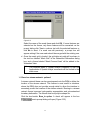
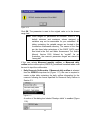
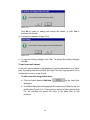
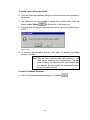
2. A prompt box will be displayed requesting the user to verify the command
(Figure 4.9)
Figure 4.9
3. To close the SWAT ArcView interface and ArcView program, click Yes. To
abandon the exit procedure, and return to the main interface screen, click No.
SECTION 4.1.6: EDIT SWAT D ATABASES
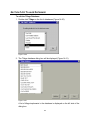
To edit the SWAT Databases
1. On the main interface, click the button beside Edit SWAT Databases.
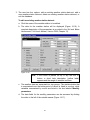
2. A dialog box will appear with a list of the databases (Figure 4.10).
42
Figure 4.10
Seven databases are available for editing:
User Soils
This database is used to store custom soil data. Data is entered into this
database for soil maps that do not use the soil database included with the
interface.
User Weather Stations
This database is used to store custom weather generator station data.
Statistical weather data is entered into this database for weather
simulation stations not included in the provided database.
Land Cover/Plant Growth
This database contains SWAT plant growth parameters. While users are
given the option of modifying existing land cover/plant parameters or
adding additional plant species to the database, we would like to
emphasize that changes to the plant database should be based on
experimental data. The typical user will not need to make changes to this
database.
Fertilizer
This database contains SWAT fertilizer parameters. Both inorganic and
organic (manure) fertilizer data is stored in this database.
Pesticide
This database contains SWAT pesticide parameters.
Tillage
This database contains SWAT tillage parameters.
Urban
This database contains SWAT urban land type parameters.
Section 14 describes the procedures used to modify the databases.
43
SECTION 4.1.7: SAVE CURRENT PROJECT
To save the active SWAT project
1. On the main interface, click the button beside Save Project.
2. A prompt box will appear once the project has been saved. Click OK to return
to the main interface.
The project must be saved via the Save Project option on the
main interface menu or by the Save Project button (diskette
symbol or File menu item) for the user to be able to fully
restore the project in the interface at a future time.
SECTION 4.1.8: ENVIRONMENTAL V ARIABLES
To set the environmental variables for a project
While the user specifies the directory where output from the interface is stored
with the New Project command, the Environmental Variables command is
used to identify the directory where data accessed by the interface is stored, i.e.
interface input. The types of data and map themes required to run the interface
are reviewed in Section 3.
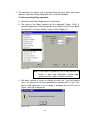
1. On the main interface, click the button beside Environmental Variables.
2. A prompt box will appear which shows the locations of data and programs
used by the interface (Figure 4.11). While the SWAT ArcView interface will
automatically set the locations of SWAT Programs and SWAT Databases
upon installation, the SWAT User Data directory needs to be defined for
every new project.
Whenever a browser is activated, it will automatically open the
SWAT Users Data directory. While the maps for the interface
can be located any place the user wishes, the precipitation,
temperature, solar radiation, relative humidity, wind speed, and
weather generator data files must be stored in this directory.
44
Figure 4.11
The directory initially specified in the text field is the directory where interface
output for the project is stored--the project directory. This needs to be
replaced with the location of the interface data directory.
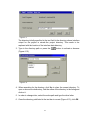
3. Type in the directory path or press the
(Figure 4.12).
button to activate a browser
Figure 4.12
4. When searching for the directory, click Up to close the current directory. To
open or choose a subdirectory, find the name of the directory in the listing and
click on it.
5. In order to change drive, select the entire path and type the drive letter.
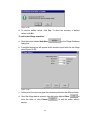
6. Once the directory path listed in the text bar is correct (Figure 4.13), click OK.
45
Figure 4.13
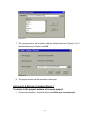
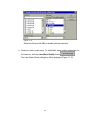
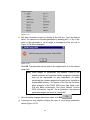
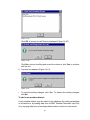
7. The prompt window will be shown with the selected directory (Figure 4.14). If
the listed directory is correct, click OK.
Figure 4.14
8. The project window will be restored to the screen.
SECTION 4.1.9: RETURN TO CURRENT PROJECT
To return to the project window of an open project
1. On the main interface, click the button beside Return to current project.
46
SECTION 4.2: PROJECT VIEWS
The SWAT ArcView interface creates two views: the Watershed View and the
SWAT View. The Watershed View is used to process all maps while the SWAT
View is used to edit input data, run the SWAT model, and analyze output.
The Watershed View menu bar contains the same pull-down menus as the basic
ArcView window, 2 Spatial Analyst pull-down menus (Analysis and Surface)
plus one menu unique to the SWAT ArcView Watershed View—Avswat.
The SWAT View menu bar contains the same pull-down menus as the basic
ArcView window plus 4 menus unique to the SWAT View. These are Input, Edit
Input, Simulation, and Reports. The SWAT View is created once all map
processing has been completed in the Watershed View. To shift between the
Watershed and SWAT Views, position the mouse cursor in an open area in the
map display, click the right mouse button, and select SWAT View from the popup menu (see Section 4.3 for more information about the pop-up menu).
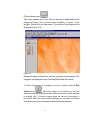
Figure 4.15 shows the ArcView View menu and tool bars, Figure 4.16 shows the
Watershed View menu and tool bars while Figure 4.17 shows the SWAT View
menu and tool bars.
Figure 4.15
Figure 4.16
Figure 4.17
47
SECTION 4.2.1: THE AVSWAT M ENU
The Avswat menu contains all the commands required to import and process the
ArcView themes and tables used for delineation of subbasins and HRUs within
the watershed. Figure 4.18 displays the Avswat menu.
Figure 4.18
The Avswat Menu: Avswat main interface dialog
The Avswat main interface dialog command returns the user to the main
interface screen (Figure 4.2).
The Avswat Menu: Automatic Delineation
The Automatic Delineation command accesses the dialog box used to
import topographic maps and delineate the watershed. This procedure is
reviewed in Section 5.
The Avswat Menu: Land Use and Soil definition
The Land Use and Soil definition command accesses the dialog box
used to import land use and soil maps, link the maps to SWAT databases,
and perform an overlay. This procedure is reviewed in Section 6.
The Avswat Menu: HRUs distribution
The HRUs distribution command accesses the dialog box used to define
the number of HRUs created within each subbasin in the watershed. This
procedure is reviewed in Section 6.
The Avswat Menu: Reports
The Reports command lists various reports generated by the interface. To
access a particular report, highlight the name of the report and click the
left mouse button. The report of interest will be displayed in a text editor.
48
The Avswat Menu: SWAT View
The SWAT View command activates the SWAT View.
SECTION 4.2.2: THE INPUT MENU
The Input menu contains the commands which generate the ArcView database
files used by the interface to store input values for the SWAT model. Figure 4.19
displays the input menu.
Figure 4.19
The Input Menu: Weather Stations
The Weather Stations command loads weather station locations and data
for use.
The Input Menu: Write All
The Write All command creates ArcView tables (.dbf) that store values for
SWAT input parameters. Initial SWAT ASCII input files are also
generated.
The Input Menu: Write Configuration File (.fig)
The Write Configuration File (.fig) command creates an ArcView table
(fig.dbf) that stores values for the watershed configuration input
parameters. The SWAT ASCII watershed configuration input file is also
generated.
49
The Input Menu: Write Soil Data (.sol)
The Write Soil Data (.sol) command creates an ArcView table (sol.dbf)
that stores values for SWAT soil input parameters. Initial SWAT ASCII .sol
input files are also generated.
The Input Menu: Write Weather Generator Data (.wgn)
The Write Weather Generator Data (.wgn) command creates an
ArcView table (wgn.dbf) that stores values for SWAT weather generator
input parameters. Initial SWAT ASCII .wgn input files are also generated.
The Input Menu: Write Subbasin General Data (.sub)
The Write Subbasin General Data (.sub) command creates an ArcView
table (sub.dbf) that stores values for SWAT subbasin input parameters.
Initial SWAT ASCII .sub input files are also generated.
The Input Menu: Write HRU General Data (.hru)
The Write HRU General Data (.hru) command creates an ArcView table
(hru.dbf) that stores values for SWAT HRU input parameters. Initial SWAT
ASCII .hru input files are also generated.
The Input Menu: Write Main Channel Data (.rte)
The Write Main Channel Data (.rte) command creates an ArcView table
(rte.dbf) that stores values for SWAT main channel input parameters.
Initial SWAT ASCII .rte input files are also generated.
The Input Menu: Write Groundwater Data (.gw)
The Write Groundwater Data (.gw) command creates an ArcView table
(gw.dbf) that stores values for SWAT groundwater input parameters. Initial
SWAT ASCII .gw input files are also generated.
The Input Menu: Write Water Use Data (.wus)
The Write Water Use Data (.wus) command creates an ArcView table
(wus.dbf) that stores values for SWAT water use input parameters. Initial
SWAT ASCII .wus input files are also generated.
50
The Input Menu: Write Management Data (.mgt)
The Write Management Data (.mgt) command creates an ArcView table
(mgt.dbf) that stores values for SWAT management input parameters.
Initial SWAT ASCII .mgt input files are also generated.
The Input Menu: Write Soil Chemical Data (.chm)
The Write Soil Chemical Data (.chm) command creates an ArcView
table (chm.dbf) that stores values for SWAT soil chemical input
parameters. Initial SWAT ASCII .chm input files are also generated.
The Input Menu: Write Pond Data (.pnd)
The Write Pond Data (.pnd) command creates an ArcView table
(pnd.dbf) that stores values for SWAT pond/wetland input parameters.
Initial SWAT ASCII .pnd input files are also generated.
The Input Menu: Write Stream Water Quality Data (.swq)
The Write Stream Water Quality Data (.swq) command creates an
ArcView table (swq.dbf) that stores values for SWAT stream water quality
input parameters. Initial SWAT ASCII .swq input files are also generated.
SECTION 4.2.3: THE EDIT INPUT MENU
The Edit Input menu is one of four new menus introduced in the SWAT View.
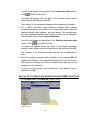
The Edit Input menu allows you to edit the SWAT model databases and the
watershed database files containing the current inputs for the SWAT model. Five
items are listed on the Edit Input menu (Figure 4.20).
Figure 4.20
51
The Edit Input Menu: Databases
The Databases command allows the user to access the SWAT model
databases from within a project.
The Edit Input Menu: Point Source Discharges
The Point Source Discharges command allows the user to access/define
the point source loadings for all subbasins with point source discharges.
The Edit Input Menu: Inlet Discharges
The Inlet Discharges command allows the user to access/define loadings
for upstream sections of the watershed not directly modeled in the current
project.
The Edit Input Menu: Reservoirs
The Reservoirs command allows the user to access/edit input parameters
for any reservoirs located within the watershed.
The Edit Input Menu: Subbasins Data
The Subbasins Data command allows the user to access/edit input
parameters for land areas, channels, ponds/wetlands, and groundwater
systems within the watershed.
SECTION 4.2.4: THE SIMULATION MENU
The Simulation menu is one of four new menus introduced in the SWAT View.
The Simulation menu allows you to run the SWAT model and import results to
the interface. The Simulation menu also contains tools that allow the user to
rapidly calibrate the model simulation and determine delivery loads from the
different areas of the watershed. Four items are listed on the Simulation menu
(Figure 4.21).
Figure 4.21
52
The Simulation Menu: Run SWAT
The Run SWAT command allows the user to modify parameters in three
SWAT input files, the input control code file (.cod), the basin input file
(.bsn), and the watershed water quality input file (.wwq), as well as set up
and run the SWAT model.
The Simulation Menu: Read Results
The Read Results command imports output from the SWAT run into
ArcView tables (.dbf) so that the simulation results may be displayed
within the interface.
The Simulation Menu: Calibration Tool
The Calibration Tool command allows the user to perform global edits on
SWAT input variables commonly modified during calibration. The interface
saves these modified SWAT runs in separate directories so that the user
can compare results from several different calibration runs.
The Simulation Menu: Make Delivered Load Table
The Make Delivered Load Table command analyzes SWAT output to
calculate the source of loadings at any point along the channel network.
SECTION 4.2.5: THE REPORTS M ENU
The Reports menu is one of four new menus introduced in the SWAT View. The
Reports menu provides the user access to ArcView and ASCII tables generated
during the project. Five items are listed on the Reports menu (Figure 4.22).
Figure 4.22
53
The Reports Menu: Show List
The Show List command displays a list of all ASCII reports generated in
the project as well as several of the SWAT input files that users might wish
to review.
The Reports Menu: SBS Table
The SBS Table command displays the ArcView table containing
information loaded from the SWAT .sbs output file (HRU output) (this
command is enabled only when the simulation printout frequency is
yearly).
The Reports Menu: Delivered Load Table
The Delivered Load Table command displays the ArcView table
containing the loadings from the various subbasins for the point along the
stream network defined when the Make Delivered Load Table command
under the Simulation menu was performed.
The Reports Menu: Map-Chart
The Map-Chart command provides a dialog box that allows the user to
map and chart information from the SWAT .bsb and .rch output files and
the Delivered Load Table. See Section 13.6 for a full description of this
tool.
The Reports Menu: GenScn
The GenScn command allows the user to analyze the outputs using
GENeration and analysis of model simulation SceNarios (GenScn) tool
(U.S.G.S., 1998). The installation package is located in:
\Installation dir\GenScn
U.S. Geological Survey, Department of the Interior. 1998. A Tool for the
Generation and Analysis of Model Simulation Scenarios for Watersheds
(GenScn). Water-Resources Investigations Report 98-4134. Decatur, GA,
Reston, VA, 152 p.
54
SECTION 4.3: POP UP MENU
A shortcut menu to several tools is provided once the user has completed all
procedures in the Watershed View and activated the SWAT View. This shortcut
allows you to switch the current working View, edit the Point Source of
Discharge, Inlet Discharge, Reservoir, and all the Subbasin inputs.
1. Right click the mouse within the map display area. A menu will appear (Figure
4.23)
Figure 4.23
2. The pop-up menu contains 6 items:
a. Watershed View. Selecting this option will switch the screen to the
Watershed View. You can return to the SWAT View using the analog pop
up menu or by selecting SWAT View under the AvSwat menu contained
in Watershed View.
b. Point Source of Discharges.
i. If the mouse cursor was located outside the watershed when right
clicked, a message box will be displayed (Figure 4.24).
Figure 4.24
Click OK to proceed.
ii. If the mouse cursor was located over a subbasin with no point
discharges when right clicked, a message box will notify the user
(Figure 4.25).
55
Figure 4.25
Click OK to proceed.
iii. If the mouse cursor was located over a subbasin with point discharges
when right clicked, a dialog box will display the subbasin point source
input values (Figure 4.26).
Figure 4.26
This is the same dialog box that is accessed by clicking Point Source
Discharges under the Edit Input menu. See Section 9 for more
information about the dialog box.
c. Inlet Discharges:
i. If the mouse cursor was located outside the watershed when right
clicked, a message box will notify the user (Figure 4.27).
Figure 4.27
56
Click OK to proceed.
ii. If the mouse cursor was located over a subbasin with no inlet
discharges when right clicked, a message box will notify the user
(Figure 4.28).
Figure 4.28
Click OK to proceed.
iii. If the mouse cursor was located over a subbasin with inlet discharges
when right clicked, a dialog box will display the subbasin inlet
discharge data (Figure 4.29).
Figure 4.29
This is the same dialog box that is accessed by clicking Inlet
Discharges under the Edit Input menu. See Section 10 for more
information about the dialog box.
d. Reservoirs:
i. If the mouse cursor was located outside the watershed when right
clicked, a message box will notify the user (Figure 4.30).
57
Figure 4.30
Click OK to proceed.
ii. If the mouse cursor was located over a subbasin with no reservoir
when right clicked, a message box will notify the user (Figure 4.31).
Figure 4.31
iii. If the mouse cursor was located over a subbasin with a reservoir when
right clicked, a dialog box will display the reservoir input data (Figure
4.32).
Figure 4.32
58
This is the same dialog box that is accessed by clicking Reservoirs
under the Edit Input menu. See Section 11 for more information about
the dialog box.
e. Edit Subbasin Input:
i. If the mouse cursor was located outside the watershed when right
clicked, a message box will notify the user (Figure 4.33).
Figure 4.33
Click OK to proceed.
ii. If the mouse cursor was located over any subbasin area when right
clicked, the Edit Subbasin Inputs dialog pops up with the subbasin
number selected (Figure 4.34).
Figure 4.34
This is the same dialog box that is accessed by clicking Subbasins
Data under the Edit Input menu. See Section 12 for more information
about the dialog box.
Tip: Before clicking the mouse, move the mouse cursor
on top of the subbasin area you want to analyze.
This is convenient when using all the pop-up menu
items except the first one.
59
f. Avswat Main Interface Dialog. Selecting this option will switch the
screen to the Main Interface screen (Figure 4.35). You can return to the
project by clicking the button labeled Return to Current Project.
Figure 4.35
60
SECTION 5: WATERSHED DELINEATION
This tool allows the user to delineate subwatersheds based on an
automatic procedure using Digital Elevation Model (DEM) data. User specified
parameters provide limits that influence the size and number of subwatersheds
created.
Purpose
The Watershed Delineation carries out advanced GIS functions to aid the user in
segmenting watersheds into several "hydrologically" connected sub-watersheds
for use in watershed modeling with SWAT.
Application
The Watershed Delineation tool uses and expands ArcView and Spatial Analyst
extension functions to operate watershed delineations. The delineation process
requires a Digital Elevation Model (DEM) in ArcInfo grid format. The user also
has the option of importing and using a pre-digitized stream network in ArcView
shape (PolyLine) format.
Once the delineation is finished, a detailed report (Topographic Report) is added
to the current project, and the following resulting themes will be added to the
Watershed View: Subbasins, Streams,Outlets and (optional) Reservoirs. See
Watershed Delineation Output Data for the content of the respective table of
attributes. The topographic report describes the elevation distribution within the
watershed (or "hydrologically" not connected watersheds) and within each subwatershed unit (subbasin). The themes carry the parameters of the watershed(s)
characterization.
Key Procedures
Ÿ
Load the DEM
Ÿ
(Optional) Define the working area (Focused Area)
Ÿ
(Optional) Load the stream network to be used for the delineation
Ÿ
Preprocess the DEM
Ÿ
Specify the minimum sub-watershed area (critical source area)
Ÿ
Review and edit the stream network points
Ÿ
Run the calculation of the subbasin parameters
61
Ÿ
(Optional) Locate the Reservoirs
Note: Only the DEM grid file is required for
the delineation process.
SECTION 5.1: W ATERSHED DELINEATION D IALOG B OX
When a new project is created, the Watershed Delineation dialog box will
automatically be displayed. If the dialog box is not displayed, on the Avswat
menu, click Automatic Delineation. (The Avswat menu is present only in the
Watershed View.) The Watershed Delineation dialog will open (Figure 5-1).
Figure 5.1
The dialog is divided into five sections: DEM Setup, Stream Definition, Outlet and
Inlet Definition, Main Watershed Outlet(s) Selection and Definition, and
Reservoirs.
62
SECTION 5.2: DEM SETUP
1. The DEM Setup section is shown in Figure 5.2.
Figure 5.2
One button loads the DEM grid map used to calculate all subbasin/reach
topographic parameters. Two check boxes (options) load or create a mask
grid and/or load a stream shape file.
2. To load or select the DEM grid, click the
labeled "DEM grid"
button beside the text box
3. A dialog box is opened to specify which DEM map grid to use (Figure 5.3).
Figure 5.3
You may select a DEM grid that has previously been added to the
Watershed View or load a DEM.
Click OK after the selection. If the first option was selected, the list of the
grid themes in the Watershed View is shown (Figure 5.4); otherwise a grid
dataset file browser (Figure 5.5) will appear to allow you to specify which
DEM will be used.
63
Figure 5.4
Figure 5.5
Select the name of the DEM map grid and Click OK (or double click the
selection.)
4. Once the DEM is loaded, the grid data set path will be shown in the text
box labeled “DEM Grid”. A prompt box will be displayed reminding the
user to verify DEM properties (Figure 5.6)
Figure 5.6
64
5. Click the properties button
next to the DEM grid text box.
The DEM properties dialog box allows DEM vertical and horizontal units of
measure and the projection to be verified or edited (Figure 5.7).
Figure 5.7
To change the units of measure, click on the arrows to display drop-down
boxes(
or
) and select one of the listed units.
Note: Careful!! The DEM properties dialog should correctly report the
horizontal and vertical units. Incorrect settings will affect the results
of the watershed geomorphic parameterization.
6. To verify or edit the projection, click the projection button
.
Note: The projection does not have to be defined in order to use the
interface. If the projection is not defined:
•
All location tables must use XPR and YPR coordinates to define
the location of the objects of interest (Latitude and Longitude
cannot be used to denote the locations)
•
The US weather generator database cannot be used
•
The PHU values cannot be calculated for each individual plant
in the watershed by the interface.
A prompt box will appear listing projection details for the DEM map. When
a new DEM map is loaded, the projection will be undefined (Figure 5.8).
65
Figure 5.8
Click OK. A prompt box will appear (Figure 5.9)
Figure 5.9
If the projection listed was correct, click No. To change the projection click
Yes.
7. If Yes was clicked, a prompt box is displayed offering two options:
predefined projection and custom projection (Figure 5.10). Click either
predefined projection or custom projection.
Figure 5.10
66
8. If Predefined projection was chosen, the dialog box in Figure 5.11 will be
displayed. Only three projections are predefined in the interface:
Geographic (decimal degrees), Albers Equal Area (conterminous US), and
Wisconsin TM. Click the project map projection. Once the proper
projection is highlighted, click OK.
Figure 5.11
9. If Custom projection was chosen, the dialog box in Figure 5.12 will be
displayed. Scroll the drop-down menus for Category and Type to find the
project map projection and click the appropriate choices. Once the
projection has been selected, standard settings for the projection will be
displayed in the lower portion of the dialog box. If the projection settings
need to be altered, click the circle beside custom and type the correct
values for each of the projection properties (Figure 5.13).
Figure 5.12
67
Figure 5.13
10. Once all projection properties have been set, click OK. This will close the
projection dialog box.
11. Once the units of measure and projection are properly set, click OK on
the properties dialog box.
12. Once the DEM properties are set, the Apply button (labeled
“Preprocessing of the DEM to remove sinks” will be enabled. The following
two options need to be set before proceeding with the preprocessing of
the DEM.
13. Focus watershed area optional
The first option in the DEM setup section allows you to import or create a
grid map that masks out a part of the DEM grid. Only the portion of the
DEM covered by the mask will be processed by the interface. This map is
not required but will reduce the processing time of the GIS functions.
Click the box beside Focusing watershed area option. A check will
appear in the box
and a prompt dialog will
open (Figure 5.14)
68
Figure 5.14
The user has three options for masking an area of the DEM map. To
activate one option, highlight the option and click OK or double-click the
selection.
a The first option, Load mask grid from disk, allows the user to import
a grid map from a disk drive. If this option is selected, a grid data set
browser is opened (Figure 5.15).
Figure 5.15
Select the name of the mask grid and click OK (or double click the
selection). If a mask was set previously, a prompt box will appear
asking if the new mask should be merged with the existing one (Figure
5.16).
69
Figure 5.16
Click Yes to merge the new and previous mask grids.
Click No to skip merging.
b The second option, Manually delineate, allows the user to draw and
edit a polygon mask using the manual delineation tool. (Figure 5.17)
Figure 5.17
If a mask grid was previously defined, a prompt box will appear asking
the user if the previous mask will be edited (Figure 5.18).
Figure 5.18
Click Yes to edit the previous mask. Otherwise click No.
While delineating the mask, the standard ArcView zoom-in and zoomout
tools can be used without closing the dialog.
70
Click the draw button
.
The cursor appears as a loop. Click on the map to begin defining the
polygon boundary. Click at each corner boundary, or vertex, of the
polygon. Double-click the final vertex. The outline of the polygon will be
displayed (Figure 5.19)
Figure 5.19
Repeat the same procedure for as many polygons as are needed. The
polygons are displayed as the Focusing Watershed Area theme.
To add a new vertex to a polygon or move a vertex, click the Edit
Vertex button
. Move the cursor to the position on the line
where the new vertex will be located. When the cursor symbol changes
to a target, click. To move a vertex, place the cursor on the vertex to
be moved. When the cursor symbol changes to a crosshair, hold down
the left mouse button and drag the vertex to the new position.
71
To delete a polygon, click the Delete button
. Click on the
polygon to be deleted. When the polygon is selected (Figure 5-20),
press the Delete key on the keyboard and the polygon will be
removed.
Figure 5.20
Once all drawing and editing on the grid mask is completed, click the
Apply button.
c
The third option, Select boundary theme from Watershed View,
allows a polygon shape theme already loaded in the Watershed View
to be selected as the mask.
A prompt box appears with a list of all polygon shape themes loaded in
the Watershed View (Figure 5-21).
72
Figure 5.21
Select the name of the mask theme and click OK. If some features are
selected on the theme, only these features will be converted: on the
prompt dialog click Yes to continue just with the selected features or
click No to abort. If a mask was set previously, a prompt box will
appear asking if the new mask should be merged with the existing one.
d Once the mask grid is loaded, the grid data set path will be shown in
the text box labeled “Mask Grid” in the Watershed Delineation dialog
box, and a theme labeled “Mask-Focused Area” will be added to the
Watershed View.
Note: The Analysis Mask of Spatial Analyst Properties is now set.
Applications of Spatial Analyst commands will be limited to the
mask zone.
14. Burn in a stream network optional
A stream network theme can be superimposed onto the DEM to define the
location of the stream network. This feature is most useful in situations
where the DEM does not provide enough detail to allow the interface to
accurately predict the location of the stream network. Burning in a stream
network theme improves hydrographic segmentation and sub-watershed
boundary delineation. The theme must be a polyline shape file.
Click the box beside Burn_in option. A check will appear in the box
and a prompt dialog will open (Figure 5.22)
73
Figure 5.22
Four options are available to specify the stream network: Digitized Stream
Network, Reach File V1, Reach File V3, and National Hydrography
Dataset (NHD).
Digitized Stream Network: This option is selected when the user is
supplying the stream network. The interface assumes the stream
network delineated in the shape file contains no errors.
Reach File V1 is the oldest set of U.S. stream network delineations,
Reach File V3 is the second generation set of U.S. stream network
delineations, and NHD is the latest set of U.S. stream network
delineations. The Reach File V3 streams data contains many spurious
features (e.g. wide rivers, lakes, etc.). When stream delineations are
imported from these datasets, the user should define the source. The
interface will “clean” the stream delineation. NHD stream delineations
are available for most of the U.S. from U.S. Geological Survey. This
dataset is of much higher quality than V1 and V3, but it still needs to be
filtered to retain only the lines of flowing bodies of water. When the
NHD option is selected, the user needs to obtain the flow direction
table (in dBase format). The name of this table must be the same as
the NHD shape postfixed by “rflow”. Example NHD files may be viewed
in the installation dir/avswatdb/example2/nhd directory.
Click OK after the selection has been made (or double click the selection).
A prompt box will open, and the user will select one of two options to load
the stream delineation (Figure 5.23)
74
Figure 5.23
You may select a polyline theme that has previously been added to the
Watershed View or load a polyline theme.
Click OK after the selection. If the first option was selected, the list of the
polyline themes in the Watershed View is shown (Figure 5.24); otherwise
a polyline dataset file browser (Figure 5.25) will appear to allow you to
specify which shape file will be used.
Figure 5.24
Figure 5.25
75
Select the name of the stream network theme (hold the Shift key for
multiple selection) and click OK.
If any of the selected shape files are not polylines, a dialog box will report
the error (Figure 5.26) and the process will be stopped.
Figure 5.26
For Reach File V3 or NHD options, if the wrong data set is selected, a
dialog box will display an error message noting that the fields for the
shape file are not correct.
For the NHD option, if the NHD flow direction table is not located in the
same directory as the shape file, a dialog box will display an error
message.
Once the stream network is loaded, the shape file path will be shown in
the text box labeled Digitized streams. The selected theme(s) will be
displayed in the Watershed View as a single theme named “Digitized
streams” (multiple selected data sets will be merged).
The filtered features (if any) from the selected themes are merged into a
theme named “Removed streams” that is added to the Watershed View. A
dialog box is displayed to indicate this to the user (Figure 5.27)
Figure 5.27
76
Tip:
After filtering and before proceeding to the next preprocessing
step, you should edit the “Digitized stream” theme to provide a
continuous set of stream lines (e.g. draw lines through lakes
and ponds, remove isolated reaches). For this task, you can
start an editing section of the “Digitized stream” theme and use
the ArcView default tools in the Watershed View
.
Note: Other than outlet lines, the stream lines should not cross the
edge of the DEM (or the Focused Area if a mask was set).
Lines crossing the edge can affect the resulting flow direction.
15. DEM Preprocessing
Once the DEM grid is loaded, the properties have been reviewed, and
optional themes are set, click the Apply button next to the label
“Preprocessing of the DEM to remove sinks”.
The interface will process the DEM map grid to remove all of the nondraining zones (sinks).
While processing the DEM, a prompt box will appear (Figure 5.28).
Figure 5.28
Click No if all cells on the edge of the working zone need to flow away
from the zone. This is the recommended choice.
Click Yes if the flow is calculated normally for edge cells, with the edge
being slightly lower than the cell.
A prompt box is displayed when map preprocessing is complete (Figure
5.29). Click OK.
77
Figure 5.29
SECTION 5.3: STREAM D EFINITION
In this section of the Watershed Delineation dialog box, the initial stream
network and subbasin outlets are defined. The interface lists a minimum,
maximum, and suggested sub-watershed area (in hectares), which are shown
in the stream definition section (Figure 5.30)
Figure 5.30
The user has the ability to set the minimum size of the subbasins. This
function plays an important role in determining the detail of the stream
network and the size and number of sub-watersheds. The threshold area, or
critical source area, defines the minimum drainage area required to form the
origin of a stream.
1. In the text box labeled “Threshold area”, type the upstream drainage area
(in hectares) required to define the beginning of a stream. The smaller the
specified number of hectares, the more detailed the drainage network
delineated by the interface.
2. Click the Apply button.
3. Two themes are now added to the Watershed View and displayed over
the DEM map grid: Streams (the current synthetic drainage network) and
Outlets (the respective stream junction points) (Figure 5.31).
78
Figure 5.31
4. The user can change the threshold value and re-run the stream and outlet
definition routine or proceed with the next section.
SECTION 5.4: OUTLET AND INLET D EFINITION
In this section of the Watershed Delineation dialog box, the user may refine
the stream network and outlet configuration. Drainage inlets and subwatershed outlets may be added, deleted, or redefined (Figure 5.32)
Figure 5.32
Sub-watershed outlets are the points in the drainage network of a subwatershed where streamflow exits the sub-watershed area. Adding outlets at
the location of monitoring stations is useful for comparison of measured and
predicted flows and concentrations.
There are two types of drainage inlets: a point-source discharge or the outlet
of a draining watershed. The second type of inlet is used when a portion of
the watershed area is not directly modeled with SWAT. For both types of
79
inlets, the user provides discharge data records. The inlet discharge is routed
through the stream network.
Inlets and outlets may be added to the stream network by importing a
predefined table or manually clicking the mouse over the map on the screen.
Two radio buttons allow you to switch the current definition between inlets
and outlets
.
The legend for the Outlets theme in the Watershed View (Figure 5.33)
distinguishes the types of inlets/outlets added to the view.
Figure 5.33
The following sections described the different methods used to add inlets and
outlets.
Adding Outlets by Table
Outlet point locations (subbasin outlets) can be imported in the project
using a dBASE table and the following steps:
1. Make
sure
the
radio
button
labeled
"Outlet"
is
selected
.
2. Click on the
button next to the "Table" text box. A file
browser will appear (Figure 5.34) allowing you to select a dBASE table.
Select the file name and click OK (or double click the selection).
80
Figure 5.34
3. This table must have the same fields specified in Section 3.3 for
Subbasin Outlet Location Table. All locations listed in the table must be
outlet Type “O”. If a different "Type" value is specified, a dialog box will
report an error like the one reported in Figure 5.35 and the loading
process will stop.
Figure 5.35
4. Once geocoded, the outlet locations will snap automatically to the
closest reach of the Streams theme.
Note:
Xpr and Ypr field data values have priority over
the Lat and Long field data value for the definition
of the point location on the map.
5. The DEM dialog box will automatically minimize, and the Watershed
View will be redrawn showing the added points.
.
81
Adding Point Sources or Inlets of Draining Watersheds from Tables
Inlet point locations can be imported in the project using a dBASE table
and the following steps:
1. Make sure the "Inlet" radio button is selected
.
2. In the Outlet Definition section of the DEM dialog box, click on the
button next to the "Table" text box. A dialog box will
appear (Figure 5.36)
Figure 5.36
3. This table must have the same fields specified in Section 3.3 for
Watershed Inlet Location Table. All locations listed in the table must be
Type “D” (Point Sources) or Type “I” (Draining Watershed Inlets). If a
different "Type" value is specified, a dialog box will report an error like
the one reported in Figure 5.35 and the loading process will stop.
4. The DEM dialog box will automatically minimize, and the Watershed
View will be redrawn showing the added points.
Manually Editing Outlets and Inlets
Outlets and inlets may be manually edited using the following steps.
Adding Outlets
1. In the Outlet Definition section of the DEM dialog box, make sure the
"Outlet" radio button is selected
82
.
2. Click the
button.
3. The Watershed Delineation dialog will be minimized. Move the cursor
to the desired location(s) and click the left mouse button. An outlet
point will automatically snap to the closest stream line, and the feature
will be added to the "Outlets" theme.
4. When all desired outlets have been added, maximize the dialog box.
Adding Inlets
1. In the Outlet Definition section of the DEM dialog box, make sure the
Inlet radio button is selected
.
2. Click the
button.
3. The Watershed Delineation dialog will be minimized. Move the cursor
to the desired location(s) and click the left mouse button. A dialog box
will open (Figure 5.37) providing two options: Point discharge and Inlet
of Draining Watershed.
Figure 5.37
4. Select the inlet type. The inlet point will automatically snap to the
closest stream line, and the feature will be added to the "Outlets"
theme.
5. When all desired inlets have been added, maximize the dialog box.
83
When adding and deleting points:
Do not insert an inlet or outlet point in a junction cell. A close-up
view of stream juncture points created by the interface is shown on the
DEM map grid in Figure 5.38. The points are placed in the first cell of
each branch of the stream. If these points are removed and replaced with
one point in the junction cell (Figure 5.39), the interface will not be able to
understand which branch of the stream is the correct stream line and will
be unable to delineate the subbasins properly for the two stream
branches.
Figure 5.38
Figure 5.39
Deleting Outlet and/or Inlet Points
1. If necessary, zoom in on the inlet or outlet points to be deleted.
2. Click the
button.
3. The Watershed Delineation dialog will be minimized. Move the cursor
to the location(s) you wish to remove.
4. Hold down the left mouse button, and move the mouse to draw a box
around the point(s) you wish to remove. Release the left mouse button.
5. A prompt box will appear, asking you to verify removal of the selected
point(s).(Figure 5.40)
84
Figure 5.40
Redefining Outlets/Inlets
1. Click the
button.
2. The Watershed Delineation dialog will be minimized. Move the cursor
to the desired location(s) and left click. Hold down the left mouse
button, and draw a box around the point(s) you wish to redefine.
Release the left mouse button. A prompt box will open (Figure 5.41).
Click the Cancel button to exit.
Figure 5.41
You may redefine one or more outlets to drainage watershed inlets and
vice versa. Point Source inlets cannot be redefined. If one of these
points is selected, a dialog box will report an error (Figure 5.42), and
the process will stop.
85
Figure 5.42
SECTION 5.5: MAIN W ATERSHED OUTLET SELECTION AND DEFINITION
Sub-watershed delineation is completed in this section (Figure 5.43) of the
Watershed Delineation dialog box.
Figure 5.43
The interface will allow more than one watershed to be delineated at the
same time. It is convenient to select just the most downstream outlet(s) of
each target watershed(s).
Click the
button.
1. The DEM dialog will minimize and another dialog will appear (Figure 5.44).
Figure 5.44
2. Press the ESC key to exit the selection.
3. To select one watershed outlet, position the cursor close to the point
chosen to be the watershed outlet. Hold down the left mouse button and
86
move the mouse to form a box on the screen around the selected outlet.
Release the left mouse button.
4. To select multiple watershed outlets that are not adjacent to one another,
hold down the Shift key continuously while performing the actions
described in Step 4 as many times as necessary to select all the
watershed outlets of interest.
Tip: The tool allows multiple main watershed outlets to be
selected. This feature allows non- hydrologically
connected watersheds to be simulated at the same time.
5. Once the outlet points are selected, click OK on the outlet selection
prompt box.
If a Point Discharge or Inlet of Draining Watershed is specified, a dialog
box will report an error and processing will stop (Figure 5.45).
Figure 5.45
Otherwise a confirmation prompt pops up (Figure 5.46).
Figure 5.46
6. Click Yes to proceed.
87
Note:
Repeated outlets (located in the same location) will be
removed. In this case, a message dialog will pop up
(Figure5.47).
Figure 5.47
7. A map of the watershed (Watershed theme), sub-watersheds (Subbasins
theme), and stream network restricted to the watershed (Streams theme)
will appear on the screen when the interface has completed the watershed
delineation (Figure 5.48).
Figure 5.48
88
If one or more "Inlet of watershed" points are set on the stream network,
the Inlet Draining Watershed theme is also added to the Watershed View
(Figure 5.49).
Figure 5.49
8. By clicking the
button, the user can step back and repeat steps 1-7.
This action removes the watershed delineation and allows outlets and
inlets to be edited.
When the Undo button is clicked, a prompt box will appear asking the
user to verify the undo operation (Figure 5.50)
Figure 5.50
89
Click Yes to remove the watershed delineation.
Click No to continue with the current settings.
Calculation of Subbasin Parameters
This function calculates geomorphic parameters for each subbasin and
the relative stream reach. The results of the calculations are stored in the
table of attributes of the updated Subbasin and Streams themes. (See
Appendix-Watershed Delineation Output Data for a description of the
stored data.)
1. Click the
button.
2. If the Projection for the watershed was not defined when the DEM was
loaded, a message box will appear (Figure 5.51).
Figure 5.51
Click Yes to define the Projection or click No to leave the projection
undefined.
a. If the projection is left undefined, another message box will appear
(Figure 5.52).
Figure 5.52
Click OK.
b. A prompt box is displayed (Figure 5.53).
90
Figure 5.53
c. Type the latitude to be assigned to the subbasins and click OK.
3. When all parameters are calculated, a dialog box appears (Figure
5.54).
Figure 5.54
Note: Each subbasin is coupled to a single stream reach. If
the user removed any of the outlets defined by the
interface during the initial analysis of the DEM, the
main stem within the subbasin area is assumed to
represent the single stream reach associated with the
subbasin.
Each subbasin in the Subbasins theme is numbered, and the label is
visible in the Watershed View.
The Streams theme is labeled as well if the burning option Reach V3
or NHD has been used.
A new report, named Topographic Report, is now available (Figure
5.55). This report provides a statistical summary and distribution of
discrete land surface elevations in the watershed and all the subwatersheds.
91
Figure 5.55
SECTION 5.6: RESERVOIRS—OPTIONAL
Once the delineation is complete, the user has the option of
inserting/removing reservoir locations along the main channel network (Figure
5.56).
Figure 5.56
Adding a reservoir.
1. Click the
button.
2. The dialog box will be minimized, and the cursor will become a crosshair.
Click over the target subbasin area to add a reservoir.
3. A prompt box will be displayed asking for verification of the reservoir
placement (Figure 5.57).
92
Figure 5.57
If the wrong subbasin is listed, click No and repeat step 2. If the correct
subbasin is listed, click Yes. The new reservoir location will be placed at
the outlet of the respective subbasin.
4. Once the first reservoir location is added, the new Reservoirs theme will
be added to the Watershed View (Figure 5.58).
Figure 5.58
Tip: The user is allowed to add a single reservoir location for
each subbasin. Refine the outlet set if more than one
reservoir location needs to be set in the current subbasin
area.
93
Removing a reservoir(s).
1. Click the
button.
2. The Watershed Delineation dialog box will be minimized and the mouse
cursor will become a square. Draw a square around the reservoir(s) you
wish to remove by holding down the left mouse button.
3. A prompt box will be displayed asking for verification of the reservoir(s)
removal (Figure 5.59).
Figure 5.59
4. If the wrong subbasin is listed, click No and repeat step 2. If the correct
subbasin is listed, click Yes.
5. If all the reservoir locations are removed, the Reservoirs theme will be
removed from the Watershed View.
94
SECTION 6: LAND USE/SOIL C HARACTERIZATION
Land Use and Soil Characterization for a watershed is performed using
two commands in the Avswat menu of the Watershed View. This tool allows
users to load land use and soil themes into the current project and determine the
land use/soil class combinations and distributions for the delineated watershed(s)
and each respective sub-watershed. The themes can be either grid or shape
format.
Once the land use and soil themes have been imported and linked to the
SWAT databases, the user specifies criteria used in determining the HRU
distribution. One or more unique land use/soil combinations (hydrologic response
units or HRUs) can be created for each subbasin.
SECTION 6.1: L AND USE/S OIL D EFINITION AND O VERLAY
Purpose
The Land Use and Soils Classification and Overlay tool allows the user to load
the land use and soil themes and determine land use/soil class combinations and
distributions for the delineated watershed(s) and each respective sub-watershed.
The themes can be either grid or shape theme(s). The land use and soil themes
must be in the same projection as the DEM used in the watershed delineation.
Application
Hydrologic models like SWAT require land use and soil data to determine the
area and the hydrologic parameters of each land-soil category simulated within
each sub-watershed. The Land Use and Soil Classification tool guides the user
through the process of specifying the data to be used.
Either shape or grid themes may be used. Shape files are automatically
converted to grid, the format required by Spatial Analyst to compute crosstabulated areas between land use and soil data sets.
Once the application is finished a detailed report is added to the current project.
This report describes the land use and soil class distribution within the watershed
and within each sub-watershed unit (subbasin).
Key Procedures
Ÿ
Define the land use theme
95
Ÿ
Reclassify the land use theme
Ÿ
Define the soil theme
Ÿ
Reclassify the soil theme
Ÿ
Overlay land use and soil themes
Ÿ
Click the Exit button
SECTION 6.1.1: GET STARTED
Initiate the Landuse and Soil Classification and Overlay tool by selecting Land
Use and Soil Definition in the Avswat menu (Figure 6.1). (The Avswat menu is
present only in the Watershed View.)
Figure 6.1
The Definition of Landuse and Soil themes dialog will open (Figure 6.2).
Figure 6.2
96
The dialog is divided into two main sections: Land Use data layer and Soil data
layer.
SECTION 6.1.2: LAND USE DATA L AYER
Define Land Use/Land Cover theme:
1. Select the land use data layer by clicking the
button next to the text box
labeled Land Use Grid. A dialog box labeled Set the LandUse Grid will
appear (Figure 6.3).
Figure 6.3
2. If the land use theme is already displayed in the Watershed View, highlight
Select Landuse theme(s) from Watershed View. If the land use theme is
not displayed, highlight Load Landuse theme(s) from disk. Click OK.
3. A new dialog is displayed for the user to define the type of theme being used
(Figure 6.4). Select either Shape or Grid from the drop-down menu and click
OK.
Figure 6.4
97
a. If you selected the Shape option:
i. If loading from the Watershed View, a dialog is displayed (Figure 6.5)
showing the list of shape themes.
Figure 6.5
Select one or more themes (hold down the Shift key for a multiple
selection) and click OK. The shape file(s) will be automatically
converted to grid (and merged for a multiple selection).
ii. If loading from disk, a file browser pops up (Figure 6.6).
Figure 6.6
Select one or more themes (hold the Shift key for a multiple selection)
and click OK.
98
The selected themes are converted into a grid theme with the cell size
set to the base cell size. The base cell size is the cell size of the DEM
theme.
By default, the script will look for the Lucode field in the table of
attributes of the shape themes and use these values for the conversion
to grid. If this field is not included, the script will look for the field types
integer and string. If none of these fields are found, a dialog box will
report the lack of usable fields (Figure 6.7) and stop the process.
Figure 6.7
If more than one field is usable, a dialog box will list them (Figure 6.8),
and you can select one and click OK.
Figure 6.8
If more than one theme was selected, the interface will check all
themes for the selected field. If one or more themes do not contain the
field, the interface will stop the loading process.
b. If you selected the Grid option:
i. If loading from the Watershed View, a dialog box is displayed (Figure
6.9) showing the list of grid themes.
99
Figure 6.9
ii. If loading from disk, a prompt dialog pops up (Figure 6.10).
Figure 6.10
If the land use grid is not projected, click No to exit. This will stop map
processing.
If the land use grid is defined in the same projection as the DEM, click
Yes to proceed. A browser will be displayed allowing the user to select
the land use grid (Figure 6.11).
Figure 6.11
100
Note: The base cell size of the land use grid is automatically set to
the same size as the DEM grid cell. This is required to
properly overlay the different maps for comparison.
4. The Load and Clip Land Use process might return an unsuccessful report
(Figure 6.12) if none of the selected theme(s), either grids or shape, overlay
part of the watershed. Click OK and the process will be stopped.
Figure 6.12
5. When this step is complete, a Load and Clip Land Use message box will
appear (Figure 6.13) stating that the land use theme has been processed and
clipped to the watershed boundaries. The message box also reminds the user
to load a look-up table or manually define the land use classes for the theme.
Figure 6.13
6. Click OK to proceed. This will return you to the Definition of LandUse and Soil
Themes dialog box.
7. A new theme, LanduseTmp, is added to the Watershed View, where the user
may review the results of the map processing. The path of the resulting grid is
shown in the text box labeled Landuse Grid . The list box displays the
landuse grid values with percent watershed area. The LanduseSwat attribute
that defines the land cover/plant from the SWAT databases is blank and must
be defined (Figure 6.14).
101
Figure 6.14
Define SWAT Land Cover associated with land use theme categories:
1. Select the Grid attribute field
values to be reclassified.
containing the codes/category
2. SWAT land cover/plant descriptions are assigned to land use theme
categories using the Landuse Reclass Section of the dialog box (Figure 6.15).
Figure 6.15
3. You can manually assign a land cover/plant code or use a look-up table.
Manually assign land cover/plant codes:
102
a. To manually assign land cover/plant codes, double-click in the
LandUseSwat spot in the Joining Attributes box (Figure 6.16).
Figure 6.16
b. A dialog box will pop up listing two database files from which a SWAT land
type can be selected: Land Cover/Plant or Urban (Figure 6.17).
Figure 6.17
c. Highlight the desired database file by clicking on it. Click OK (or Cancel to
exit). A dialog box will pop up listing the available SWAT land cover codes
(Figure 6.18) or the available SWAT urban land type codes (Figure 6.19).
Figure 6.18
103
Figure 6.19
Tip: Prior to loading the land use map in a project, edit the
SWAT Land use/Plant Growth or Urban data base (see
Section 14) to add any new types of land cover required for
the land use map reclassification.
d. Scroll down the list and highlight the land cover code for the map category
by clicking on it. Click OK (or double click the selection). The SWAT land
cover or urban code will be displayed next to the corresponding land use
map category in the Definition of Land Use and Soil Themes dialog box
(Figure 6.20).
Figure 6.20
104
e. Repeat these steps until all LanduseSWAT codes are defined.
Assign land cover/plant codes using a look-up table:
a. To load a look-up table select the land use look-up table by clicking on the
button labeled Look-up table Grid ValuesàLand cover classes
.
b. A dialog box will be displayed (Figure 6.21).
Figure 6.21
Two options are listed. If the land use map theme uses USGS land
use/land cover classification codes, the built-in LULC USGS table may be
selected. Otherwise the user will supply a table to be imported by the
interface.
Use built-in USGS land use classification table.
i. Highlight Built in LULC USGS table. Click OK.
Use custom classification table.
i. Highlight User table . Click OK.
ii. A prompt box will appear that allows the user to specify the format of
the land use classification table (Figure 6.22). The land use
classification table may be formatted in dBASE (.dbf) or ASCII (.txt).
105
Figure 6.22
iii. Select the proper format and click OK.
iv. A browser will appear, allowing you to select and load the look-up table
from disk (Figure 6.23).
Figure 6.23
Note: Information on the land use classification or lookup table format (dBASE and ASCII) is provided in
Section 3.
v. Highlight the name of the look-up table and click OK.
vi. The interface will insert LanduseSWAT codes from the table into the
list box (Figure 6.24).
106
Figure 6.24
4. Once a LandUseSwat code has been assigned to all map categories, the
Reclassify button will be enabled. Click the
button.
5. A new theme named "SwatLanduseClass" will be displayed in the Watershed
View (Figure 6.25).
Figure 6.25
107
6. The land use data layer is now loaded.
SECTION 6.1.3: SOIL DATA L AYER
Define Soil theme:
1. Select the soil data layer by clicking the
button next to the text box
labeled Soil Grid. A dialog box labeled Set the Soil Grid will appear (Figure
6.26).
Figure 6.26
2. If the soil theme is already displayed in the Watershed View, highlight Select
Soil theme(s) from Watershed View. If the soil theme is not displayed,
highlight Load Soil theme(s) from disk. Click OK.
3. A new dialog is displayed for the user to define the type of theme being used
(Figure 6.27). Select either Shape or Grid from the drop-down menu and
click OK.
Figure 6.27
108
a. If you selected the Shape option:
i. If loading from the Watershed View, a dialog is displayed (Figure 6.28)
showing the list of shape themes.
Figure 6.28
Select one or more themes (hold down the Shift key for a multiple
selection) and click OK. The shape file(s) will be automatically
converted to grid (and merged for a multiple selection).
ii. If loading from disk, a file browser pops up (Figure 6.29).
Figure 6.29
Select one or more themes (hold the Shift key for a multiple selection)
and click OK.
109
The selected themes are converted in a grid theme with the cell size
set to the base cell size. The base cell size is the cell size of the DEM
theme.
By default, the interface will look for one of the follow fields (listed in
order of priority) Muid, Stmuid, Name, S5id, and Seqn in the table of
attributes of the shape themes and use these values for the conversion
to grid. If one of these fields is not included, the script will look for the
field types integer and string. If none of these fields are found, a dialog
box will report the lack of usable fields (Figure 6.30) and stop the
process.
Figure 6.30
If more than one field is usable, a dialog box will list them (Figure
6.31), and you can select one and click OK.
Figure 6.31
If more than one theme was selected, the interface will check all
themes for the selected field. If one or more themes do not contain the
field, the interface will stop the loading process.
b. If you selected the Grid option:
110
i. If loading from the Watershed View, a dialog box is displayed (Figure
6.32) showing the list of grid themes.
Figure 6.32
ii.
If loading from disk, a prompt dialog pops up (Figure 6.33).
Figure 6.33
If the soil grid is not projected, click No to exit. This will stop map
processing.
If the soil grid is defined in the same projection as the DEM, click Yes
to proceed. A browser will be displayed allowing the user to select the
soil grid (Figure 6.34).
Figure 6.34
111
Note: The base cell size of the soil grid is automatically set to the
same size as the DEM grid cell. This is required to properly
overlay the different maps for comparison.
4. The Load and Clip Soil process might return an unsuccessful report (Figure
6.35) if none of the selected theme(s), either grids or shape, overlay part of
the watershed. Click OK and the process will be stopped.
Figure 6.35
5. When this step is complete, a Load and Clip Soil message box will appear
(Figure 6.36) stating that the soil theme has been processed and clipped to
the watershed boundaries. The message box also reminds the user to load a
look-up table or manually define the soil classes for the theme.
Figure 6.36
6. Click OK to proceed. This will return you to the Definition of LandUse and Soil
Themes dialog box.
7. A new theme, SoilTmp, is added to the Watershed View where the user may
review the results of the map processing. The path of the resulting grid is
shown in the text box labeled Soils Grid. The list box displays the soil grid
values with percent watershed area as well as attributes that will store (some
could be already populated) the soil description information (Figure 6.37).
112
Figure 6.37
Define SWAT Soil associated with soil theme categories:
1. Select the Grid attribute field
values to be reclassified.
containing the codes/category
2. Soil map categories must be linked to one of two databases: the U.S.
STATSGO database or the User Soils database. STATSGO data for three
states, Texas, Pennsylvania, and Wisconsin, are loaded when the interface is
installed. Data for other states can be downloaded from the SWAT website
and loaded following the directions provided in Section 2. Information on the
User Soils database is provided in Section 14.
The interface allows map categories to be linked to the soil databases in one
of five ways. The database and linkage options are defined by the soil option
radio buttons (Figure 6.38).
Figure 6.38
113
To link to the User Soils database, the Name radio button is selected. To link
a STATSGO map to the STATSGO soil database, the Stmuid, Stmuid +
Seqn, or Stmuid + Name radio buttons are used. STATSGO maps are
general soil distribution maps. STATSGO map associations or polygons are
comprised of many soil series. The Stmuid button will assign data for the
dominant soil series in the STATSGO polygon to HRUs. The Stmuid + Seqn
or Stmuid + Name radio buttons provide users with methods to assign data
from a soil series other than the dominant to HRUS. To link a soil series or
Soils5 map to the STATSGO database, the S5id radio button is selected.
3. As for landuse, the attribute data required to link the map categories to soil
information in one of the two databases may be entered manually or loaded
from a look-up table.
Manually assign soil attribute data:
To manually assign soil attribute data, double-click in the empty records
below the Joining Attributes label (Figure 6.39).
Figure 6.39
For user provided soil data click the radio button labeled Name
.
a. Only the joining attribute records labeled Name are available. Double click
a record.
b. A dialog box is displayed listing all soils in the User Soil database (Figure
6.40).
Figure 6.40
c. Select the soil and click OK (or double click the selection).
114
Tip: Input your soils entry and data sets in the User Soils
data base (See Section 14) before you reclassify the
Soil grid.
For the use of the STATSGO database, the user has four options:
a. Stmuid. The State STATSGO polygon number is specified by the user,
and the interface selects the dominant soil phase in the STATSGO
polygon to represent the soil attributed in the area mapped in the polygon.
i. Click the Stmuid radio button
.
ii. Double click the respective record. A dialog box will be displayed that
allows the user to enter the State STATSGO polygon number (Figure
6.41).
Figure 6.41
iii. Type the Stmuid number in the text box. Click OK. The entry is now set
in the selected record.
b. S5id. The Soils5 ID number for USDA soil series data is specified by the
user.
i. Click the S5id radio button
.
ii. Double click the respective record. A dialog box will be displayed that
allows the user to enter the Soils5 ID number (Figure 6.42).
Figure 6.42
iii. Type the Soils5 ID number in the text box. Click OK. The entry is now
set in the selected record.
c. Stmuid+Seqn. The State STATSGO polygon number and sequence
number of soil phase is specified by the user.
115
i. Click the Stmuid + Seqn radio button
.
ii. Two joining attribute records must be defined for each map category.
iii. When the Stmuid record is double-clicked, a dialog box (Figure 6.41)
is displayed. Enter the State STATSGO polygon number and click OK.
The Stmuid number is set in the selected record.
iv. Double click the Seqn record. A dialog box will be displayed that
allows the user to enter a sequence number. This number is the
ranking in dominance (1=dominant, 2=second most dominant, etc.)
used to select the soil series data assigned to HRUs containing the
STATSGO polygon. (Figure 6.43)
Figure 6.43
v. Type the sequence number in the text box. Click OK. The entry is now
set in the selected record.
d. Stmuid + Name. The State STATSGO polygon number and soil series
name is specified by the user.
i. Click the Stmuid + Name radio button
.
ii. Two joining attribute records must be defined for each map category.
iii. When the Stmuid record is double-clicked, a dialog box (Figure 6.41)
is displayed. Enter the State STATSGO polygon number and click OK.
The Stmuid number is set in the selected record.
iv. Double click the Name record. A dialog box will be displayed that
allows the user to enter a soil series name (Figure 6.44).
Figure 6.44
v. Type the soil series name in the text box. Click OK. The entry is now
set in the selected record.
116
vi. Repeat these steps until all soil joining attribute codes are defined.
Assign soil attribute information using a look-up table:
a. To load a look-up table, select the soil look-up table by clicking on the
button labeled Look-up table Grid ValuesàSoil Attributes
.
b. A prompt box will appear that allows the user to specify the format of the
land use classification table (Figure 6.45). The land used classification
table may be formatted in dBASE (.dbf) or ASCII (.txt).
Figure 6.45
c. Select the proper format and click OK.
d. A browser will appear, allowing you to select and load the look-up table
from disk (Figure 6.46).
Figure 6.46
117
Note: Information on the soil classification or look-up
table format (dBASE and ASCII) is provided in
Section 3.
e. Highlight the name of the look-up table and click OK.
f. The interface will insert soil joining attribute codes from the table into the
list box (Figure 6.47).
Figure 6.47
7. Once the joining attribute codes have been assigned to all map categories,
the Reclassify button will be enabled. Click the
button.
8. A new theme named "SoilClass" will be displayed in the Watershed View
(Figure 6.48).
Figure 6.48
118
9. The soil data layer is now loaded.
SECTION 6.1.4: OVERLAY OF LANDUSE AND SOIL M APS
1. When both the landuse and soil grids are reclassified, the
button is enabled. Click the Overlay button.
Note: If LandUseSwat is set to NOCL for any landuse map category,
a message box will be displayed requesting the user to
redefine LandUseSwat (Figure 6.49).
Figure 6.49
If this message box appears, click OK, replace the NOCL
codes with SWAT land use codes, and reclassify.
2. A message box signals the end of the overlay process (Figure 6.50)
Figure 6.50
3. A report named SWAT model: LandUse and Soil Distribution is generated
during the overlay process (Figure 6.51). This report provides a detailed
description of the distribution of the landuse and soil classes in the watershed
and all the sub-watersheds. To access this report, click on Reports under the
Avswat menu. Select SWAT model: LandUse and Soil Distribution and
click OK.
119
Figure 6.51
4. Once the overlay process is complete, the user may proceed with
determination of hydrologic response units (HRUs).
SECTION 6.2: HRU DISTRIBUTION
Purpose
Once the land use and soil data layers have been imported, the distribution of
hydrologic response units (HRUs) within the watershed must be determined. The
HRUs Distribution command in the Avswat menu allows the user to specify
criteria used in determining the HRU distribution. One or more unique land
use/soil combinations (hydrologic response units or HRUs) can be created for
each subbasin.
Application
Subdividing the watershed into areas having unique land use and soil
combinations enables the model to reflect differences in evapotranspiration and
other hydrologic conditions for different land covers/crops and soils. Runoff is
predicted separately for each HRU and routed to obtain the total runoff for the
watershed. This increases the accuracy of load predictions and provides a much
better physical description of the water balance.
120
The user has two options in determining the HRU distribution: assign a single
HRU to each subwatershed or assign multiple HRUs to each subwatershed. If a
single HRU per subbasin is selected, the HRU is determined by the dominant
land use category and soil type within each watershed. If multiple HRUs are
selected, the user may specify sensitivities for the land use and soil data that will
be used to determine the number and kind of HRUs in each watershed.
Key Procedures
Ÿ
Select single or multiple HRUs per subwatershed.
Ÿ
For multiple HRUs, define land use and soil threshold levels.
Ÿ
Click the OK button to determine the HRU distribution.
Detailed Operations
1. Select HRU distribution from the Watershed View menu Avswat (Figure
6.52).
Figure 6.52
2. The Swat Model: definition of the land use / soil distribution dialog box will be
displayed (Figure 6.53).
121
Figure 6.53
3. The dialog box has two radio buttons: Dominant Land Use and Soil and
Multiple Hydrologic Response Units. The user must select the button for
the method used to create HRUs.
a. The Dominant Land Use and Soil option will create one HRU for each
subbasin. The dominant land use and soil class in the subbasin are
simulated in the HRU. To activate this option, select the radio button
.
b. The Multiple Hydrologic Response Units option will create multiple
HRUs within each subbasin. To activate this option, select the radio button
.
Two slide bars are now visible (Figure 6.54).
Figure 6.54
122
Note: The creation of multiple HRUs is a two-step process.
First, land uses are chosen. Once the land uses to be
modeled are determined, the different soils for each
land use are chosen. One HRU is created for each
unique land use/soil combination.
The first scale controls the threshold level used to eliminate minor land
uses in each subbasin. Land uses that cover a percentage of the subbasin
area less than the threshold level are eliminated. After the elimination
process, the area of the remaining land uses is reapportioned so that
100% of the land area in the subbasin is modeled.
For example, assume there is a subbasin that contains
Ÿ
Ÿ
Ÿ
Ÿ
Ÿ
35% agricultural land in corn
30% pasture
21% forest
10% agricultural land in orchard
4% urban
If the threshold level for land use is set to 20%, HRUs would be created
for pasture, forest, and corn. The areas of modeled land uses would be
modified as follows:
Ÿ
Ÿ
Ÿ
corn: (35% ÷ 86%) x 100% = 41%
pasture: (30% ÷ 86%) x 100% = 35%
forest: (21% ÷ 86%) x 100% = 24%
where 86% was the percentage of the subbasin originally covered by
pasture, forest, and corn.
The second scale controls the creation of additional HRUs based on the
distribution of the selected land uses over different soil types. This scale is
used to eliminate minor soils within a land use area. As with the land use
areas, once minor soil types are eliminated, the area of remaining soils is
reapportioned so that 100% of the land use area is modeled.
For example, assume that the overlay performed by the interface during
the processing of the land use and soil maps identified the following soil
distribution for pastureland in the subbasin:
Ÿ
Ÿ
Ÿ
Ÿ
20% Houston Black
25% Branyon
15% Heiden
10% Austin
123
Ÿ
Ÿ
Ÿ
Ÿ
Ÿ
Ÿ
Ÿ
Ÿ
Ÿ
7% Stephen
6% Denton
5% Frio
4% Purves
3% Bastrop
2% Altoga
1% Eddy
1% San Saba
1% Ferris
If the threshold level for soils within a land use area is set to 10%, the
following HRUs will be created for this example:
Ÿ
Ÿ
Ÿ
Ÿ
pasture/Houston Black
pasture/Branyon
pasture/Heiden
pasture/Austin
This process is performed for every land use modeled in the subbasin.
The threshold levels set for multiple HRUs is a function of the project goal
and the amount of detail desired by the modeler. For most applications,
the default settings for land use threshold (20%) and soil threshold (10%)
are adequate.
i. Specify the Landuse threshold level by moving the pointer on the first
slide bar
.
ii. Specify the Soil threshold level by moving the pointer on the second
slide bar
.
4. Click OK.
5. If the Multiple Hydrologic Response Units option was selected and the soil
class threshold was set too high, a message dialog is displayed (Figure 6.55).
124
Figure 6.55
If this message is displayed, close the message box, decrease the soil
threshold value, and click OK on the Swat Model: definition of the land use /
soil distribution dialog box to repeat the HRU definition process.
6. Once the HRUs are created a message dialog pops up (Figure 6.56).
Figure 6.56
7. Click OK.
8. A report named SWAT model: LandUse and Soil Distribution (after threshold
application) is generated during the HRU definition process (Figure 6.57).
This report provides a detailed description of the distribution of the landuse
and soil classes after application of thresholds for the watershed and all the
sub-watersheds. The number of HRUs with the land use/soil classes and
areal extent are listed for each subbasin. To access this report, click on
Reports under the Avswat menu in the Watershed View. Select SWAT
model: LandUse and Soil Distribution (after threshold application) and
click OK.
125
Figure 6.57
9. An ArcView table, Distrswat, is also created that provides a detailed
distribution of the HRUs, landuse and soil classes in the watershed and all
subwatersheds (Figure 6.58).
Figure 6.58
10. When the HRU distribution has been defined, the SWAT View is automatically
created. A message box will appear notifying the user of this fact (Figure
6.59).
126
Figure 6.59
Click OK.
11. The interface will activate the SWAT View (Figure 6.60).
Figure 6.60
127
SECTION 7: IMPORT WEATHER DATA
Weather data to be used in a watershed simulation is imported once the
HRU distribution has been defined. Weather data is loaded using the first
command in the Input menu of the SWAT View. This tool allows users to load
weather station locations into the current project and assign weather data to the
sub-watersheds. For each type of weather data loaded, each sub-watershed is
linked to one gage.
1. Select Weather Stations from the Input menu on the SWAT View. The
Weather Data Definition dialog is displayed (Figure 7.1).
Figure 7.1
2. The Weather Data Definition dialog is divided into six sections: Weather
simulation data, Rainfall data, Temperature data, Solar Radiation data, Wind
Speed data, and Relative Humidity data. The first section listed, Weather
simulation data, must be set. The interface will not allow the user to perform
other input data processing until the Weather simulation data is defined. The
other five sections allow the user to choose between simulated or measured
climate data for specific types of data.
a. Weather simulation data: In this section, the user must define the data
used to generate various weather parameters. Data loaded in this section
is used to build .wgn files for the dataset. For more information on the type
128
of data used to generate weather data, please see the SWAT2000
Theoretical Documentation and the SWAT2000 User’s Manual.
Weather station locations and weather generator data are obtained from
one of two sources: the built-in US database or the User Weather Stations
database.
i. US database: The US database contains weather information for
1,041 stations around the United States and is provided with the
interface.
In order to load and geocode the US database, select the US
Database radio button
Click the
.
button.
ii. Custom database: This option is used to load custom weather
generator data stored in the User Weather Stations database.
Select the Custom database radio button
.
Click the open file folder button next to the text box that appeared with
the
radio
button
that
was
selected
.
A file browser (Figure 7.2) allows you to select the dBASE location
table for the weather generator stations. The location table is prepared
by the user following the format described in Section 3.
Figure 7.2
Highlight the name of the weather generator location table and click
OK or double click the selection.
129
iii. The weather locations will be loaded in the SWAT View as the
Weagages point theme (with the custom database option, the data
path will be displayed in the text box beside the button).
b. Rainfall data (optional). In this section, the user can import measured
precipitation data for use in the project.
To use measured precipitation data, select the Raingages radio button
appeared
. Click the open file folder button next to the text box that
with
the
radio
button
that
was
selected
.
A file browser (Figure 7.3) allows you to select the dBASE Precipitation
gage location table. The rain gage location table must be prepared by the
user following the format described in Section 3.
Figure 7.3
Highlight the name of the precipitation gage location table and click OK or
double click the selection.
The precipitation gage locations will be loaded in the SWAT View as the
Raingages point theme and the data path will be displayed in the text box.
c. Temperature data (optional). In this section, the user can import
measured temperature data for use in the project.
To use measured temperature data, select the Climate Stations radio
button
. Click the open file folder button next to the text
130
box
that
appeared
with
the
radio
button
that
was
selected
.
A file browser (Figure 7.4) allows you to select the dBASE Temperature
gage location table. The temperature gage location table is prepared by
the user following the format described in Section 3.
Figure 7.4
Highlight the name of the temperature gage location table and click OK or
double click the selection.
The temperature gage locations will be loaded in the SWAT View as the
Tempgages point theme, and the data path will be displayed in the text
box.
d. Solar Radiation data (optional). In this section, the user can import
measured solar radiation data for use in the project.
To use measured solar radiation data, select the Solargages radio button
appeared
. Click the open file folder button next to the text box that
with
the
radio
button
that
was
selected
.
A file browser (Figure 7.5) allows you to select the dBASE Solar radiation
gage location table. The solar radiation gage location table must be
prepared by the user following the format described in Section 3.
131
Figure 7.5
Highlight the name of the solar radiation gage location table and click OK
or double click the selection.
The solar radiation gage locations will be loaded in the SWAT View as the
Solargages point theme and the data path will be displayed in the text box.
e. Wind Speed data (optional). In this section, the user can import
measured wind speed data for use in the project
To use measured wind speed data, select the Windgages radio button
appeared
. Click the open file folder button next to the text box that
with
the
radio
button
that
was
selected
.
A file browser (Figure 7.6) allows you to select the dBASE Wind speed
gage location table. The wind speed gage location table must be
prepared by the user following the format described in Section 3.
Figure 7.6
132
Highlight the name of the wind speed gage location table and click OK or
double click the selection.
The wind speed gage locations will be loaded in the SWAT View as the
Windgages point theme, and the data path will be displayed in the text
box.
f. Relative humidity data (optional). In this section, the user can import
measured relative humidity data for use in the project
To use measured relative humidity data, select the Rel. Humidity gages
radio button
. Click the open file folder button next to
the text box that appeared with the radio button that was selected
.
A file browser (Figure 7.7) allows you to select the dBASE Relative
humidity gage location table. The relative humidity gage location table
must be prepared by the user following the format described in Section 3.
Figure 7.7
Highlight the name of the relative humidity gage location table and click
OK or double click the selection.
The relative humidity gage locations will be loaded in the SWAT View as
the Humgages point theme, and the data path will be displayed in the text
box.
3. Once all weather data is specified and station locations are loaded, an OK
button will appear in the lower right corner of the Weather Data Definition
dialog box (Figure 7.8).
133
Figure 7.8
Click the OK button. This starts the set up of the weather database:
a. Data assigned to a subbasin is obtained from the closest station.
b. A -99.0 value is used to fill in skipped daily data and to fill in measured
climate records so that all records have the same starting and ending
date. The starting date use for measured climate data is the earliest
starting date listed in any record while the ending date is the latest ending
date listed in any record. The –99.0 value is used to call the weather
generator to generate a value to replace the missing data during run time.
4. When setup of the weather database is complete, a message dialog is
displayed (Figure 7.9).
Figure 7.9
Click OK.
134
SECTION 8: CREATION OF I NPUT
The Input menu is one of four new menus introduced in the SWAT View.
The items contained in the Input menu allow the user to build database files
containing the information needed to generate default input for SWAT. Select the
Input menu using the mouse or pressing the ALT+I keys. Several commands
are listed on the Input menu (Figure 8.1). These commands are enabled in
sequence (the next command is enabled only after the steps associated with the
previous command are completed) and need to be processed only once for a
project. However, if the user modifies the HRU distribution (see Section 6.1 and
6.2) after building the input database files, the Input menu commands will need
to be processed again.
Figure 8.1
Before SWAT can be activated, the initial watershed input values must be
defined. These values are set automatically based on the watershed delineation
and land use-soil characterization (see Section 5 and Section 6) or from defaults.
There are two ways to build the initial values: activate the Write All
command or the individual Write commands on the Input menu. The individual
Write commands have been left on the menu for debugging purposes. The
majority of users will perform the first option.
135
SECTION 8.1: W RITE A LL
1. Select the Write All item from the Input menu on the SWAT View (or press
Ctrl+B) (Figure 8.2).
Figure 8.2
a. The Write All Inputs dialog box will appear to verify that all input is to be
generated at once (Screen 8.3). Click No to abort. Click Yes to proceed.
Figure 8.3
b. The Current Status of Input Data message box that lists the different
databases being generated appears (Figure 8.4). As each database is
completed, a check mark appears next to the database name and a beep
sounds.
136
Figure 8.4
c. When writing of the .sub (subbasin general input) database begins, a
prompt box appears (Figure 8.5) offering two options for defining
Manning's roughness factor for the tributary channels in all subbasins.
Figure 8.5
Click No to accept the default value (0.014). Click Yes to open the
Manning’s Roughness Factor “n” dialog (Figure 8.6).
137
Figure 8.6
Enter the input value in the box labeled "Manning's n" or set its value by
browsing the tabulated values within the dialog. Click Cancel to use the
default value (0.014). Click OK to use the current value in the input box.
d. When writing of the .rte (main channel input) database begins, a prompt
box appears (Figure 8.7) offering two options for defining Manning's
roughness factor for the main channels in all subbasins.
Figure 8.7
Click No to accept the default value (0.014). Click Yes to open the
Manning’s Roughness Factor “n” dialog (Figure 8.6).
Enter the input value in the box labeled "Manning's n" or set its value by
browsing the tabulated values within the dialog. Click Cancel to use the
default value (0.014). Click OK to use the current value in the input box.
138
e. When writing of the .mgt (management input) database begins, a prompt
box appears with two options for defining plant growth heat units (Figure
8.8):
Figure 8.8
i. Yes may be chosen only for watersheds in the United States. If you
click Yes, the plant heat units will be calculated from local climatic
parameters stored in an internal weather generator database.
ii. If you click No, a dialog box will appear asking for a default heat unit
value (Figure 8.9). The default heat unit value will be used for all land
cover/plants within the watershed. Click Cancel to abort. Click OK to
use the current value in the input box.
Figure 8.9
f. When all databases have been built, a message box will be displayed
(Figure 8.10).
Figure 8.10
Click OK to proceed.
You can activate the Write All command in the same way at any later
time. In this case, a confirmation dialog pops up (Figure 8.11).
139
Figure 8.11
Click No to abort the process. Click Yes to proceed.
Note: If you make changes to inputs using the commands under
the Edit Inputs menu and then reactivate the Write All
command under the Input menu, all your editing changes
will be overwritten by the default values.
You can abort any current writing process by clicking the stop button
located in the lower right corner of the ArcView screen near the status bar.
You can activate the Write All command at any later time. In this case a
different confirmation dialog pops up (Figure 8.12).
Figure 8.12
Click No to write only the missing initial inputs. Click Yes to proceed to
rewrite all the initial inputs. Click Cancel to abort any writing action.
g. When all of the default inputs have been generated, you can move to the
Simulation menu and make a SWAT run (See Section 10) or edit the
default inputs using the editors activated under the Edit Inputs menu (See
Section 9).
140
SECTION 8.2: INDIVIDUAL W RITE C OMMANDS
1. As an alternative to writing all the input files at once, they can be written
individually. If this method is used to write the input database files, the
database files must be written (selected) in the sequence in which they are
presented in the Input menu: watershed configuration file (Figure 8.13), soil
data, weather generator data, general subbasin data, hru general data, main
channel data, groundwater data, water use data, management data, soil
chemical data, pond data, and stream water quality data.
Figure 8.13
a. To write SWAT input databases individually, begin by selecting the Write
Configuration File (.fig) command from the Input menu (or press
Ctrl+C). This selection generates the watershed configuration file (see
Soil and Water Assessment Tool User's Manual, Version 2000, Chapter 2
and Appendix B). When the file has been written, a message box will pop
up (Figure 8.14).
Figure 8.14
Click OK to proceed.
141
b. From the Input menu, select Write Soil Data (.sol) (or press Ctrl+D).
This selection generates the HRU soil data (see the Soil and Water
Assessment Tool User's Manual, Version 2000, Chapter 22). When the
data files have been written, a message box will pop up (Figure 8.15).
Figure 8.15
Click OK to proceed.
c. From the Input menu, select Write Weather Generator Data (.wgn) (or
press Ctrl+E). This selection generates the subbasin weather generator
data (see Soil and Water Assessment Tool User's Manual, Version 2000,
Chapter 13). When the data files have been written, a message box will
pop up (Figure 8.16).
Figure 8.16
Click OK to proceed.
d. From the Input menu, select Write General Subbasin Data (.sub) (or
press Ctrl+F). This selection generates the general subbasin data (see
Soil and Water Assessment Tool User's Manual, Version 2000, Chapter
6). A prompt box pops up (as described in 1.c under Section 8.1). When
the data files have been written, a message box will pop up (Figure 8.17).
Figure 8.17
Click OK to proceed.
142
e. From the Input menu, select Write General HRU Data (.hru) (or press
Ctrl+G). This selection generates the general HRU data (see Soil and
Water Assessment Tool User's Manual, Version 2000, Chapter 19). When
the data files have been written, a message box will pop up (Figure 8.18).
Figure 8.18
Click OK to proceed.
f. From the Input menu, select Write Main Channel Data (.rte) (or press
Ctrl+H). This selection generates the subbasin main channel data (see
Soil and Water Assessment Tool User's Manual, Version 2000, Chapter
25). A prompt box pops up (as described in 1.d under Section 8.1). When
the data files have been written, a message box will pop up (Figure 8.19).
Figure 8.19
Click OK to proceed.
g. From the Input menu, select Write Groundwater Data (.gw) (or press
Ctrl+I). This selection generates the HRU groundwater data (see Soil
and Water Assessment Tool User's Manual, Version 2000, Chapter 24).
When the data files have been written, a message box will pop up (Figure
8.20).
Figure 8.20
Click OK to proceed.
143
h. From the Input menu, select Write Water Use Data (.wus) (or press
Ctrl+J). This selection generates the subbasin water use data (see Soil
and Water Assessment Tool User's Manual, Version 2000, Chapter 21).
When the data files has been written, a message box will pop up (Figure
8.21).
Figure 8.21
Click OK to proceed.
i. From the Input menu, select Write Management Data (.mgt) (or press
Ctrl+K). This selection generates the HRU management data (see Soil
and Water Assessment Tool User's Manual, Version 2000, Chapter 20). A
prompt box pops up (see description under 1.e under Section 8.1). When
the data files have been written, a message box will pop up (Figure 8.22).
Figure 8.22
Click OK to proceed.
j.
From the Input menu, select Write Soil Chemical Data (.chm) (or press
Ctrl+L). This selection generates the HRU soil chemical data (see Soil
and Water Assessment Tool User's Manual, Version 2000, Chapter 23).
When the data files have been written, a message box will pop up (Figure
8.23).
Figure 8.23
144
Click OK to proceed.
k. From the Input menu, select Write Pond Data (.pnd) (or press Ctrl+M).
This selection generates the subbasin pond data (see Soil and Water
Assessment Tool User's Manual, Version 2000, Chapter 28). When the
data files have been written, a message box will pop up (Figure 8.24).
Figure 8.24
Click OK to proceed.
l.
From the Input menu, select Write Stream Water Quality Data (.swq) (or
press Ctrl+N). This selection generates the subbasin stream water
quality data (see Soil and Water Assessment Tool User's Manual, Version
2000, Chapter 27). When the data files have been written, a message box
will pop up (Figure 8.25).
Figure 8.25
Click OK to proceed.
m. When all of the default inputs have been generated, you can move to the
Simulation menu and make a SWAT run (See Section 10) or edit the
default inputs using the editors activated under the Edit Inputs menu (See
Section 9).
145
SECTION 9: I NPUT MODIFICATION—POINT SOURCES
The Edit Input menu is one of four new menus introduced in the SWAT
View. The Edit Input menu allows you to edit the SWAT model databases and
the watershed database files containing the current inputs for the SWAT model.
Select the Edit Input menu using the mouse or by pressing the ALT+D keys.
Five items are listed on the Edit Input menu (Figure 9.1).
Figure 9.1
The second item of the Edit Input menu allows the user to edit point
source discharge loadings. Point source discharges are added to the watershed
configuration during the watershed discretization (see Section 5).
1. Select Point Source Discharges from the Edit Input menu (or press
Ctrl+1) (Figure 9.2).
Figure 9.2
If there are no point sources in the watershed (See Section 5), a dialog box
warns the user (Figure 9.3).
146
Figure 9.3
The Edit Point Discharges Inputs dialog pops up (Figure 9.4) if at least one
point source of discharge was set in the watershed (see Section 5).
Figure 9.4
All subbasins containing point sources are listed.
2. To edit point source data for a subbasin, click on the number of the subbasin
on the list. The Point Discharges Data dialog box will open, displaying the
data for the point source in the selected subbasin (Figure 9.5).
147
Figure 9.5
Point source data may be summarized in one of four formats: constant daily
loadings, average annual loadings, average monthly loadings, and daily
loadings. Four radio buttons are located at the top of the dialog box for the
user to select the data format they prefer.
a. Constant Daily Loadings. By default, this radio button will be enabled. If
the point source loadings are to be input as constant daily loadings, verify
that the radio button labeled “Constant”
is selected.
This option allows the user to enter the following data: average daily water
loading [m3], sediment loading [tons], organic Nitrogen [kg], organic
Phosphorus [kg], Nitrate (NO3) [kg], mineral (soluble) Phosphorus loading
[kg], Ammonia (NH3) [kg], Nitrite (NO2) [kg], Conservative Metal #1 [kg],
Conservative Metal #2, Conservative Metal #3 [kg], Persistent Bacteria
and Less Persistent Bacteria (both in [ # bacteria/100 ml]) as required by
the SWAT model (see the Soil and Water Assessment Tool User's
Manual, Version 2000, Chapter 31). This data represents average daily
loadings input to the stream network every day of the simulation.
To define the constant daily loadings, enter the data in the section of the
dialog box labeled Constant Daily Loadings (Figure 9.6). If data for any
conservative metal is input, the type of metal should be specified.
148
Figure 9.6
b. Average annual daily loadings. If the point source loadings are to be
input as average daily loadings for each year, verify that the radio button
labeled “Annual Records”
is selected.
The Average Annual Daily Loadings section in the dialog box is now
enabled (Figure 9.7).
Figure 9.7
This option requires the user to summarize daily loadings by year (see the
Soil and Water Assessment Tool User's Manual, Version 2000, Chapter
31). Prior to creating the project, a data table should be set up following
the format specified for Annual Loadings in Section 3.3.
i. Click the open file folder button
to the left of the text box.
ii. A prompt box will appear so that the user can specify the format of the
file containing the average annual point source loadings (Figure 9.8).
Select dBASE (.dbf) or text file (.txt) and click OK.
Figure 9.8
149
iii. A browser will be displayed, allowing the user to select the dBASE file
(.dbf) or text file (.txt) file containing the point source data from disk
(Figure 9.9).
Figure 9.9
iv. Select the file and click OK (or double click the selection).
b. Average monthly daily loadings. If the point source loadings are to be
input as average daily loadings summarized on a monthly basis, verify that
the radio button labeled “Monthly Records”
is selected.
The Average Monthly Daily Loadings section of the dialog box is now
enabled (Figure 9.10).
Figure 9.10
This option requires the user to summarize average daily loadings by
month (see the Soil and Water Assessment Tool User's Manual, Version
2000, Chapter 31). Prior to creating the project, a data table should be set
up following the format specified for Monthly Loadings in Section 3.3.
i. Click on the open file folder button
to the left of the text box.
ii. A prompt box will appear so that the user can specify the format of the
file containing the monthly point source loadings (Figure 9.11). Select
dBASE (.dbf) or text file (.txt) and click OK.
150
Figure 9.11
iii. A browser will be displayed, allowing the user to select the dBASE file
(.dbf) or text file (.txt) file containing the point source data from disk
(Figure 9.12).
Figure 9.12
iv. Select the file and click OK (or double click the selection).
b. Daily Loadings. If the point source loadings are to be input summarized
on a daily basis, verify that the radio button labeled “Daily Records”
is selected.
The Daily Loadings section of the dialog box is now enabled (Figure 9.13).
Figure 9.13
This option requires the user to summarize loadings by day (see the Soil
and Water Assessment Tool User's Manual, Version 2000, Chapter 31).
151
Prior to creating the project, a data table should be set up following the
format specified for Daily Loadings in Section 3.3.
i. Click on the open file folder button
to the left of the text box.
ii. A prompt box will appear so that the user can specify the format of the
file containing the average daily point source loadings (Figure 9.14).
Select dBASE (.dbf) or text file (.txt) and click OK.
Figure 9.14
iii. A browser will be displayed, allowing the user to select the dBASE file
(.dbf) or text file (.txt) file containing the point source data from disk
(Figure 9.15).
Figure 9.15
iv. Select the file and click OK (or double click the selection).
3. Click Exit in the Edit Point Discharges Input dialog box to return to the current
project.
152
153
SECTION 10: I NPUT MODIFICATION—I NLET DISCHARGES
The Edit Input menu is one of four new menus introduced in the SWAT
View. The Edit Input menu allows you to edit the SWAT model databases and
the watershed database files containing the current inputs for the SWAT model.
Select the Edit Input menu using the mouse or by pressing the ALT+D keys.
Five items are listed on the Edit Input menu (Figure 10.1).
Figure 10.1
The third item of the Edit Input menu allows the user to edit the inlet
discharge loadings. Inlet discharges are added to the watershed configuration
during the watershed discretization (see Section 5).
1. Select Inlet Discharges from the Edit Input menu in the SWAT View (or
press Ctrl+2) (Figure 10.2).
Figure 10.2
If no inlet sources are defined in the watershed (See Section 5), a dialog box
notifies the user (Figure 10.3).
154
Figure 10.3
The Edit Inlet Discharges Inputs dialog pops up (Figure 10.4) if at least one
inlet discharge was set in the watershed (See Section 5).
Figure 10.4
All subbasins into which inlet discharges drain will be listed.
2. To edit the inlet discharges data associated with a subbasin, click on the
number of the subbasin on the list. The Inlet Discharges data dialog box will
open, displaying the data for the inlet discharge associated with the selected
subbasin (Figure 10.5).
155
Figure 10.5
Inlet discharge data may be summarized in one of four formats: constant daily
loadings, average annual loadings, average monthly loadings, and daily
loadings. Four radio buttons are located at the top of the dialog box for the
user to select the data format they prefer.
a. Constant daily loadings. By default, this radio button will be enabled. If
the inlet discharge loadings are to be input as constant daily loadings,
verify that the radio button labeled “Constant”
is selected.
This option allows the user to enter the following data: average daily water
loading [m3], sediment loading [tons], organic Nitrogen [kg], organic
Phosphorus [kg], Nitrate (NO3) [kg], mineral (soluble) Phosphorus loading
[kg], Ammonia (NH3) [kg], Nitrite (NO2) [kg], Conservative Metal #1 [kg],
Conservative Metal #2, Conservative Metal #3 [kg], Persistent Bacteria
and Less Persistent Bacteria (both in [ # bacteria/100 ml]) as required by
156
the SWAT model (see the Soil and Water Assessment Tool User's
Manual, Version 2000, Chapter 31). This data represents average daily
loadings input to the stream network every day of the simulation.
To define the constant daily loadings, enter the data in the section of the
dialog box labeled Constant Daily Loadings (Figure 10.6). If data for any
conservative metal is input, the type of metal should be specified.
Figure 10.6
b. Average annual daily loadings. If the inlet discharge loadings are to be
input as average daily loadings for each year, verify that the radio button
labeled “Annual Records”
is selected.
The Average Annual Daily Loadings section in the dialog box is now
enabled (Figure 10.7).
Figure 10.7
This option requires the user to summarize daily loadings by year (see the
Soil and Water Assessment Tool User's Manual, Version 2000, Chapter
31). Prior to creating the project, a data table should be set up following
the format specified for Annual Loadings in Section 3.3.
i. Click the open file folder button
to the left of the text box.
ii. A prompt box will appear so that the user can specify the format of the
file containing the average annual inlet discharge loadings (Figure
10.8). Select dBASE (.dbf) or text file (.txt) and click OK.
157
Figure 10.8
iii. A browser will be displayed, allowing the user to select the dBASE file
(.dbf) or text file (.txt) file containing the inlet discharge data from disk
(Figure 10.9).
Figure 10.9
iv. Select the file and click OK (or double click the selection).
b. Average monthly daily loadings. If the inlet discharge loadings are to be
input as average daily loadings summarized on a monthly basis, verify that
the radio button labeled “Monthly Records”
is selected.
The Average Monthly Daily Loadings section of the dialog box is now
enabled (Figure 10.10).
Figure 10.10
This option requires the user to summarize average daily loadings by
month (see the Soil and Water Assessment Tool User's Manual, Version
158
2000, Chapter 31). Prior to creating the project, a data table should be set
up following the format specified for Monthly Loadings in Section 3.3.
i. Click on the open file folder button
to the left of the text box.
ii. A prompt box will appear so that the user can specify the format of the
file containing the monthly inlet discharge loadings (Figure 10.11).
Select dBASE (.dbf) or text file (.txt) and click OK.
Figure 10.11
iii. A browser will be displayed, allowing the user to select the dBASE file
(.dbf) or text file (.txt) file containing the inlet discharge data from disk
(Figure 10.12).
Figure 10.12
iv. Select the file and click OK (or double click the selection).
159
d. Daily Loadings. If the inlet discharge loadings are to be input summarized
on a daily basis, verify that the radio button labeled “Daily Records”
is selected.
The Daily Loadings section of the dialog box is now enabled (Figure
10.13).
Figure 10.13
This option requires the user to summarize loadings by day (see the Soil
and Water Assessment Tool User's Manual, Version 2000, Chapter 31).
Prior to creating the project, a data table should be set up following the
format specified for Daily Loadings in Section 3.3.
i. Click on the open file folder button
to the left of the text box.
ii. A prompt box will appear so that the user can specify the format of the
file containing the average daily inlet discharge loadings (Figure
10.14). Select dBASE (.dbf) or text file (.txt) and click OK.
Figure 10.14
iii. A browser will be displayed, allowing the user to select the dBASE file
(.dbf) or text file (.txt) file containing the inlet discharge data from disk
(Figure 10.15).
160
Figure 10.15
iv. Select the file and click OK (or double click the selection).
3. Click Exit in the Edit Inlet Discharges Input dialog box to return to the current
project.
161
SECTION 11: I NPUT MODIFICATION—RESERVOIRS
The Edit Input menu is one of four new menus introduced in the SWAT
View. The Edit Input menu allows you to edit the SWAT model databases and
the watershed database files containing the current inputs for the SWAT model.
Select the Edit Input menu using the mouse or by pressing the ALT+D keys.
Five items are listed on the Edit Input menu (Figure 11.1).
Figure 11.1
The fourth item of the Edit Input menu allows the user to edit reservoir
parameters/inputs. Reservoirs are added to the watershed configuration during
the watershed discretization (see Section 5).
1. Select Reservoirs from the Edit Input menu (or press Ctrl+3) (Figure
11.2).
Figure 11.2
If no reservoirs are defined in the watershed (See Section 5), a dialog box
notifies the user (Figure 11.3).
162
Figure 11.3
The Edit Reservoirs Inputs dialog is displayed (Figure 11.4) if at least one
reservoir is defined in the watershed (see Section 5).
Figure 11.4
All subbasins containing reservoirs will be listed.
2. To edit the parameters for a reservoir, click on the number of the subbasin in
which it is located. The Reservoir data dialog will open with the current data
for the selected subbasin (Figure 11.5).
163
Figure 11.5
The Reservoir data dialog box allows the user to enter/edit reservoir
parameters related to the water, sediment, nutrient and pesticide processes
occurring in the reservoir.
a. Reservoir data. The variable names listed in the Reservoir data dialog box
are defined in the Soil and Water Assessment Tool User's Manual,
Version 2000, Chapter 29.
Note: If the cursor is placed on top of any text box or button, a
short help description (yellow label) appears and the range
of variation for parameter is shown.
To edit a parameter, activate the text box adjacent to the variable name by
clicking on it. Enter and/or edit the text value. You can move to the next
parameter by pressing the TAB key.
If the current value of the parameter is out of range, a message box like
the one in Figure 11.6 appears.
164
Figure 11.6
Click OK. The parameter is reset to the original value or to the closest
range limit.
Note: Value ranges for parameters are editable. Some of the
default minimum and maximum values assigned to
variables may not be reasonable for your watershed. All
tables containing the variable ranges are located in the
/installation dir/avswatdb directory. The names of the files
are the three letter extensions of the SWAT ASCII input
files listed in the Soil and Water Assessment Tool User's
Manual, Version 2000, followed by “rng.dbf”. As an
illustration, the reservoir parameter ranges are stored in
“resrng.dbf”
If the user selects Measured monthly outflow or Measured daily
outflow as the outflow option (IRESCO), predefined formatted tables must
be used to input the outflow data.
i. Daily Reservoir Outflow data. If Measured daily outflow is selected
from the IRESCO drop-down list (Figure 11.7), the user is required to
create a data table containing the daily outflow information for the
reservoir following the format specified for Reservoir Daily Outflow in
Section 3.3 .
Figure 11.7
A section of the dialog box labeled “Resdayo table” is enabled (Figure
11.8).
165
Figure 11.8
Click the open file folder button
.
A prompt box will appear so that the user can specify the format of the
file containing the daily reservoir outflow data (Figure 11.9). Select
dBASE (.dbf) or text file (.txt) and click OK.
Figure 11.9
A browser will be displayed, allowing the user to select the dBASE file
(.dbf) or text file (.txt) containing the daily reservoir outflow data from
disk (Figure 11.10).
Figure 11.10
Select the file and click OK (or double click the selection).
ii. Monthly Reservoir Outflow data. If Measured monthly outflow is
selected from the IRESCO drop-down list (Figure 11.11), the user is
required to create a data table containing the monthly outflow
166
information for the reservoir following the format specified for Reservoir
Monthly Outflow in Section 3.3.
Figure 11.11
A section of the dialog box labeled “Resmono table” is enabled (Figure
11.12).
Figure 11.12
Click the open file folder button
.
A prompt box will appear so that the user can specify the format of the
file containing the monthly reservoir outflow data (Figure 11.13). Select
dBASE (.dbf) or text file (.txt) and click OK.
Figure 11.13
A browser will be displayed, allowing the user to select the dBASE file
(.dbf) or text file (.txt) containing the data from disk (Figure 11.14).
167
Figure 11.14
Select the file and click OK (or double click the selection).
b. Reservoir water quality data. To define/edit water quality parameters for
the reservoir, click the Lake Water Quality button
The Lake Water Quality dialog box will be displayed (Figure 11.15).
168
.
Figure 11.15
The variable names listed in the Lake Water Quality data dialog box are
defined in the Soil and Water Assessment Tool User's Manual, Version
2000, Chapter 30.
Note: If the cursor is placed on top of any text box or button, a
short help description (yellow label) appears and the
range of variation for parameters is shown.
To edit a parameter, activate the text box adjacent to the variable name by
clicking on it. Enter and/or edit the text value. You can move to the next
parameter by pressing the TAB key.
If the current value of the parameter is out of range, a message box like
the one in Figure 11.16 appears.
169
Figure 11.16
Click OK. The parameter is reset to the original value or to the closest
range limit.
Note: Value ranges for parameters are editable. Some of the
default minimum and maximum values assigned to
variables may not be reasonable for your watershed. All
tables containing the variable ranges are located in the
/installation dir/avswatdb directory. The names of the files
are the three letter extensions of the SWAT ASCII input
files listed in the Soil and Water Assessment Tool User's
Manual, Version 2000 followed by “rng.dbf”. As an
illustration, the reservoir parameter ranges are stored in
“resrng.dbf”
3. Once all parameters are properly set, click OK to exit the Lake Water Quality
of Reservoir data dialog boxes and save the current settings. Click Cancel to
exit the Lake Water Quality or Reservoir data dialog boxes without saving.
170
SECTION 12: I NPUT MODIFICATION—S UBBASINS
The Edit Input menu is one of four new menus introduced in the SWAT
View. The Edit Input menu allows you to edit the SWAT model databases and
the watershed database files containing the current inputs for the SWAT model.
Select the Edit Input menu using the mouse or by pressing the ALT+D keys.
Five items are listed on the Edit Input menu (Figure 12.1).
Figure 12.1
The fifth item of the Edit Input menu allows the user to edit land area,
channel, pond/wetland, and groundwater parameters/inputs.
Select the Subbasins data command on the Edit Input menu (or press Ctrl+4)
(Figure 12.2). This item is enabled only once the default Soil data is created (see
Section 8).
Figure 12.2
The Edit Subbasins Inputs dialog box is displayed (Figure 12.3).
171
Figure 12.3
This dialog box is designed to facilitate the navigation and editing of the SWAT
input data related to subbasins and HRUs. The dialog box contains four lists:
subbasins, landuses, soil types, and input files. The input files extensions listed
in the input file list are extensions given to the ASCII files required to run the
SWAT model. Descriptions of the parameters contained in each of these files can
be found in the Soil and Water Assessment Tool User's Manual, Version 2000.
When a subbasin is selected, the landuses and soil types present within the
subbasin appear in the adjacent lists. Specify the subbasin/landuse/soil
combination of interest by selecting an item from each category in the dialog box:
1. Select the subbasin number: the land use list updates to the land uses
simulated in the selected subbasin.
2. Select the land use type: the soils list updates to the soils simulated with the
selected land use in the selected subbasin.
3. Select the soil type.
4. Select the input file type.
The following sections review the SWAT input editors. SWAT input in the
interface is organized by SWAT input file type (as described in the Soil and
Water Assessment Tool User's Manual, Version 2000).
172
SECTION 12.1: EDIT S OIL P HYSICAL D ATA (. SOL)
1. Click on .Sol in the Select Input File list of the Edit Subbasin Inputs dialog
box. The soil physical data for the selected subbasin/landuse/soil (HRU) is
displayed in a dialog box. The new dialog box is titled Sol: Subbasin
#_Landuse type_Soil name. (Figure 12.4). A complete description of the
variables is provided in the Soil and Water Assessment Tool User's Manual,
Version 2000, Chapter 22.
Figure 12.4
Note: If the cursor is placed on top of any text box or button,
a short help description (yellow label) appears and the
range of variation for the parameter is shown.
2. The data are separated into two groups, the first set of parameters pertaining
to the soil profile and displayed in the box labeled 'By Soil'. The second group
of parameters pertains to a particular soil layer and is displayed in the box
labeled 'By Layer'. The layer number is displayed at the bottom between the
Up and Down buttons
. Data for different layers in
the soil profile can be accessed by clicking these buttons.
173
a. Edit data: Activate a parameter text box by clicking on it. Type the desired
value. You can move to the next parameter by pressing the TAB key. If the
value of the parameter is out of range, a message box like the one in
Figure 12.5 will be displayed.
Figure 12.5
Click OK. The parameter will be reset to the original value or to the closest
range limit.
Note: Value ranges for parameters are editable. Some of the
default minimum and maximum values assigned to variables
may not be reasonable for your watershed. All tables
containing the variable ranges are located in the /installation
dir/avswatdb directory. The names of the files are the three
letter extensions of the SWAT ASCII input files listed in the
Soil and Water Assessment Tool User's Manual, Version
2000, followed by “rng.dbf”. As an illustration, the reservoir
parameter ranges are stored in “resrng.dbf”
b. Load data: To load a new data set from a preformatted SWAT .sol file,
click the Load (.Sol)
button.
A prompt box containing a warning about the importance of properly
formatting the file to be imported will be displayed (Figure 12.6).
Figure 12.6
174
Click No to abort the importing procedure. To continue with the load, click
Yes. A browser will be displayed (Figure 12.7).
Figure 12.7
Select the soil input file (.sol) to be loaded and click OK (or double click
the selection). The soil data will fill the fields in the dialog.
3. Close the dialog box: Click Cancel to exit without saving the changes. Click
OK to exit and save any changes made.
If unacceptable parameter values were inserted, a message box may pop up
like the one described above in Step 2.a. Click OK and return to editing and
correct the values.
4. If the user saves the modified values, once the values are saved for the HRU
(by clicking the OK button in step 3), a new dialog box will be displayed
allowing the user to copy the modifications to other subbasin/land use/soil
data sets (Figure 12.8).
Figure 12.8
175
a. If you do not want to copy the edited soil data to other data sets, click No.
The changes will have been saved for the individual HRU and no others.
b. If you wish to copy the edited soil data to other data sets, proceed as
follows:
i. Specify in the Subbasins section of the dialog box the subbasins to
which the edited soil data will be copied. Select the All
button
to copy to all the subbasins. If the changes are to be copied to only
certain subbasins, click the Selected
subbasins.
button to specify the
When the Selected button is active, a list of subbasins will be
displayed (Figure 12.9).
Figure 12.9
Highlight the subbasin(s) to which you would like the data to be copied
from the new enabled list by clicking on the subbasin number. To
select more than one subbasin, hold down the Shift key while
highlighting the subbasin numbers.
ii. Specify in the Landuses section of the dialog box the landuse type(s)
within the specified subbasins to which the soil data will be copied.
Select the button labeled with the name of the original landuse
to copy the soil data only to HRUs with the same landuse
type. Click the Selected
button to select other/additional
landuses.
When the Selected button is active, a list of landuses will be displayed
(Figure 12.10).
176
Figure 12.10
Highlight the landuse(s) to which you would like the data to be copied
from the new enabled list by clicking on the landuse code. To select
more than one landuse, hold down the Shift key while highlighting
the landuse codes.
iii. Specify in the Soils section of the dialog box the soil type(s) available
for the specified subbasins/landuse(s) to which the soil data will be
copied. Select the button labeled with the name of the original soil
to copy the soil data only in the HRUs with this same soil
type. Click the Selected
button to select other/additional
soil types.
When the Selected button is active, a list of soil types will be displayed
(Figure 12.11).
Figure 12.11
Highlight the soil type(s) to which you would like the data to be copied
from the new enabled list by clicking on the soil type code. To select
more than one soil type, hold down the Shift key while highlighting
the soil type codes.
Tip: Although the option to copy soil data to selected soil
types is provided, you are strongly discouraged from
using this option. Overwriting soil data of one soil series
with that from a different soil series defeats the purpose
of using the interface to analyze the soil and land use
distribution.
177
iv. Once you have made all your selections, click OK. The interface will
save all the settings changes and return to the Edit Subbasins Inputs
dialog box (Figure 12.3).
178
SECTION 12.2: EDIT W EATHER GENERATOR INPUT D ATA (.WGN)
1. Click on .Wgn in the Select Input File list of the Edit Subbasin Inputs dialog
box. The parameters used to generate weather data for the subbasin are
displayed in a new dialog box titled Wgn: Subbasin # (Figure 12.12) A
complete description of the variables is provided in the Soil and Water
Assessment Tool User's Manual, Version 2000, Chapter 13.
Figure 12.12
Note: If the cursor is placed on top of any text box or
button, a short help description (yellow label)
appears and the range of variation for parameters
is shown.
2. The data are separated into two groups: the first set of parameters contains
variables that require a single value. Variables that require values for each
month of the year are located in the section of the dialog box labeled 'Monthly
parameters'. The data fields for the monthly parameters are accessed by
clicking the radio button to the left of the variable name of interest.
a. Edit data: Activate a parameter text box by clicking on it. Type the desired
value. You can move to the next parameter by pressing the TAB key. If the
value of the parameter is out of range, a message box like the one in
Figure 12.13 will be displayed.
179
Figure 12.13
Click OK. The parameter is reset to the original value or to the closest
range limit.
Note: Value ranges for parameters are editable. Some of the
default minimum and maximum values assigned to variables
may not be reasonable for your watershed. All tables
containing the variable ranges are located in the /installation
dir/avswatdb directory. The names of the files are the three
letter extensions of the SWAT ASCII input files listed in the
Soil and Water Assessment Tool User's Manual, Version
2000, followed by “rng.dbf”. As an illustration, the reservoir
parameter ranges are stored in “resrng.dbf”
b. Load data: To load a new data set from a preformatted SWAT .wgn file,
click the Load (.Wgn)
button.
A prompt box containing a warning about the importance of properly
formatting the file to be imported will be displayed (Figure 12.14).
Figure 12.14
Click No to abort the importing procedure. To continue with the load, click
Yes. A browser will be displayed (Figure 12.15).
180
Figure 12.15
Select the weather generator input file (.wgn) to be loaded and click OK
(or double click the selection). The data will fill the fields in the dialog.
3. Close the dialog box: Click Cancel to exit without saving the changes. Click
OK to exit and save any changes made.
If unacceptable parameter values were inserted, a message box may pop up
like the one described above in Step 2a. Click OK and return to editing and
correct the values.
4. If the user saves the modified values, once the values are saved for the
subbasin (by clicking the OK button in Step 3), a new dialog box will be
displayed allowing the user to copy the modifications to other subbasin data
sets (Figure 12.16).
Figure 12.16
181
a. If you do not want to copy the edited weather generator data to other data
sets, click No. The changes will have been saved for the individual
subbasin and no others.
b. If you wish to copy the edited weather generator data to other data sets,
proceed as follows:
In the dialog box, specify the subbasins to which the data will be copied.
Select the All the subbasins
button to copy to all
subbasins in the watershed. If the changes are to be copied to only certain
subbasins, click the Selected subbasins
choose the subbasins.
button to
When the Selected subbasins button is active, a list of subbasins will be
displayed (Figure 12.17)
Figure 12.17
Highlight the subbasin(s) to which you would like the data to be copied
from the new enabled list by clicking on the subbasin number. To select
more than one subbasin, hold down the Shift key while highlighting the
subbasin numbers.
Once you have made all selections, click OK. The interface will save all
the changes and return to the Edit Subbasins Inputs dialog box (Figure
12.3).
182
SECTION 12.3: EDIT S UBBASIN GENERAL INPUT D ATA (.SUB)
1. Click .Sub item in the Select Input File list of the Edit Subbasin Inputs dialog
box. General subbasin parameters dealing with elevation bands, climate
change, and tributary channels are displayed in a new dialog box titled Sub:
Subbasin # (Figure 12.18). A complete description of the variables is provided
in the Soil and Water Assessment Tool User's Manual, Version 2000, Chapter
6.
Figure 12.18
Note: If the cursor is placed on top of any text box or
button, a short help description (yellow label)
appears and the range of variation for parameters is
shown.
2. The data are separated into two groups: the parameters listed in the upper
portion of the dialog box are those that require only one value while the
parameters listed in the lower portion of the dialog box next to radio buttons
are those that require values for every month or elevation band. The data
fields for the parameters in the lower portion of the dialog box are accessed
by clicking the radio button to the left of the variable name.
Edit data: Activate a parameter text box by clicking on it. Type the desired
value. You can move to the next parameter by pressing the TAB key. If the
value of the parameter is out of range, a message box like the one in Figure
12.19 will be displayed.
Note: The parameter HRUTOT cannot be edited.
183
Figure 12.19
Click OK. The parameter is reset to the original value or to the closest range
limit.
Note: Value ranges for parameters are editable. Some of the default
minimum and maximum values assigned to variables may not
be reasonable for your watershed. All tables containing the
variable ranges are located in the /installation dir/avswatdb
directory. The names of the files are the three letter extensions
of the SWAT ASCII input files listed in the Soil and Water
Assessment Tool User's Manual, Version 2000, followed by
“rng.dbf”. As an illustration, the reservoir parameter ranges are
stored in “resrng.dbf”
3. Close the dialog box: Click Cancel to exit without saving the changes. Click
OK to exit and save any changes made.
If unacceptable parameter values were inserted, a message box may pop up
like the one described above in Step 2. Click OK and return to editing and
correct the values.
4. If the user saves the modified values, once the values are saved for the
subbasin (by clicking OK in Step 3), a new dialog box is displayed allowing
the user to copy the modifications to other subbasin data sets (Figure 12.20).
Figure 12.20
184
Note: Values for the parameter HRUTOT are not allowed
to overwrite those in a different subbasin. Values for
all other variables will be updated.
a. If you do not want to copy the edited general subbasin data to other data
sets, click No. The changes will have been saved for the individual
subbasin and no others.
b. If you wish to copy the edited general subbasin data to other data sets,
proceed as follows:
In the dialog box, specify the subbasins to which the edited soil data will
be copied. Select the All the subbasins
button to copy to
all subbasins in the watershed. If the changes are to be copied to only
certain subbasins, click the Selected subbasins
button to choose the subbasins.
When the Selected subbasins button is active, a list of subbasins will be
displayed (Figure 12.21)
Figure 12.21
Highlight the subbasin(s) to which you would like the data to be copied
from the new enabled list by clicking on the subbasin number. To select
more than one subbasin, hold down the Shift key while highlighting the
subbasin numbers.
Once you have made all selections, click OK. The interface will save all
the changes and return to the Edit Subbasins Inputs dialog box (Figure
12.3).
185
SECTION 12.4: EDIT HRU GENERAL INPUT D ATA (.HRU)
1. Click .Hru in the Select Input File list of the Edit Subbasin Inputs dialog box.
General HRU parameters dealing with surface and subsurface water flow,
erosion, and management inputs related to the simulation of urban areas,
irrigation, tile drains and potholes are displayed in a new dialog box titled Hru:
Subbasin #_Landuse type_Soil name (Figure 12.22). A complete description
of the variables is provided in the Soil and Water Assessment Tool User's
Manual, Version 2000, Chapter 19.
Figure 12.22
Note: If the cursor is placed on top of any text box or
button, a short help description (yellow label)
appears, and the range of variation for parameters is
shown.
Note: If the HRU was defined for an urban land type, the
variable URBLU will be set to that land type.
2. Edit data: Activate a parameter text box by clicking on it. Type the desired
value. You can move to the next parameter by pressing the TAB key. If the
value of the parameter is out of range, a message box like the one in Figure
12.23 pops up.
Note: The parameter HRU_FR cannot be edited.
186
Figure 12.23
Click OK. The parameter is reset to the original value or to the closest range
limit.
Note: Value ranges for parameters are editable. Some of the default
minimum and maximum values assigned to variables may not
be reasonable for your watershed. All tables containing the
variable ranges are located in the /installation dir/avswatdb
directory. The names of the files are the three letter extensions
of the SWAT ASCII input files listed in the Soil and Water
Assessment Tool User's Manual, Version 2000, followed by
“rng.dbf”. As an illustration, the reservoir parameter ranges are
stored in “resrng.dbf”
3. Close the dialog box: Click Cancel to exit without saving the changes. Click
OK to exit and save any changes made.
If unacceptable parameter values were inserted, a message box may pop up
like the one described above in Step 2. Click OK and return to editing and
correct the values.
4. If the user saves the modified values, once the values are saved for the HRU
(by clicking OK in Step 3), a new dialog box is displayed allowing the user to
copy the modifications to other HRU data sets (Figure 12.24).
187
Figure12.24
Note: Values for the parameters HRU_FR and IPOT are
not allowed to overwrite those in a different HRU.
Values for all other variables will be updated.
a. If you do not want to copy the edited general HRU data to other data sets,
click No. The changes will have been saved for the individual HRU and no
others.
b. If you wish to copy the edited general HRU data to other data sets,
proceed as follows:
i. Specify in the Subbasins section of the dialog box the subbasins to
which the edited general HRU data will be copied. Select the All
button to copy to all the subbasins. If the changes are to be
copied to only certain subbasins, click the Selected
to specify the subbasins.
button
When the Selected button is active, a list of subbasins will be
displayed (Figure 12.25).
Figure 12.25
Highlight the subbasin(s) to which you would like the data to be copied
from the new enabled list by clicking on the subbasin number. To
select more than one subbasin, hold down the Shift key while
highlighting the subbasin numbers.
ii. Specify in the Landuses section of the dialog box the landuse type(s)
within the specified subbasins to which the general HRU data will be
copied. Select the button labeled with the name of the original landuse
to copy the general HRU data only to HRUs with the same
landuse type. Click the Selected
button to select
other/additional landuses.
When the Selected button is active, a list of landuses will be displayed
(Figure 12.26).
188
Figure 12.26
Highlight the landuse(s) to which you would like the data to be copied
from the new enabled list by clicking on the landuse code. To select
more than one landuse, hold down the Shift key while highlighting
the landuse codes.
iii. Specify in the Soils section of the dialog box the soil type(s) available
for the specified subbasins/landuse(s) to which the general HRU data
will be copied. Select the button labeled with the name of the original
soil
to copy the general HRU data only in the HRUs with this
same soil type. Click the Selected
button to select
other/additional soil types.
When the Selected button is active, a list of soil types will be displayed
(Figure 12.27).
Figure 12.27
Highlight the soil type(s) to which you would like the data to be copied
from the new enabled list by clicking on the soil type code. To select
more than one soil type, hold down the Shift key while highlighting
the soil type codes.
iv. Once you have made all your selections, click OK. The interface will
save all the changes and return to the Edit Subbasins Inputs dialog
box (Figure 12.3).
189
SECTION 12.5: EDIT MAIN CHANNEL INPUT D ATA (.RTE)
1. Click .Rte in the Select Input File list of the Edit Subbasin Inputs dialog box.
Main channel parameters related to water and sediment transport are
displayed in a new dialog box titled Rte: Subbasin # (Figure 12.28). A
complete description of the variables is provided in the Soil and Water
Assessment Tool User's Manual, Version 2000, Chapter 25.
Figure 12.28
Note: If the cursor is placed on top of any text box or
button, a short help description (yellow label)
appears and the range of variation for parameters is
shown.
2. Edit data: Activate a parameter text box by clicking on it. Type the desired
value. You can move to the next parameter text box by pressing the TAB key.
If the value of the parameter is out of range, a message box like the one in
Figure 12.29 pops up.
Figure 12.29
Click OK. The parameter is reset to the original value or to the closest range
limit.
Note: Value ranges for parameters are editable. Some of the default
minimum and maximum values assigned to variables may not
190
be reasonable for your watershed. All tables containing the
variable ranges are located in the /installation dir/avswatdb
directory. The names of the files are the three letter extensions
of the SWAT ASCII input files listed in the Soil and Water
Assessment Tool User's Manual, Version 2000, followed by
“rng.dbf”. As an illustration, the reservoir parameter ranges are
stored in “resrng.dbf”
3. Close the dialog box: Click Cancel to exit without saving the changes. Click
OK to exit and save any changes made.
If unacceptable parameter values were inserted, a message box similar to the
one described in Step 2 may be displayed. Click OK and return to editing and
correct the values.
4. If the user saves the modified values, once the values are saved for the
subbasin (by clicking OK in Step 3), a new dialog box is displayed allowing
the user to copy the modifications to other subbasin data sets (Figure 12.30).
Figure 12.30
a. If you do not want to copy the edited main channel data to other data sets,
click No. The changes will have been saved for the individual subbasin
and no others.
b. If you wish to copy the edited main channel data to other data sets,
proceed as follows:
In the dialog box, specify the subbasins to which the edited main channel
data will be copied. Select the All the subbasins
button to
copy to all subbasins in the watershed. If the changes are to be copied to
191
only certain subbasins, click the Selected subbasins
button to choose the subbasins.
When the Selected subbasins button is active, a list of subbasins will be
displayed (Figure 12.31)
Figure 12.31
Highlight the subbasin(s) to which you would like the data to be copied
from the new enabled list by clicking on the subbasin number. To select
more than one subbasin, hold down the Shift key while highlighting the
subbasin numbers.
Once you have made all selections, click OK. The interface will save all
the changes and return to the Edit Subbasins Inputs dialog box (Figure
12.3).
192
SECTION 12.6: EDIT GROUNDWATER INPUT D ATA (.GW )
1. Click .Gw in the Select Input File list of the Edit Subbasin Inputs dialog box.
Groundwater parameters are displayed in a new dialog box titled Gw:
Subbasin #_Landuse type_Soil name (Figure 12.32). A complete description
of the variables is provided in the Soil and Water Assessment Tool User's
Manual, Version 2000, Chapter 24.
Figure 12.32
Note: If the cursor is placed on top of any text box or
button, a short help description (yellow label)
appears and the range of variation for parameters is
shown.
2. Edit data: Activate a parameter text box by clicking on it. Type the desired
value in the text box. You can move to the next parameter by pressing the
TAB key. If the value of the parameter is out of range, a message box like the
one in Figure 12.33 pops up.
Figure 12.33
Click OK. The parameter is reset to the original value or to the closest range
limit.
193
Note: Value ranges for parameters are editable. Some of the default
minimum and maximum values assigned to variables may not
be reasonable for your watershed. All tables containing the
variable ranges are located in the /installation dir/avswatdb
directory. The names of the files are the three letter extensions
of the SWAT ASCII input files listed in the Soil and Water
Assessment Tool User's Manual, Version 2000, followed by
“rng.dbf”. As an illustration, the reservoir parameter ranges are
stored in “resrng.dbf”
3. Close the dialog box: Click Cancel to exit without saving the changes. Click
OK to exit and save any changes made.
If unacceptable parameter values were inserted, a message box similar to the
one described in Step 2 may be displayed. Click OK and return to editing and
correct the values.
4. If the user saves the modified values, once the values are saved for the HRU
(by clicking OK in Step 3), a new dialog box is displayed allowing the user to
copy the modifications to other HRU data sets (Figure 12.34).
Figure 12.34
a. If you do not want to copy the edited groundwater data to other data sets,
click No. The changes will have been saved for the individual HRU and no
others.
b. If you wish to copy the edited groundwater data to other data sets,
proceed as follows:
194
iii. Specify in the Subbasins section of the dialog box the subbasins to
which the edited groundwater data will be copied. Select the All
button to copy to all the subbasins. If the changes are to be
copied to only certain subbasins, click the Selected
to specify the subbasins.
button
When the Selected button is active, a list of subbasins will be
displayed (Figure 12.35).
Figure 12.35
Highlight the subbasin(s) to which you would like the data to be copied
from the new enabled list by clicking on the subbasin number. To
select more than one subbasin, hold down the Shift key while
highlighting the subbasin numbers.
iv. Specify in the Landuses section of the dialog box the landuse type(s)
within the specified subbasins to which the groundwater data will be
copied. Select the button labeled with the name of the original landuse
to copy the groundwater data only to HRUs with the same
landuse type. Click the Selected
button to select
other/additional landuses.
When the Selected button is active, a list of landuses will be displayed
(Figure 12.36).
Figure 12.36
Highlight the landuse(s) to which you would like the data to be copied
from the new enabled list by clicking on the landuse code. To select
195
more than one landuse, hold down the Shift key while highlighting
the landuse codes.
v. Specify in the Soils section of the dialog box the soil type(s) available
for the specified subbasins/landuse(s) to which the groundwater data
will be copied. Select the button labeled with the name of the original
soil
to copy the groundwater data only in the HRUs with this
same soil type. Click the Selected
button to select
other/additional soil types.
When the Selected button is active, a list of soil types will be displayed
(Figure 12.37).
Figure 12.37
Highlight the soil type(s) to which you would like the data to be copied
from the new enabled list by clicking on the soil type code. To select
more than one soil type, hold down the Shift key while highlighting
the soil type codes.
iv. Once you have made all your selections, click OK. The interface will
save all the changes and return to the Edit Subbasins Inputs dialog
box (Figure 12.3).
196
SECTION 12.7: EDIT W ATER USE INPUT D ATA (.WUS)
1. Click .Wus in the Select Input File list of the Edit Subbasin Inputs dialog box.
Consumptive water use parameters are displayed in a new dialog box titled
Wus: Subbasin # (Figure 12.38). A complete description of the variables is
provided in the Soil and Water Assessment Tool User's Manual, Version
2000, Chapter 21.
Figure 12.38
Note: If the cursor is placed on top of any text box or button,
a short help description (yellow label) appears, and the
range of variation for parameters is shown.
2. Edit data: Activate a parameter text box by clicking on it. Type the desired
value. You can move to the next parameter text box by pressing the TAB key.
If the value of the parameter is out of range a message box like the one in
Figure 12.39 pops up.
Figure 12.39
197
Click OK. The parameter is reset to the original value or to the closest range
limit.
Note: Value ranges for parameters are editable. Some of the default
minimum and maximum values assigned to variables may not
be reasonable for your watershed. All tables containing the
variable ranges are located in the /installation dir/avswatdb
directory. The names of the files are the three letter extensions
of the SWAT ASCII input files listed in the Soil and Water
Assessment Tool User's Manual, Version 2000, followed by
“rng.dbf”. As an illustration, the reservoir parameter ranges are
stored in “resrng.dbf”
3. Close the dialog box: Click Cancel to exit without saving the changes. Click
OK to exit and save any changes made.
If unacceptable parameter values were inserted, a message box similar to the
one described in Step 2 may be displayed. Click OK and return to editing and
correct the values.
4. If the user saves the modified values, once the values are saved for the
subbasin (by clicking OK in Step 3), a new dialog box is displayed allowing
the user to copy the modifications to other subbasin data sets (Figure 12.40).
Figure 12.40
a. If you do not want to copy the edited water use data to other data sets,
click No. The changes will have been saved for the individual subbasin
and no others.
198
b. If you wish to copy the edited water use data to other data sets, proceed
as follows:
In the dialog box, specify the subbasins to which the edited water use data
will be copied. Select the All the subbasins
button to
copy to all subbasins in the watershed. If the changes are to be copied to
only certain subbasins, click the Selected subbasins
button to choose the subbasins.
When the Selected subbasins button is active, a list of subbasins will be
displayed (Figure 12.41)
Figure 12.41
Highlight the subbasin(s) to which you would like the data to be copied
from the new enabled list by clicking on the subbasin number. To select
more than one subbasin, hold down the Shift key while highlighting the
subbasin numbers.
Once you have made all selections, click OK. The interface will save all
the changes and return to the Edit Subbasins Inputs dialog box (Figure
12.3).
199
SECTION 12.8: EDIT MANAGEMENT INPUT D ATA (. MGT)
1. Click .Mgt in the Select Input File list of the Edit Subbasin Inputs dialog box.
Management parameters are displayed in a new dialog box titled Mgt:
Subbasin #_Landuse type_Soil name (Figure 12.42). A complete description
of the variables is provided in the Soil and Water Assessment Tool User's
Manual, Version 2000, Chapter 20.
Figure 12.42
Note: If the cursor is placed on top of any text box or button, a
short help description (yellow label) appears, and the
range of variation for parameters is shown.
2. Two types of management data are displayed in the dialog box: general
information and operation-specific information. Figure 12.42 displays the first
page of the management editor, which contains general management
information, the current operations schedule and controls to modify the
management operation scenario.
a. General management information is displayed in the middle section of the
dialog box. To edit this information, activate a parameter text box by
200
clicking on it. Type the desired value in the text box. You can move to the
next parameter by pressing the TAB key.
The initial curve number for the management scenario may be entered by
typing in the text box or by selecting a value from the curve number table.
To access the curve number table, click the Curve
dialog box will be displayed (Figure 12.43).
button. A
Figure 12.43
Curve number values for different management conditions are accessed
by clicking the radio buttons for the condition and, if applicable, the cover.
Curve numbers are displayed for the hydrologic group of the soil being
simulated in the HRU (Figure 12.44).
Figure 12.44
201
To use the curve number displayed in the dialog box, click OK. To exit the
curve number lookup dialog box without modifying the initial curve number
value, click Cancel.
If the value of a parameter is out of range, a message box like the one in
Figure 12.45 pops up.
Figure 12.45
Click OK. The parameter is reset to the original value or to the closest
range limit.
Note: Value ranges for parameters are editable. Some of the default
minimum and maximum values assigned to variables may not
be reasonable for your watershed. All tables containing the
variable ranges are located in the /installation dir/avswatdb
directory. The names of the files are the three letter extensions
of the SWAT ASCII input files listed in the Soil and Water
Assessment Tool User's Manual, Version 2000, followed by
“rng.dbf”. As an illustration, the reservoir parameter ranges are
stored in “resrng.dbf”
b. Operation-specific information must be scheduled by date or by plant
growth stage (i.e. heat units). The interface will allow different types of
scheduling to be used in different HRUs within the watershed, but for a
given HRU, all operations must be scheduled exclusively by date or by
plant growth stage (i.e., heat units). Click the respective radio button
to select the desired option.
When switching from one method to the other, a warning is displayed
(Figure 12.46).
202
Figure 12.46
To abort the change in scheduling method, click No. Click Yes to continue
and switch the method. When the scheduling method is changed, all
operations in the list are removed.
Note: The default management operations are scheduled
by heat units.
To move up and down the management operation list, use the mouse to
click on an operation or use the up and down arrow keys on the keyboard.
The user can modify the operations scenario using the buttons located to
the right of the list of operations:
Add Year: This command will add a new rotation year to the operation
schedule.
Delete Year: This command will delete the highlighted year from the
operation schedule.
Add Operation: This command will add a new operation to the rotation
year currently active.
Delete Operation: This command will delete the highlighted operation.
Edit Operation: This command will display the parameter values for
the highlighted operation, allowing the user to modify the values.
In addition to these commands, the two buttons at the top of the dialog
box may be used to modify or save the displayed scenario.
Load Scenario: This command will replace existing management
items with those from a predefined scenario.
Save Scenario: This command will store the management information
for the displayed management data set as a predefined scenario. The
data set is then available for loading in the current project and other
projects.
To add a rotation year:
a. Click the Add Year
button.
203
b. A new year number will appear in the operation schedule list.
c. Select the line with the new year number to add operations in the new
rotation year.
To delete a rotation year:
a. Highlight one operation line belonging to the year to be deleted.
b. Click the Delete Year
button.
c. A warning prompt dialog pops up (Figure 12.47).
Figure 12.47
d. Click No to abort. Click Yes to continue and remove all the operations
in the specified rotation year.
e. If Yes is selected, the remaining rotation years will be renumbered so
that all rotation years in the operation list are consecutively numbered.
To add an operation:
a. Highlight the operation in the list, after which the new operation is to be
added. Click the Add Operation
button. If the
highlighted operation is the first one listed in the operation schedule, a
prompt box will appear requesting the user to specify whether the
operation will be added before or after the highlighted operation.
b. A prompt box will be displayed (Figure 12.48).
Figure 12.48
204
c. To abort adding an operation, click Cancel. Otherwise, display the
drop-down list by clicking the arrow to the right of the text box. The
drop-down list will display allowed operations. Select the desired
operation and click OK.
d. The Add Operation dialog box will be displayed (Figure 12.49).
Figure 12.49
e. The fields in the dialog box will vary depending on the type of operation
added and the scheduling method used in the HRU. Figure 12.49
shows the input parameters for a plant operation. Figure 12.50
displays the input parameters for an irrigation operation; Figure 12.51
displays the input parameters for a fertilizer application; Figure 12.52
shows the input parameters for a pesticide application; Figure 12.53
shows the input parameters for a tillage operation; Figure 12.54
displays the input parameters for a harvest only operation; Figure
12.55 displays the input parameters for a grazing operation; Figure
12.56 shows the input parameters for an auto-irrigation operation;
Figure 12.57 shows the input parameters for an auto-fertilization
operation; Figure 12.58 shows the input parameters for a harvest and
kill operation; Figure 12.59 shows the input parameters for a kill
operation; Figure 12.60 displays the input parameters for a street
sweeping operation; and Figure 12.61 displays the input parameters
for a release/impound operation.
205
Figure 12.50
Figure 12.51
Figure 12.52
206
Figure 12.53
Figure 12.54
Figure 12.55
207
Figure 12.56
Figure 12.57
Figure 12.58
208
Figure 12.59
Figure 12.60
Figure 12.61
209
Note: When adding/editing a plant operation, a drop-down list
allows the user to select a land cover/plant from the SWAT
plant growth database. When adding/editing a fertilizer, autofertilization or grazing operation, a drop-down list allows the
user to select a fertilizer/manure from the SWAT fertilizer
database. When adding/editing a pesticide operation, a dropdown list allows the user to select a pesticide from the SWAT
pesticide database. When adding/editing a tillage operation, a
drop-down list allows the user to select a tillage implement
from the SWAT tillage database.
Figure 12.51 displays the input parameters for a fertilizer application
where the application is scheduled by date. Figure 12.62 displays the
same screen when scheduling by heat units.
Figure 12.62
Note: When scheduling with heat units, the values used to schedule
the operations between the time of planting and the time at
which the land cover is killed are fractions of total accumulated
plant heat units. Outside this growing period, the values used
to schedule operations are fractions of annual, base-zero, heat
units. Chapter 17 in the SWAT 2000 Theoretical
Documentation explains heat unit scheduling in detail.
f. When all the parameters have been properly defined for the operation,
click Save. To abort the add operation process, click Cancel.
g. If the new operation was saved, it will be added to the management
operation schedule.
210
To delete an operation:
a. Highlight the operation to be deleted by clicking on it.
b. Click the Delete Operation
button.
c. A prompt box will appear (Figure 12.63).
Figure 12.63
d. Click No to abort the deletion. Click Yes to remove the operation from
the operation schedule.
To edit an operation:
a. Highlight the operation to be edited by clicking on it.
b. Click the Edit Operation
button.
Tip: The operation editor can also be activated by double
clicking the operation in the management operation
schedule list.
c. An Edit Operation dialog box will be displayed that contains the
parameters and defined values for the operation (e.g. Figure 12.64).
This dialog box has the same format as the corresponding Add
Operation dialog box.
Figure 12.64
211
d. Make desired changes. Once all editing changes have been made,
click Save to save changes and close the dialog box. To close the
dialog box without saving changes, click Cancel.
To add a scenario:
Once the user has set up a management operation schedule, the list of
operations may be saved as a scenario. As a scenario, the operation
scheduling and management settings are available pre-built for future
projects.
a. Click the Save Scenario
button.
b. A prompt box will appear (Figure 12.65).
Figure 12.65
c. Enter a name for the scenario and click OK or click Cancel to
terminate the save.
d. If the current management operations were loaded from a scenario, a
message box is displayed (Figure 12.66) that gives the user the option
to update the original scenario or to save the scenario under another
name.
Figure 12.66
e. Click Yes to update the original scenario or No to create a new
scenario.
Note: The scenarios saved by the user are available for
use in the current project as well as other projects.
212
To load a scenario:
a. Click the Load Scenario
button.
b. A prompt box will appear (Figure 12.67).
Figure 12.67
c. All scenarios stored in the database are listed. Select one scenario by
clicking on it. The scenario name will be displayed in the text box. Click
OK to continue with the load or click Cancel to terminate the load.
d. The existing management operation list will be deleted and replaced
with the list of operations for the scenario.
To delete a scenario:
a. Click the Delete Scenario
button.
b. A message box will appear (Figure 12.68).
Figure 12.68
c. Click Yes to proceed with the deletion. Click No to abandon the delete
procedure.
d. If Yes was clicked, the scenario file will be removed from the database.
Note: When a scenario is deleted, the management
schedule is reset to the last schedule saved for the
HRU.
213
3. Exit the management editor dialog box: Once all desired changes have been
made to the management parameters, click the OK button located in the
lower right corner of the Management Data dialog box (Figure 12.69), or click
Cancel to exit the dialog without saving the changes.
Figure 12.69
4. If the user saves the modified values, once the values are saved for the HRU
(by clicking OK in Step 3), a new dialog box is displayed allowing the user to
copy the modifications to other HRU data sets (Figure 12.70).
Figure 12.70
214
a. If you do not want to copy the edited management data to other data sets,
click No. The changes will have been saved for the individual HRU and no
others.
b. If you wish to copy the edited management data to other data sets,
proceed as follows:
i. Specify in the Subbasins section of the dialog box the subbasins to
which the edited management data will be copied. Select the All
button to copy to all the subbasins. If the changes are to be
copied to only certain subbasins, click the Selected
to specify the subbasins.
button
When the Selected button is active, a list of subbasins will be
displayed (Figure 12.71).
Figure 12.71
Highlight the subbasin(s) to which you would like the data to be copied
from the new enabled list by clicking on the subbasin number. To
select more than one subbasin, hold down the Shift key while
highlighting the subbasin numbers.
ii. Specify in the Landuses section of the dialog box the landuse type(s)
within the specified subbasins to which the management data will be
copied. Select the button labeled with the name of the original landuse
to copy the management data only to HRUs with the same
landuse type. Click the Selected
button to select
other/additional landuses.
When the Selected button is active, a list of landuses will be displayed
(Figure 12.72).
215
Figure 12.72
Highlight the landuse(s) to which you would like the data to be copied
from the new enabled list by clicking on the landuse code. To select
more than one landuse, hold down the Shift key while highlighting
the landuse codes.
iii. Specify in the Soils section of the dialog box the soil type(s) available
for the specified subbasins/landuse(s) to which the management data
will be copied. Select the button labeled with the name of the original
soil
to copy the management data only in the HRUs with
this same soil type. Click the Selected
button to select
other/additional soil types.
When the Selected button is active, a list of soil types will be displayed
(Figure 12.73).
Figure 12.73
Highlight the soil type(s) to which you would like the data to be copied
from the new enabled list by clicking on the soil type code. To select
more than one soil type, hold down the Shift key while highlighting
the soil type codes.
v. Once you have made all your selections, click OK. The interface will
save all the changes and return to the Edit Subbasins Inputs dialog
box (Figure 12.3).
216
SECTION 12.9: EDIT S OIL C HEMICAL INPUT D ATA (. CHM)
1. Click .Chm in the Select Input File list of the Edit Subbasin Inputs dialog box.
Soil chemical parameters are displayed in a new dialog box titled Chm:
Subbasin #_Landuse type_Soil name (Figure 12.74). A complete description
of the variables is provided in the Soil and Water Assessment Tool User's
Manual, Version 2000, Chapter 23.
Figure 12.74
Note: If the cursor is placed on top of any text box or button,
a short help description (yellow label) appears and the
range of variation for parameters is shown.
2. The soil chemical data is divided into two groups. The group of parameters in
the section of the dialog box labeled ‘Soil Nutrient Data By Layer’ define
levels of nutrients in the soil layers. The parameters in the portion of the
dialog box labeled ‘Soil Pesticide Data’ allow users to specify pesticide levels
in the soil.
3. Edit nutrient data:
a. The layer number of the data displayed in the text fields is listed in the text
box between the Up and Down buttons
217
. The
different layers in the soil profile can be accessed by clicking these
buttons.
b. Once the desired layer number is displayed, activate a parameter text box
by clicking on it. Type the desired value in the text box. You can move to
the next parameter by pressing the Tab key.
c. If the parameter is out of range, a message box like the one in Figure
12.75 pops up.
Figure 12.75
Click OK. The parameter is reset to the original value or to the closest
range limit.
4. Edit pesticide data:
To add a pesticide:
a. Click the Add Pesticide
button.
b. A prompt box with a drop-down list is displayed (Figure 12.76). All
pesticides in the SWAT pesticide database (see Section 14) are listed.
Figure 12.76
c. Select the desired pesticide by clicking on the name. Click OK to add the
pesticide to the list of pesticides in the soil or click Cancel to close the
prompt box without adding a pesticide to the list.
218
d. If the user added a pesticide, the pesticide name will appear in the list of
pesticides in the Soil Pesticide Data section (Figure 12.77).
Figure 12.77
Note: Up to 10 different pesticides may be simulated in
the land areas of the watershed. Pesticides are
input in the soil chemical (.chm) and management
(.mgt) files.
e. To edit the parameter values for a particular pesticide, highlight the
pesticide name. Activate a parameter text box by clicking on it. Type the
desired value in the text box. You can move to the next parameter by
pressing the Tab key. If the value of the parameter is out of range, a
message box like the one in Figure 12.78 pops up.
Figure 12.78
Click OK. The parameter is reset to the original value or to the closest
range limit.
Note: Value ranges for parameters are editable. Some of the default
minimum and maximum values assigned to variables may not
be reasonable for your watershed. All tables containing the
variable ranges are located in the /installation dir/avswatdb
directory. The names of the files are the three letter extensions
of the SWAT ASCII input files listed in the Soil and Water
Assessment Tool User's Manual, Version 2000, followed by
219
“rng.dbf”. As an illustration, the reservoir parameter ranges are
stored in “resrng.dbf”
To remove a pesticide:
a. Highlight the name of the pesticide in the list by clicking on it.
b. Click the Remove Pesticide
button.
c. A prompt box appears (Figure 12.79).
Figure 12.79
d. Click Yes to remove the pesticide or click No to abandon the delete
process.
5. Close the dialog box: Click Cancel to exit without saving the changes. Click
OK to exit and save any changes made.
If unacceptable parameter values were inserted, a message box similar to the
one described in Step 2 may be displayed. Click OK and return to editing and
correct the values.
6. If the user saves the modified values, once the values are saved for the HRU
(by clicking OK in Step 3), a new dialog box is displayed allowing the user to
copy the modifications to other HRU data sets (Figure 12.80).
Figure 12.80
220
a. If you do not want to copy the edited soil chemical data to other data sets,
click No. The changes will have been saved for the individual HRU and no
others.
b. If you wish to copy the edited soil chemical data to other data sets,
proceed as follows:
i. Specify in the Subbasins section of the dialog box the subbasins to
which the edited soil chemical data will be copied. Select the All
button to copy to all the subbasins. If the changes are to be
copied to only certain subbasins, click the Selected
to specify the subbasins.
button
When the Selected button is active, a list of subbasins will be
displayed (Figure 12.81).
Figure 12.81
Highlight the subbasin(s) to which you would like the data to be copied
from the new enabled list by clicking on the subbasin number. To
select more than one subbasin, hold down the Shift key while
highlighting the subbasin numbers.
ii. Specify in the Landuses section of the dialog box the landuse type(s)
within the specified subbasins to which the soil chemical data will be
copied. Select the button labeled with the name of the original landuse
to copy the soil chemical data only to HRUs with the same
landuse type. Click the Selected
button to select
other/additional landuses.
When the Selected button is active, a list of landuses will be displayed
(Figure 12.82).
221
Figure 12.82
Highlight the landuse(s) to which you would like the data to be copied
from the new enabled list by clicking on the landuse code. To select
more than one landuse, hold down the Shift key while highlighting
the landuse codes.
iii. Specify in the Soils section of the dialog box the soil type(s) available
for the specified subbasins/landuse(s) to which the soil chemical data
will be copied. Select the button labeled with the name of the original
soil
to copy the soil chemical data only in the HRUs with this
same soil type. Click the Selected
button to select
other/additional soil types.
When the Selected button is active, a list of soil types will be displayed
(Figure 12.83).
Figure 12.83
Highlight the soil type(s) to which you would like the data to be copied
from the new enabled list by clicking on the soil type code. To select
more than one soil type, hold down the Shift key while highlighting
the soil type codes.
iv. Once you have made all your selections, click OK. The interface will
save all the changes and return to the Edit Subbasins Inputs dialog
box (Figure 12.3).
222
SECTION 12.10: EDIT P OND/W ETLAND INPUT D ATA (.PND)
1. Click .Pnd in the Select Input File list of the Edit Subbasin Inputs dialog box.
Subbasin impoundment parameters are displayed in a new dialog box titled
Pnd: Subbasin # (Figure 12.84). A complete description of the variables is
provided in the Soil and Water Assessment Tool User's Manual, Version
2000, Chapter 28.
Figure 12.84
2. When the dialog box appears, the subbasin pond parameters are shown. To
display the subbasin wetland parameters (Figure 12.85), click the radio button
adjacent to Wetland Data. The radio buttons
switch back and forth between the two data types.
223
allow the user to
Figure 12.85
Note: In both pages if the cursor is placed on top of any text
box or button, a short help description (yellow label)
appears and the range of variation for parameters is
shown.
3. Edit data: Activate a parameter text box by clicking on it. Type the desired
value. You can move to the next parameter text box by pressing the Tab key.
If the value of the parameter is out of range, a message box like the one in
Figure 12.86 pops up.
Figure 12.86
Click OK. The parameter is reset to the original value or to the closest range
limit.
224
Note: Value ranges for parameters are editable. Some of the default
minimum and maximum values assigned to variables may not
be reasonable for your watershed. All tables containing the
variable ranges are located in the /installation dir/avswatdb
directory. The names of the files are the three letter extensions
of the SWAT ASCII input files listed in the Soil and Water
Assessment Tool User's Manual, Version 2000, followed by
“rng.dbf”. As an illustration, the reservoir parameter ranges are
stored in “resrng.dbf”
4. Close the dialog box: Click Cancel to exit without saving the changes. Click
OK to exit and save any changes made.
If unacceptable parameter values were inserted, a message box similar to the
one described in step 3 may be displayed. Click OK and return to editing and
correct the values.
5. If the user saves the modified values, once the values are saved for the
subbasin (by clicking OK in step 4) a new dialog box is displayed allowing the
user to copy the modifications to other subbasin data sets (Figure 12.87).
Figure 12.87
a. If you do not want to copy the edited pond/wetland data to other data sets,
click No. The changes will have been saved for the individual subbasin
and no others.
225
b. If you wish to copy the edited pond/wetland data to other data sets,
proceed as follows:
In the dialog box, specify the subbasins to which the edited pond/wetland
data will be copied. Select the All the subbasins
button to
copy to all subbasins in the watershed. If the changes are to be copied to
only certain subbasins, click the Selected subbasins
button to choose the subbasins.
When the Selected subbasins button is active, a list of subbasins will be
displayed (Figure 12.88)
Figure 12.88
Highlight the subbasin(s) to which you would like the data to be copied
from the new enabled list by clicking on the subbasin number. To select
more than one subbasin, hold down the Shift key while highlighting the
subbasin numbers.
Once you have made all selections, click OK. The interface will save all
the changes and return to the Edit Subbasins Inputs dialog box (Figure
12.3).
226
SECTION 12.11: EDIT S TREAM W ATER Q UALITY INPUT D ATA (.SWQ)
1. Click .Swq in the Select Input File list of the Edit Subbasin Inputs dialog box.
Stream water quality parameters are displayed in a new dialog box titled Swq:
Subbasin # (Figure 12.89). A complete description of the variables is provided
in the Soil and Water Assessment Tool User's Manual, Version 2000, Chapter
27.
Figure 12.89
2. When the dialog box appears, the stream nutrient water quality parameters
are shown. To display the stream pesticide water quality parameters (Figure
12.90), click the radio button adjacent to Pesticides. The radio buttons
allow the user to switch back and forth between the two data
types.
227
Figure 12.90
Note: In both pages if the cursor is placed on top of any text
box or button, a short help description (yellow label)
appears, and the range of variation for parameters is
shown.
3. Edit data: Activate a parameter text box by clicking on it. Type the desired
value. You can move to the next parameter text box by pressing the Tab key.
If the value of the parameter is out of range a message box like the one in
Figure 12.91 pops up.
Figure 12.91
Click OK. The parameter is reset to the original value or to the closest range
limit.
Note: Value ranges for parameters are editable. Some of the default
minimum and maximum values assigned to variables may not
228
be reasonable for your watershed. All tables containing the
variable ranges are located in the /installation dir/avswatdb
directory. The names of the files are the three letter extensions
of the SWAT ASCII input files listed in the Soil and Water
Assessment Tool User's Manual, Version 2000, followed by
“rng.dbf”. As an illustration, the reservoir parameter ranges are
stored in “resrng.dbf”
4. Close the dialog box: Click Cancel to exit without saving the changes. Click
OK to exit and save any changes made.
If unacceptable parameter values were inserted, a message box similar to the
one described in step 3 may be displayed. Click OK and return to editing and
correct the values.
5. If the user saves the modified values, once the values are saved for the
subbasin (by clicking OK in step 4) a new dialog box is displayed allowing the
user to copy the modifications to other subbasin data sets (Figure 12.92).
Figure 12.92
a. If you do not want to copy the edited stream water quality data to other
data sets, click No. The changes will have been saved for the individual
subbasin and no others.
b. If you wish to copy the edited stream water quality data to other data sets,
proceed as follows:
229
In the dialog box, specify the subbasins to which the edited stream water
quality data will be copied. Select the All the subbasins
button to copy to all subbasins in the watershed. If the changes are to be
copied to only certain subbasins, click the Selected subbasins
button to choose the subbasins.
When the Selected subbasins button is active, a list of subbasins will be
displayed (Figure 12.93)
Figure 12.93
Highlight the subbasin(s) to which you would like the data to be copied
from the new enabled list by clicking on the subbasin number. To select
more than one subbasin, hold down the Shift key while highlighting the
subbasin numbers.
6. Once you have made all selections, click OK. The interface will save all the
changes and return to the Edit Subbasins Inputs dialog box (Figure 12.3)
230
SECTION 13: SWAT OUTPUT
The Simulation menu is one of four new menus introduced in the SWAT
View. The Simulation menu allows you to finalize the set up of input for the
SWAT model and run the SWAT model, "read" the results of the simulation and
build dBASE tables, apply a calibration tool and perform load calculations. Select
the Simulation menu using the mouse or by pressing the ALT+S keys. Four
items are listed on the Simulation menu (Figure 13.1).
Figure 13.1
SECTION 13.1: RUN SWAT
The first command in the Simulation menu allows the user to set up and run the
SWAT model.
1. Select Run SWAT from the Simulation menu on the SWAT View (or press
Cmd+A) (Figure 13.2).
Figure 13.2
2. The Set Up and Run SWAT model simulation dialog box is displayed. (Figure
13.3).
231
Figure 13.3
3. The dialog box contains several sections in which the user defines the option
to be used in the simulation of various processes.
a. Period of Simulation. In this section, the user specifies the starting and
ending dates of the simulation using the drop-down controls
(click on the drop down list or use the
up and down arrow keys to change the value).
b. Rainfall/Runoff/Routing. In this section, the user specifies the options to be
used for precipitation time step, runoff calculation method, and routing
time step. The user may choose between three options (Figure 13.4):
232
Figure 13.4
i. Daily rain/CN/ Daily refers to daily rainfall/curve number runoff/daily
routing.
ii. Sub-hourly/G&A/Daily refers to sub-hourly rainfall/Green & Ampt
runoff/daily routing.
iii. Sub-hourly/G&A/Hourly refers to sub-hourly rainfall/Green & Ampt
runoff/hourly routing.
See Soil and Water Assessment Tool User's Manual, Version 2000,
Chapter 4 for more information about these options.
Note: The second and third options require sub-daily
precipitation. See Soil and Water Assessment Tool User's
Manual, Version 2000, Chapter 7 for the required formats.
The user must create a file called pcp.pcp with the subhourly precipitation to replace the pcp.pcp file generated
by the interface when the button labeled Set up Swat
Run (see 3 below) is clicked. The file should be copied to
the directory: \project name\scenarios\default\txtinout
before running the model.
c. Rainfall distribution. In this section, the user selects the distribution used
to generate precipitation data. The user may choose between two options,
Skewed normal or Mixed exponential, using the respective radio button.
When Mixed exponential is selected, a text box is enabled for the user to
specify the exponent (Figure 13.5)
Figure 13.5
233
See Soil and Water Assessment Tool User's Manual, Version 2000,
Chapter 4 for more information about these options.
d. Potential ET method. In this section, the user selects the method used to
estimate potential evapotranspiration (PET). The available options are
Priestly-Taylor, Penman-Monteith, Hargreaves, and Read in. When
Read in is selected, the user must provide a file, either in dBASE or txt
format, containing the daily value of PET (Figure 13.6). The format of the
PET file is given in Section 3.
Figure 13.6
To import PET file:
i. Click the open file folder
button.
ii. A prompt box is displayed (Figure 13.7).
Figure 13.7
iii. Select the proper format and click OK (or double click selection).
iv. A browser will appear, allowing the user to locate and select the file
containing the daily PET values (Figure 13.8)
234
Figure 13.8
v. Highlight the name of the file and click OK (or double click selection).
vi. The name of the table will be displayed in the text box beside the Read
in radio button.
See Soil and Water Assessment Tool User's Manual, Version 2000,
Chapter 4 for more information about these options.
e. Crack flow. In this section, the user specifies whether crack or by-pass
flow will or will not be simulated. The user has two options, Not active or
Active (Figure 13.9). To select an option, click the radio button adjacent to
the option.
Figure 13.9
See Soil and Water Assessment Tool User's Manual, Version 2000,
Chapter 4 for more information about these options.
f. Channel water routing method. In this section, the user selects the method
used to route water in the channel network. Two options are available, the
Variable storage and Muskingum methods (Figure 13.10). To select an
option, click the radio button adjacent to the option.
235
Figure 13.10
See Soil and Water Assessment Tool User's Manual, Version 2000,
Chapter 4 for more information about these options.
g. Channel dimensions. In this section, the user defines whether or not
channel dimensions are allowed to change during the course of the
simulation due to channel degradation (Figure 13.11).
Figure 13.11
See Soil and Water Assessment Tool User's Manual, Version 2000,
Chapter 4 for more information about these options.
h. Stream Water Quality processes. In this section, the user decides whether
or not in-stream nutrient transformations are calculated (Figure 13.12).
Figure 13.12
See Soil and Water Assessment Tool User's Manual, Version 2000,
Chapter 4 for more information about these options.
i. Lake Water Quality processes. This section controls the printing of lake
water quality information. During the reformatting of output files, this
variable became obsolete, and the selection of a radio button has no
impact on model results (Figure 13.13).
Figure 13.13
j.
Print out frequency. This section controls the frequency of print output.
The available options are: Daily, Monthly, and Yearly (Figure 13.14).
236
Figure 13.14
k. Routing Pesticide. In this section, the user can select the pesticide that
SWAT will route through the channel network during the simulation. A
drop-down control provides a list of all pesticides simulated in the HRUs
(Figure 13.15).
Figure 13.15
Note: This list reports pesticides that eventually have been set
within the MGT (Management Input Data, see Section
12.8) and/or CHM (Soil Chemical Input Data, see Section
12.9) inputs.
l.
Watershed Parameters. Within this section, the user can access
parameters in two additional input files (Figure 13.16).
Figure 13.16
Basin Input File .
i. To access parameters stored in the .bsn file, click the
button.
A complete description of the variables is provided in the Soil and
Water Assessment Tool User's Manual, Version 2000, Chapter 5.
ii. The Bsn Inputs dialog box is displayed. The dialog box contains two
pages of parameters (Figure 13.17 and 13.18).
237
Figure 13.17
Figure 13.18
Note: If the cursor is placed on top of any text box or button,
a short help description (yellow label) appears, and the
range of variation for the parameter is shown.
iii. To switch from one page to the other, click the radio buttons next to the
page number of interest
.
238
iv. Edit data: Activate a parameter text box by clicking on it. Type the
desired value. You can move to the next parameter by pressing the
TAB key. If the value of the parameter is out of range, a message box
like the one in Figure 13.19 will be displayed.
Figure 13.19
Click OK. The parameter will be reset to the original value or to the
closest range limit.
Note: Value ranges for parameters are editable. Some of the
default minimum and maximum values assigned to variables
may not be reasonable for your watershed. All tables
containing the variable ranges are located in the /installation
dir/avswatdb directory. The names of the files are the three
letter extension of the SWAT ASCII input files listed in the
Soil and Water Assessment Tool User's Manual, Version
2000, followed by “rng.dbf”. As an illustration, the reservoir
parameter ranges are stored in “resrng.dbf”
v. Close the dialog box: Click Cancel to exit without saving the changes.
Click OK to exit and save any changes made.
General Water Quality Input File.
i. To access parameters stored in the .wwq file, click the
button. A complete description of the variables is provided in the Soil
and Water Assessment Tool User's Manual, Version 2000, Chapter 26.
ii. The Wwq Inputs dialog box is displayed (Figure 13.20).
239
Figure 13.20
Note: If the cursor is placed on top of any text box or button,
a short help description (yellow label) appears and the
range of variation for the parameter is shown.
iii. Edit data: Activate a parameter text box by clicking on it. Type the
desired value. You can move to the next parameter by pressing the
TAB key. If the value of the parameter is out of range, a message box
like the one in Figure 13.21 will be displayed.
Figure 13.21
Click OK. The parameter will be reset to the original value or to the
closest range limit.
Note: Value ranges for parameters are editable. Some of the
default minimum and maximum values assigned to variables
may not be reasonable for your watershed. All tables
containing the variable ranges are located in the /installation
dir/avswatdb directory. The names of the files are the three
letter extension of the SWAT ASCII input files listed in the
240
Soil and Water Assessment Tool User's Manual, Version
2000, followed by “rng.dbf”. As an illustration, the reservoir
parameter ranges are stored in “resrng.dbf”
iv. Close the dialog box: Click Cancel to exit without saving the changes.
Click OK to exit and save any changes made.
4. Once all options and parameters are defined. Click the Setup SWAT Run
button. This button generates the final input files based
on the settings defined in the Set Up and Run SWAT model Simulation dialog
box. The main tasks performed during this process include preparing the
weather input files and verifying that the provided data (reservoir outflow,
point source and inlet discharge, evapotranspiration) is complete and
consistent with the set period of simulation. An error massage will notify the
user of any problems.
5. When the preprocessing is successfully completed, a message box is
displayed (Figure 13.22).
Figure 13.22
6. If some dBASE files were modified without using the built-in editing tools
described in Section 12, click Yes to re-write the ASCII input files used to run
SWAT from the modified dBASE files. If no dBASE files were modified
outside the editing tools, click No.
If the user clicked Yes, a list of input file types is displayed (Figure 13.23).
241
Figure 13.23
Select the input file type(s) that needs to be re-written, and click OK or click
Cancel to exit the list box. If files were re-written, a message will notify the
user when all input files have been re-written (Figure 13.24).
Figure 13.24
Click OK.
7. Once the Setup of the SWAT input files is complete, two additional buttons
are displayed on the Set Up and Run SWAT model Simulation dialog box
(Figure 13.25).
242
Figure 13.25
8. A tool is provided to check the ranges of all input values. The user is not
required to check the ranges of input values. If the user wishes to check input
values, the following steps are performed:
a. Click the Check Input Ranges
button.
b. A warning is displayed (the process could be time consuming) (Figure
13.26)
Figure 13.26
243
c. Click No to abort the checking process, or click Yes to continue. The
checking process searches for parameters in the current watershed input
database and the SWAT model databases that are out of range. When
finished, a message notifies the user (Figure 13.27).
Figure 13.27
d. The tool has generated a report titled: SWAT model: check parameter
ranges. This report is accessed by selecting Show List from the Reports
menu and selecting the report name from the list.
e. Click OK.
Tip: The user should correct the input parameters that are
out of range before proceeding with the SWAT model
run.
9. Once all the input files are built, the user can run the model. Click the Run
SWAT
button.
10. When the SWAT simulation terminates, one of two message boxes will be
displayed:
a. If the simulation terminates before the entire simulation period is
completed, a message box will notify the user of a run failure (Figure
13.28).
Figure 13.28
244
Click OK. Review inputs before attempting a new run.
Note: To debug a simulation:
1. Copy swat2000.exe from the avswatpr directory to
the txtinout directory for the project.
2. Open a DOS command prompt window. Change to
the project txtinout directory and run swat2000.exe
3. The error message will remain visible and will
specify the line of code where the model is
crashing. The user can use the source code to
identify the problem or send the error message to
technical support for assistance in locating the
problem.
b. If the simulation terminates properly, a message box will notify the user of
a successful run (Figure 13.29).
Figure 13.29
Click OK. Another prompt box will be displayed (Figure 13.30).
Figure 13.30
The SWAT simulation generates ASCII output files whose data must be
transferred to dBASE tables for access in the interface. Click Yes to load
the output data to dBASE tables. Click No to defer the generation of
dBASE output tables to a later time. Clicking Yes performs the same
operations performed by the Read Results command in the Simulation
menu.
245
SECTION 13.2: READ R ESULTS
The second command in the Simulation menu allows the user to process the
ASCII outputs of SWAT in order to make ArcView standard dBASE tables.
Only the ASCII output files in spreadsheet format are loading into dBASE tables
(see the Soil and Water Assessment Tool User's Manual, Version 2000, Chapter
32):
a. HRU Output File (.sbs): loaded only when yearly print frequency is selected
b. Subbasin Output File (.bsb)
c. Main Channel Output File (.rch)
d. HRU impoundment output file (.wtr): (optional)
e. Reservoir Output File (.rsv): (optional)
The other SWAT output files can be viewed using the Show list command under
the Reports menu.
1. Select Read Results from the Simulation menu (or press Cmd+B) (Figure
13.31).
Figure 13.31
a. If the Calibration Tool was not used and the model did not run a calibration
scenario (see next section), the reading routine builds and displays the
output tables (Figure 13.32).
246
Figure 13.32
b. If the Calibration Tool was used and the model did run a calibration
scenario (see next section), a dialog pops up (Figure 13.33).
Figure 13.33
A drop-down control lists the current default output item and any
calibration scenario.
Click Cancel to abort the reading. To continue, select one of the
scenarios, and click OK to load the SWAT output for the selected
simulation (Figure 13.34).
247
Figure 13.34
2. The output tables can be exported or analyzed in the interface with the MapChart tool under the Reports menu (see Section 13.5) or outside of the
interface using standard ArcView mapping/graphing features.
SECTION 13.3: C ALIBRATION T OOL
The third command in the Simulation menu allows the user to perform global
changes on input parameters that are commonly modified during the calibration
process.
1. Select Calibration Tool from the Simulation menu (or press Cmd+C) (Figure
13.35).
Figure 13.35
2. The Calibration Set Up dialog box is displayed (Figure 13.36).
248
Figure 13.36
3. The user may create a new calibration scenario or load a previously saved
scenario.
Create a new scenario:
a. Click the New
‘Scenario’.
button in the section of the dialog box labeled
b. Type a name for the scenario in the text box labeled New Name
.
c. Press the Enter key on the keyboard.
Load an existing scenario:
a. Click the Load
‘Scenario’.
b. A
list
will
button in the section of the dialog box labeled
be
displayed
showing
all
available
scenarios
.
c. Select the desired scenario from the list.
4. Once a scenario is created or loaded, a table of SWAT input parameters will
be enabled (Figure 13.37).
249
Figure 13.37
5. This table lists 27 SWAT input parameters. The name of the parameter and
the related SWAT input file are listed in the table. The user can change the
value of any of these parameters (alone or in combination), run SWAT for the
scenario, and compare the scenario results to those in the original ‘default’
simulation or to other scenarios.
6. Select one parameter in the table by clicking on the parameter name. Another
section of the dialog box is enabled (Figure 13.38).
Figure 13.38
7. The Calibration Tool provides the user with two options for altering the value
of a parameter from the value defined in the original or default scenario.
a. By Percentage. Using the slider, select the percent change in value.
(Note: the lower and upper limits of the percent variation are parameter
dependent.)
b. By Value. Type the change in value in the text box.
Note: CN2 and SOL_AWC parameter variation are allowed
to vary only by value.
8. The user can change the current upper limit and lower limit of the parameters
using the respective Upper limit and Lower limit buttons
250
.
When one of these buttons is clicked, a prompt box is displayed (Figure
13.39).
Figure 13.39
Type the new value in the text box. Click OK to close the prompt box and
save the change, or click Cancel to close the prompt box without saving the
change.
9. The change in parameter value may be applied to the entire watershed or to
only a portion of the watershed.
a. To apply the change to all subbasins, select the radio button labeled
Apply to all sub-basins. To apply the change to only a portion of the
subbasins,
select
the
radio
button
Select
sub-basins
.
If the user decides to apply the change to only a few subbasins, a list of all
subbasins in the watershed is displayed when the Select sub-basins
radio button is chosen. Scroll the list and highlight the number of all
subbasins where the change in parameter value is to be made. Hold down
the Shift key to select multiple subbasins.
Note: USLE_C is a SWAT database parameter and cannot
be changed for particular subbasins.
b. If the selected parameter is an HRU-level parameter, the user can limit the
change in parameter value to specific landuses in the selected subbasins.
To isolate the change in parameter value to certain landuses, click the box
labeled Landuse
.
If the box is checked, a list of landuses is displayed. Scroll the list and
highlight the landuses where the change in parameter value is to be
made. Hold down the Shift key to select multiple landuses.
Note: For USLE_C, you must select the target landuses.
10. Once the settings for the parameter are complete, the user has three options:
save the settings for the parameter, exit the parameter editor tool without
saving the settings, or erase the current settings and define other settings.
251
a. To save settings. Click the Apply
button below the table of
parameters. This closes the editing tools for the specific parameter and
saves the settings.
b. To exit without saving. Click the Cancel Apply
button below
the table of parameters. This closes the editing tools for the specific
parameter without saving the settings.
c. To erase current settings. Click the Reset
button below the table
of parameters. This resets all values back to the original settings.
11. Repeat steps 6 through 10 for as many input parameters as desired.
12. Once all parameter modifications have been made for the scenario, the user
can choose whether or not parameter values in the watershed are allowed to
exceed range limits after parameter modifications are applied. This is
controlled by the In Range and Out Range radio buttons
.
When the In Range button is selected, the interface will apply all parameter
modifications defined in the scenario and then verify that the new values are
within range limits for the parameters. If the new values exceed range limits,
they will be set to the closest allowed value.
When the Out Range button is selected, the interface will apply all parameter
modifications defined in the scenario without checking that the new values are
within range limits for the parameters.
13. Click OK to save the scenario.
A subdirectory will be created in the project name\scenarios\default\scen
directory that contains the dbf tables and SWAT input files for the scenario.
The subdirectory is given the name of the scenario defined by the user.
14. A prompt box will be displayed during the save (Figure 13.40).
Figure 13.40
15. Click No to skip this option. Click Yes to write a note. If the user clicks Yes, a
text box is displayed (Figure 13.41).
252
Figure 13.41
Enter a note and click Close.
16. Once all changes are made, a prompt box is displayed (Figure 13.42).
Figure 13.42
17. Click Yes to run a SWAT simulation for the scenario or click No to skip this
option. If the user runs SWAT, one of two message boxes will be displayed
when the SWAT simulation terminates.
a. If the simulation terminated before the entire simulation period was
completed, a message box will notify the user of a run failure (Figure 13.43).
Figure 13.43
Click OK. Review inputs before attempting a new run.
253
b. If the simulation terminates properly, a message box will notify the user of
a successful run (Figure 13.44).
Figure 13.44
Click OK. Another prompt box will be displayed (Figure 13.45).
Figure 13.45
The SWAT simulation generates ASCII output files whose data that must
be transferred to dBASE tables for access in the interface. Click Yes to
load the output data to dBASE tables. Click No to defer the generation of
dBASE output tables to a later time. (Clicking Yes performs the same
operations performed by the Read Results command in the Simulation
menu.
18. Click Close to exit the Calibration Tool.
SECTION 13.4: CREATE D ELIVERED L OAD T ABLE
The fourth command in the Simulation menu allows the user to generate a table
itemizing the amount of load at any point on the channel network originating from
each of the upstream subbasins. This table can only be generated when the
yearly print frequency is selected. Average annual data are analyzed to produce
this table.
1. Select Make Delivered Load Table from the Simulation menu (or press
Cmd+D) (Figure 13.46).
254
Figure 13.46
2. If a calibration scenario has been created (see previous section), a prompt
box is displayed (Figure 13.47).
Figure 13.47
A drop-down control lists the original (default) run and any calibration
scenarios for the project. Select one of the runs and click OK, or click Cancel
to abort the process.
3. A prompt box is displayed for the user to select the location in the channel
network at which the calculation is made (Figure 13.48).
255
Figure 13.48
4. Select the location of interest and click OK, or click Cancel to exit the tool.
5. A message box is displayed when the table is made (Figure 13.49).
Figure 13.49
6. The table can be viewed by selecting Delivered Load Table in the Reports
menu.
Note: The Delivery Load Table reports the loads regarding the
same variables contained in the Subbasin Output File
(.bsb). In addition, the respective Delivery Ratios (variable
names are prefixed by "R") are reported.
256
SECTION 13.5 REPORTS: MAP-C HART
The fourth command in the Reports menu allows the user to graph and map
output from a SWAT simulation.
1. Select Map-Chart from the Reports menu on the SWAT View (or press
Ctr+F4) (Figure 13.50).
Figure 13.50
2. If a calibration scenario has been created (see Section 13.3 previous section),
and the respective simulation output imported into ArcView (see Section
13.2), a prompt box is displayed (Figure 13.51).
Figure 13.51
A drop-down control lists the original (default) run and any calibration
scenarios for the project. Select one of the runs and click OK, or click Cancel
to abort the process.
3. A dialog box will be displayed (Figure 13.52) that provides options for
mapping/graphing data from two SWAT output files, the reach (.rch) output
file and the subbasin (.bsb) output file, and the Delivered Load Table (this
257
table is only available when the yearly print frequency is selected and the
calculations are made for the Entire Watershed; see Section 13.4). Data from
the reach output file will be graphed while data from the subbasin output file
and the Delivered Load Table will be mapped and graphed.
Figure 13.52
4. Depending on the output file selected, the list of variables available for
plotting will vary (Figures 13.53, 13.54 and 13.55).
Figure 13.53
258
Figure 13.54
Figure 13.55
5. For each output file, there are three plotting parameters that must be defined:
Subbasin, Variable(s), and Time(s). Only one subbasin may be selected.
Multiple variables and/or times may be selected by holding down the Shift
key while clicking the parameters of choice.
6. Once all plotting parameters are set, click OK.
7. A graph will be displayed. If subbasin output or the Delivery Output Table are
being plotted, a map of the watershed will be produced showing values for the
first variable type selected in the list of variables and for the first time period
selected in the list of output times (Figures 13.56).
259
Figure 13.55
Note: The graphic capabilities of ArcView are adequate
for basic data presentation. For more sophisticated
graphs, the SWAT output should be imported into a
separate graphics package.
260
SECTION 14: SWAT D ATABASE EDITORS
Purpose
The SWAT model uses five databases to store required information about plant
growth and urban land uses, tillage, fertilizer components, and pesticide
properties (See Soil and Water Assessment Tool User's Manual, Version 2000).
The interface provides dialog-based editors to access and edit these five
databases, as well as two additional databases that store custom soils and
custom weather station parameters.
Application
The SWAT Database Editors are available once the AvSWAT 2000 extension is
loaded.
1. On the main interface, click the button beside Edit SWAT Databases, or
when the SWAT View is active, select Databases from the Edit Input menu.
2. A dialog box will appear with a list of the databases (Figure 14.1).
Figure 14.1
Seven databases are available for editing:
User Soils
This database is used to store custom soil data. Data are
entered into this database for soil maps that do not use the
US STATSGO soil database included with the interface.
User Weather Stations
This database is used to store custom weather generator
261
station data. Statistical weather data is entered into this
database for weather simulation stations not included in the
provided database.
Land Cover/Plant Growth
This database contains SWAT plant growth parameters.
While users are given the option of modifying existing land
cover/plant parameters or adding additional plant species to
the database, we would like to emphasize that changes to the
plant database should be based on experimental data. The
typical user will not need to make changes to this database.
Information about the plant growth parameters provided with
the interface is provided in Soil and Water Assessment Tool
User's Manual, Version 2000, Appendix A.
Fertilizer
This database contains SWAT fertilizer/manure parameters.
Both inorganic and organic (manure) fertilizer data are stored
in this database. Information about the fertilizer parameters
provided with the interface is provided in Soil and Water
Assessment Tool User's Manual, Version 2000, Appendix A.
Pesticide
This database contains SWAT pesticide parameters.
Information about the pesticide parameters provided with the
interface is provided in Soil and Water Assessment Tool
User's Manual, Version 2000, Appendix A.
Tillage
This database contains SWAT tillage parameters. Information
about the tillage parameters provided with the interface is
provided in Soil and Water Assessment Tool User's Manual,
Version 2000, Appendix A.
Urban
This database contains SWAT urban land type parameters.
Information about the urban land type parameters provided
with the interface is provided in Soil and Water Assessment
Tool User's Manual, Version 2000, Appendix A.
262
SECTION 14.1: USER S OILS D ATABASE
To edit the User Soils Database:
1. Double-click User Soils on the list of databases (Figure 14.2).
Figure 14.2
2. The User Soils dialog box will be displayed (Figure 14.3)
Figure 14.3
A list of soils in the custom database is displayed on the left side of the dialog
box.
263
3. The user has four options: edit an existing soil dataset, add a new soil
dataset, delete an existing soil dataset, or exit the database. A list of soils in
the custom database is also shown.
To edit an existing soil dataset:
a. Click the name of the soil to be edited.
b. The data for the soil will be displayed (Figure 14.4). A complete
description of the variables is provided in the Soil and Water Assessment
Tool User's Manual, Version 2000, Chapter 22.
Figure 14.4
Note: If the cursor is placed on top of any text box or
button, a short help description (yellow label)
appears, and the range of variation is shown.
c. The soil parameters are separated into two groups. The parameters that
are applicable to the entire soil profile are displayed in the box titled By
Soil, and the parameters that pertain to a particular soil layer are
displayed in the box titled By Layer. The layer number is displayed at the
bottom of the By Layer box between the Up and Down buttons. The
different layers in the soil profile can be accessed via these buttons
.
d. Edit data : Activate a cursor by clicking in the text box. Type the desired
value. You can move to the next parameter by pressing the TAB key. If the
264
value of the parameter is out of range, a message box like the one in
Figure 14.5 will be displayed.
Figure 14.5
Click OK. The parameter will be reset to the original value or to the closest
range limit.
Note: Value ranges for parameters are editable. Some of the
default minimum and maximum values assigned to variables
may not be reasonable for your watershed. All tables
containing the variable ranges are located in the /installation
dir/avswatdb directory. The names of the files are the three
letter extension of the SWAT ASCII input files listed in the
Soil and Water Assessment Tool User's Manual, Version
2000, followed by “rng.dbf”. As an illustration, the reservoir
parameter ranges are stored in “resrng.dbf”
e. Once all editing changes have been made, click Exit
.
f. A prompt box may appear, notifying the user of out-of-range parameter
values (Figure 14.6).
Figure 14.6
Click OK. A prompt box will then be displayed (Figure 14.7).
265
Figure 14.7
Click No to return to editing and correct the values, or click Yes to
continue with the exit.
g. A prompt box appears (Figure 14.8).
Figure 14.8
h. To save the editing changes, click Yes. To discard the editing changes,
click No.
To add a new soil dataset:
A new soil may be added to the database by setting parameters on a blank
form, by loading data from a SWAT Soil Input File or by copying data from an
existing soil record to a new record.
To add a new soil using a blank form:
a. Click the button labeled Add New
dialog box.
on the User Soils
b. A modified dialog box will appear which contains input fields for the soil
profile data (Figure 14.9). If the minimum value in a field is greater than
0.0, the interface will preset the value in the blank form to that
minimum.
266
Figure 14.9
c. At this point, the user may type the necessary data into the different
fields. A unique name must be given to the soil (the name can include
numbers, but the name must begin with a letter).
d. Once the soil data is entered, click the button labeled Save
to store the data, or click the Cancel
editor without saving.
button to exit the
e. The user is returned to the original User Soils dialog box. If the soil
data was saved, the list of soils in the database will include the name
of the soil just added.
To load soil data from a file:
a. Click the button labeled Load (.Sol)
dialog box.
on the User Soils
b. A prompt box will appear warning the user of potential problems if the
.sol file to be loaded is not in the correct format (Figure 14.10).
Figure 14.10
267
To proceed with the load, click Yes. To abandon the load operation,
click No.
c. A browser will be displayed if the user clicks Yes (Figure 14.11).
Figure 14.11
d. Select the soil input file (.sol) to be loaded and click OK (or double click
the selection). The soil data will fill the fields in the User Soils dialog.
e. Look over the data to verify it was imported correctly.
f. Click the Save button to store the new data set, or click Cancel to exit
the load procedure without saving.
To add a new soil by modifying an existing record:
a. From the User Soils dialog box, click the name of the soil to be copied.
b. Once the soil data is displayed, click the button labeled Add New
(Modify)
.
c. A modified dialog box will appear with all the data fields filled (copied
from the previously selected soil data) except the soil name (Figure
14.12).
268
Figure 14.12
d. Enter a new soil name and modify the other data fields.
e. Click Save to store the modified soil data or Cancel to exit the editor
without saving.
To delete a soil dataset:
a. From the User Soils dialog box, click the name of the soil to be deleted.
b. The dialog box will be modified to display the soil data. Click the button
labeled Delete
at the bottom of the dialog box.
c. A prompt box will appear requesting the user to verify the delete (Figure
14.13).
Figure 14.13
To continue with the delete process, click Yes. To abandon the delete
process, click No.
To exit the User Soils database:
a. From the User Soils dialog box, click Exit
269
.
SECTION 14.2: USER W EATHER S TATIONS D ATABASE
To edit the User Weather Station Database:
1. Double-click User Weather Stations on the list of databases (Figure 14.14).
Figure 14.14
2. The User Weather Stations dialog box will be displayed (Figure 14.15).
Figure 14.15
A list of stations in the custom database is displayed on the left side of the
dialog box.
270
3. The user has four options: edit an existing weather station data set, add a
new weather station data set, delete an existing weather station data set, or
exit the database.
To edit an existing weather station dataset:
a. Click the name of the weather station to be edited.
b. The data for the weather station will be displayed (Figure 14.16). A
complete description of the parameters is provided in the Soil and Water
Assessment Tool User's Manual, Version 2000, Chapter 13).
Figure 14.16
Note: If the cursor is placed on top of any text box or
button, a short help description (yellow label)
appears and the range of variation is shown.
c. The weather data are separated into two groups. The statistical data that
is summarized over the entire period of record is listed in one box, while
variables summarized by month are listed in the box labeled Monthly
parameters.
d. The data fields for the monthly parameters can be accessed by clicking
the circle to the left of the variable names (Figure 14.17).
271
Figure 14.17
e. Edit data: Activate a cursor by clicking in the text box. Type the desired
value. You can move to the next parameter by pressing the Tab key. If the
value of the parameter is out of range a message box like the one in
Figure 14.18 will be displayed
Figure 14.18
Click OK. The parameter will be reset to the original value or to the closest
range limit.
Note: Value ranges for parameters are editable. Some of the
default minimum and maximum values assigned to variables
may not be reasonable for your watershed. All tables
containing the variable ranges are located in the /installation
dir/avswatdb directory. The names of the files are the three
letter extension of the SWAT ASCII input files listed in the
Soil and Water Assessment Tool User's Manual, Version
2000, followed by “rng.dbf”. As an illustration, the reservoir
parameter ranges are stored in “resrng.dbf”
f. Once all editing changes have been made, click Exit
.
g. A prompt box may appear notifying the user of out-of-range parameter
values (Figure 14.19).
272
Figure 14.19
Click OK. A prompt box will then be displayed (Figure 14.20).
Figure 14.20
Click No to return to editing and correct the values or click Yes to continue
with the exit.
h. A prompt box appears (Figure 14.21).
Figure 14.21
i. To save the editing changes, click Yes. To discard the editing changes,
click No.
To add a new weather data set:
A new weather station may be added to the database by setting parameters
on a blank form, by loading data from a SWAT Weather Generator Input File,
or by copying data from an existing weather station record to a new record.
273
To add a new weather station using a blank form:
a. Click the button labeled Add New
Weather Station dialog box.
on the User
b. A modified dialog box will appear which contains input fields for the
weather station data (Figure 14.22). The interface will preset the
values to the minimum value allowed for the parameters.
Figure 14.22
c. At this point, the user may type the necessary data into the different
fields. The fields for monthly parameters are not displayed until the
radio button to the left of a parameter name is clicked. A unique name
must be given to the station (the name can include numbers but must
begin with a letter).
d. Once the weather station data is entered, click the button labeled Save
to store the data, or click the Cancel
exit the editor without saving.
button to
e. The user is returned to the original User Weather Station dialog box. If
the station data was saved, the list of weather stations in the database
will include the name of the weather station just added.
274
To load weather station data from a file:
a. Click the button labeled Load (.wgn)
Weather Station dialog box.
on the User
b. A prompt box will appear, warning the user of potential problems if the
.wgn file to be loaded is not in the correct format (Figure 14.23).
Figure 14.23
To proceed with the load, click Yes. To abandon the load operation,
click No.
c. A browser will be displayed if the user selects Yes (Figure 14.24).
Figure 14.24
d. Select the weather generator input file (.wgn) to be loaded and click
OK (or double click the selection). The weather data will fill the fields in
the User Weather Station dialog box
e. Look over the data to verify it was imported correctly.
f. Click the Save button to store the data set or click Cancel to exit the
load procedure without saving.
275
To add a new weather station by modifying an existing record:
a. From the User Weather Station dialog box, click the name of the
weather station to be copied.
b. Once the weather data is displayed, click the button labeled Add New
(Modify)
.
c. A modified dialog box will appear with all the data fields filled (copied
from the previously selected weather station data) except the weather
station name (Figure 14.25).
Figure 14.25
d. Enter a new weather station name, and modify the other data fields.
e. Click Save to store the modified weather station data, or click Cancel
to exit the editor without saving.
To delete a weather station dataset:
a. From the User Weather Station dialog box, click the name of the weather
station to be deleted.
b. The dialog box will be modified to display the weather data. Click the
button labeled Delete
at the bottom of the dialog box.
c. A prompt box will appear requesting the user to verify the delete (Figure
14.26).
276
Figure 14.26
To continue with the delete process, click Yes. To abandon the delete
process, click No.
To exit the User Weather Station database:
a. From the User Weather Station dialog box, click Exit
277
.
SECTION 14.3: L AND COVER/P LANT GROWTH D ATABASE
To edit the Land Cover/Plant Growth Database:
1. Double-click Land Cover/Plant Growth on the list of databases (Figure
14.27).
Figure 14.27
2. The Land Cover/Plant Growth database dialog box will be displayed (Figure
14.28).
Figure 14.28
A list of land cover/plants in the database is displayed on the left side of the
dialog box.
278
3. The user has four options: edit an existing land cover data set, add a new
land cover data set, delete an existing land cover data set, or exit the
database.
To edit an existing land cover dataset:
a. Click the name of the land cover/plant to be edited.
b. The data for the land cover will be displayed (Figures 14.29). A complete
description of the parameters is provided in the Soil and Water
Assessment Tool User's Manual, Version 2000, Chapter 14.
Figure 14.29
Note: If the cursor is placed on top of any text box or
button, a short help description (yellow label)
appears and the range of variation is shown.
c. Edit data: Activate a cursor by clicking in the text box. Type the desired
value. You can move to the next parameter by pressing the Tab key. If the
value of the parameter is out of range, a message box like the one in
Figure 14.30 will be displayed.
279
Figure 14.30
Click OK. The parameter will be reset to the original value or to the closest
range limit.
Note: Value ranges for parameters are editable. Some of the
default minimum and maximum values assigned to variables
may not be reasonable for your watershed. All tables
containing the variable ranges are located in the /installation
dir/avswatdb directory. The names of the files are the three
letter extension of the SWAT ASCII input files listed in the
Soil and Water Assessment Tool User's Manual, Version
2000, followed by “rng.dbf”. As an illustration, the reservoir
parameter ranges are stored in “resrng.dbf”
d. Once all editing changes have been made, click Exit
.
e. A prompt box appears (Figure 14.31).
Figure 14.31
f. To save the editing changes, click Yes. To discard the editing changes,
click No.
To recover default values for an edited land cover dataset:
The default growth parameters for the land cover types provided with the
interface are stored and can be recovered at any time. This operation may
only be performed for land covers provided with the interface. This operation
will eliminate all changes made to the growth parameters by the user.
a. Click the name of the land cover/plant.
280
b. Click the button labeled Default at the bottom of the dialog box.
c. A prompt box will appear (Figure 14.32).
Figure 14.32
d. To recover default values, click Yes. To abort the recovery of default
values, click No.
To add a new land cover dataset:
A new land cover may be added to the database by setting parameters on a
blank form or by copying data from an existing land cover record to a new
record.
To add a new land cover using a blank form:
a. Click the button labeled Add New
Cover/Plant Growth dialog box.
on the Land
b. A modified dialog box will appear which contains input fields for the
growth parameters (Figure 14.33). The interface will preset the values
to the minimum allowed for the parameters.
Figure 14.33
281
c. At this point, the user may type the necessary data into the different
fields.
d. Once the land cover data is entered, click the button labeled Save
to store the data, or click the Cancel
exit the editor without saving.
button to
e. The CROP: Hydrological Parameters dialog box is displayed when
data for a new land cover/plant is saved (Figure 14.34).
Figure 14.34
The user must define a default Manning’s overland n value and default
curve numbers that will be used by the interface to initialize these
parameters when setting up projects where the new land cover/plant is
present in the watershed.
Values may be typed into the text boxes or the user can access tables
to decide what value should be assigned.
To access the SCS Runoff Curve Table, click the SCS Runoff Curve
Table
14.35).
button. The table will be displayed (Figure
Figure 14.35
282
Curve number values for different management conditions are
accessed by clicking the radio buttons for the condition and, if
applicable, the cover. To exit the table and copy the displayed curve
numbers, click OK. To exit the table without copying the displayed
curve numbers, click Cancel.
To access the Manning’s n Table, click the Factor ‘n’ Table
button. The table will be displayed (Figure 14.36).
Figure 14.36
To use a value from the table, click on the desired value and then click
OK. To exit the table without copying a value, click Cancel.
Once the default values for curve number and Manning’s n value for
overland flow are set correctly, click OK.
f. The user is returned to the original Land Cover/Plant Growth dialog
box. The list of land covers in the database will include the name of the
land cover just added.
To add a new land cover by modifying an existing record:
a. From the Land Cover/Plant Growth dialog box, click the name of the
land cover to be copied.
b. Once the land cover data is displayed, click the button labeled Add
New (Modify)
.
283
c. A modified dialog box will appear with all the data fields filled (copied
from the previously selected land cover), except the land cover name
(Figure 14.37).
Figure 14.37
d. Enter a new land cover name and a four character code, and modify
the other data fields.
e. Click Save to store the modified land cover data, or click Cancel to exit
the editor without saving.
f. The CROP: Hydrological Parameters dialog box is displayed when
data for a new land cover/plant is saved (Figure 14.38)
Figure 14.38
284
The user must define a default Manning’s overland n value and default
curve numbers that will be used by the interface to initialize these
parameters when setting up projects where the new land cover/plant is
present in the watershed.
Values may be typed into the text boxes or the user can access tables
to decide what value should be assigned.
To access the SCS Runoff Curve Table, click the SCS Runoff Curve
Table
14.39).
button. The table will be displayed (Figure
Figure 14.39
Curve number values for different management conditions are
accessed by clicking the radio buttons for the condition and, if
applicable, the cover. To exit the table and copy the displayed curve
numbers, click OK. To exit the table without copying the displayed
curve numbers, click Cancel.
To access the Manning’s n Table, click the Factor ‘n’ Table
button. The table will be displayed (Figure 14.40).
Figure 14.40
285
To use a value from the table, click on the desired value and then click
OK. To exit the table without copying a value, click Cancel.
Once the default values for curve number and Manning’s n value for
overland flow are set correctly, click OK.
g. The user is returned to the original Land Cover/Plant Growth dialog
box. The list of land covers in the database will include the name of the
land cover just added.
To delete a user defined land cover dataset:
a. From the Land Cover/Plant Growth dialog box, click the name of the land
cover to be deleted.
b. The dialog box will be modified to display the land cover data. Click the
button labeled Delete at the bottom of the dialog box.
c. A prompt box will appear requesting the user to verify the delete (Figure
14.41).
Figure 14.41
To continue with the delete process, click Yes. To abandon the delete
process, click No.
Note: Only the new Land Cover/Plant Growth data sets
entered by the User can be removed from the database.
The user can not remove the data sets that are included
with the interface but can modify the parameters and/or
restore the default values.
To exit the Land Cover/Plant Growth database:
a. From the Land Cover/Plant Growth dialog box, click Exit
286
.
SECTION 14.4: FERTILIZER D ATABASE
To edit the Fertilizer Database:
1. Double-click Fertilizer on the list of databases (Figure 14.42).
Figure 14.42
2. The Fertilizer database dialog box will be displayed (Figure 14.43)
Figure 14.43
A list of fertilizers/manure in the database is displayed on the left side of the
dialog box.
287
3. The user has four options: edit an existing fertilizer, add a new fertilizer,
delete an existing fertilizer, or exit the database.
To edit an existing fertilizer:
a. Click the name of the fertilizer to be edited.
b. The data for the fertilizer will be displayed (Figure 14.44). A complete
description of the parameters is provided in the Soil and Water
Assessment Tool User's Manual, Version 2000, Chapter 17.
Figure 14.44
Note: If the cursor is placed on top of any text box or
button, a short help description (yellow label)
appears and the range of variation is shown.
c. Edit data: Activate a cursor by clicking in the text box. Type the desired
value. You can move to the next parameter by pressing the TAB key. If the
value of the parameter is out of range, a message box like the one in
Figure 14.45 will be displayed.
288
Figure 14.45
Click OK. The parameter will be reset to the original value or to the closest
range limit.
Note: Value ranges for parameters are editable. Some of the
default minimum and maximum values assigned to variables
may not be reasonable for your watershed. All tables
containing the variable ranges are located in the /installation
dir/avswatdb directory. The names of the files are the three
letter extension of the SWAT ASCII input files listed in the
Soil and Water Assessment Tool User's Manual, Version
2000, followed by “rng.dbf”. As an illustration, the reservoir
parameter ranges are stored in “resrng.dbf”
d. Once all editing changes have been made, click Exit
.
e. A prompt box appears (Figure 14.46).
Figure 14.46
f. To save the editing changes, click Yes. To discard the editing changes,
click No.
To recover default values for an edited fertilizer:
The default values for the fertilizers provided with the interface are stored and
can be recovered at any time. This operation may only be performed for
fertilizers provided with the interface. This operation will eliminate all changes
made to the fertilizer parameters by the user.
a. Click the name of the fertilizer.
289
b. Click the button labeled Default at the bottom of the dialog box.
c. A prompt box will appear (Figure 14.47).
Figure 14.47
d. To recover default values, click Yes. To abort the recovery of default
values, click No.
To add a new fertilizer:
A new fertilizer may be added to the database by setting parameters on a
blank form or by copying data from an existing fertilizer record to a new
record.
To add a new fertilizer using a blank form:
a. Click the button labeled Add New
Database dialog box.
on the Fertilizer
b. A modified dialog box will appear which contains input fields for the
fertilizer data (Figure 14.48).
Figure 14.48
290
c. At this point, the user may type the necessary data into the different
fields.
d. Once the fertilizer data is entered, click the button labeled Save
to store the data, or click Cancel
without saving.
to exit the editor
e. The user is returned to the original Fertilizer Database dialog box. The
list of fertilizers in the database will include the name of the fertilizer
just added.
To add a new fertilizer by modifying an existing record:
a. From the Fertilizer Database dialog box, click the name of the fertilizer
to be copied.
b. Once the fertilizer data is displayed, click the button labeled Add New
(Modify)
.
c. A modified dialog box will appear with all the data fields filled except
the fertilizer name (Figure 14.49).
Figure 14.49
d. Enter a new fertilizer name and character code and modify the other
data fields.
e. Click Save to store the modified fertilizer data, or click Cancel to exit
the editor without saving.
291
f. The user is returned to the original Fertilizer Database dialog box. The
list of fertilizers in the database will include the name of the fertilizer
just added.
To delete a user defined fertilizer:
a. From the Fertilizer Database dialog box, click the name of the fertilizer to
be deleted.
b. The dialog box will be modified to display the fertilizer data. Click the
button labeled Delete
at the bottom of the dialog box.
c. A prompt box will appear requesting the user to verify the delete (Figure
14.50).
Figure 14.50
d. To continue with the delete process, click Yes. To abandon the delete
process, click No.
Note: Only new Fertilizer data sets entered by the user
can be removed from the database. The user
cannot remove the data sets that are included with
the interface but can modify the parameters and/or
restore the default values.
To exit the Fertilizer Database:
a. From the Fertilizer Database dialog box, click Exit
292
.
SECTION 14.5: PESTICIDE D ATABASE
To edit the Pesticide Database:
1. Double-click Pesticide on the list of databases (Figure 14.51).
Figure 14.51
2. The Pesticide database dialog box will be displayed (Figure 14.52).
Figure 14.52
A list of pesticides in the database is displayed on the left side of the dialog
box.
293
3. The user has four options: edit an existing pesticide, add a new pesticide,
delete an existing pesticide, or exit the database.
To edit an existing pesticide:
a. Click the name of the pesticide to be edited.
b. The data for the pesticide will be displayed (Figure 14.53). A complete
description of the parameters is provided in the Soil and Water
Assessment Tool User's Manual, Version 2000, Chapter 16.
Figure 14.53
Note: If the cursor is placed on top of any text box or button,
a short help description (yellow label) appears and
the range of variation is shown.
c. Edit data: Activate a cursor by clicking in the text box. Type the desired
value. You can move to the next parameter by pressing the TAB key. If the
value of the parameter is out of range, a message box like the one in
Figure 14.54 will be displayed.
Figure 14.54
294
Click OK. The parameter will be reset to the original value or to the closest
range limit.
Note: Value ranges for parameters are editable. Some of the
default minimum and maximum values assigned to variables
may not be reasonable for your watershed. All tables
containing the variable ranges are located in the /installation
dir/avswatdb directory. The names of the files are the three
letter extension of the SWAT ASCII input files listed in the
Soil and Water Assessment Tool User's Manual, Version
2000, followed by “rng.dbf”. As an illustration, the reservoir
parameter ranges are stored in “resrng.dbf”
d. Once all editing changes have been made, click Exit
.
e. A prompt box appears (Figure 14.55).
Figure 14.55
f. To save the editing changes, click Yes. To discard the editing changes,
click No.
To recover default values for an edited pesticide:
The default values for the pesticides provided with the interface are stored
and can be recovered at any time. This operation may only be performed for
pesticides provided with the interface. This operation will eliminate all
changes made to the pesticide parameters by the user.
a. Click the name of the pesticide.
b. Click the button labeled Default at the bottom of the dialog box.
c. A prompt box will appear (Figure 14.56).
295
Figure 14.56
d. To recover default values, click Yes. To abort the recovery of default
values, click No.
To add a new pesticide:
A new pesticide may be added to the database by setting parameters on a
blank form or by copying data from an existing pesticide record to a new
record.
To add a new pesticide using a blank form:
a. Click the button labeled Add New
Database dialog box.
on the Pesticide
b. A modified dialog box will appear which contains input fields for the
pesticide data (Figure 14.57).
Figure 14.57
c. At this point, the user may type the necessary data into the different
fields.
296
d. Once the pesticide data is entered, click the button labeled Save
to store the data, or click Cancel
editor without saving.
to exit the
e. The user is returned to the original Pesticide Database dialog box. The
list of pesticides in the database will include the name of the pesticide
just added.
To add a new pesticide by modifying an existing record:
a. From the Pesticide Database dialog box, click the name of the
pesticide to be copied.
b. Once the pesticide data is displayed, click the button labeled Add New
(Modify)
.
c. A modified dialog box will appear with all the data fields filled except
the pesticide name (Figure 14.58).
Figure 14.58
d. Enter a new pesticide name, and modify the other data fields.
e. Click Save to store the modified pesticide data, or click Cancel to exit
the editor without saving.
f. The user is returned to the original Pesticide Database dialog box. The
list of pesticides in the database will include the name of the pesticide
just added.
297
To delete a user defined pesticide:
a. From the Pesticide Database dialog box, click the name of the pesticide to
be deleted.
b. The dialog box will be modified to display the pesticide data. Click the
button labeled Delete
at the bottom of the dialog box.
c. A prompt box will appear, requesting the user to verify the delete (Figure
14.59).
Figure 14.59
d. To continue with the delete process, click Yes. To abandon the delete
process, click No.
Note: Only the new Pesticide data sets entered by the
User can be removed from the database. The user
cannot remove the data sets that are included with
the interface but can modify the parameters and/or
restore the default values.
To exit the Pesticide Database:
a. From the Pesticide Database dialog box, click Exit
298
.
SECTION 14.6: TILLAGE D ATABASE
To edit the Tillage Database:
1. Double-click Tillage on the list of databases (Figure 14.60).
Figure 14.60
2. The Tillage database dialog box will be displayed (Figure 14.61).
Figure 14.61
A list of tillage implements in the database is displayed on the left side of the
dialog box.
299
3. The user has four options: edit an existing tillage data set, add a new tillage
data set, delete an existing tillage data set, or exit the database.
To edit an existing tillage operation:
a. Click the name of the tillage data set to be edited.
b. The data for the tillage operation will be displayed (Figure 14.62). A
complete description of the parameters is provided in the Soil and Water
Assessment Tool User's Manual, Version 2000, Chapter 15.
Figure 14.62
Note: If the cursor is placed on top of any text box or
button, a short help description (yellow label)
appears and the range of variation is shown.
c. Edit data: Activate a cursor by clicking the text box. Type the desired
value. You can move to the next parameter by pressing the TAB key. If the
value of the parameter is out of range, a message box like the one in
Figure 14.63 will be displayed.
Figure 14.63
300
Click OK. The parameter will be reset to the original value or to the closest
range limit.
Note: Value ranges for parameters are editable. Some of the
default minimum and maximum values assigned to variables
may not be reasonable for your watershed. All tables
containing the variable ranges are located in the /installation
dir/avswatdb directory. The names of the files are the three
letter extension of the SWAT ASCII input files listed in the
Soil and Water Assessment Tool User's Manual, Version
2000, followed by “rng.dbf”. As an illustration, the reservoir
parameter ranges are stored in “resrng.dbf”
d. Once all editing changes have been made, click Exit
.
e. A prompt box appears (Figure 14.64).
Figure 14.64
f. To save the editing changes, click Yes. To discard the editing changes,
click No.
To recover default values for an edited tillage operation:
The default values for the tillage operations provided with the interface are
stored and can be recovered at any time. This procedure may only be
performed for tillage operations provided with the interface. This procedure
will eliminate all changes made to the tillage parameters by the user.
a. Click the name of the tillage operation.
b. Click the button labeled Default at the bottom of the dialog box.
c. A prompt box will appear (Figure 14.65).
301
Figure 14.65
d. To recover default values, click Yes. To abort the recovery of default
values, click No.
To add a new tillage operation:
a. Click the button labeled Add New
dialog box.
on the Tillage Database
b. A modified dialog box will appear which contains input fields for the tillage
data (Figure 14.66).
Figure 14.66
c. At this point, the user may type the necessary data into the different fields.
d. Once the tillage data is entered, click the button labeled Save
store the data, or click Cancel
saving.
302
to
to exit the editor without
e. The user is returned to the original Tillage Database dialog box. The list of
tillage operations in the database will include the name of the tillage
operation just added.
To delete a tillage operation:
a. From the Tillage Database dialog box, click the name of the tillage
operation to be deleted.
b. The dialog box will be modified to display the tillage data. Click the button
labeled Delete
at the bottom of the dialog box.
c. A prompt box will appear, requesting the user to verify the delete (Figure
14.67).
Figure 14.67
d. To continue with the delete process, click Yes. To abandon the delete
process, click No.
Note: Only the new Tillage data sets entered by the User
can be removed from the database. The user cannot
remove the data sets that are included with interface
but can modify the parameters and/or restore the
default values.
To exit the Tillage Database:
a. From the Tillage Database dialog box, click Exit
303
.
SECTION 14.7: URBAN D ATABASE
To edit the Urban Database:
1. Double-click Urban on the list of databases (Figure 14.68).
Figure 14.68
2. The Urban database dialog box will be displayed (Figure 14.69).
Figure 14.69
A list of urban land types in the database is listed on the left side of the dialog
box.
304
3. The user has four options: edit an existing urban data set, add a new urban
data set, delete an urban data set, or exit the database.
To edit an existing urban land type:
a. Click the name of the urban land type to be edited.
b. The data for the urban land type will be displayed (Figure 14.70). A
complete description of the parameters is provided in the Soil and Water
Assessment Tool User's Manual, Version 2000, Chapter 18.
Figure 14.70
Note: If the cursor is placed on top of any text box or
button, a short help description (yellow label)
appears and the range of variation is shown.
c. Edit data: Activate a cursor by clicking in the text box. Type the desired
value. You can move to the next parameter by pressing the TAB key. If the
value of the parameter is out of range, a message box like the one in
Figure 14.71 will be displayed.
Figure 14.71
305
Click OK. The parameter will be reset to the original value or to the closest
range limit.
Note: Value ranges for parameters are editable. Some of the
default minimum and maximum values assigned to variables
may not be reasonable for your watershed. All tables
containing the variable ranges are located in the /installation
dir/avswatdb directory. The names of the files are the three
letter extension of the SWAT ASCII input files listed in the
Soil and Water Assessment Tool User's Manual, Version
2000, followed by “rng.dbf”. As an illustration, the reservoir
parameter ranges are stored in “resrng.dbf”
d. Once all editing changes have been made, click Exit
.
e. A prompt box appears (Figure 14.72).
Figure 14.72
f. To save the editing changes, click Yes. To discard the editing changes,
click No.
To recover default values for an edited urban land type:
The default values for the urban land types provided with the interface are
stored and can be recovered at any time. This procedure may only be
performed for urban land types provided with the interface. This procedure
will eliminate all changes made to the urban parameters by the user.
a. Click the name of the urban land type.
b. Click the button labeled Default at the bottom of the dialog box.
c. A prompt box will appear (Figure 14.73).
306
Figure 14.73
d. To recover default values, click Yes. To abort the recovery of default
values, click No.
To add a new urban land type:
A new urban land type may be added to the database by setting parameters
on a blank form or by copying data from an existing urban land type record to
a new record.
To add a new urban land type using a blank form:
a. Click the button labeled Add New
Database dialog box.
on the Urban
b. A modified dialog box will appear which contains input fields for the
urban data (Figure 14.74).
Figure 14.74
c. At this point, the user may type the necessary data into the different
fields.
307
d. Once the urban data is entered, click the button labeled Save
to store the data, or click Cancel
editor without saving.
to exit the
e. The CROP: Hydrological Parameters dialog box is displayed when
data for a new urban land type is saved (Figure 14.75)
Figure 14.75
The user must define a default Manning’s overland n value and default
curve numbers that will be used by the interface to initialize these
parameters when setting up projects where the new urban land type is
present in the watershed.
Values may be typed into the text boxes, or the user can access tables
to decide what value should be assigned.
To access the SCS Runoff Curve Table, click the SCS Runoff Curve
Table
14.76).
button. The table will be displayed (Figure
Figure 14.76
Curve number values for different management conditions are
accessed by clicking the radio buttons for the condition and, if
308
applicable, the cover. To exit the table and copy the displayed curve
numbers, click OK. To exit the table without copying the displayed
curve numbers, click Cancel.
To access the Manning’s n Table, click the Factor ‘n’ Table
button. The table will be displayed (Figure 14.77).
Figure 14.77
To use a value from the table, click on the desired value and then click
OK. To exit the table without copying a value, click Cancel.
Once the default values for curve number and Manning’s n value for
overland flow are set correctly, click OK.
f. The user is returned to the original Urban Database dialog box. The list
of urban land types in the database will include the name of the urban
land type just added.
To add a new urban land type by modifying an existing record:
a. From the Urban Database dialog box, click the name of the urban land
type to be copied.
b. Once the urban data is displayed, click the button labeled Add New
(Modify)
.
309
c. A modified dialog box will appear with all the data fields filled (copied
from the previously selected urban land type), except the urban land
type name (Figure 14.78).
Figure 14.78
d. Enter a new urban land type name and modify the other data fields.
e. Click Save to store the modified urban data, or click Cancel to exit the
editor without saving.
f. The CROP: Hydrological Parameters dialog box is displayed when
data for a new urban land type is saved (Figure 14.79)
Figure 14.79
The user must define a default Manning’s overland n value and default
curve numbers that will be used by the interface to initialize these
parameters when setting up projects where the new urban land type is
present in the watershed.
310
Values may be typed into the text boxes, or the user can access tables
to decide what value should be assigned.
To access the SCS Runoff Curve Table, click the SCS Runoff Curve
Table
14.80).
button. The table will be displayed (Figure
Figure 14.80
Curve number values for different management conditions are
accessed by clicking the radio buttons for the condition and, if
applicable, the cover. To exit the table and copy the displayed curve
numbers, click OK. To exit the table without copying the displayed
curve numbers, click Cancel.
To access the Manning’s n Table, click the Factor ‘n’ Table
button. The table will be displayed (Figure 14.81).
Figure 14.81
311
To use a value from the table, click on the desired value and then click
OK. To exit the table without copying a value, click Cancel.
Once the default values for curve number and Manning’s n value for
overland flow are set correctly, click OK.
g. The user is returned to the original Urban Database dialog box. The list
of urban land types in the database will include the name of the urban
land type just added.
To delete a user defined urban land type:
a. From the Urban Database dialog box, click the name of the urban land
type to be deleted.
b. The dialog box will be modified to display the urban data. Click the button
labeled Delete at the bottom of the dialog box.
c. A prompt box will appear requesting the user to verify the delete (Figure
14.82).
Figure 14.82
d. To continue with the delete process, click Yes. To abandon the delete
process, click No.
Note: Only the new Urban data sets entered by the user
can be removed from the database. The user
cannot remove the data sets that are included with
the interface but can modify the parameters and/or
restore the default values.
To exit the Urban Database:
a. From the Urban Database dialog box (Figure 42), click Exit
312
.
SECTION 15: T HE EXAMPLE DATA SET
Data for the Lake Fork Watershed in Northeast Texas has been
included in the installation package as a demonstration data set. The
example data set is stored in the directory :\Installation
dir\AvSwatDB\Example1, which can be found on the drive that the SWAT
ArcView interface is installed (Figure 15.1).
Figure 15.1
The example data set includes 4 ArcView grid themes, 16 DBF
tables, and two text files. The 4 ArcView grid themes are:
§
dem: A Digital Elevation Model (DEM) ArcView grid for the Lake Fork
Watershed. The map was created in the Albers Equal Area projection
with the resolution in meters and the elevation in meters.
§
amask: A DEM Mask ArcView grid. The map was created in the Albers
Equal Area projection with the resolution in meters.
313
§
landuse: A Land Cover/Land Use ArcView grid for the Lake Fork
Watershed. The map was created in the Albers Equal Area projection
with the resolution in meters.
§
soil: A Soil ArcView grid for the Lake Fork Watershed. The map was
created in the Albers Equal Area projection with the resolution in
meters. The Soil grid is a STATSGO soil map.
The DBF tables and text files are:
§
Location table for USGS stream flow gages: strflow.dbf
§
Location table for in-stream nutrient monitoring points: nutrient.dbf
§
Location table for rain gages: pcpfork.dbf
§
Precipitation
data
tables:
pcp_8743.dbf,
pcp_9836.dbf, pcp_4483.dbf, pcp_4976.dbf
§
Location table for temperature gages: tmpfork.dbf
§
Temperature
data
tables:
tmp_4976.dbf, tmp_8743.dbf
§
Location table for weather stations whose data was used to create
custom weather generator data sets: wgnstations.dbf
§
Land Use look up table: luc.dbf
§
Land Use look up file: luc.txt
§
Soil look up table, STMUID option: soilc.dbf
§
Soil look up file, STMUID option: soilc.txt
tmp_2902.dbf,
pcp_2902.dbf,
tmp_4483.dbf,
For more information on the different types of tables and maps required to
run the interface, please see Section 3.
SECTION 15.1: CREATE SWAT R UN WITH E XAMPLE D ATASET
1. Start ArcView 3.2 by double-clicking the icon. If an icon for the program
is not present, click the Start button, then highlight Programs. From
the software list displayed, highlight ESRI. The program name
ArcView 3.2 will be displayed. Click the program name to start
ArcView.
2. On the File menu, click Extensions.
3. Scroll the list of available extensions until you locate AVSWAT2000.
Check the box beside AVSWAT2000 and click OK.
314
4. The main interface will be displayed (Figure 15.2).
Figure 15.2
5. Click the box beside New Project.
6. A browser will be displayed requesting a name for the new project.
Type lakefork in the text box labeled File Name (Figure 15.3).
Figure 15.3
7. Click OK.
Note: Once OK is clicked, the interface creates a
subdirectory called lakefork within the active directory
315
displayed in the directory tree on the dialog box. This
directory is used to store maps and database tables
created by the interface as well the input files for
SWAT.
8. After the project name is specified, the interface brings up the
Environmental Variables prompt box (Figure 15.4). This prompt box
lists the directories in which the interface searches for the information
needed to create the SWAT input files.
Figure 15.4
Programs used by the interface are stored in the directory listed next to
SWAT Programs. This directory is defined when the interface is
installed.
The directory listed next to SWAT Data Bases contains all the
database (.dbf) tables used by the interface to set default input values
and define the upper and lower limits for variable values. This directory
also contains the soil and weather generator databases included with
the interface. As with the previous directory, this directory is defined
when the interface is installed.
The third directory is the SWAT User Data directory. When the
interface brings up the Environmental Variables prompt box, the
project directory created by the interface is listed in the text box (the
interface output directory). This needs to be changed to the directory
where the DBF tables containing the measured precipitation and
temperature data are stored.
9. The maps and database tables required for the example project are
stored in :/Installation dir/AvSwatDB/Example1. The name in the text
316
box may be changed by: 1) typing the directory pathway in the text
box, or 2) searching for the correct directory with a browser.
To activate a browser:
a. Click the
button to the right of the text box.
b. A directory browser will appear with the directory listed in the text
box visible (Figure 15.5).
Figure 15.5
c. Click the button labeled Up. This will make the installation dir
directory active. You will see at least three directories listed:
avswatdb, avswatpr, and lakefork. Select avswatdb by clicking on
the name in the list of directories. When the avswatdb directory is
active, several subdirectories will be listed: allus, example1,
example2, helpdoc, and exinputs. Select example1 by clicking on
the name in the list of directories. The Directory browser will now
look like Figure 15.6.
Figure 15.6
317
d. Once the proper directory is listed in the text box next to Selected
Dir, click the button labeled OK.
10. The SWAT User Data directory in the prompt box will show the
directory chosen with the browser (Figure 15.7).
Figure 15.7
11. Click OK to confirm the choice.
Note: To access the Environmental Variables prompt box at
any time, select Avswat Main Interface Dialog from
the Avswat menu to bring up the Main Interface
screen, and then click the button next to
Environmental Variables.
12. Once the User Data directory is defined, the interface will display the
SWAT Project Window and automatically activate the Watershed
Delineation dialog box (Figure 15.8).
318
Figure 15.8
SECTION 15.1.1: PROCESSING THE ELEVATION M AP GRID
1. To load the example DEM, click
beside the DEM grid text box.
2. A prompt box is opened (Figure 15.9)
Figure 15.9
Highlight Load DEM grid from disk and click OK.
319
3. A grid dataset file browser will appear with the User Data directory
active (Figure 15.10).
Figure 15.10
4. Click the name of the elevation map grid (dem). The name of the
elevation map grid will then be displayed in the text box below Grid
Name on the browser. Click OK to confirm the choice.
5. The name of the elevation map grid will be displayed in the DEM grid
text box on the Watershed dialog box, and the elevation map will be
displayed (Figure 15.11).
Figure 15.11
320
6. A prompt box will appear reminding the user to verify DEM properties
(Figure 15.12).
Figure 15.12
Click OK.
7. Click the properties button
next to the DEM grid text box.
The interface will activate the map Properties prompt box (Figure
15.13).
Figure 15.13
8. The units for the X-Y and Z resolutions should be set to meters. To
define the projection, click the projection button
. A prompt
box will appear listing projection details for the DEM (Figure 15.14).
Figure 15.14
Click OK.
321
9. A prompt box will appear asking if the user wishes to modify the
projection information. Click Yes.
10. The interface will activate the map projection prompt box (Figure
15.15).
Figure 15.15
The maps in the example data set were created in the Albers Equal
Area projection, which is a Predefined Projection in the interface. Click
the button to the left of Predefined Projection on the map projection
prompt box. A list of predefined projections will be displayed. Highlight
Albers Equal-Area (Conterminous U.S.) by clicking on the name. Click
OK to select this projection, and then click OK on the DEM Properties
dialog box.
The map resolution units and projection are properties of the map that
are set when the map is created. While the interface can utilize maps
in any projection, all maps used for a project must all be in the same
projection.
11. Optional: At this point the user may load a masking map grid and/or
perform a burn-in of the stream network with a shape file containing
the stream delineation for the watershed. A burn-in is useful in
watersheds with very little relief (e.g. delta regions) or where the
elevation map is not detailed enough to accurately predict the stream
network. The example data set contains a masking map grid.
To load the masking map grid:
322
a. On the Watershed Delineation dialog box, check the box next to
Focusing watershed area option. A check will appear in the box
and a prompt box will open Figure
15.16).
Figure 15.16
Highlight Load mask grid from disk and click OK.
b. A browser is displayed. Click the name of the masking map grid,
amask, and then click OK.
c. The masking map grid will be displayed on the screen (Figure
15.17).
Figure 15.17
323
When a masking map grid is displayed, the stream
network will be delineated only for the area of the
DEM covered by the masking map grid.
12. Once the elevation map is displayed, the map must be preprocessed.
The preprocessing feature "smooths" the elevation grid by filling in
areas of the map that drain to a point rather than drain to a channel.
Preprocessing speeds up the amount of time it takes for the interface
to define the channel network. To preprocess the elevation map, click
the button labeled Apply next to Preprocessing of the DEM
.
While processing the DEM, a prompt box will appear (Figure 15.18).
Figure 15.18
Click No.
13. A prompt box will appear after the map preprocessing is complete.
Click OK.
14. Once the elevation map has been preprocessed, the threshold area
used to define the origin of a stream needs to be specified. The smaller
the number, the more detailed the stream network generated by the
interface. Figure 15.19 shows the stream network generated with the
threshold set to 100 ha, while Figure 15.20 shows the stream network
generated with the threshold set to 1000 ha.
324
Figure 15.19
Figure 15.20
325
For the example project, set the threshold area to 1000. Once the
proper area is displayed in the text field next to Threshold Area, click
Apply.
15. The stream network will be displayed upon completion of the
calculations (Figure 15.20). Subbasin outlets defined by the junction of
two streams are denoted on the network by blue dots.
The user may modify the number of subbasin outlets
manually or by importing an Avenue database (.dbf) table
containing outlet location coordinates. Points added via the
table or manually will be snapped to the closest point on the
delineated stream channels.
16. A table of locations where nutrient data was collected has been
included in the example data set. To load the table, first verify that the
Outlet radio button is selected
. Then click
next to the text field labeled Table on the Watershed Delineation dialog
box.
17. A browser will be displayed (Figure 15.21).
Figure 15.21
Select nutrient.dbf from the list of tables and click OK. The subbasin
outlet locations loaded from the table are displayed as white dots
(Figure 15.22).
326
Figure 15.22
18. To manually add subbasin outlets, first verify that the Outlet radio
button is selected
. Then click the button labeled Add
.
19. The dialog box will be minimized. Use the mouse to move around the
map, and click with the left mouse button to place a subbasin outlet
where the mouse is positioned. Subbasin outlets added manually will
be displayed as red dots. Add four outlets so that the map looks similar
to Figure 15.23.
Figure 15.23
327
20. Once the display of subbasin outlets is satisfactory, the watershed
outlet must be selected. Click the button above Select
. The
dialog box will be minimized and a prompt box will appear (Figure
15.24).
Figure 15.24
21. Select the subbasin outlet located on the lower right (Figure 15.25) to
be the subbasin outlet by holding down the left mouse button and
moving the mouse to form a box around the outlet dot. The outlet dot
will turn yellow when it is selected.
Figure 15.25
328
22. Click OK on the prompt box once the correct outlet is selected.
Another prompt box will appear to verify the outlet choice. Click Yes to
continue with the processing.
23. The subbasin delineation for the watershed will be displayed (Figure
15.26).
Figure 15.26
24. Click the button labeled Apply next to Calculation of subbasin
parameters
.
25. Once the calculation of subbasin parameters is complete, a prompt
box will appear. Click OK.
SECTION 15.1.2: PROCESSING THE LAND USE/SOIL MAP GRIDS
1. Select Land Use and Soil Definition in the Avswat menu (Figure
15.27).
Figure 15.27
329
2. The Definition of Landuse and Soil themes dialog box will open (Figure
15.28).
Figure 15.28
3. To load the example land use grid, click
Grid text field.
beside the Landuse
4. A prompt box will appear (Figure 15.29).
Figure 15.29
Highlight Load Landuse theme(s) from disk and click OK.
330
5. Another prompt box will appear for the user to define the map format.
Select Grid and click OK.
6. A message box will appear reminding the user that the data must be
projected. Click Yes.
7. A browser will appear with the User Data directory active. Click the
name of the land use map grid (landuse). Click OK to confirm the
choice.
8. The raw land use grid will be displayed and clipped to the watershed
area (Figure 15.30).
Figure 15.30
A message box will also appear reminding the user to load the look-up
table for the map. Click OK.
9. When the land use map grid is loaded, the interface does not know
which SWAT land use code to assign to the different categories. Three
options for loading this information are described in Section 6.
The example data set includes a custom look up table to define the
SWAT land use to be modeled for each category. Click
beside
LookupTable Grid Valuesà Land cover classes.
331
10. A prompt box will be displayed for the user to select the type of table to
be loaded. Highlight User table and click OK.
11. Another prompt box will appear for the user to define the format of the
look up table. Select .dbf file and click OK.
12. A browser will be displayed. Click the name of the look up table
(luc.dbf). Once the correct table is selected, click OK.
13. The SWAT land use categories will be displayed on the scrollable
listing on the Land Use/Soil dialog box. Once a LandUseSwat code
has been assigned to all map categories, the Reclassify button will be
enabled. Click the
button.
14. The category display for the map will show the SWAT land use codes
(Figure 15.31).
Figure 15.31
15. To load the example soil grid, click
field.
16. A prompt box will appear (Figure 15.32).
332
beside the Soil Grid text
Figure 15.32
Highlight Load Soil theme(s) from disk and click OK.
17. Another prompt box will appear for the user to define the map format.
Select Grid and click OK.
18. A message box will appear reminding the user that the data must be
projected. Click Yes.
19. A browser will appear with the User Data directory active. Click the
name of the soil map grid (soil). Click OK to confirm the choice.
20. The raw soil grid will be displayed and clipped to the watershed area
(Figure 15.33).
Figure 15.33
333
A message box will also appear reminding the user to load the look-up
table for the map. Click OK.
21. Five options for linking the soil map grid to the soil database are
described in Section 6. The example data set is set up to link via
STATSGO polygon numbers. On the Land Use/Soil dialog box, select
the Stmuid option for linking the soil grid to the soil database
.
Then click
attributes.
beside
Lookup Table Grid ValuesàSoils
22. A prompt box will appear for the user to define the look up table type.
Select .dbf file and click OK.
23. A browser will be displayed. Click the name of the look up table
(soilc.dbf). Once the correct table is selected, click OK.
24. The soil linkage information will be displayed in the scrollable listing on
the Land Use/Soil dialog box). Once an Stmuid code has been
assigned to all map categories, the Reclassify button will be enabled.
Click the
button.
25. The category display for the map will show the soil codes (Figure
15.34).
Figure 15.34
334
26. Once the land use and soil map grids have been loaded and
reclassified, click the button labeled Overlay at the bottom of the Land
Use/Soil dialog box.
27. When the overlay of the land use and soil map grids is complete, a
prompt box will notify the user that the overlay process is complete.
Click OK.
28. A report is generated during the overlay process. To access the report,
select Reports under the Avswat menu. From the list of reports, select
SWAT model: LandUse and Soil Distribution and click OK.
29. Close the report after viewing.
SECTION 15.1.3: LAND USE/SOIL DISTRIBUTION
1. Select HRU distribution from the Avswat menu (Figure 15.35).
Figure 15.35
2. The Land Use/Soil Distribution dialog box will be displayed (Figure
15.36).
Figure 15.36
Select Dominant Land Use and Soil and click OK.
335
3. A message box will be displayed notifying the user when setup of
HRUs is completed. Click OK.
4. A second message box is displayed notifying the user that the SWAT
View is now active. Click OK. The interface will automatically switch to
the SWAT View.
5. A report is generated during the HRU creation process. To access the
report, select Show List under the Reports menu. From the list of
reports, select SWAT model: LandUse and Soil Distribution (after
threshold application) and click OK. The total number of HRUs created
in the watershed is listed in the top section of the report in bold letters.
The remainder of the report lists the land use and soil modeled in
every subbasin and the percent area distribution of 1) subbasins within
the watershed and 2) HRUs within the subbasins.
6. Close the report after viewing.
SECTION 15.1.4: WEATHER STATIONS
1. To load the example weather data, click Weather Stations under the
Input menu (Figure 15.37).
Figure 15.37
2. The Weather Data dialog box will be displayed (Figure 15.38).
336
Figure 15.38
The example data set contains data files with measured precipitation
and temperature for weather stations around the watershed.
3. To load the table containing the locations of the rain gage stations,
click the radio button next to Raingages in the section of the dialog
box labeled Rainfall data.
A text box will appear at the bottom of the Rainfall data section. Click
beside the text field.
A browser will be displayed. Click the name of the rain gage location
table (pcpfork.dbf) then click OK.
The locations of the rain gages will be displayed as squares (Figure
15.39).
Figure 15.39
4. To load the table containing the locations of the temperature gage
stations, click the radio button next to Climate stations in the section
of the dialog box labeled Temperature data.
337
A text box will appear at the bottom of the Temperature data section.
Click
beside the text field.
A browser will appear. Click the name of the climate station location
table (tmpfork.dbf) and then click OK.
The locations of the temperature gages will be displayed as triangles.
5. For a SWAT simulation using measured weather data, weather
simulation information is needed to fill in missing data and to generate
relative humidity, solar radiation, and wind speed. The example data
set uses weather generator data loaded into the custom database.
Click the radio button next to Custom data base.
A text box will appear at the bottom of the Weather simulation data
section. Click
beside the text field.
A browser will appear. Select the name of the weather generator
stations location table from the list (wgnstations.dbf) and then click OK.
The locations of the weather generator stations will be displayed as
stars.
6. Once the weather generator data is loaded, a button labeled OK will
appear at the bottom of the Weather Data dialog box. Click this button.
The interface will assign the different weather station data sets to the
subbasins in the watershed.
7.
A prompt box will appear when processing of the weather data is
complete. Click OK.
SECTION 15.1.5: CREATE ARCVIEW DATABASES & SWAT INPUT FILES
1. On the Input menu, click Write All (Figure 15.40).
Figure 15.40
338
This creates the ArcView databases and SWAT input files containing
default settings for SWAT input.
2. A message box will appear requesting the user to confirm the Write All
command. Click Yes.
3. When the interface reaches the point where general subbasin data is
compiled, a prompt box will appear asking the user if the default
Manning’s n value of 0.014 for overland flow should be changed. Click
No.
4. When the interface reaches the point where main channel data is
compiled, a prompt box will appear asking the user if the default
Manning’s n value of 0.014 for channel flow should be changed. Click
No.
5. When the interface reaches the point where management data is
compiled, a prompt box will appear asking if plant heat units should be
estimated or set to a default value. Click Yes to estimate.
6. A message box will be displayed upon completion of the SWAT input
database initialization. Click OK.
SECTION 15.1.6: RUN SWAT
1. On the Simulation menu, click Run SWAT (Figure 15.41).
Figure 15.41
2. A dialog box will be brought up (Figure 15.42).
339
Figure 15.42
3. The initial and final day of simulation are set to the first and last days of
measured weather data. Leave those values set to 1/1/1977 and
12/31/1978. Set the Potential ET method to Hargreaves and the
Printout Frequency to Monthly. Leave all other settings as is.
4. Click the button labeled Setup SWAT Run to build the climate and
watershed level input files.
5. A prompt box will appear asking if any input files need to be rewritten
from modified .dbf files. Click No.
6. Click the Run SWAT button.
7. When the SWAT run is finished, a message box will be displayed
noting that the simulation was successfully completed. Click OK.
SECTION 15.1.7: VIEW RESULTS
1. A prompt box will be displayed asking if the user wishes to read the
ASCII outputs. Click Yes.
2. The SWAT output data is loaded into dBASE tables and displayed
(Figure 15.43).
340
Figure 15.43
3. To graph and map results, on the Reports menu click Map-Chart
(Figure 15.44).
Figure 15.44
4. Select the BSB output file. Then Select 1 under Subbasins, WYLD
under Variables, and 011977 through 121977 (to select multiple
months hold down the Shift key while clicking the desired months).
Once all the settings have been made, click OK.
5. A map of the water yield for all subbasins in 01/1997 will be plotted and
the water yield for subbasin 1 will be graphed for the period specified
(Figure 15.45).
341
Figure 15.45
6. To make other plots, access the dialog box by clicking Map-Chart on
the Reports menu. If the SWAT/ArcView menus are not listed, click
the Output map, and they should appear.
7. If desired, input data may be edited from the Edit Inputs menu. After
editing changes have been made, repeat the steps in Section 15.1.6
and 15.1.7 to generate and view the new output.
8. A Calibration Tool and Delivery Load Table Tool are available under
the Simulation menu. Section 13 describes these tools.
9. To exit the SWAT/ArcView interface, click in the map display area with
the right mouse button to make the pop-up menu appear. Select
Avswat Main Interface dialog on the pop-up menu. Then click the
button next to Exit ArcView. A prompt box will appear to confirm the
exit selection. Click Yes.
342
APPENDIX 1:
WATERSHED DELINEATION O UTPUT DATA
The following sections describe the ArcView themes and tables
generated during the watershed delineation process.
Subbasins Theme Data Fields
Field Name
Id
Description
ArcView internal field
GridCode
ArcView internal field
Subbasin
Subbasin number
Area
Subbasin area [hectares]
Len1
Stream reach (longest path within the subbasin) length [meters]
Slo1
Subbasin slope [%]
Sll
Field slope length [meters]
Csl
Stream reach (longest path within the subbasin) slope [%]
Wid1
Stream reach (longest path within the subbasin) width [meters]
Dep2
Stream reach (longest path within the subbasin) depth [meters]
Latitude
Latitude of the subbasin centroid
Elevation
Elevation of the subbasin centroid [meters]
Bname
String available for labeling the theme
Streams Theme Data Fields
Field Name
Arcid
Description
ArcView internal Field
From_node
ArcView internal Field
To_node
ArcView internal Field
Subbasin
Subbasin number
Subbasinr
Subbasin number receiving surface water from the subbasin
Numin
Number of inlet subbasins
Areac
Cumulated drainage area [hectares]
Len2
Stream reach length [meters]
Slo2
Stream reach slope [%]
Wid2
Stream reach width [meters]
Dep2
Stream reach depth [meters]
MinEl
Minimum elevation of the stream reach [meters]
MaxEl
Maximum elevation of the stream reach [meters]
Sname
String available for labeling the theme
343
Outlets Theme Data Fields
Field Name
PointId
Description
ArcView internal field
Grid_Code
ArcView internal field
Xpr
X coordinate in the current projection
Ypr
Y coordinate in the current projection
Lat
Latitude - decimal degrees
Long
Longitude - decimal degrees
Type
Outlet type
Id
Outlet ID
Reservoirs Theme
Field Name
Subbasins
Description
Subbasin number
Xpr
X coordinate in the current projection
Ypr
Y coordinate in the current projection
Lat
Latitude - decimal degrees
Long
Longitude - decimal degrees
Outlets Theme Type Field Values
Type
L
Meaning
Linking stream added outlet
O*
Table added outlet
T
Manually added outlet
P
Manually added point source
D*
Table added point source
I*
Table added draining watershed inlet
W
Manually added draining watershed inlet
* Acceptable values for importing outlet-inlet table.
344
APPENDIX 2: STATE FIPS C ODES
Alabama
Arizona
Arkansas
California
Colorado
Connecticut
Delaware
Florida
Georgia
Idaho
Illinois
Indiana
Iowa
Kansas
Kentucky
Louisiana
Maine
Maryland
Massachusetts
Michigan
Minnesota
Mississippi
Missouri
Montana
AL
AZ
AR
CA
CO
CT
DE
FL
GA
ID
IL
IN
IA
KS
KY
LA
ME
MD
MA
MI
MN
MS
MO
MT
01
04
05
06
08
09
10
12
13
16
17
18
19
20
21
22
23
24
25
26
27
28
29
30
Nebraska
Nevada
New Hampshire
New Jersey
New Mexico
New York
North Carolina
North Dakota
Ohio
Oklahoma
Oregon
Pennsylvania
Rhode Island
South Carolina
South Dakota
Tennessee
Texas
Utah
Vermont
Virginia
Washington
West Virginia
Wisconsin
Wyoming
345
NE
NV
NH
NJ
NM
NY
NC
ND
OH
OK
OR
PA
RI
SC
SD
TN
TX
UT
VT
VA
WA
WV
WI
WY
31
32
33
34
35
36
37
38
39
40
41
42
44
45
46
47
48
49
50
51
53
54
55
56