1
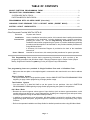
TABLE OF CONTENTS
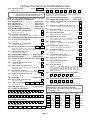
SINGLE PARTITION PROGRAMMING FORM................................................................................3
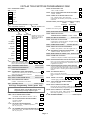
TWO-PARTITION PROGRAMMING FORM.....................................................................................7
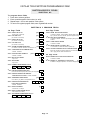
SYSTEM-WIDE DATA FIELDS..........................................................................................................8
PARTITION-SPECIFIC DATA FIELDS .............................................................................................11
PROGRAMMING WITH #93 MENU MODE (Overview))..............................................................13
CHANGING ZONE RESPONSE TYPE & REPORT CODES (EXPERT MODE) .......................14
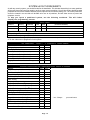
SYSTEM LAYOUT WORKSHEETS ..............................................................................................16
Other Documents Provided With The VISTA-40
Document
Installation
Instructions
User’s Manual
Purpose and Content
Use the Installation Instructions portion of this manual when installing the hard-ware
components of the installation, including hardwired zones, wireless transmitters,
powering the control, etc. Use the Programming Procedures section of the
installation manual when programming the system. It provides detailed programming
procedures and descriptions of all data fields. It also provides detailed procedures for
using #93 Menu Mode.
A Summary Of Connections Diagram is provided at the back of the Installation
Instructions.
Intended for the end user, this manual provides procedures for system operation.
This Programming Guide includes basic programming information, a brief overview of the
programming procedure with #93 Menu Mode, Changing Response type & Report Codes (Expert
Mode), Single and 2-Partition Programming Forms, plus System Layout Worksheets.
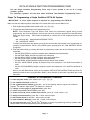
Two programming forms are provided: A Single Partition Form and a 2-Partition Form.
• Make sure that one alpha or voice/alpha keypad is connected to the control and is set to device address
"00."
Single Partition System
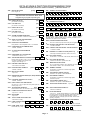
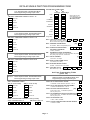
• The system default is for a single partition system. Use the SINGLE PARTITION PROGRAMMING FORM
beginning on page 4 when programming for single partition usage.
Two-Partition System
• You must enter "2" in data field 2✱ 00 to set the system for two partitions. Use the 2-PARTITION
PROGRAMMING FORM beginning on page 8 when programming the system for two partitions.
# 93 Menu Mode
• Because the control supports various types of input devices (such as button type transmitters, serial
number polling loop devices, etc.), zone characteristics, including zone response types and report codes,
must be programmed using the #93 Menu Mode procedure.
• In addition to programming zone information, #93 Menu Mode is required for enrolling serial numbers,
programming alpha descriptors, programming device characteristics and for programming relay output
functions.
• Refer to the separate Installation and Setup Guide for detailed procedures when using #93 Menu Mode.
Page 2