1
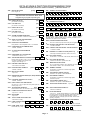
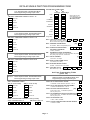
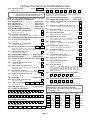
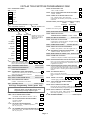
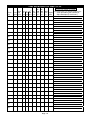
VISTA-40 SINGLE PARTITION PROGRAMMING FORM
Standard default (✱97) values are shown in brackets [ ], otherwise default = 0.
✱ 00
|
✱ 33
ASSIGN RESPONSE TYPE FOR ZONES
Skip these fields. Use #93 Menu Mode, Zone
Programming to program response types.
✱ 34
SECONDARY PHONE NUMBER
✱ 35
DOWNLOAD PHONE No.
INSTALLER CODE
[4140]
|
|
PRIMARY PHONE NUMBER
Enter 4 digits, 0-9
✱02
✱0 9
- ✱05
ENTRY DELAY #1
[02]
|
[03]
|
Enter 0-9 for each digit, or #11 (✴), #12 (#), #13 (pause)
Enter 0-9 for each digit, or #11 (✴), #12 (#), #13 (pause)
(00-15 times 15 seconds)
✱1 0
EXIT DELAY #1
Enter 0-9 for each digit, or #11 (✴), #12 (#), #13 (pause)
(00-15 times 15 seconds)
✱1 1
ENTRY DELAY #2
[06]
✱3 6
DOWNLOAD ID No.
|
|
|
|
|
(00-15 times 15 seconds)
|
|
|
|
Enter 00-09; A-F (10-15) [15 15 15 15 15 15 15 15]
✱1 2
EXIT DELAY #2
[08]
|
✱ 37
[04]
|
ZONE 9 FAST/SLOW RESPONSE
Dialer System
Not
Remote Remote Remote Upload Download
Shutdwn Shutdwn Used Bypass Disarm Arm
Program Program
See field 1✱ 53 for Callback disable option; [1=enable]; 0=disable; For UL
installations, all options must be disabled.
1=fast; 0= slow; "0" for UL.
✱3 8
(00-15 times 15 seconds)
✱1 3
ALARM SOUNDER DURATION
01-15 times 2 minutes . Minimum 4 minutes for UL.
✱1 4
✱1 5
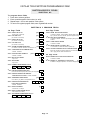
KEYSWITCH ASSIGNMENT
✱3 9
✱2 1
✱4 0
OPEN/CLOSE REPORTING FOR KEYSWITCH
✱ 41
NORMALLY CLOSED or EOLR (Zones 2-8)
RANDOMIZE AC LOSS REPORT
✱ 42
4285 PHONE MODULE ACCESS CODE
|
Enter 01-09 for 1st digit; 11( for ✴) or 12 (for #) for
2nd digit To disable voice module, enter
1st digit = 00 & 2nd digit = 11
[00]
[11]
✱ 43
[1]
✱ 44
RING DETECTION COUNT
|
01-14; 15=answering machine; 00=no detection; Do not set to 00 if
voice module is used, or 01 if VIM module is used.
[0-0-1]
1=enable; 0=disable
✱2 3
DIAL TONE DETECTION
1=wait for true dial tone; 0=pause, then dial
PREVENT FIRE TIME-OUT
KEYPAD PANIC ENABLES
DIAL TONE PAUSE
0=5 seconds; 1=11 seconds; 2=30 seconds; Must be "0" for UL.
|
1=no timeout; 0=fire timeout
✱2 2
[1]
1=N.C.loops; 0=EOLR supervision; Must be "0" for UL.
1=randomize 10-40 min.; 0=no
✱2 0
OPEN/CLOSE REPORT FOR INSTALLER
1=enable; 0=disable
AC LOSS KEYPAD SOUNDING
1=yes; 0=no
✱1 9
|
1=enable; 0=disable
CONFIRMATION OF ARMING DING
1=enable; 0=disable
✱1 7
PREVENT ZONE XX BYPASS
01-64; 00 if all zones (except Fire zones) can be bypassed
Enter partition in which keyswitch used, 1-2; 0=disable
✱1 6
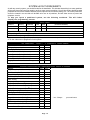
DOWNLOAD COMMAND ENABLES
0
✱ 45
95
MULTIPLE ALARMS
96 99
[1]
1=yes; 0=no
PRIMARY FORMAT
0=Low Speed; 1=Contact ID; 2=Ademco High Speed;
3=Ademco Express
✱ 46
LOW SPEED FORMAT (Primary)
0=Ademco Low Speed; 1=Sescoa/Radionics
✱2 4
IGNORE EXPANSION ZONE (RF, RPM) TAMPER
✱ 47
1=disable; 0=enable
✱2 5
LRR BURG.TRIGGER FOR TYPE 8
0=Low Speed; 1=Contact ID; 2=Ademco High Speed;
3=Ademco Express
[1]
✱ 48
1=enable; 0=disable
✱2 6
INTELLIGENT TEST REPORTING
TEST REPORT INTERVAL
[024]
|
POWER UP IN PREVIOUS STATE
[1]
QUICK ARM
CHECKSUM VERIFICATION
✱ 50
SESCOA/RADIONICS SELECT
TOUCH-TONE OR ROTARY DIAL
1=TouchTone; 0=rotary
✱3 1
✱ 52
PABX ACCESS CODE
|
|
|
Alarm Rstr Bypass Trbl Opn/Cls Low Bat
0=standard; 1=expanded; Note: Expanded overrides 4+2 format.
PRIM. SUBS. ACCT #
Enter 00-09; B-F (11-15)
STANDARD/EXPANDED REPORT FOR PRIMARY
|
00-09; B-F (11-15)
✱3 2
DUAL REPORTING
1=yes; 0=no; If used with Spilt Reporting "1" option (1✱ 34), alarms
go to both primary & secondary numbers, while all other reports go
to secondary only. If used with Split Reporting "2" option,
open/close and test messages go to both lines, while all other
reports go to primary.
[1]
1=yes; 0=no
✱ 30
1=yes; 0=no
1=Sescoa; 0=Radionics
✱ 51
1=yes; 0=no; "1" for UL.
✱2 9
✱ 49
Prim Scndry
|
Enter interval in hours, 001-199; 000=no report ; Max. 024 for UL.
✱ 28
LOW SPEED FORMAT (Sec.)
0=Ademco Low Speed; 1=Sescoa/Radionics
Set "0" for UL 1=yes, (no report sent if any other report was
recently sent); 0=no
✱2 7
SECONDARY FORMAT
|
[15 15 15 15]
|
|
|
✱ 53
STANDARD/EXPANDED REPORT FOR SECONDARY
Alarm Rstr Bypass Trbl Opn/Cls Low Bat
0=Standard; 1=Expanded; Note: Expanded Overrides 4+2 Format.
Page 4