1
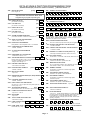
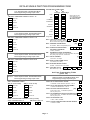
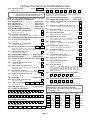
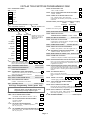
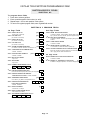
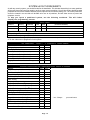
VISTA-40 SINGLE PARTITION PROGRAMMING FORM
Use the Single Partition Programming Form only if your system is set up as a single
partition system.
For 2-partition systems, use the form titled "VISTA-40 Two-Partition Programming Form."
Steps To Programming a Single Partition VISTA-40 System
IMPORTANT: A 2-Line Alpha keypad is required for programming the VISTA-40.
Make sure that one alpha keypad is connected to the control and is set to device address "00."
1. Enter Programming Mode (enter installer code + [8] + [0] + [0]).
2. Program the data fields shown on the programming form.
NOTE: Zone Response Type and Report Code fields will automatically appear during normal
programming, but must be skipped if the zone has not been previously programmed using #93 Menu
Mode (see step 3 below). These fields are bordered by a dotted line on the programming forms and
include:
✱02 - ✱05 and 1✱01 - 1✱09 ASSIGN RESPONSE TYPES
✱54 - ✱78 REPORT CODES
To skip these fields when they appear, press [✱] plus the next data field number to be programmed. For
example, to skip fields ✱02 - ✱05 in a one partition system, press [✱] plus "09." Field ✱09 ENTRY DELAY
#1 appears.
3. Enter #93 Menu Mode by pressing #93 while in programming mode, then do the following in the order
presented:
• Use the DEVICE PROG. prompts to program device addresses and characteristics.
• Use the ZONE PROG. prompts to program zone information.
• Use the RELAY PROG. prompts to program relay output information.
• Use the ALPHA PROG. prompts to program alpha descriptors.
• Use the SERIAL # PROG prompts to program sensor device serial numbers.
• Use RLY VOICE DESCR. prompts to program relay voice descriptors, if the 4285 Phone Module is
used.
• Use the CUSTOM INDEX prompts to program custom word substitutes, if the 4285 Phone Module is
used.
Refer to the #93 Menu Mode section of the separate INSTALLATION INSTRUCTIONS document for
detailed procedures when using #93 Menu Mode. A brief overview of this mode is provided later in this
document.
SUMMARY OF PROGRAMMING COMMANDS
• To enter program mode, enter installer code + [8] + [0] + [0]
• To set standard defaults, press ✱ 9 7
• To set communication defaults, press ✱ 94 + one of the following: ✱ 80=low speed; ✱ 81=Ademco
Express; ✱82=Ademco High Speed; ✱83=Ademco's Contact ID
• To change to next page of program fields, press ✱ 9 4
• To return to previous set of fields, press ✱ 9 9
• To erase account & phone number field entries, press [✱ ] + field number + [✱ ]
• To assign zone descriptors, press #93 + follow menu prompts
• To add custom words, press #93 + follow menu prompts
• To enter Installer's Message, press #93 + follow menu prompts
• To exit program mode, press ✱99 OR ✱98: ✱99 allows re-access to programming mode by installer code.
✱98 prevents re-access to programming mode by installer code.
Page 3