1
Calibrating
9.3
Calibrating
All robots in the system must be calibrated before any can be moved under program or
pendant control. The CALIBRATE program instruction and monitor command can be
used to calibrate any robots not currently calibrated. If a robot is currently calibrated, the
NOT.CAL parameter can be set to force it to recalibrate.
The following monitor command will force all robots to calibrate, in numerical order:
.CALIBRATE
If any of the robots fails to calibrate (for example, its travel is obstructed) calibration will
stop. After you have fixed the problem, use the CALIBRATE command again to calibrate
the remaining robots. Any robots that had already successfully calibrated will not be
re-calibrated.
Occasionally, you may wish to force a robot to go through the calibrate sequence a second
time, for example during setup. The NOT.CAL parameter is a bit field that indicates if any
robots are not currently calibrated, with bit 1 representing robot 1, bit 2 representing
robot 2, bit 3 representing robot 3, and so forth. For example, the following command lines
will force all robots to recalibrate even if they are currently calibrated:
.PARAMETER NOT.CAL = -1
.CALIBRATE
;Mark all robots “Not calibrated”
;Force robots to re-calibrate
The value -1 for the NOT.CAL value above is the binary value 1...111, which indicates that
all robots are not calibrated. Similarly, the value 6 (= binary 110) indicates that robot 1 is
calibrated, but robots 2 and 3 are not. The CALIBRATE command or instruction will
calibrate only uncalibrated robots.
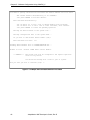
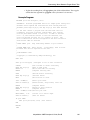
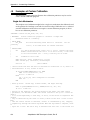
Robots can also be calibrated from a program. The following program can be executed in
any program task to calibrate all robots and move them to their READY position. (The
program could be made to check that each robot successfully calibrated before attempting
to move that robot.)
.PROGRAM calibrate
; ABSTRACT:Demonstration routine for calibrating all robots
;
and moving them to their READY position.
;* Copyright (c) 1990, 1994 by Adept Technology, Inc.
AUTO r
DETACH ()
DISABLE DRY.RUN
CALIBRATE
;Detach current robot to allow SELECTING
; another robot
;CALIBRATE will have no effect if DRY.RUN
; switch is enabled.
;Calibrate all uncalibrated robots
; This will fail if any robots are
; attached in another task.
FOR r = 1 TO SELECT(ROBOT,–1) ;For all robots in the system...
SELECT ROBOT = r ;Select robot (no robot is yet ATTACHed)
ATTACH ()
;Gain robot control
READY
;Move to READY position
DETACH ()
;Release robot control
END
RETURN
.END
AdeptMotion VME Developer’s Guide, Rev B
153