1
Chapter 6
Customizing the Controller Hardware
This chapter includes directions on making the following changes to your system:
•
Enable autoload of a program at system startup.
•
Selecting an A-Series or S-Series monitor.
•
Setting the default path specification that is set each time the controller is
turned on.
•
Setting the start-up robot monitor SPEED.
•
Setting the serial I/O configuration.
•
Setting the analog I/O configuration.
•
Setting of certain system switches.
The majority of custom operations are made with the controller configuration
utility CONFIG_C.V2. A few operations require setting switches on the controller.
Most controller configuration changes will not take effect until the controller has
been restarted.
The changes made with the controller configuration utility are written to the
operating system disk. Therefore, if you make changes to the controller
configuration and then start the system with a different system disk, a different
controller configuration may be in place. The user-definable characteristics of the
operating system can be stored in a separate file. In the event a drive failure
results in the loss of your operating system, these files can be used to configure a
new operating system copy to the exact configuration of the lost operating
system. You can also make an exact copy of the operating system and its current
configuration on a floppy disk for backup (see the Instructions for Adept Utility
Programs).
Customizing the Controller Hardware
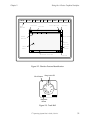
When the controller is turned on, the system looks at the setting of the
configuration DIP switch on the SIO module. This switch determines several
options the system uses during the boot procedure. See the Adept MV Controller
User's Guide for the location of the configuration DIP switch on the SIO module.
The options are:
94
•
Whether to autoload a program at startup.
•
Where V+ output should be displayed.
V+Operating System User’s Guide, Ver 12.1