1
Flash Memory Programmer FL-PR5 User’s Manual (Provisional)
SBA1-070002-00
35/138
CHAPTER 4 PROGRAMMING GUI USAGE
This chapter explains functional details on windows and dialog boxes of the programming GUI.
4.1
Introduction
Make sure that the programming GUI, USB driver, and the FP5 parameter file (PR5 file) for the target device are
installed.
4.2
For the installation method, refer to CHAPTER 3 SOFTWARE INSTALLATION.
Startup of Programming GUI
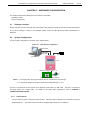
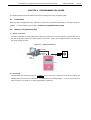
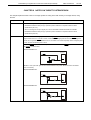
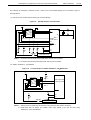
(1) System connection
Connect a USB cable (or serial cable) to the USB port (or serial port) on the host machine, and the other side of
the cable to the USB connector (or serial connector) on the FP5.
Plug in the AC adapter and then connect to the
FP5 power supply connector.
Figure 4-1.
System Connection
Serial cable
or
USB cable
AC adapter
Host
machine
Outlet
FP5
(2) FP5 startup
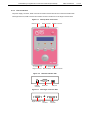
After the cables are connected, press the
POWER LED is turned on and “Commands
POWER
button on the FP5. When the FP5 is correctly started, the
>” is displayed in the message display.
defect in the FP5, so consult an our sales representative or distributor.
If not, the cause may be a