1
FRONTIER,
PATHFINDER
& XTERRA
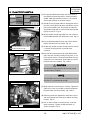
13. OPERATION CHECK:
(1) Connect the battery negative terminal.
(2) Turn vehicle ignition switch to the "ACC" position.
(3) Reference the vehicle specific Satellite Radio Installation Instructions for further information. If Satellite
radio was part of installation turn radio on then select satellite radio mode. Acquiring (Sirius) or Loading
(XM) will display for a while. If not, move vehicle to outside and try again.
(4) If Satellite radio was part of installation tune to preview channel (XM: channel "1" / Sirius: channel "184")
to make sure receiving preview channel correctly. For Sirius tuner installations the preview channel may
not be accessible. For further information reference the Operation Check section of the vehicle specific
Satellite Radio Installation Instructions.
(5) Confirm proper audio operation. (AM / FM / SAT / TAPE / CD)
(6) Confirm accelerator pedal function per service manual.
(7) If no iPod is present the head unit display should show "NO IPOD". If an iPod is connected to the
system a check mark should be displayed on the iPod screen and audio should start playing in 5-20
seconds.
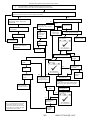
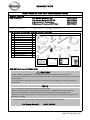
(8) A full diagnostic tree is available on the next page for troubleshooting the system.
14. REINSTALLATION OF REMOVED PARTS:
(1) Re-install all removed vehicle parts referring to the service manual for the vehicle.
CAUTION
Use caution when re-installing interior components to avoid damage, scratches, or breaking of mounting
clips. Refer to the vehicle specific service manual for more information.
(2) Clean interior of vehicle.
15. FINAL INSPECTION:
(1) Inspect the vehicle interior and exterior for damage.
(2) Confirm proper operation of vehicle systems.
(3) Reset radio presets to the recorded settings.
(4) If equipped, verify proper sunroof operation and perform the reset procedure if necessary. Refer to
Service Manual requirements.
(5) Place the Owners Manual and Quick Reference Card in the customers glove box.
8/9
999U7-XT100II [3] 1.4.07