1
Table of Contents
INTRODUCTION...................................................................................................................1
ACCESSING YOUR COMPUTER.........................................................................................1
ELECTRONIC EQUIPMENT HANDLING PRECAUTIONS ................................................1
HARDWARE CONFIGURABLE OPTIONS ..........................................................................2
Printed Circuit Board Configurations ...................................................................................2
Replacing the Time and Date Battery ...................................................................................5
SSD Chip Removal..............................................................................................................6
UPGRADING AM-8000 ON-BOARD MEMORY..................................................................7
Removing Memory DIMMs .................................................................................................7
Installing Memory DIMMs ..................................................................................................7
PERIPHERALS ......................................................................................................................8
Installing Additional 3-1/2” Peripherals ................................................................................8
Installing Additional 5-1/4” Peripherals ................................................................................8
Additional Documentation for Peripherals ............................................................................8
DISK DRIVE REPLACEMENT AND WARMBOOT RESTORE ..........................................9
System Administrator Tools .................................................................................................9
Formatting DVD-RAM Media ........................................................................................... 10
Adding another hard disk ................................................................................................... 11
Restoring the AM-8000 to a fresh or wiped hard disk (warm boot)...................................... 13
Restoring just one .AMD file from a "Ghosted" backup ...................................................... 15
ON-LINE DOCUMENTATION............................................................................................ 15
APPENDIX A - AM8000 OPTIMAL BIOS SETTINGS ....................................................... 17
Table of Figures
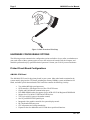
Figure 1: Static Protection Wrist Strap ....................................................................................2
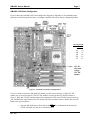
Figure 2: AM-8000 CPU Board Configuration ........................................................................3
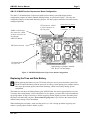
Figure 3: AM-8000 Multifunction Coprocessor Board Configuration ......................................5
Figure 4: SSD Chip Removal Tool..........................................................................................6
Rev. A01