1
Chapter 2. Programming
3.
4.
5.
6.
7.
8.
9.
10.
11.
12.
2.1.3.
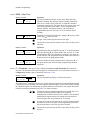
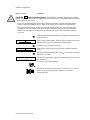
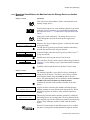
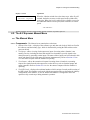
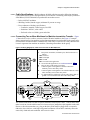
Use the Manual button (`) to enter manual mode when the machine is idle.
The Operator Signal light does not operate when the controller is in manual mode.
The Signal Cancel button (x) has no function in manual mode.
The Next button (y) has no function in manual mode.
In the Manual menu, the display presents user prompts and selected information. The software
date code and machine configuration are displayed; inputs and outputs and their respective
statuses are shown in those modes. Other menu selections display DIP switch settings, as well
as temperature and level testing information.
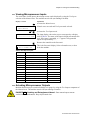
The Scroll Up button (v) displays the next higher numbered mode in the manual menu. For
example, pressing this button once will scroll from the Software Date Code mode to the Test
Inputs mode.
At the manual menu, the Scroll Down button (w) displays the available menu items in reverse
numeric order.
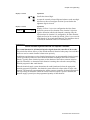
The Door unlock button (') unlocks the door latch. The function of this button is the same
whether the machine is in normal operating mode or manual mode.
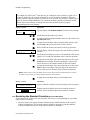
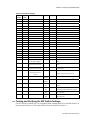
The Run/Program keyswitch has no effect on how the manual mode operates. However, the
status of the switch (either + or –) is displayed in field F in the Test Inputs menu.
The Run Indicator light is not activated during manual operation.
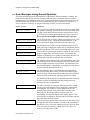
Control Functions During Programming
The programming mode is used to modify the actions performed in a wash formula or to create new
wash formulas.
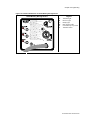
1. The Start button (\) is used in combination with the Next button (y) or the Terminate button
(z) to delete or insert a step in a wash formula, respectively.
2. The Terminate button (z) returns the user to the main programming menu (top line of display
reads Program X Menu) from the Add/Change Formula and the Standard Formulas menus.
The Terminate button has no effect after the Configure menu has been accessed, or after any
parameter of any formula has been accessed in the Add/Change Formula menu.
3. The Manual button is not used in the programming mode.
4. The Operator Signal light is not used in the programming mode.
5. The Signal Cancel button is not used in programming.
6. Use the Next button (y) to confirm any choice and move to the next decision in the sequence.
7. The display presents the programming menus and choices within those menus, including all
configuration and formula parameters.
8. The Scroll Up button (v) scrolls the available choices upward from the lowest available
number.
9. Use the Scroll Down button (w) to change the selected programming parameter to the next
lower-numbered choice.
10. The Door unlock button (') has no function in programming mode.
11. The Run/Program keyswitch allows programming when set to P. The Program menu
includes selections for adding and changing wash formulas, configuring the controller, and
restoring the standard formulas provided with the machine. The keyswitch must be set to the
Run position (R) for normal machine operation, as described in Section 2.1.1 “Control
Functions During Normal Operation”.
PELLERIN MILNOR CORPORATION