1
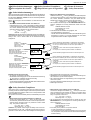
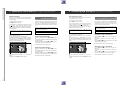
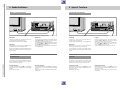
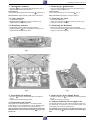
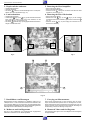
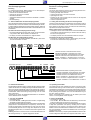
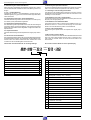
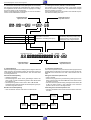
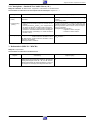
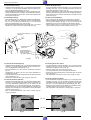
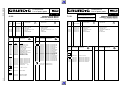
2. Connecting and Setting Up Tuning the Recorder to TV Stations, Variant 2
Variante 2
Variant 2
8
8
1
CAS
2
4
3
5
7
6
8
SELE
CT
J
9
0
CLEA
REC
ORD
ii
K
e
PREV
IOUS
R
S
1
TIME
R
ATS
SP/L
RP
0
CLEA
R
K
e
PREV
IOUS
TIME
R
&
%
II
uu
STO
RE
ATS
T
S
6
9
CT
REC
ORD
II
NEX
TRAC
KING
CAS
3
5
8
SELE
J
ii
uu
STO
RE
2
4
7
&
%
NEX
T
TRAC
KING
SP/L
P
P
RP
10
10
8
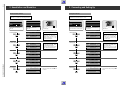
Drücken Sie diese Tasten der
Fernbedienung
8
In der Anzeige am Recorder
sehen Sie
Erläuterungen
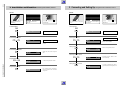
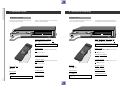
1. Funktion anwählen
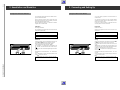
Press these buttons on the remote
control
You will see this on the display of
the recorder
Explanations
1. Selecting function
8
“
“
,
8
“
“
,
MA:N8
STORE ,
0
Taste
“ länger als 5 Sekunden
STORE
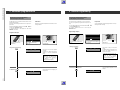
2. Fernseh-Programm suchen
% oder “
&,
“
MA:N8
STORE ,
0
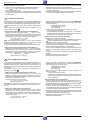
Press the
“ button for more than
STORE
2. Searching for a TV station
MA:N8
% “
&
“
0
or
,
Das rollierende Symbol »0 « zeigt die
Suche an.
MA:N8
0
The scrolling symbol » 0 « indicates that
the recorder is searching.
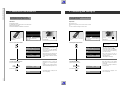
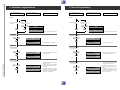
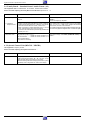
3. Storing a TV station
“
STORE ,
3. Fernseh-Programm speichern
“
ME:MO
STORE ,
8P:0 I
ME:MO
8P:0 I
ME:MO
8P:20
Select a free programme position.
Wählen Sie einen freien Programmplatz.
4. Selecting a programme position
% “
&
“
or
,
4. Programmplatz wählen
% “
&
“
oder
,
ME:MO
8P:20
Programme position » P 20 « is selected in the example.
Im Beispiel Programmplatz »P 20 «.
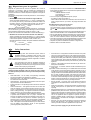
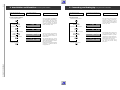
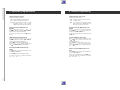
5. Storing the programme position
GRUNDIG Service-Technik
“
STORE ,
5. Programmplatz speichern
“
STORE ,
I9: 30
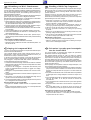
Zum Suchen weiterer Fernseh-Programme wiederholen Sie die Einstellung ab Pkt. 1.
I9: 30
To search for additional TV stations,
repeat the procedure starting with point
1.
Allgemeiner Teil / General
1 - 20
2. Anschließen und Einstellen Fernseh-Programme einstellen, Variante 2