1
9
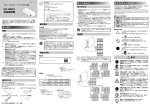
Orient the analog RGB cable properly,
and connect it to the connector (J5) on
the display accelerator board.
Be sure to verify that the cable is
connected securely.
Step 2:
Connecting the
Monitor
Connect the monitor to monitor connector 2
or the HDMI monitor connector.
10 Attach the supplied connector cover to
HDMI monitor connector
monitor connector 1.
or
Monitor connector 2
11 Reinstall the chassis cover by
performing the procedure of step 1 in
reverse order.
Caution
• When monitors are connected via a
monitor switch, images may not always
display. We recommend connecting
monitors directly to the unit.
• Monitor connector 2 and the HDMI
monitor connector cannot be used at the
same time.
Step 2: Connecting the Monitor
9