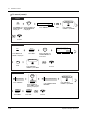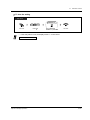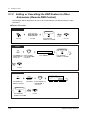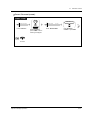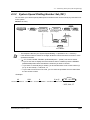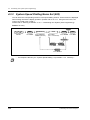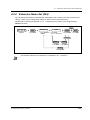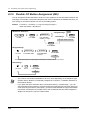
1
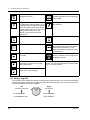
DIGITA
L SUPER
HYBR
ID
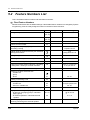
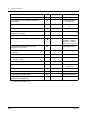
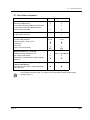
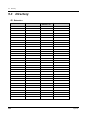
SYSTE
M
RUN
OFF
LINE
ALARM
Digital Super Hybrid System
User Manual
Model No.
KX-TD500CE
Please read this manual before connecting the Digital Super Hybrid System.
Thank you for purchasing the Panasonic Digital Super Hybrid System.
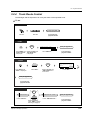
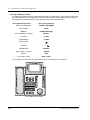
Telephones
More Extensions
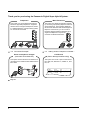
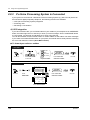
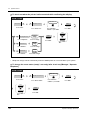
This system can connect digital and analogue
Panasonic proprietary telephones. Single line
devices such as a single line telephone, facsimile, cordless telephone, voice processing system,
etc. can also be connected.
This system can double the extension capacity
by connecting a proprietary telephone and a single line telephone. The proprietary telephone
can share the extension with another single line
telephone. Furthermore, you can connect a
Panasonic digital proprietary telephone and a
single line telephone to one port and
use them as individual extensions.
DIGITAL
SUPER
HYBRID
SYSTEM
RUN
OFF
LINE
ALARM
DIGITAL
SUPER
HYBRID
SYSTEM
RUN
OFF
LINE
ALARM
"1.2
Connection Example."
"1.3
Adding Another Telephone in Parallel."
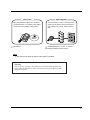
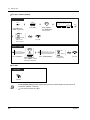
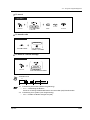
Saves on telephone charges
(Automatic Route Selection)
Call Record
(Station Message Detail Recording)
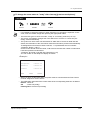
This system chooses the most cost-effective carrier based on the outside number dialled and the
time called.
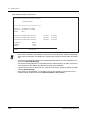
This system can record or print out call information: date, time, extension no., dialled no., duration, etc.
A
DIGITAL
SUPER
HYBRID
SYSTEM
RUN
OFF
LINE
ALARM
B
C
Page 24.
2
Date
Time
06/24/97 10:03AM
06/24/97 11:07AM
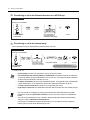
Ext
123
223
• • • • • • •
• • • • • • •
• • • • • • •
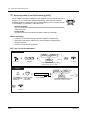
Saves Time
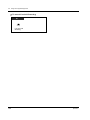
VPS Integration
Many useful features support your operations
and eliminate tasks. For example, easy dialling
with memory and re-dialling to busy parties.
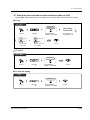
You can forward your call to a voice processing
system and let callers leave their messages in
your mailbox when you are unable to receive
calls.
Message
DIGITAL
SUPER
HYBRID
SYSTEM
RUN
OFF
LINE
Message
ALARM
Message
(One-Touch
Dialling)
"Operation."
Message
Message
Message
"VPS Integration" in "2.8.3 If a Voice
Processing System is Connected."
Note
In this manual, the suffix of each model number is omitted.
Warning
This is a Class A product. In a domestic environment this product may
cause radio interference in which case the user may be required to take
adequate measures.
3
Important Information
WARNING
THIS UNIT MAY ONLY BE INSTALLED AND SERVICED BY QUALIFIED SERVICE PERSONNEL.
WHEN A FAILURE OCCURS WHICH RESULTS IN THE INTERNAL PARTS BECOMING
ACCESSIBLE, DISCONNECT THE POWER SUPPLY CORD IMMEDIATELY AND RETURN THIS
UNIT TO YOUR DEALER.
DISCONNECT THE TELECOM CONNECTION BEFORE DISCONNECTING THE POWER
CONNECTION PRIOR TO RELOCATING THE EQUIPMENT, AND RECONNECT THE POWER
FIRST.
THIS UNIT IS EQUIPPED WITH AN EARTHING CONTACT PLUG. FOR SAFETY REASONS THIS
PLUG MUST ONLY BE CONNECTED TO AN EARTHING CONTACT SOCKET WHICH HAS BEEN
INSTALLED ACCORDING TO REGULATIONS.
THE POWER SUPPLY CORD IS USED AS THE MAIN DISCONNECT DEVICE. ENSURE THAT
THE SOCKET-OUTLET IS LOCATED / INSTALLED NEAR THE EQUIPMENT AND IS EASILY
ACCESSIBLE.
TO PREVENT FIRE OR SHOCK HAZARD, DO NOT EXPOSE THIS PRODUCT TO RAIN OR
MOISTURE.
Safety Instructions
When using your telephone equipment, basic safety precautions should always be followed to reduce
the risk of fire, electric shock and injury to persons, including the following:
1. Do not use this product near water, for example, near a both tub, wash bowl, kitchen sink or
laundry tub, in a wet basement or near a swimming pool.
2. Avoid using a telephone (other than a cordless type) during an electric storm. There may be a
remote risk of electric shock from lightning.
3. Do not use the telephone to report a gas leak in the vicinity of the leak.
4. Use only the power cord and batteries indicated in this manual. Do not dispose of batteries in a
fire. They may explode. Check with local codes for possible special disposal instructions.
SAVE THESE INSTRUCTIONS
[Icon Descriptions]
The following icons are used frequently in this manual.
Hints
4
Conditions
Programming References
Important Information
Attention
•
•
•
•
•
Keep the unit away from heating appliances and electrical noise generating devices such as
fluorescent lamps, motors and televisions. These noise sources can interfere with the
performance of the unit.
This unit should be kept free of dust, moisture, high temperature (more than 40°C) and vibration,
and should not be exposed to direct sunlight.
Never attempt to insert wires, pins, etc., into the vents or holes of this unit.
If there is any trouble, disconnect the unit from the telephone line. Plug the telephone directly into
the telephone line. If the telephone operates properly, do not reconnect the unit to the line until the
problem has been repaired by an authorised Panasonic Factory Service Centre. If the telephone
does not operate properly, chances are that the problem is in the telephone system, and not in the
unit.
Do not use benzine, thinner, or any abrasive powder to clean the cabinet. Wipe it with a soft cloth.
The serial number of this product may be found on the label affixed to the bottom of the unit.
You should note the model number and the serial number of this unit in the space provided
and retain this manual as a permanent record of your purchase, to aid in identification in the
event of theft.
MODEL NO.:
SERIAL NO.:
For future reference
DATE OF PURCHASE
NAME OF DEALER
DEALER’S ADDRESS
Attention
5
Table of Contents
1 OVERVIEW
1.1
Capacity ................................................................................................................... 10
1.2
Connection Example............................................................................................... 11
1.3
Adding Another Telephone in Parallel .................................................................. 13
2 Operation
2.1
Before Operating the Telephones......................................................................... 16
2.2
Making Calls ............................................................................................................ 22
2.2.1
2.2.2
2.2.3
2.2.4
2.2.5
2.2.6
2.2.7
2.3
Basic Calling ....................................................................................................................... 22
Easy Dialling ....................................................................................................................... 25
Redial .................................................................................................................................. 33
When the Dialled Line is Busy or There is No Answer ........................................................ 35
Calling without Restrictions ................................................................................................. 42
Alternating the Calling Method (Alternate Calling — Ring / Voice) ..................................... 46
To Access Another Party Directly from Outside (Direct Inward System Access [DISA]) ..... 47
Receiving Calls........................................................................................................ 49
2.3.1 Answering Calls................................................................................................................... 49
2.3.2 Answering Hands-free (Hands-free Answerback) ............................................................... 51
2.3.3 Answering a Call Ringing at Another Telephone (Call Pickup) ............................................ 52
2.3.4 Answering a Call via an External Speaker (Trunk Answer From Any Station [TAFAS]) ....... 54
2.3.5 Using the ANSWER / RELEASE Button .............................................................................. 55
2.4
During a Conversation ............................................................................................ 57
2.4.1
2.4.2
2.4.3
2.4.4
2.4.5
2.4.6
2.4.7
Holding a Call ....................................................................................................................... 57
Talking to Two Parties Alternately (Call Splitting) ................................................................. 63
Transferring a Call ................................................................................................................ 64
Answering a Call Waiting...................................................................................................... 67
Three-party Conversation .................................................................................................... 69
Mute ..................................................................................................................................... 72
Letting Other People Listen to the Conversation (Off-Hook Monitor) [KX-T7531, KX-T7533
and KX-T7536 only]............................................................................................................ 73
2.4.8 End-to-End DTMF Signalling (Tone Through) ...................................................................... 74
2.5
Before Leaving Your Desk ...................................................................................... 76
2.5.1 Forwarding Your Calls (Call Forwarding) .............................................................................. 76
2.5.2 Forwarding Your Calls by ISDN (Call Forwarding by ISDN Provider) ................................... 80
2.5.3 Showing an Absent Message on the Caller's Telephone Display (Absent Message
Capability) ........................................................................................................82
2.5.4 Preventing Other People from Using Your Telephone (Electronic Station Lockout).............. 85
2.5.5 Leaving an Extension Group (Log-In / Log-Out) .................................................................. 87
2.6
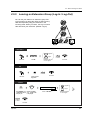
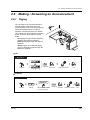
Making / Answering an Announcement ................................................................ 89
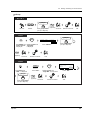
2.6.1 Paging .................................................................................................................................. 89
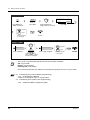
2.6.2 Paging a Person and Transferring a Call .............................................................................. 93
2.6.3 Answering a Paged Announcement ..................................................................................... 95
6
Table of Contents
2.7
Setting the Telephone According to Your Needs..................................................97
2.7.1
2.7.2
2.7.3
2.7.4
2.7.5
2.7.6
2.7.7
2.7.8
2.7.9
2.7.10
2.7.11
2.7.12
2.7.13
2.7.14
2.7.15
2.8
Using User-supplied Equipment ..........................................................................123
2.8.1
2.8.2
2.8.3
2.9
Setting the Alarm (Timed Reminder (Wake-up Call))........................................................... 97
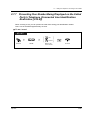
Refusing Incoming Calls (Do Not Disturb [DND])............................................................... 101
Receiving a Call Waiting (Call Waiting / Off-Hook Call Announcement [OHCA] / Whisper
OHCA) .............................................................................................................................. 103
Denying the Paged Announcement (Paging – Deny)......................................................... 105
Displaying Your Number on the Called Party and Calling Party's Telephone (Calling /
Connected Line Identification Presentation [CLIP / COLP]) ............................................. 107
Preventing Your Number Being Displayed on the Called Party's Telephone (Calling Line
Identification Restriction [CLIR])....................................................................................... 108
Preventing Your Number Being Displayed on the Called Party's Telephone (Connected Line
Identification Restriction [COLR]) ..................................................................................... 109
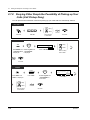
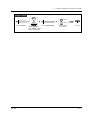
Denying Other People the Possibility of Picking up Your Calls (Call Pickup Deny) ............ 110
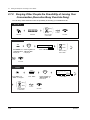
Denying Other People the Possibility of Joining Your Conversation (Executive Busy Override
Deny) ................................................................................................................................ 112
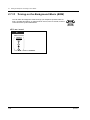
Turning on the Background Music (BGM) ........................................................................ 114
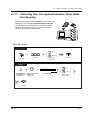
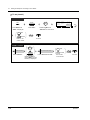
Protecting Your Line against Indication Tones (Data Line Security)................................. 115
Checking the Day / Night Service Status ......................................................................... 117
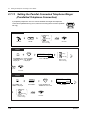
Setting the Parallel Connected Telephone Ringer (Parallelled Telephone Connection) ... 118
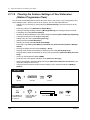
Clearing the Feature Settings at Your Extension (Station Programme Clear).................. 120
Identifying Malicious Callers (Malicious Call Identification [MCID]).................................. 122
If a Doorphone / Door Opener is Connected ..................................................................... 123
If a Host PBX is Connected................................................................................................ 127
If a Voice Processing System is Connected....................................................................... 128
After Moving to a New Location in the Office .....................................................136
2.9.1
Using the Same Extension Number and the Setting of Your Previous Extension (Walking
Station) ............................................................................................................................. 136
2.10
Using the Display Proprietary Telephone..........................................................137
2.10.1
Calling Using the Call Log (Incoming Call Log) [KX-T7533, KX-T7536, KX-T7230, KX-T7235
only].................................................................................................................................. 137
2.10.2 Recording a Call Log [KX-T7533, KX-T7536, KX-T7230, KX-T7235 only] ...................... 140
2.10.3 Denying Other People the Possibility of Seeing Your Call Log (Incoming Call Log Lock) [KXT7533, KX-T7536, KX-T7230, KX-T7235 only] ................................................................ 141
2.10.4 Using the KX-T7531, KX-T7533, KX-T7536 or KX-T7235 ............................................... 143
2.11
Other Features .....................................................................................................160
2.11.1
2.11.2
2.11.3
2.11.4
Controlling the External Modem (External Modem Control) ............................................ 160
Accessing the ISDN Network Service (ISDN Network Service Access) .......................... 162
Monitoring the Number of UCD Calls Waiting to be Answered (UCD Monitor Mode) ...... 164
Switching the Day / Night Service .................................................................................... 168
3 Operator / Manager Operation
3.1
3.1.1
3.1.2
3.1.3
3.1.4
3.1.5
3.2
Extension Control..................................................................................................172
Setting the Alarm for Other Extensions (Remote Timed Reminder (Wake-up Call)) ......... 172
Setting or Cancelling the DND Feature to Other Extensions (Remote DND Control) ........ 176
Calling the Extension that has set Call Forwarding (Remote FWD Cancel-Once)............. 178
Changing the Settings (Station Programming)................................................................... 180
Changing Service Level of Extensions (Switching COS) ................................................... 181
System Control ......................................................................................................183
Table of Contents
7
3.2.1
3.2.2
3.2.3
3.2.4
3.2.5
3.2.6
Turning on the External Background Music (Background Music [BGM] - External) ........... 183
Recording Outgoing Messages .......................................................................................... 184
Trunk Busy-out Setting ....................................................................................................... 187
Trunk Route Control ........................................................................................................... 191
Displaying a System Error Indication (Local Alarm Indication) [Manager only].................. 192
Hotel Use Features (Hotel Application) [KX-T7536, KX-T7235 only] ................................. 195
4 Customising Your Phone & System
4.1
Customising Your Phone (Station Programming).............................................. 204
4.1.1 Initial Settings ..................................................................................................................... 205
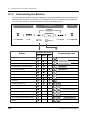
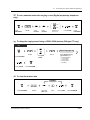
4.1.2 Customising the Buttons .................................................................................................... 208
4.2
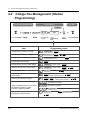
Charge Fee Management (Station Programming).............................................. 212
4.3
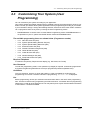
Customising Your System (User Programming) ................................................ 213
4.3.1
4.3.2
4.3.3
4.3.4
4.3.5
4.3.6
4.3.7
4.3.8
4.3.9
Date and Time Set (000) .................................................................................................... 222
System Speed Dialling Number Set (001) ......................................................................... 223
System Speed Dialling Name Set (002)............................................................................. 224
Extension Name Set (004) ................................................................................................. 225
Flexible CO Button Assignment (005) ................................................................................ 226
Caller ID Dial Set (006) ...................................................................................................... 229
Caller ID Name Set (007) ................................................................................................... 230
Absent Messages Set (008) ............................................................................................... 231
Quick Dial Number Set (009) ............................................................................................. 232
5 Appendix
5.1
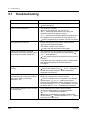
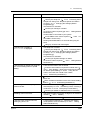
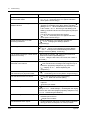
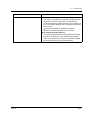
Troubleshooting .................................................................................................... 234
5.2
Feature Numbers List ........................................................................................... 238
5.3
Directory ................................................................................................................ 242
5.4
What is This Tone?................................................................................................ 256
5.5
Specifications........................................................................................................ 269
6 Index
Index ............................................................................................................................... 270
Quick Reference Card for a Single Line Telephone
8
Table of Contents
Section 1
OVERVIEW
This section briefly outlines your system.
OVERVIEW
9
1.1 Capacity
1.1 Capacity
The KX-TD500 system can consist of one, two, or three shelves (Basic and Expansion1,2). Each
shelf contains its own power supply. [Building Block System]
DIG
ITA
L SU
PER
HY
BR
ID
SYS
TEM
RU
N
OF
F LIN
E
ALA
DIG
ITA
L SU
RM
PER
HY
BR
ID
SYS
TEM
RU
PO
FU
WER
ON
OF
N
OF
F LIN
E
ALA
SE
RM
1
F
Basic System
3-Shelf System
Basic System
Basic System consists of one Shelf called Basic Shelf.
You can connect up to 192 lines (including Extensions and CO lines) to the Basic System.
3-Shelf System
The KX-TD500 system's capacity can be expanded by installing up to two Expansion Shelves on the
Basic Shelf. Fully expanded system (Basic Shelf + Expansion Shelf 1 + Expansion Shelf 2) is called
"3-Shelf System."
You can connect up to 512 lines (including Extensions and CO lines) to the 3-Shelf System.
10
OVERVIEW
1.2 Connection Example
1.2 Connection Example
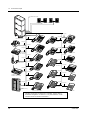
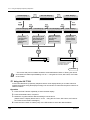
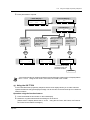
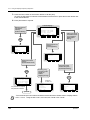
This diagram shows you a connection example including optional equipment.
Paging Speaker 1
Amplifier
DIG
ITA
L SUP
ER
HYB
RID
SYS
TEM
RUN
OFF
LIN
E
ALA
RM
Paging Speaker 2
Amplifier
Radio
Printer
Radio
To AC Outlet
Battery Adaptor KX-A-46
Personal Computer (PC)
OVERVIEW
Automobile type batteries, connected in
series
• Consisting of two 12VDC (24VDC)
11
1.2 Connection Example
Central Office Lines
DIGIT
AL
SUPE
R HYBR
ID
SYST
EM
RUN
OFF
LINE
ALAR
M
Panasonic
Doorphone 1
Panasonic
Panasonic
Panasonic
Doorphone 2 Doorphone 3
Doorphone 4
(two pair)
DIGI
TAL
(two pair)
Panaso
nic
(two pair)
KX-TD500 System
(one pair)
KX-T7220
KX-T70XX
KX-T7235
(two pair)
(two pair)
Single Line Telephone
DIGITAL
Panasonic
Panasonic
(one pair)
KX-T7130
Data Terminal
(two pair)
KX-T7230
KX-T7250
(two pair)
(two pair)
DIGI
TAL
Pana
sonic
(one pair)
(two pair)
XXXX
XXXXXXXX
TALK
ON
OFF
AB
C
2
JK
L
5
TU
V
8
3
DE
F
MN
O
1
GH
I
4
S
7
DP
ER
6
Pan
aso
WX
PR
Y
nic
9
0
REDIAL/
PAUSE
XXXX
PROGRAM
AUTO
XXXXXXX
SOUND
MUTE
XXXXXXXX
XXXX
XXXXXXXXXXXXXXXXXX
TONE
1
2
3
4
5
6
8
7
HOLD
N
O
LOW
9
FULL
CH
CHARG
ER
XXX
10
MUTE
SCA
nic
(two pair)
VOLUME
MIC
CHARGE
Cordless Phone
XXXXXXXX
AUT
XXX
XXXXXXXX
aso
10CH
XXX
Pan
PAGE/INTE
RCOM
KX-T7320
KX-T7040
(two pair)
KX-T7533
(one pair)
KX-T7330
(two pair)
(two pair)
(two pair)
KX-T7240
Telephone Answering
Machine with Facsimile
KX-T7536
TVP200
VOICE
PROCE
SSING
SYSTE
M
(two pair)
KX-T7350
(one pair)
KX-T755
KX-T7540
(two pair)
0
(two pair)
INT'
PROG
.
R
6
12
5
1
ABC
11
2
GHI
4
DEF
10
3
MNO
9
6
TUV
8
0
4
3
JKL
5
PQRS
7
WXYZ
9
2
8
1
7
KX-T7550
Panasonic
Voice Processing
System
KX-T7531/KX-T7545
KX-T7541
Parallel connections of extension is available. Please refer to
"Paralleled Telephone" in Section "1.3 System Features" of the
Features Guide for further information.
12
OVERVIEW
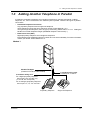
1.3 Adding Another Telephone in Parallel
1.3 Adding Another Telephone in Parallel
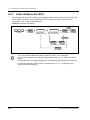
A Panasonic proprietary telephone and a single line telephone, including a facsimile, cordless
telephone, etc., can be connected to one extension jack in parallel. There are two types of parallel
connections.
• Parallelled Telephone Connection
Any proprietary telephone and a single line telephone
These telephones share the same extension number. Follow Method 1 or 2.
To ring the single line telephone, set to ring (on) if necessary. (Please refer to "2.7.13 Setting the
Parallel Connected Telephone Ringer (Parallelled Telephone Connection).")
• Extra Device Port (XDP)
Digital proprietary telephone and a single line telephone
Each telephone has a different extension number and can work individually. For more information,
contact your dealer. Follow Method 2 or 3.
Method 1
DIGIT
AL
SUPE
R HYBR
ID
SYST
EM
RUN
OFF
LINE
ALAR
M
Modular T-Adaptor
(Panasonic KX-J66 or USOC RJA2X)
4-conductor wiring cord
For a digital proprietary telephone:
Connect pins “D1” and “D2” only.
(“T” and “R” are not required.)
For an analogue proprietary telephone:
Connect pins “T,” “R,” “D1” and “D2.”
Proprietary Telephone
OVERVIEW
2-conductor wiring cord
Connect pins “T” and “R.”
Single Line Telephone
13
1.3 Adding Another Telephone in Parallel
Method 2
<Back of the KX-T7500 Series DPTs>
DIGITA
L SUPER
HYBRI
D SYSTE
M
RUN
OFF
LINE
ALARM
To system
To single line telephone
Note: Ensure the cords
are inserted in the grooves
to prevent damage to the
connectors, for both wall
mounting and desktop
positioning.
4-conductor wiring cord
Connect pins “T,” “R,” “D1” and “D2.”
2-conductor wiring cord
Connect pins “T” and “R.”
<Back of the KX-T7200 Series DPTs>
To single line
To system telephone
LCD ADJ
PUSH
TO EMSS
Single Line Telephone
TO TEL
Digital Proprietary Telephone
Method 3
DIGIT
AL
SUPE
R HYBR
ID
SYSTE
M
RUN
ALARM
Digital Proprietary Telephone
4-conductor wiring cord
Connect pins “T,” “R,”
“D1” and “D2.”
14
Single Line Telephone
2-conductor wiring cord
Connect pins “T” and “R.”
OVERVIEW
Section 2
Operation
This chapter shows you how to operate each feature
step by step. Read this chapter to become familiar with
the many useful features of this system.
Operation
15
2.1
Before Operating the Telephones
2.1
Before Operating the Telephones
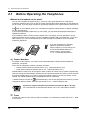
What kind of telephone can be used?
You can use a single line telephone (SLT), such as a rotary pulse telephone or a Panasonic
proprietary telephone (PT) such as the KX-T7536. Operate the feature depending on the telephone
you are using. If you are using a Panasonic proprietary telephone with a special function button such
as
and / or has a display (D-PT), you can follow the operation with the button or display messages
for easy programming.
If you use a large display telephone (e.g. KX-T7536), you can follow the displayed messages to
operate the features.
If your telephone does not have function buttons and / or a display, you may operate the unit by
entering a feature number instead. Follow the available operation with your telephone. If you use a
DSS Console, you can use the buttons on the DSS Console as the buttons on the connected
proprietary telephone.
•
If you use a Panasonic proprietary
telephone which does not have
function buttons, you may change one
of the unused flexible buttons to a
function button. Please refer to
"4.1.2 Customising the Buttons."
Feature Numbers
To operate certain features, you need to enter specified feature numbers (and an additional
parameter, if required).
There are two categories of feature numbers as follows:
• Flexible Feature Numbers (Please refer to "5.2 Feature Numbers List.")
• Fixed Feature Numbers (Please refer to "5.2 Feature Numbers List.")
Flexible feature numbers can be changed to other numbers for easier use by System Programming.
There are two types of fixed feature numbers list in the System and either one of them can be selected
by System Programming. If you want to change the feature numbers, consult your dealer. In this
manual, the default numbers (factory installed) are used for operations.
A flexible number is shown as
(half-shaded key). Use the new programmed number if you have
changed the feature number. Write the new number in "5.2 Feature Numbers List."
If you use a single line telephone which does not have the " " or "#" keys;
it is not possible to access features that have " " or "#" in their feature numbers.
Tones
You will hear various tones, during or after an operation, for confirmation. Please refer to "5.4 What
is This Tone?"
16
Operation
2.1
Before Operating the Telephones
Display
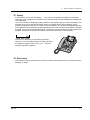
In this manual, you will see "the display ...". This refers to the display of a Panasonic proprietary
telephone. If your telephone is not a Panasonic proprietary telephone with a display, the message will
not be displayed.
If you use a Panasonic display proprietary telephone, the display helps you confirm the settings. For
example, when you set the Do Not Disturb feature, the display shows "Do Not Disturb". Some
proprietary telephones also give you easy access to operations. A message is displayed depending
on the operation. By pressing the corresponding button on the side or bottom of the display, or rotating
a jog dial, you can access the desired feature. For example, if turning background music on becomes
available, "BGM" will be shown on the display. Follow the instructions in each operation.
BGM
Furthermore, depending on the display proprietary
telephone, you can operate features or make calls using
the display message. Please refer to 2.10 Using the
Display Proprietary Telephone.
1 JA
N 15
:00
Extens
io
Featur n STA Spee
es
SYS Sp d
Call
eed
Log
CONT
RING
BGM
Restrictions
Some features may be restricted at your extension under system programming. Consult your System
Manager or dealer.
Operation
17
2.1
Before Operating the Telephones
Icon Descriptions
The following icons show you the feature availability, notes and action to operate the features.
This feature cannot be operated
with a single line telephone.
(CO)
OR
9
Related Programming Title
Please refer to "4 Customising
Your Phone & System," if
necessary.
desired no.
(or
0
)
OR
8
0
1
to
8
4
8
Seize an external line (One of the
following).
• Press the CO button.
• Dial automatic line access
number 9 (or 0).*
*) 9: SP, 0: NL, JT
• Dial trunk group access number
801 to 848.
Off-hook (One of the following).
• Lift the handset.
• Press the SP-PHONE button.
• Press the MONITOR button. (To
start talking, lift the handset.)
Press the Call button on the
Doorphone.
On-hook (One of the following).
• Hang up.
• Press the SP-PHONE button.
• Press the MONITOR button.
Press the switchhook lightly.
Press the corresponding function
button on the proprietary
telephone. (Please refer to "When
You Use a Panasonic Proprietary
Telephone" in this section.)
Wait for an answer.
Enter the required number.
<Examples>
Talk.
account code
Enter the account code.
extension no.
Dial an extension number.
phone no.
Dial the telephone number.
group no.
Dial the group number.
One short beep
18
You will hear a confirmation, dial,
ring or ringback tone.
C. Tone: confirmation tone
D. Tone: dial tone
R. Tone: ring tone
R. B. Tone: ringback tone
Operation
2.1
Before Operating the Telephones
When You Use a Panasonic Proprietary Telephone
When you use a Panasonic proprietary telephone and the DSS Console, they may have some of the
useful function buttons listed below. These buttons make operations simple. The illustrations may
differ from the buttons on your telephone.
(CO)
(DSS)
Operation
Used to answer an incoming call.
Call Forwarding / Do Not Disturb:
Used to perform Call Forwarding or Do
Not Disturb.
Used to receive an incoming intercom
call in the hands-free mode or mute the
microphone during a conversation.
Used to place a call on hold.
Used for System Speed Dialling or
storing programme changes.
Used to make or receive an intercom
call.
CO: Used to make or receive an
outside call. A Loop-CO button
supports all lines. Pressing this button
seizes an idle line automatically.
(Button assignment is required.) (Only
the CO "number" (e.g. 1, 2) may be
shown on some telephones.)
Jog Dial: Used to adjust the volume
and the display contrast or select
desired items for each function.
Conference: Used to establish a threeparty conversation.
Used to leave a message waiting
indication or call back the party who left
the message waiting indication.
DSS: Used to access the extension.
(Only the "S" may be shown on some
telephones.)
Used for hands-free dialling. You can
monitor the party's voice hands-free.
Used to send a flash signal to the
Central Office or another connected
PBX. Or used to disconnect the current
call and make another call without
hanging up.
Used to insert a pause during dialling.
Used as the PROGRAM button if it is
not equipped.
Function: Located beside the display.
Used to perform the displayed function
or operation.
PDN: Used to make or receive an
intercom / outside call. This button can
also be used to set / cancel various
features available for the extension.
(PDN)
19
2.1
Before Operating the Telephones
(PF)
Used to enter and exit the
Programming mode.
Soft: Used to perform a function or
operation appearing on the bottom line
of the display.
Programmable Function: Located on
the upper part of the CO button or on
the DSS Console. Assigns the desired
button and used to access the stored
function. Mostly used as a One-Touch
dialling button. (Only the "F and
number" may be shown on some
telephones.)
Speakerphone: Used for the handsfree operation.
Used to redial.
Used to transfer a call to another party.
Used to disconnect the line.
Used to monitor an intercom call
automatically, but it cannot be used for
hands-free conversations. It also
mutes the handset microphone during
a conversation.
Used to store a dialled phone number
and redial.
(SAVE)
(SDN)
SHIFT
SDN: A copy of the other extension's
PDN button. Acts as a proxy of the
owner PDN button.
VOLUME
Used to adjust the speaker / handset
receiver / headset / ringer volume and
the display contrast.
If the term is in parentheses like (Account) in this
section, it means a flexible button has been made
into an "Account" button.
Used to alternate between the
subfunctions on the display.
Using a Jog Dial
The Jog Dial can be used for the display contrast and the volume control or you can search for desired
items on the display. Rotate the Jog Dial in the either direction as desired. The contrast or the volume
level and the items will change as follows:
Left
(counter-clockwise)
20
Right
(clockwise)
Level decreases
Level increases
To the previous item
To the next item
Operation
2.1
Before Operating the Telephones
How to Follow the Steps
A sample operation is shown below.
Feature title
Sub feature title
2.2.5 Calling Without Restrictions
Using an account code (Account Code Entry)
An Account Code gives information about outside calls for accounting and billing purposes.
You may not be able to make an outside call without an account code entry.
The mode is assigned to each user. Ask your manager for your mode.
Description
PT / SLT
ACCNT
#
OR
account code
OR
(Account)
9
OR
4
Off-hook.
9
Press “ACCNT”,
Account or dial 49.
Enter account code
(max. 10 digits).
9
Operation steps
The description of the
icons are explained
on page 18
Press # or dial 99.
(CO)
OR
C.Tone
phone no.
line access
no.
Press CO or enter
line access number
(9 or 801-848).
Enter phone number.
Conditions
• A Panasonic proprietary telephone user can enter
an account code during a conversation and when
hearing a reorder tone after the other party hangs up.
• If you enter the wrong code, press the “ ” key
while entering the account code and then re-enter
the code.
• To cancel the entry, press the Account button or
the hookswitch while entering the code.
• For your convenience, you can store the code with
the phone number in memory (e.g. Speed dialling).
• If you hear a reorder tone, the entered account
code is wrong. Enter the correct code.
Hints
You may give a specified account code to extension
users and check their telephone usage. You can
specify an account code to each client and check the
call duration.
Customising Your Phone
• Customising the Buttons
Create or re-arrange an Account button.
Programming References: The related or required programming is noted.
To programme, please refer to “4 Customising Your Phone & System.”
Operation
21
2.2 Making Calls
2.2 Making Calls
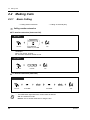
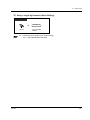
2.2.1
Basic Calling
— Calling another extension
— Calling an external party
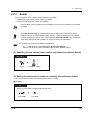
Calling another extension
To another extension (Intercom Call)
PT
SLT
PTand
/ SLT
extension no.
OR
(DSS)
Off-hook.
Enter extension
number or press DSS.
Talk.
<Example>
When you call Mr. Thomas....
Mr. Thomas's extension number is 123.
PT / SLT
1
2
3
Dial 123.
Off-hook.
Talk.
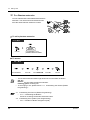
To another extension (PDN Call)
PT
(SDN)
(SDN)
D.Tone
Off-hook.
•
22
Press SDN.
R.B.Tone
Press SDN.
Talk.
The DSS button light shows the current status as follows:
Off: The extension is idle.
Red on: You or another extension is using the line.
Operation
2.2 Making Calls
Do you have an extension directory?
Complete the directory on "Extension" in "5.3 Directory" and make a photo copy for your
reference.
For quick operation
If you are an Operator or dial some extensions frequently, the DSS button is useful.
•
•
4.1
Customising Your Phone (Station Programming)
• 4.1.2 Customising the Buttons
Create or re-arrange a DSS button.
Create or re-arrange a PDN button.
Create or re-arrange a SDN button.
4.3 Customising Your System (User Programming)
• 4.3.5 Flexible CO Button Assignment (005)
To an Operator (Operator Call)
PT / SLT
0
(or
9
)
Dial 0 (or 9).*
Off-hook.
*) 0: SP, 9: NL, JT
Calling an external party
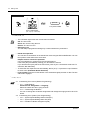
You have to seize an outside line before dialling an outside phone number because external calls are
made via your system.
Select one of the following methods:
•
Press an idle
•
Dial automatic line access number
An idle line is selected automatically.
*) 9: SP, 0: NL, JT
•
Dial trunk group access number
A specific line is selected.
Operation
(CO)
button.
(or
)*.
to
.
23
2.2 Making Calls
PT / SLT
(CO)
OR
9
(or
)*
0
phone no.
OR
8
0
1
D.Tone
to
Off-hook.
8
4
8
Enter phone number.
Talk.
Seize an external line
(CO, 9 (or 0)* or 801-848).
*) 9: SP, 0: NL, JT
•
•
•
•
•
*1
The CO button light shows the current status as follows:
Off: The line is idle.
Green on: You are using the line.
Red on: The line is in use.
Emergency call
You can dial pre-programmed emergency numbers without any restrictions.
Hands-free operation
You can have a conversation in the hands-free mode using the SP-PHONE button. You can
then perform other tasks at the same time.
Helpful hints for hands-free operation
Use your telephone in a quiet room for best performance.
If the other party has difficulty hearing you, decrease the volume.
If you and the other party talk at the same time, parts of your conversation will be lost. To
avoid this, talk alternately.
To select the less expensive line automatically, dial "9 (or 0)"*1 or press the Loop-CO button
to seize a line. (Automatic Route Selection)
If you misdial, press the FLASH button or the switchhook lightly and then re-dial. The line
will remain engaged.
9 : SP, 0 : NL, JT
4.1
•
•
4.3
•
•
•
24
Customising Your Phone (Station Programming)
4.1.1 Initial Settings
Preferred Line Assignment — Outgoing
Select the seized line when going off-hook.
4.1.2 Customising the Buttons
You can re-arrange the CO button assignment and change the ringing tone for each CO
button.
Customising Your System (User Programming)
4.3.2 System Speed Dialling Number Set (001)
4.3.3 System Speed Dialling Name Set (002)
4.3.5 Flexible CO Button Assignment (005)
Operation
2.2 Making Calls
2.2.2
Easy Dialling
This is convenient for frequently dialled phone numbers.
— With one button
— To a pre-set party by going off-hook
— Using numbers stored at your extension — Using a single digit number
— Using numbers stored in the system
— To a Phantom extension
With one button (One-Touch Dialling)
PT
(CO)
Off-hook.
Press CO,
if required.
(One-Touch
Dialling)
Press One-Touch
Dialling.
4.1
Customising Your Phone (Station Programming)
• 4.1.1 Initial Settings— Full One-Touch Dialling Assignment
Allow or cancel the one-touch operation while on-hook. (Default: Allow)
• 4.1.2 Customising the Buttons
Create or re-arrange the One-Touch Dialling button and store the desired number, phone
number, feature number, etc.
4.3 Customising Your System (User Programming)
• 4.3.5 Flexible CO Button Assignment (005)
Operation
25
2.2 Making Calls
Using numbers stored at your extension (Station Speed Dialling)
You can store up to 10 numbers at your extension for your personal use. Telephone Directory for
"Station Speed Dialling" is provided in "5.3 Directory."
To store a phone number
PT / SLT
3
0
station speed
dial no.
desired no.
#
Enter station speed
dial number (0-9).
Enter the desired
number.
Dial #.
C.Tone
Off-hook.
Dial 30.
On-hook.
Enter a line access number (9 (or 0)* or 801 to 848)
as the first digit before an external party number.
*) 9 : SP, 0 : NL, JT
•
" " and PAUSE can also be stored as digits.
To dial
PT / SLT
3
Off-hook.
26
Dial 3 .
station speed
dial no.
Enter station speed
dial number (0-9).
Operation
2.2 Making Calls
Using numbers stored in the system (System Speed Dialling)
You can make a call using up to 1000 speed dial numbers (000 - 999) which are previously stored by
System / User programming. Telephone Directory for "System Speed Dialling" is provided in
"5.3 Directory."
PT / SLT
system speed
dial no.
OR
Off-hook.
•
Press AUTO DIAL
or dial .
More than one speed dial number can be used for long telephone numbers, if the number
is divided when stored.
<Example>
If the number is divided and stored in system speed dial numbers 001 and 002:
0
Operation
Enter system speed
dial number (000-999).
0
1
0
0
2
•
If "Tenant Service" is employed by System Programming, up to 2000 Speed Dialling codes
can be shared among each tenant under the condition of up to 1000 codes per tenant.
4.3
Customising Your System (User Programming)
• 4.3.2 System Speed Dialling Number Set (001)
• 4.3.3 System Speed Dialling Name Set (002)
27
2.2 Making Calls
To a pre-set party by going off-hook (Pickup Dialling)
You can make an extension or outside call simply by going off-hook if you pre-assigned.
To store a phone number
PT / SLT
7
4
2
desired
party’s no.
#
C.Tone
Dial 742.
Off-hook.
Dial #.
Enter the desired
party’s number
(max. 24 digits).
On-hook.
Enter a line access number (9 (or 0)* or 801 to 848)
as the first digit before an external party number.
*) 9: SP, 0: NL, JT
T7531
desired
party’s no.
MODE
→P i c k u p D L P G . . #
SELECT
Press MODE until
“ Feature Access”
is displayed.
Rotate Jog Dial
until “ Pickup DL PG”
is displayed.
Press SELECT.
Enter the desired
party’s number
(max. 24 digits).
Enter a line access number (9 (or 0)* or 801 to 848)
as the first digit before an external party number.
#
C.Tone
*) 9 : SP, 0 : NL, JT
On-hook.
Dial #.
MODE
T7533
Press “ FEAT.”
Press SHIFT until
“ FEAT” is displayed.
C.Tone
28
Rotate Jog Dial
until “ Pickup DL PG”
is at the arrow.
Press “ SEL.”
desired
party’s no.
Enter the desired
party’s number
(max. 24 digits).
Enter a line access number (9 (or 0)* or 801 to 848)
as the first digit before an external party number.
#
Dial #.
→P i c k u p D L P G . . #
Remote DND
MENU
SEL
FEAT
SHIFT
On-hook.
*) 9: SP, 0: NL, JT
Operation
2.2 Making Calls
To store a phone number (contd.)
T7536 / T7235
Features
Pickup DL Prg (→..+#)
OR
desired
party’s no.
PREV
Press “ Features.”
Press “ Pickup DL Prg.”
Rotate Jog Dial or
press “ PREV” until the
following is displayed.
Enter the desired
party’s number
(max. 24 digits).
Enter a line access number (9 (or 0)* or 801 to 848)
as the first digit before an external party number.
#
C.Tone
*) 9: SP, 0: NL, JT
On-hook.
Dial #.
To set / cancel
PT / SLT
1
7
4
0
Off-hook.
Dial 74.
Set
OR
Cancel
C.Tone
On-hook.
Dial 1 to set
or 0 to cancel.
T7531
1
MODE
→P i c k u p D i a l
SELECT
Press MODE until
“ Feature Access”
is displayed.
Rotate Jog Dial
until “ Pickup Dial”
is displayed.
Press SELECT.
Set
OR
1/0
MODE
0
Cancel
Dial 1 to set
or 0 to cancel.
C.Tone
On-hook.
Operation
29
2.2 Making Calls
To set / cancel (contd.)
T7533
Press SHIFT until
“FEAT” is displayed.
1
→P i c k u p D i a l
1/0
Pickup DL PG..#
MENU
SEL
FEAT
SHIFT
Press “FEAT.”
Press “SEL.”
Rotate Jog Dial
until “Pickup Dial”
is at the arrow.
Set
OR
0
Cancel
C.Tone
On-hook.
Dial 1 to set
or 0 to cancel.
T7536 / T7235
1
Features
Pickup Dialing (→1/0)
OR
PREV
Press “ Features.”
0
Press “ Pickup Dialing.”
Rotate Jog Dial or
press “ PREV” until the
following is displayed.
Set
OR
Cancel
Dial 1 to set
or 0 to cancel.
C.Tone
On-hook.
To dial
PT / SLT
Off-hook.
30
•
To call another party, dial the desired party's phone number before the pre-set line is
connected. (Default: 1 second)
•
" " can also be stored as a digit.
Operation
2.2 Making Calls
Using a single digit number (Quick Dialling)
PT / SLT
quick dial no.
Off-hook.
4.3
•
Operation
Enter quick dial
number.
Customising Your System (User Programming)
4.3.9 Quick Dial Number Set (009)
31
2.2 Making Calls
To a Phantom extension
You can call extensions associated with a Phantom
extension. The call arrives at all extensions who
have the same Phantom extension number.
123
123
123
123
To call a phantom extension
PT / SLT
(Phantom)
OR
phantom
extension no.
Off-hook.
Press Phantom or enter
phantom
. extenison number.
To answer
PT / SLT
OR
(Phantom)
Press Phantom.
•
•
(CO)
Press CO.
OR
OR
Press INTERCOM.
(DN)
OR
Press DN.
Off-hook.
The Phantom extension button light shows the current status as follows:
Off: Idle
Red on: You are calling a phantom extension.
Flashing green: Incoming call
To set ringing or not, please refer to "4.1 Customising Your Phone (Station
Programming)."
4.1
Customising Your Phone (Station Programming)
4.1.2 Customising the Buttons
Create or re-arrange a Phantom extension button.
4.3 Customising Your System (User Programming)
• 4.3.5 Flexible CO Button Assignment (005)
•
32
Operation
2.2 Making Calls
2.2.3
Redial
This is convenient when calling the same external party again.
— Redialling the last outside phone number you dialled
— Saving the outside phone number for redialling
•
Up to 24 digits can be programmed and redialled. The line access number is not counted
as a digit.
•
To redial automatically, go off-hook with the SP-PHONE button and then press the
REDIAL button or press the REDIAL button directly. It will keep dialling the busy number
until the called party answers within a specified time (Automatic Redial). You can perform
other tasks during automatic redialling. To cancel, press the FLASH button.
4.1
Customising Your Phone (Station Programming)
• 4.1.1 Initial Settings — Full One-Touch Dialling Assignment
Allow or cancel the one-touch operation while on-hook. (Default: Allow)
Redialling the last outside phone number you dialled (Last Number Redial)
PT / SLT
OR
#
Off-hook.
Press REDIAL or dial #.
Saving the outside phone number for redialling (Saved Number Redial)
The saved number remains intact until another number is stored.
To save
PT
PT
During a conversation or while hearing a busy tone
(Save)
Press STORE.
Operation
Press SAVE.
33
2.2 Making Calls
To dial
PT
(Save)
Off-hook.
Press SAVE.
4.1
Customising Your Phone (Station Programming)
4.1.2 Customising the Buttons
Create or re-arrange a SAVE button.
4.3 Customising Your System (User Programming)
• 4.3.5 Flexible CO Button Assignment (005)
•
34
Operation
2.2 Making Calls
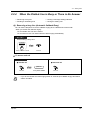
2.2.4
When the Dialled Line is Busy or There is No Answer
— Reserving a busy line
— Sending a call waiting tone
— Leaving a message waiting indication
— Joining an existing call
Reserving a busy line (Automatic Callback Busy)
You can set the telephone to receive callback ringing when a dialled line becomes idle.
When you answer the callback ringing:
For an outside call: The line is seized.
For an intercom call: The called extension starts ringing automatically.
PT / SLT
While hearing a busy tone
C.BCK
OR
C.Tone
6
Press “C.BCK” or dial 6.
On-hook.
To answer and call
PT / SLT
● Outside call
● Intercom call
phone no.
D.Tone
Off-hook.
•
Operation
Enter phone number.
Off-hook.
If you do not answer the recall ringing within 10 seconds (four callback rings), this feature
will be cancelled.
35
2.2 Making Calls
To cancel
PT / SLT
4
6
C.Tone
On-hook.
Dial 46.
Off-hook.
T7531
MODE
→C a l l b a c k C a n c e l
SELECT
Press MODE until
“Feature Access”
is displayed.
Rotate Jog Dial until
“Callback Cancel”
is displayed.
MODE
C.Tone
Press SELECT.
On-hook.
T7533
SHIFT
→C a l l b a c k C a n c e l
Data Line
1/0
MENU
SEL
FEAT
C.Tone
Press “FEAT.”
Press SHIFT until
“FEAT” is displayed.
Rotate Jog Dial until
“Callback Cancel”
is at the arrow.
Press “SEL.”
On-hook.
T7536 / T7235
Features
OR
Callback Busy Cancel
NEXT
Press “ Features.”
C.Tone
Press “ Callback Busy Cancel.”
On-hook.
Rotate Jog Dial or
press “ NEXT” until the
following is displayed.
36
Operation
2.2 Making Calls
Sending a call waiting tone (Busy Station Signalling [BSS])
The other party will know your call is waiting.
PT / SLT
While hearing a busy tone
BSS
OR
2
Press “BSS” or dial 2.
•
•
Operation
If "BSS" is not displayed or you hear a reorder tone, this feature is not set at the other
party's phone. This feature is only available if the called extension has set the "Call Waiting"
feature.
Depending on the other party's telephone, the "Off-Hook Call Announcement (OHCA)"
or the "Whisper OHCA" function can be applied. You can talk to the other party through the
speaker and the microphone (OHCA) or you only send a call announcement through the
handset (Whisper OHCA), while they are having another conversation using the handset.
37
2.2 Making Calls
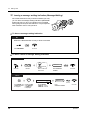
Leaving a message waiting indication (Message Waiting)
If the other extension is busy or does not answer your call,
you can leave a message waiting indication (MESSAGE
button light turns on and / or indication tone is emitted
when going off-hook) on that extension. This prompts the
other extension user to call you back.
To leave a message waiting indication
PT
When the called extension is busy or does not answer
C.Tone
On-hook.
Press MESSAGE.
To leave / cancel a message waiting indication
PTand
/ SLT
PT
SLT
1
7
0
0
Off-hook.
Dial 70.
Leave
extension no.
OR
Cancel
C.Tone
Dial 1 to leave or
0 to cancel.
Enter extension
number.
On-hook.
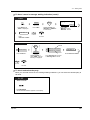
T7531
MODE
→ MSG Off
Press MODE until Rotate Jog Dial
“Feature Access” until “MSG Off”
or “MSG On”
is displayed.
is displayed.
38
extension no.
ext
SELECT
Press SELECT.
“MSG On”: Leave
“MSG Off”: Cancel.
MODE
C.Tone
Enter
extension number.
On-hook.
Operation
2.2 Making Calls
To leave / cancel a message waiting indication (contd.)
T7533
SHIFT
→M S G O f f
MSG On
FEAT
MENU
Press SHIFT until
“FEAT” is displayed.
Press “FEAT.”
ext
ext
SEL
Press “SEL.”
“MSG On”: Leave
“MSG Off”: Cancel
Rotate Jog Dial until
“MSG Off” or “MSG On”
is at the arrow.
extension no.
C.Tone
Enter
extension number.
On-hook.
T7536 / T7235
Cancel
Features
OR
NEXT
Message Off (→ext)
Message On (→ext)
Leave
Press “Features.”
Rotate Jog Dial or
press “NEXT” until the
following is displayed.
extension no.
Enter extension number.
Press “Message On” to leave
or “Message Off” to cancel.
C.Tone
On-hook.
To check and select the party
When you received more than one message waiting indications, you can select the desired party to
call back.
D – PT
While on-hook
Press MESSAGE
until the desired extension appears on the display.
Operation
39
2.2 Making Calls
•
•
•
The extension number and name of the massage senders are shown in the received order.
Single line telephone users may hear a special ring tone as notification while off-hook, if
required.
Indication tone
1s
To call back
PT / SLT with Message Lamp
OR
D.Tone 4
Off-hook.
7
0
2
Talk.
Press MESSAGE or dial 702.
To clear all message waiting indications
PT / SLT with Message Lamp
7
0
0
your extension
no.
D.Tone 4
Off-hook.
Dial 700.
Enter your extension
number.
4.1
Customising Your Phone (Station Programming)
• 4.1.2 Customising the Buttons
Create or re-arrange a MESSAGE button.
4.3 Customising Your System (User Programming)
• 4.3.5 Flexible CO Button Assignment (005)
40
Operation
2.2 Making Calls
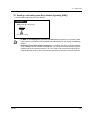
Joining an existing call (Executive Busy Override)
You can call the party who is talking with another on the telephone or add a third party to your existing
conversation.
To join
PT
● Outside call
● Intercom call
(CO)
Over
OR
(DN)
Off-hook.
Press
corresponding
CO or DN.
C.Tone
(Optional)
OR
Talk.
3
C.Tone
(Optional)
Press “ Over” or dial 3.
Talk.
To terminate one party and talk with another
PT
(CO)
OR
C.Tone
(Optional)
Press other party's
CO or INTERCOM.
Talk.
To leave the conference
PT /PT
SLT
On-hook.
•
Operation
You can also deny others the possibility of joining your conversation (Executive Busy
Override Deny) (Default: Allow). Please refer to "2.7 Setting the Telephone According to
Your Needs."
41
2.2 Making Calls
2.2.5
Calling without Restrictions
— Using an account code
— Using your calling privilege at another
extension
— To call an extension who is refusing to
receive the call
— Changing the dialling mode
Using an account code (Account Code Entry)
An Account Code gives information about outside calls for accounting and billing purposes. You may
not be able to make an outside call without an account code entry depending on your account code
entry mode. One of three modes is assigned to each extension by System Programming. Ask your
System Manager about your mode.
PT / SLT
ACCNT
#
OR
account code
(Account)
Off-hook.
4
9
D.Tone 3
OR
Enter account code
(max. 10 digits).
9
OR
9
Press # or dial 99.
Press “ ACCNT,”
Account or dial 49.
(CO)
OR
C.Tone
D.Tone
phone no.
line access
no.
Press CO or enter
line access number
(9 (or 0)* or 801-848).
Enter phone number.
*) 9: SP, 0: NL, JT
•
A Panasonic proprietary telephone user can enter an account code during a
conversation and when hearing a reorder tone after the other party hangs up.
•
If you enter the wrong code, press the " " key while entering the account code and then
re-enter the code.
To cancel the entry, press the Account button or the switchhook while entering the code.
For your convenience, you can store the code with the phone number in memory (e.g.
Speed Dialling).
If you hear a reorder tone, the entered account code is wrong. Enter the correct code.
The delimiter "99" is available for rotary type SLTs only.
•
•
•
•
•
42
The System Manager may give a specified account code to you and check your telephone
usage. The System Manager can specify an account code to each client and check the call
duration.
Operation
2.2 Making Calls
4.1
Customising Your Phone (Station Programming)
4.1.2 Customising the Buttons
Create or re-arrange an Account button.
4.3 Customising Your System (User Programming)
• 4.3.5 Flexible CO Button Assignment (005)
•
Using your calling privilege at another extension (Walking COS)
You can use your calling privileges (Class of Service) at another extension. You may override
restrictions which may be set at the extension. To perform this feature, pre-programmed walking COS
password is required.
Ask your System Manager about the walking COS password.
PT / SLT
4
desired
party’s no.
your
extension no.
walking COS
password
7
C.Tone
Off-hook.
Dial 47.
Enter walking
COS password.
Enter your
extension number.
D.Tone
Enter desired
party’s number.
Press a CO button or enter a line access number
(9 (or 0)* or 801-848) before an external phone number.
*) 9: SP, 0: NL, JT
T7531
MODE
→WK.COS code+ext
SELECT
Rotate Jog Dial
until “ WK.COS”
is displayed.
Press MODE until
“ Feature Access”
is displayed.
Press SELECT.
MODE
walking COS
password
Enter walking
COS password.
desired
party's no.
your
extension no.
C.Tone
D.Tone
Enter your
extension number.
Enter desired
party's number.
Press a CO button or enter a line access number
(9 (or 0)* or 801-848) before an external phone number.
*) 9: SP, 0: NL, JT
Operation
43
2.2 Making Calls
T7533
→W K . C O S c o d e + e x t
ABST MSG Off
MENU
SEL
FEAT
SHIFT
Press SHIFT
until “ FEAT” is
displayed.
Press “ FEAT.”
Rotate Jog Dial
until “ WK.COS”
is at the arrow.
Press “ SEL.”
walking COS
password
Enter walking
COS password.
desired
party's no.
your
extension no.
C.Tone
D.Tone
Enter your
extension number.
Enter desired
party's number.
Press a CO button or enter a line access number
(9 (or 0)* or 801-848) before an external phone number.
*) 9: SP, 0: NL, JT
T7536 / T7235
Features
Walking COS (→code+ext)
OR
PREV
Press “ Features.”
Press “ Walking COS.”
Rotate Jog Dial or
press “ PREV” until the
following is displayed.
walking COS
password
Enter walking
COS password.
desired
party’s no.
your
extension no.
C.Tone
D.Tone
Enter your
extension number.
Enter desired
party’s number.
Press a CO button or enter a line access number
(9 (or 0)* or 801-848) before an external phone number.
*) 9: SP, 0: NL, JT
The available functions are as follows:
• The outgoing call restriction level (less restriced your restriction level)
• An outside call duration
• Transferring a call to an outside party
• Using an account code entry mode (Account Code Entry)
• The number of digits you can dial during an outside call.
• The outside lines you are permitted to use.
44
Operation
2.2 Making Calls
To call an extension who is refusing to receive the call (Do Not Disturb (DND)
Override)
PT / SLT
While hearing the DND tone
Over
OR
2
Press “ Over” or dial 2.
•
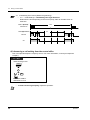
Only a pre-programmed extension can execute this feature.
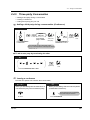
Changing the dialling mode (Pulse to Tone Conversion)
To access services such as computer telephone services, Voice Mail, etc., that require a tone dialling,
you can temporarily change the dialling mode from Pulse to Tone, if you are using a dial pulse type
CO line.
PT / SLT
After the line is connected
#
Dial
Operation
#.
desired no.
Enter desired number.
45
2.2 Making Calls
2.2.6
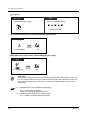
Alternating the Calling Method (Alternate Calling —
Ring / Voice)
The calling method, either ring or voice, is set by the
called extension when an intercom call is received.
However, you can change the method temporarily.
With Voice-Calling, you can talk to the party as soon
as the line is connected. (Default: Ring-Calling)
Ring
Ring
Hello
OR
For voice-calling
PT / SLT
After dialling
Voice
OR
C.Tone
Press “Voice” or
.
Talk.
For ring-calling
PT / SLT
After dialling
Tone
OR
Press “Tone” or
•
If the called party uses a single line telephone, only Ring-Calling is available.
4.1
•
46
.
Customising Your Phone (Station Programming)
4.1.1 Initial Settings — Intercom Alert Assignment
Which way do you prefer to receive an intercom call?
Operation
2.2 Making Calls
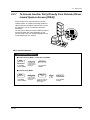
2.2.7
To Access Another Party Directly from Outside (Direct
Inward System Access [DISA])
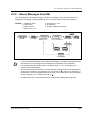
External callers can call extensions in the KXTD500 system. An outgoing message greets the
caller and gives information about how to access
an extension. You do not need the operator's
assistance.
You may not be able to access the features without
entering a DISA user code depending on the
security mode. Ask your System Manager for the
mode assigned to your system.
DIGITAL
SUPER
HYBRID
SYSTEM
RUN
OFF
LINE
ALARM
To call an extension
From Outside Telephone
● In Non Security Mode / Trunk Security Mode
DISA
phone no.
Enter DISA
phone number.
desired no.
R.B.Tone and
DISA outgoing
message
Enter desired
number.
● In All Security Mode
DISA
phone no.
Enter DISA
phone number.
Operation
DISA user
code
R.B.Tone and
DISA outgoing
message
desired no.
D.Tone
Enter pre-assigned
DISA user code
(4-10 digits).
Enter desired
number.
47
2.2 Making Calls
To call an external party
From Outside Telephone
In Non Security Mode
DISA
phone no.
line access
no.
Enter DISA
phone number.
R.B.Tone and
DISA outgoing
message
phone no.
D.Tone from
Central Office
Enter line
access number
(9 (or 0)* or 801-848).
Enter phone
number of the
external party.
In Trunk Security Mode
DISA
phone no.
DISA user
code
line access
no.
Enter DISA
phone number.
R.B.Tone and
DISA outgoing
message
D.Tone from
Central Office
D. Tone 3
Enter line
access number
(9 (or 0)* or 801-848).
phone no.
Enter phone
number of the
external party.
Enter pre-assigned
DISA user code
(4-10 digits).
In All Security Mode
DISA
phone no.
line access
no.
DISA user
code
Enter DISA
phone number.
R.B.Tone and
DISA outgoing
message
D. Tone
Enter pre-assigned
DISA user code
(4-10 digits).
phone no.
D.Tone from
Central Office
Enter line
access number
(9 (or 0)* or 801-848).
Enter phone
number of the
external party.
*) 9: SP, 0: NL, JT
To re-try
From Outside Telephone
To dial a different number during a conversation with an outside party or
while hearing the ringback, reorder, or busy tone
desired no.
D.Tone
Dial
.
Enter desired number.
Enter a line access number (9 (or 0)* or 801 to 848)
as the first digit when calling an external party.
*) 9: SP, 0: NL, JT
•
•
48
If a call between two external parties (you and the other party ) is established, both
parties will hear an alert tone 15 seconds before the time limit (Default: 10 min) expires. You
can extend the call duration time by pressing any key except " " while hearing an alert tone.
If you failed to enter a valid DISA user code three times consecutively, the call will be
disconnected automatically.
Operation
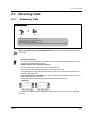
2.3 Receiving Calls
2.3 Receiving Calls
2.3.1
Answering Calls
PT / SLT
Off-hook.
Talk.
Select one of the following methods:
· Lift the handset to receive the preferred line.
(Default: Ringing line is selected.)
· Press the SP-PHONE or MONITOR* button.
· Press the flashing red/green CO, green INTERCOM or green PDN/red SDN button directly.
*When going off-hook using the MONITOR button, you have to lift the handset to talk to the
other party.
•
•
Hands-free operation
You can have a conversation in the hands-free mode with the SP-PHONE button. You can
perform other tasks at the same time.
Helpful hints for the hands-free operation
Use your telephone in a quiet room for best performance.
If the other party has difficulty hearing you, decrease the volume.
If you and the other party talk at the same time, parts of your conversation will be lost. To
avoid this, talk alternately.
If the Caller ID feature is available, you may confirm the caller's phone number and name
before answering an outside call.
Pressing the SHIFT button displays the outside line number and name.
<Example>
0111111111
John Thomas
Extension
STA Speed
Features
SYS Speed
Call Log
10101 Panasonic
Extension
Features
Call Log
SHIFT
STA Speed
SYS Speed
SHIFT
The caller's information from your telephone company will only be sent to the pre-assigned
extension.
Operation
49
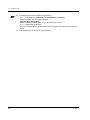
2.3 Receiving Calls
4.1
Customising Your Phone (Station Programming)
4.1.1 Initial Settings— Preferred Line Assignment — Incoming
Select the seized line when going off hook.
Intercom Alert Assignment
Select the Calling method, either ring or the other party's voice.
• 4.1.2 Customising the Buttons
You can re-arrange the CO button assignment and change the ringing tone for each CO
button.
4.3 Customising Your System (User Programming)
•
50
Operation
2.3 Receiving Calls
2.3.2
Answering Hands-free (Hands-free Answerback)
You can answer an intercom call without going off-hook as soon as the line is
connected. You will hear the caller talking without the phone ringing.
To set / cancel
PT
While on-hook
Press AUTO
ANSWER/MUTE.
•
Operation
The AUTO ANSWER / MUTE button light shows the current status as follows:
On: Set.
Off: Not set.
51
2.3 Receiving Calls
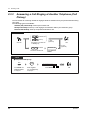
2.3.3
Answering a Call Ringing at Another Telephone (Call
Pickup)
You can answer an incoming call that is ringing at another extension from your phone without leaving
your desk.
The following types are available:
Outside (CO) Call Pickup: Picks up an outside call.
Group Call Pickup: Picks up a call ringing at an extension within your extension group.
Directed Call Pickup: Picks up a specified extension's call.
PT / SLT
4
Outside call
OR
4
0
Group
Dial 4 for an outside call
or 40 for group.
Off-hook.
4
1
Directed
Dial 41 for directed call.
C.Tone
(Optional)
Talk.
C.Tone
(Optional)
extension no.
Enter extension
number.
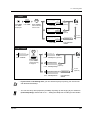
T7531
● Group Call Pickup only
MODE
→ C.Pickup Grp
SELECT
Press MODE until
“Feature Access”
is displayed.
52
Rotate Jog Dial
until “ C.Pickup Grp”
is displayed.
Press SELECT.
MODE
C.Tone
Talk.
Operation
2.3 Receiving Calls
T7533
→C . P i c k u p C O
C.PickupDNY
1/0
MENU
SEL
FEAT
SHIFT
Press SHIFT
until “FEAT”
is displayed.
Press “FEAT.” Rotate Jog Dial
until the following
is at the arrow.
C.Tone
(Optional)
Press “SEL.”
Talk.
→C . P i c k u p G r p
C.Waiting
0-3
MENU
SEL
C.Tone
(Optional)
Press “SEL.”
→C . P i c k u p D R T
ext
C.Pickup Grp
MENU
SEL
extension no.
C.Tone
(Optional)
Enter extension
number.
Press “SEL.”
T7536 / T7235
Features
OR
C.Pickup CO
NEXT
Press “ Features.”
Press “ C.Pickup CO.”
Rotate Jog Dial
or press “NEXT”
until the following
is displayed.
C.Tone
(Optional)
Talk.
C.Pickup Group
C.Tone
(Optional)
Press “ C.Pickup Group.”
C.Pickup Direct (→ext)
Press “ C.Pickup Direct.”
Operation
extension no.
C.Tone
(Optional)
Enter extension
number.
•
If you receive a call waiting tone, you can ask a third party to pick up your second call
with Directed Call Pickup.
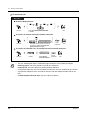
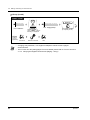
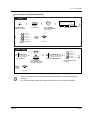
•
You can also deny other people the possibility of picking up calls ringing at your extension
(Call Pickup Deny). Please refer to "2.7 Setting the Telephone According to Your Needs."
53
2.3 Receiving Calls
2.3.4
Answering a Call via an External Speaker (Trunk
Answer From Any Station [TAFAS])
You can answer an incoming CO call ringing at an external speaker from any extension.
PT / SLT
4
Off-hook.
Speaker no.
2
Dial 42.
C.Tone
(Optional)
Enter speaker
number (1-2).
Talk.
T7531
MODE
→ Page-E ANS
extension
speaker no.
no.
1-2
SELECT
MODE
Press SELECT.
Press MODE until Rotate Jog Dial
“Feature Access” until “ Page-E ANS
is displayed.
is displayedÓ
C.Tone
On-hook.
Enter speaker
number (1or 2).
T7533
→P a g e - E A N S
1-2
Page-GRP ANS
MENU
SEL
FEAT
Press SHIFT until
"FEAT" is displayed.
Press "FEAT."
Rotate Jog Dial
until "Page-E ANS"
is at the arrow.
Press "SEL."
Speaker no.
Enter speaker
number (1 or 2).
C.Tone
(Optional)
Talk.
T7536 / T7235
Features
OR
Page-Ext Answer (→1-2)
Speaker no.
PREV
Press "Features."
Press "Page-Ext Answer."
Rotate Jog Dial or
press "PREV" until the
following is displayed.
•
54
Enter speaker
number (1 or 2).
C.Tone
(Optional)
Talk.
You can also answer a paging announcement
via an external speaker with this operation.
Operation
2.3 Receiving Calls
2.3.5 Using the ANSWER / RELEASE Button
The ANSWER and the RELEASE buttons are useful for operations with the headset or in the handsfree mode.
With the ANSWER button, you can answer all incoming calls to the paired / your own telephone.
With the RELEASE button, you can disconnect the line during or after a conversation, or complete
transferring a call.
To answer
PT & DSS Console
When a call comes in on your extension
Press ANSWER.
Talk.
Press RELEASE.
To transfer a call
PT & DSS Console
During a conversation with the headset or in the hands-free mode
desired no.
OR
C.Tone
D.Tone
Press TRANSFER.
The party
answers.
(DSS)
Enter desired
number or pressDSS.
Press RELEASE.
To transfer an outside call to an extension with One-Touch
PT & DSS Console
During a conversation with the headset or in the hands-free mode
(DSS)
The party
answers.
Press DSS.
Press RELEASE.
The other party is placed on hold and the
destination extension is called immediately.
Operation
55
2.3 Receiving Calls
•
ANSWER and RELEASE buttons are provided as a fixed button on the KX-T7541, DSS
Console. For other PTs and DSS Consoles, these buttons can be assigned to a flexible
button (CO, DSS, PF).
If you press the ANSWER button to answer a new call during the current call, the
current call will be disconnected.
If a call which comes in on your extension is not ringing, you cannot answer it by
pressing the ANSWER button.
4.1
Customising Your Phone (Station Programming)
• 4.1.2 Customising the Buttons
Create or re-arrange an ANSWER button and a RELEASE button.
4.3 Customising Your System (User Programming)
• 4.3.5 Flexible CO Button Assignment (005)
56
Operation
2.4 During a Conversation
2.4 During a Conversation
2.4.1 Holding a Call
— Holding a call
— Denying other people the possibility of retrieving calls held at your extension.
— Holding in a system call parking zone
•
•
•
If a call is not retrieved within a pre-programmed time, you will hear an alarm as a
reminder.
If a call is not retrieved within 30 minutes, it is automatically disconnected.
In some countries, the following operation results in "Exclusive Hold (Page 59)."
Holding a call (regular)
PT / SLT
During a conversation
OR
5
0
C.Tone
On-hook.
Press HOLD or
switchhook and dial 50.
Operation
57
2.4 During a Conversation
To retrieve a call
PT / SLT
At the holding extension
OR
(CO)
OR
(PDN)
OR
(SDN)
OR
5
Off-hook.
0
Talk.
Press CO / INTERCOM / PDN /SDN
or dial 50.
To retrieve an outside call held at another extension
(CO)
OR
5
3
trunk port physical no.
Press CO whose indicator is flashing
red slowly or dial 53 and trunk port
physical number (5 digits).
Off-hook.
C.Tone
(Optional)
Talk.
To retrieve an intercom call / an outside call held at another extension
5
Off-hook.
•
•
•
•
58
1
Dial 51.
holding ext no.
C.Tone
Enter holding
(Optional)
extension number.
Talk.
The CO, INTERCOM, PDN or SDN button light shows the current status as follows:
Flashing green: The call is placed on hold at your extension.
Flashing red: The call is placed on hold at another extension.
A single line telephone user can hold either an intercom call or an outside call at one time.
A proprietary telephone user can hold an intercom call and multiple outside calls at one
time.
To hold multiple intercom calls, use the "Call Park" feature.
Operation
2.4 During a Conversation
Denying other people the possibility of retrieving calls held at your extension
(Exclusive Call Hold)
The call placed on Exclusive Hold can only be retrieved from the extension on
which the call is held.
To place a call on Exclusive Hold
PT
During a conversation
C.Tone
D.Tone
Press HOLD.
On-hook.
Press HOLD.
To retrieve a call
PT
(CO)
Off-hook.
•
•
Operation
OR
OR
(PDN)
OR
(SDN)
Press CO, INTERCOM, PDN or SDN.
A PT user can hold an intercom call and multiple outside calls at one time.
In some countries, the following operation results in "Regular Call Hold (Page 57)."
59
2.4 During a Conversation
Holding a call in a system call parking zone (Call Park)
You can hold a call in the system common call parking zone and perform other operations. The parked
call can be retrieved from any extension. Up to 100 calls can be parked.
To set
PT / SLT
During a conversation
5
OR
C.Tone
2
parking zone no.
D.Tone
C.Tone
Dial 52.
On-hook.
Enter parking
zone number (00-99).
Press TRANSFER
or switchhook.
T7531
During a conversation
MODE
→Call Park
00-99
SELECT
Press TRANSFER.
Rotate Jog Dial
until “ Call Park”
is displayed.
Press MODE until
“ Feature Access”
is displayed.
MODE
Press SELECT.
parking
extension
zoneno.
no.
C.Tone
Enter parking
zone number (00-99).
On-hook.
T7533
During a conversation
→C a l l P a r k
00-99
Callback Cancel
MENU
SEL
FEAT
SHIFT
Press SHIFT until
“ FEAT” is displayed.
Press “ FEAT.”
Rotate Jog Dial until
“ Call Park” is at the arrow.
Press “ SEL.”
parking
extension
zoneno.
no.
C.Tone
Enter parking
zone number (00-99).
60
On-hook.
Operation
2.4 During a Conversation
To set (contd.)
T7536 / T7235
During a conversation
Features
parking zone no.
Call Park (→O0-99)
OR
NEXT
C.Tone
Press “ Features.”
Press “ Call Park.”
D.Tone
On-hook.
Enter parking
zone number (00-99).
Rotate Jog Dial or
press “ NEXT” until the
following is displayed.
To retrieve
PT / SLT
5
Off-hook.
parking zone no.
2
Dial 52.
Enter parking
zone number (00-99).
C.Tone
(Optional)
Talk.
T7531
MODE
→ Call Park
SELECT
Press SELECT.
Press MODE until Rotate Jog Dial
“ Feature Access” until “ Call Park”
is displayed.
is displayed.
parking zone no.
00-99
MODE
C.Tone
Enter parking zone
number (00-99).
Talk.
T7533
SHIFT
Press SHIFT until
“ FEAT” is displayed.
→C a l l P a r k
00-99
Callback Cancel
MENU
SEL
FEAT
Press “ FEAT.”
Rotate Jog Dial until
“ Call Park” is at the arrow.
Press “ SEL.”
parking zone no.
Enter parking
zone number (00-99).
Operation
C.Tone
(Optional)
Talk.
61
2.4 During a Conversation
T7536 / T7235
Features
OR
Call Park (→OO-99)
NEXT
Press “Features.”
Press “ Call Park.”
Rotate Jog Dial or
press “ NEXT” until the
following is displayed.
•
62
parking zone no.
C.Tone
(Optional)
Enter parking
zone number (00-99).
Talk.
If you hear a busy tone when entering the zone number, the zone is in use.
Enter another number.
Operation
2.4 During a Conversation
2.4.2 Talking to Two Parties Alternately (Call Splitting)
If a new call comes in on your extension when you are engaged in the call, you can answer the new
call without losing the current call. Then you can talk to either one of two parties alternately while
putting the other on hold.
PT
If another call (outside / intercom) comes in, when you are engaged in a call (outside / intercom);
OR
(CO)
OR
OR
(PDN)
OR
(SDN)
Press CO, INTERCOM, PDN or SDN.
Press TRANSFER
or HOLD.
PT
( ICM / CO type PT only )
If another intercom call comes in, when you are
engaged in an intercom call;
Press HOLD.
SLT
If another call (outside / intercom) comes in, when
you are engaged in a call (outside / intercom).
Press switchhook.
Operation
63
2.4 During a Conversation
2.4.3 Transferring a Call
— Transferring a call to an extension
— Transferring a call to a phantom extension
— Transferring a call to an extension (PDN
Call)
— Transferring a call to an extension
(Ringing Transfer)
— Transferring a call to the Remote
Resource or a UCD Group
— Transferring a call to an external party
Transferring a call to an extension
PT / SLT
During a conversation
extension no.
OR
OR
C.Tone
D.Tone
R.B.Tone
(DSS)
Enter extension
number or press DSS.
Press TRANSFER
or switchhook.
Talk.
On-hook.
The destination is confirmed before
transferring the call. This step can be skipped.
Transferring a call to a phantom extension
PT / SLT
During a conversation
(Phantom)
OR
OR
C.Tone
Press TRANSFER
or switchhook.
Talk.
D.Tone
phantom
extension no.
R.B.Tone
Press Phantom or enter
phantom extension number.
On-hook.
This step can be skipped.
64
Operation
2.4 During a Conversation
Transferring a call to an extension (PDN Call)
PT
During a conversation
(SDN)
C.Tone
D.Tone
(SDN)
D.Tone
Press TRANSFER.
Press SDN.
Press SDN.
Talk.
R.B.Tone
On-hook.
This step can be skipped.
Transferring a call to an extension (Ringing Transfer)
You can transfer a call on an SDN button to another extension with a simple operation.
The call will be transferred to the extension on which the PDN button (associated with the SDN button
assigned to your extension) is assigned.
PT
During a conversation on an SDN button
(SDN)
R.B.Tone
Press SDN.
Talk.
On-hook.
The destination is confirmed before transferring the call.
This step can be skipped.
Operation
65
2.4 During a Conversation
Transferring a call to the Remote Resource or a UCD Group
PT / SLT
During a conversation
(One-Touch)
OR
OR
C.Tone
D.Tone
extension no.
of Remote / UCD
Press One-Touch or
enter extension no.
of Remote / UCD group.
Press TRANSFER
or switchhook.
On-hook.
Transferring a call to an external party
Some extensions may be restricted from performing this function.
PT / SLT
During a conversation
(CO)
OR
OR
C.Tone D.Tone
Press TRANSFER
or switchhook.
phone no.
line access
no.
Press CO or enter
line access number
(9 (or 0)* or 801-848).
R.B.Tone
Enter phone number.
Talk.
On-hook.
The destination is confirmed before
transferring the call. This step can be skipped.
*) 9: SP, 0: NL, JT
•
•
•
•
•
•
•
66
If you misdial, press the FLASH button, and re-enter the number.
If a call between two external parties is established, both parties will hear an alert tone
15 seconds before the time limit (Default: 10 min) runs out. The original extension will hear
an alarm 50 seconds before the time runs out.
To return to the held call, press the TRANSFER button, corresponding CO / INTERCOM
/ PDN / SDN button, or the switchhook, before the destination extension answers.
To return to the conversation, press the corresponding CO button.
If you hear an alert tone, the destination extension did not answer the call. Answer the call.
You can transfer a call simply by pressing the DSS button associated with the transfer
destination extension (One-Touch Transfer). You do not have to press the TRANSFER
button.
The call will be released from your extension automatically after dialling the destination
extension number (Released Link Operation).
If this feature is enabled by System Programming, you can perform another operation
without going on-hook after transferring the call.
Operation
2.4 During a Conversation
2.4.4 Answering a Call Waiting
— Answering a call waiting in the system
— Answering a call waiting from the central office
Answering a call waiting in the system
During a conversation, a call waiting tone or voice announcement through the telephone speaker or
the handset occurs when an outside call is received or another extension is letting you know another
call is waiting. To activate this feature, set to "On." (Default: No tone) You can answer the second call
by disconnecting the current call or placing it on hold.
To talk to the new party
PT / SLT
While hearing a tone
OR
OR
(CO)
OR
OR
(PDN)
(SDN)
OR
5
0
Press HOLD or
switchhook and dial 50.
Disregard this step if you
terminate the current call.
•
•
Operation
Press CO / INTERCOM / PDN / SDN or go
on-hook and then off-hook.
Disregard this step if both parties are extensions.
Depending on the type of the other party's telephone, the "Off-Hook Call
Announcement (OHCA)" or the "Whisper OHCA" functions can be applied. You can talk to
the other party through the speaker and the microphone (OHCA) or you only receive a call
announcement through the handset (Whisper OHCA), while you are having another
conversation using the handset.
The calling extension's name or number is displayed for 5 seconds in 10 seconds intervals
before answering a call.
67
2.4 During a Conversation
4.1
Customising Your Phone (Station Programming)
4.1.1 Initial Settings— Call Waiting Tone Type Selection
Determine the tone depending on the second party, either an outside call or an
extension.
•
Tone 1 (Default)
15 s
CO/Intercom
Tone 2 (Special Tones)
5s
Intercom
CO
Answering a call waiting from the central office
This is an optional telephone company service. For more information, consult your telephone
company.
PT / SLT
While hearing a tone
EFA
OR
R
OR
6
Press “EFA”, FLASH or
switchhook and dial 6.
•
68
To return to the original party, repeat the operation.
Operation
2.4 During a Conversation
2.4.5 Three-party Conversation
— Adding a third party during a conversation
— Leaving a conference
— Letting a third party join your call
Adding a third party during a conversation (Conference)
PT / SLT
desired
party’s no.
OR
C.Tone
OR
3
D.Tone
Enter desired
party’s number.
Talk to the
third party.
C.Tone
(Optional)
Talk.
Press CONFERENCE or
switchhook and dial 3.
Press CONFERENCE
or switchhook.
Press a CO button or enter a line access number
(9 (or 0)* or 801-848) before an external phone number.
*) 9: SP, 0: NL, JT
To talk to one party by terminating the other
PT
(CO)
OR
OR
(PDN)
OR
(SDN)
C.Tone
(Optional)
Talk.
Press CO, INTERCOM, PDN or SDN.
Leaving a conference
The other two parties can continue their conversation.
PT / SLT
When you are talking with two extensions or
one extension party and one external party
PT
When you are talking with two external parties
(Unattended Conference)
Some extensions may be restricted
from performing this function.
On-hook.
Operation
Press CONFERENCE.
69
2.4 During a Conversation
To return
PT
PT / SLT
While hearing alert ringing
While the others are talking
OR
(CO)
OR
(PDN)
(SDN)
Press CO, PDN or SDN.
Off-hook.
To talk to the third party while holding the original party
PT
C.Tone
(Optional)
Press TRANSFER.
Talk.
To talk to the original party while holding the third party
SLT
C.Tone
(Optional)
Press Switchhook.
•
Talk.
Time Limit
Both parties will hear an alert tone 15 seconds before the time limit (Default: 10 min) runs
out. The original extension will hear an alert tone 50 seconds before the time runs out. The
call is disconnected when the time runs out unless the original extension returns to the
conference.
4.1
Customising Your Phone (Station Programming)
• 4.1.2 Customising the Buttons
Create or re-arrange a Conference button.
4.3 Customising Your System (User Programming)
• 4.3.5 Flexible CO Button Assignment (005)
70
Operation
2.4 During a Conversation
Letting a third party join your call (Privacy Release)
You can let a third party join your current outside call.
PT
During a conversation
(CO)
Ask the third party to perform the step below.
Press lighted CO.
C.Tone
(Optional)
(CO)
Press flashing green
CO within 5 seconds.
Talk.
A three-party conversation
is now established.
To leave
PT
On-hook.
To talk to one party by terminating the other
PT
(CO)
OR
OR
(PDN)
Press CO, INTERCOM or PDN.
•
Operation
This feature overrides "Data Line Security" ( "2.7.11 Protecting Your Line against
Indication Tones (Data Line Security)") and "Executive Busy Override Deny"
( "2.7.9 Denying Other People the Possibility of Joining Your Conversation (Executive
Busy Override Deny)") .
71
2.4 During a Conversation
2.4.6 Mute
You can disable the microphone or the handset to consult privately others in the
room while listening to the other party on the phone through the telephone
speaker or the handset. There are two types of mute as follows:
Handset Mute:
During a conversation using the handset.
This feature is available for the KX-T7500 series telephone users only.
Microphone Mute:
During a conversation using the microphone.
To set / cancel
PT
OR
Press MUTE.
•
•
72
The AUTO ANSWER / MUTE or VOICE CALL / MUTE button light shows the current status
as follows:
Flashing red: Mute
Off: Normal
This feature is available for the PT with AUTO ANSWER / MUTE button only.
Operation
2.4 During a Conversation
2.4.7 Letting Other People Listen to the Conversation (OffHook Monitor) [KX-T7531, KX-T7533 and KX-T7536
only]
You can let other people in the room listen to the conversation through the telephone speaker while
continuing the conversation using the handset.
To set / cancel
T7531 / T7533 / T7536
Press SP-PHONE.
•
•
•
Operation
This feature is only available during a conversation using the handset.
The SP-PHONE button light shows the current status as follows:
On: The voice is heard through the telephone speaker.
Off: The voice is heard only through the handset.
In some countries, the following PT extensions can also be used for above operation : KXT7030, KX-T7230 and KX-T7235.
73
2.4 During a Conversation
2.4.8 End-to-End DTMF Signalling (Tone Through)
DTMF signalling is required for access to special network services offered by some telephone
companies. This system allows you to signal the other end using DTMF tones during an established
call.
End-to-End DTMF Signalling (1)
PT
During a conversation
required code
Enter required code.
DTMF signal is sent to the other end while dialling.
End-to-End DTMF Signalling (2) (When "Automatic Hold-All Calls" is enabled)
PT
During a conversation
(Tone Through)
Press Tone
Through.
required code
Enter required code.
DTMF signal is sent to the other end while dialling.
74
Operation
2.4 During a Conversation
To cancel End-to-End DTMF Signalling mode
PT
During a conversation
(Tone Through)
Press Tone
Through.
Tone Through mode is cancelled.
•
•
If the dial type of the line is assigned to DTMF, Tone Through mode is established
automatically after the dialling sequence is finished and the call is established.
Tone Through button is effective during a call between two extensions or extension to
outside.
4.1
Customising Your Phone (Station Programming)
• 4.1.2 Customising the Buttons
Create or re-arrange a Tone Through button.
4.3 Customising Your System (User Programming)
• 4.3.5 Flexible CO Button Assignment (005)
Operation
75
2.5 Before Leaving Your Desk
2.5 Before Leaving Your Desk
2.5.1 Forwarding Your Calls (Call Forwarding)
You can have your incoming calls forwarded to a
specific destination.
ALL Calls: All calls are forwarded to another
extension regardless of the status of your
extension.
Busy: All calls are forwarded to another extension
when your extension is busy.
No Answer: All calls are forwarded to another
extension when you do not answer the call.
Busy / No Answer (BSY N/A): All calls are
forwarded to another extension when you do not
answer the call or when your extension is busy.
To Outside Line (CO Line): All calls are forwarded
to an external party regardless of the status of your
extension. The call duration is limited. Some
extensions may be restricted.
Follow Me (From): If you forget to set "All Calls" to
be forwarded before leaving your desk, you can set
the same function from the destination extension.
•
76
You can set your mailbox or mobile telephone as the forwarding destination.
Operation
2.5 Before Leaving Your Desk
To set
PT / SLT
OR
7
Off-hook.
1
0
Press FWD / DND
or dial 710.
For “Follow Me,” dial
your extension number.
2
All Calls
3
Busy
4
No Answer
5
Busy / No Answer
7
Follow Me
extension no.
C.Tone
Enter required number.
On-hook.
Enter extension
number.
(Max. 16 digits)
line access
no.
To
Outside line
6
Dial 6 to select
“To Outside Line.”
phone no.
Enter phone
number.
Enter line access
number (9 (or 0)*
or 77 or 801-848).
#
C.Tone
On-hook.
Dial #.
*) 9: SP, 0: NL, JT
T7536 / T7235
FWD/DND Cancel
Do Not Disturb
FWD - All Calls ( ext)
( ext)
FWD - Busy
FWD - No Answer ( ext)
PREV
MENU
Off-hook.
extension no.
C.Tone
NEXT
OR
Press
FWD / DND.
FWD
FWD
FWD
FWD
-
BSY N/A (
CO/TIE Line (
(
From
From Cancel (
MENU
PREV
On-hook.
Enter extension
number.
NEXT
ext)
dial)
ext)
ext)
For FWD-From (Follow Me),
dial your extension number
NEXT
(Max. 16 digits)
FWD-CO/TIE Line(→dial)
Press desired button.
line access
no.
Enter line access
number (9 (or 0)*
or 77 or 801-848).
phone no.
Enter phone
number.
#
C.Tone
Dial #.
On-hook.
*) 9: SP, 0: NL, JT
Operation
77
2.5 Before Leaving Your Desk
To cancel
PT / SLT
OR
7
Off-hook.
1
0
0
C.Tone
On-hook.
Dial 0.
Press FWD / DND
or dial 710.
From destination
C.Tone
your
extension no.
8
Dial 8.
Enter your
extension number.
T7536 / T7235
FWD/DND Cancel
C.Tone
Off-hook.
Press
FWD / DND.
On-hook.
Press FWD / DND Cancel.
From destination
C.Tone
FWD-From Cancel (→ext)
Press FWD-From Cancel.
78
your
extension no.
Enter your
extension number.
Operation
2.5 Before Leaving Your Desk
•
A call can only be forwarded to one target telephone. For example, extension A's call is
forwarded to extension B. Extension B's call is forwarded to extension C. A call to extension
A is forwarded to extension B, but the call would not be forwarded directly to extension C
from A.
one step
B
•
•
A
one step
C
The extension which is set as the destination can call the original extension.
While setting, you can temporarily cancel this feature by pressing the FWD / DND button.
Pressing the FWD / DND button alternates between setting or cancelling the mode.
You can set the "Do Not Disturb (DND)" and "Call Forwarding (FWD)" features at the same
time. However, only one feature will work at a time. Pressing the FWD / DND button while
on-hook changes the feature as follows:
•
DND
•
FWD
OFF
The FWD / DND button light shows the current status as follows:
Off : Both features are not set.
This setting can be changed
Red on : FWD mode
by System Programming.
Red flash : DND mode
4.1
Customising Your Phone (Station Programming)
• 4.1.2 Customising the Buttons
Create or re-arrange an FWD / DND button.
4.3 Customising Your System (User Programming)
• 4.3.5 Flexible CO Button Assignment (005)
Operation
79
2.5 Before Leaving Your Desk
2.5.2 Forwarding Your Calls by ISDN (Call Forwarding by
ISDN Provider)
You can have your incoming calls forwarded to an outside number via ISDN network.
This is the Call Forwarding feature provided by the ISDN network.
This feature can be categorised as follows:
Call Forwarding Unconditional (CFU)
Allows you to have all your incoming calls forwarded to an outside number via ISDN network
regardless of the status of your extension.
Call Forwarding Busy (CFB)
Allows you to have your incoming calls forwarded to an outside number via ISDN network when
your extension is busy.
Call Forwarding No Reply (CFNR)
Used to route your incoming calls to an outside number via ISDN network if your extension isn't
answered after a pre-determined number of rings.
To set
PT / SLT
OR
7
Off-hook.
#
1
0
Press FWD / DND
or dial 710.
9
2
1
Unconditional
9
3
1
Busy
9
4
1
No Reply
Enter required number.
phone no.
#
Enter phone
number.
Dial #.
MSN
Enter MSN (Multiple
Subscriber Number).
C.Tone
Dial #.
80
On-hook.
Operation
2.5 Before Leaving Your Desk
To cancel
PT / SLT
7
Off-hook.
9
2
0
Unconditional
OR
9
3
0
Busy
1
9
4
0
No Reply
9
0
0
Press FWD / DND
or dial 710.
MSN
All
Enter required number.
Enter MSN (Multiple
Subscriber Number).
#
C.Tone
Dial #.
•
Operation
On-hook.
This feature can be used together with the regular Call Forwarding / Do Not Disturb feature
provided by the KX-TD500 System.
81
2.5 Before Leaving Your Desk
2.5.3 Showing an Absent Message on the Caller's Telephone
Display (Absent Message Capability)
You can show the reason for your absence, if the calling extension uses a Panasonic proprietary
telephone with a display. This way the caller will know when you will be available. You can choose one
of nine messages.
Message no.
•
Default Message
1
Will Return Soon
2
Gone Home
3
At Ext %%%% (Extension number)
4
Back at %%:%% (Hour:Minute)
5
Out Until %%/%% (Month/Day)
6
In a Meeting
7
( Blank )
8
( Blank )
9
( Blank )
Enter the desired value in the "%" space.
You must make your message in all of the "%"s using 0 to 9, #, or .
The message can be changed. Consult your System Manager or dealer.
•
To set
PT / SLT
7
Off-hook.
5
Dial 750.
0
1 Will Return Soon
2 Gone Home
3 At Ext %%%% + Extension no.
44 Back at %%:%% + Hour : Minute
5 Out Until %%/%% + Month / Day
6 In a Meeting
7
8
9
C.Tone
On-hook.
Enter required number.
82
Operation
2.5 Before Leaving Your Desk
To set (contd.)
T7531
1
2
MODE
→ ABST MSG On
1-9
SELECT
Press MODE until
“Feature Access”
is displayed.
Rotate Jog Dial
until “ABST MSG On”
is displayed.
MODE
Press SELECT.
3
4
5
6
Will Return Soon
Gone Home
At Ext %%% + Extension no.
Back at %%:%% + Hour : Minute
Out until %%/%% + Month / Day
In a Meeting
7
8
9
Enter required number.
C.Tone
On-hook.
T7533
Press SHIFT until
“FEAT” is displayed.
1
2
3
44
5
6
7
8
9
→A B S T M S G O n
1-9
BSY Out Cancel
MENU
SEL
FEAT
SHIFT
Press “FEAT.”
Will Return Soon
Gone Home
At Ext %%%% + Extension no.
Back at %%:%% + Hour : Minute
Out Until %%/%% + Month / Day
In a Meeting
Rotate Jog Dial until
“ABST MSG On” is
at the arrow.
Press “SEL.”
C.Tone
On-hook.
Enter required number.
T7536 / T7235
Features
OR
Absent MSG On (→1-9)
NEXT
Press “Features.”
Press “Absent MSG On.”
Rotate Jog Dial or
press “NEXT” until the
following is displayed.
1 Will Return Soon
2 Gone Home
3 At Ext %%%% + Extension no.
44 Back at %%:%% + Hour : Minute
5 Out Until %%/%% + Month / Day
6 In a Meeting
7
8
9
Enter required number.
C.Tone
On-hook.
Operation
83
2.5 Before Leaving Your Desk
To cancel
PT / SLT
7
5
0
0
C.Tone
On-hook.
Dial 7500.
Off-hook.
T7531
MODE
→ABST MSG Off
SELECT
Press MODE until
“Feature Access”
is displayed.
Rotate Jog Dial
until “ABST MSG
Off” is displayed.
MODE
C.Tone
Press “SELECT.”
On-hook.
T7533
SHIFT
→A B S T M S G O f f
ABST MSG On
1-9
MENU
SEL
FEAT
C.Tone
Press SHIFT until
“FEAT” is displayed.
Press “FEAT.”
Rotate Jog Dial until
“ABST MSG Off” is
at the arrow.
On-hook.
Press “SEL.”
T7536 / T7235
Features
Absent MSG Off
OR
NEXT
C.Tone
Press “ Absent MSG Off.”
Press “ Features.”
On-hook.
Rotate Jog Dial or
press “ NEXT” until the
following is displayed.
•
To confirm the message, go off-hook.
It will be displayed.
3.2
System Control
3.2.6 Hotel Use Features (Hotel Application) [KX-T7536, KX-T7235 only]
4.3 Customising Your System (User Programming)
• 4.3.8 Absent Messages Set (008)
•
84
Operation
2.5 Before Leaving Your Desk
2.5.4 Preventing Other People from Using Your Telephone
(Electronic Station Lockout)
You can lock your extension so that other users cannot make CO calls from your extension.
To lock / unlock
PT / SLT
7
6
desired code
2
desired code Lock
OR
Dial 762.
Off-hook.
C.Tone
desired code
Unlock
On-hook.
Enter desired code (3 digits)
twice to lock or once to unlock.
T7531
MODE
→St. Lock
abcabc
SELECT
Press MODE until
“Feature Access”
is displayed.
Press “SELECT.”
Rotate Jog Dial until
“St. Lock” is displayed.
desired code
desired code
MODE
Lock
OR
Unlock
desired code
C.Tone
Enter desired code (3 digits)
twice to lock or once to unlock.
On-hook.
T7533
→S t . L o c k
abcabc
STA
Prog Clear
MENU
SEL
FEAT
SHIFT
Press “FEAT.”
Press SHIFT until
“FEAT” is displayed.
desired code
Rotate Jog Dial until
“St.Lock” is at the arrow.
Press “SEL.”
desired code Lock
OR
desired code
C.Tone
Unlock
On-hook.
Enter desired code (3 digits)
twice to lock or once to unlock.
Operation
85
2.5 Before Leaving Your Desk
To lock / unlock (contd.)
T7536 / T7235
Features
Station Lock (→abcabc)
OR
PREV
Press “ Features.”
Press “ Station Lock.”
Rotate Jog Dial or
press “ PREV” until the
following is displayed.
desired code
desired code Lock
OR
desired code
Unlock
C.Tone
On-hook.
Enter desired code (3 digits)twice to lock or once to unlock.
•
86
If you forget the code or cannot unlock your phone, consult an Operator or the Manager.
They can unlock your extension (Remote Station Lock Control).
Operation
2.5 Before Leaving Your Desk
2.5.5 Leaving an Extension Group (Log-In / Log-Out)
You can set your status in an extension group. Set
Log-Out when you leave the office so that incoming
calls will temporarily skip your extension in the
receiving order. When you return, set Log-In so that
calls will reach your extension. (Default: Log-In)
log in
log out
PT / SLT
0
4
5
1
Off-hook.
Dial 45.
Log-Out
OR
Log-In
C.Tone
Dial 0 to log-out
or 1 to log-in.
On-hook.
PT
(Log-In /
Log-Ou)
Off-hook.
C.Tone
On-hook.
Press Log-In /
Log-Out.
T7531
0
1
MODE
→Login/out
SELECT
Press MODE until Rotate Jog Dial
“ Feature Access” until “ Login / out”
is displayed.
is displayed.
Press “ SELECT.”
Log-Out
OR
1/0
MODE
1
Log-In
Dial 0 to log-out
or 1 to log-in.
C.Tone
On-hook.
Operation
87
2.5 Before Leaving Your Desk
T7533
→L o g i n / o u t
MSG Off
MENU
FEAT
SHIFT
Press “FEAT.”
Press SHIFT until
“FEAT” is displayed.
0
1
Rotate Jog Dial until
“Login / out” is at the arrow.
1/0
ext
SEL
Press “SEL.”
Log-Out
OR
1
Log-In
C.Tone
On-hook.
Dial 0 to log-out
or 1 to log-in.
T7536 / T7235
0
1
Features
OR
Login/Logout (→1/0)
NEXT
Press “ Features.”
1
Press “ Login / Logout.”
Rotate Jog Dial or
press “ NEXT” until the
following is displayed.
•
•
Log-Out
OR
Log-In
Dial 0 to log-out
or 1 to log-in.
C.Tone
On-hook.
The Log-In / Log-Out button light shows the current status as follows:
Off: Log-In mode
Red on: Log-Out mode
Flashing red: a call waiting
There should be at least one extension in the extension group that is in the Log-In mode.
4.1
Customising Your Phone (Station Programming)
4.1.2 Customising the Buttons
Create or re-arrange a Log-In / Log-Out button.
4.3 Customising Your System (User Programming)
4.3.5 Flexible CO Button Assignment (005)
88
Operation
2.6 Making / Answering an Announcement
2.6 Making / Answering an Announcement
2.6.1 Paging
You can make a voice announcement to
several people at the same time. Your
announcement is sent over the proprietary
telephone speakers and / or external
speakers. The paged person can answer
your paging from any telephone (including
SLTs). There are three types as shown
below:
All: Paging through both the telephone
speakers and external speakers.
External: Paging through the external
speakers.
Group: Paging to a particular paging
group or all paging groups through the
telephone speakers.
All
PT / SLT
3
2
OR
3
Off-hook.
Dial 32
C.Tone
(Optional)
3
or 33
.
Announce.
Wait for an answer.
Talk.
External
PT / SLT
Speaker no.
3
2
OR
0
Off-hook.
Operation
Dial 32.
Enter speaker number
(1 or 2) or 0 (for all).
C.Tone
(Optional)
Announce.
Wait for an answer.
Talk.
89
2.6 Making / Answering an Announcement
External (contd.)
T7531
Speaker no.
MODE
→Page Extrn
Announce.
0
MODE
Press “ SELECT.”
Press MODE until Rotate Jog Dial
“ Feature Access” until “ Page Extrn”
is displayed.
is displayed.
C.Tone
(Optional)
OR
0-2
SELECT
Wait for an answer.
Enter speaker number
(1 or 2) or 0 (for all).
Talk.
T7533
→P a g e E x t r n
0-2
Page GRP
01-16
MENU
SEL
FEAT
SHIFT
Rotate Jog Dial
until “Page Extrn”
is at the arrow.
Press “FEAT.”
Press SHIFT until
“FEAT” is displayed.
Press “SEL.”
Speaker no.
OR
0
Enter speaker number
(1 or 2) or 0 (for all).
C.Tone
(Optional)
Announce.
Wait for an answer.
Talk.
T7536 / T7235
Features
Paging External (→0-2)
OR
PREV
OR
Press “Features.”
Press “Paging External.”
Rotate Jog Dial or
press “PREV” until the
following is displayed.
C.Tone
(Optional)
90
Announce.
Wait for an answer.
Speaker no.
0
Enter speaker number
(1 or 2) or 0 (for all).
Talk.
Operation
2.6 Making / Answering an Announcement
Group
PT / SLT
group no.
3
3
OR
#
Off-hook.
Dial 33.
C.Tone
(Optional)
Enter group number
(01-16) or # (for all).
Announce.
Wait for an answer.
Talk.
T7531
group no.
MODE
→Page GRP
SELECT
Press MODE until Rotate Jog Dial until
“Feature Access” “Page GRP”
is displayed.
is displayed.
C.Tone
(Optional)
Announce.
OR
01-16
Press “SELECT.”
Wait for an answer.
#
MODE
Enter group number
(01-16) or # (for all).
Talk.
T7533
→P a g e G R P
Parallel
MENU
FEAT
SHIFT
Press SHIFT until
“ FEAT” is displayed.
Press “ FEAT.”
Rotate Jog Dial until
“ Page GRP” is at the arrow.
01-16
1/0
SEL
Press “ SEL.”
group no.
OR
#
Enter group number
(01-16) or # (for all).
Operation
C.Tone
(Optional)
Announce.
Wait for an answer.
Talk.
91
2.6 Making / Answering an Announcement
Group (contd.)
T7536 / T7235
group no.
Features
OR
Paging Group (→#,01-16)
PREV
#
Press “ Paging Group.”
Press “ Features.”
Rotate Jog Dial or
press “ PREV” until the
following is displayed.
C.Tone
(Optional)
•
•
92
Announce.
Wait for an answer.
OR
Enter group number
(01-16) or # (for all).
Talk.
A ringing, busy extension, or a single line telephone cannot receive a paged
announcement.
The PT user can deny being paged. For more details, please refer to "To set / cancel" in
"2.7.4 Denying the Paged Announcement (Paging – Deny)."
Operation
2.6 Making / Answering an Announcement
2.6.2 Paging a Person and Transferring a Call
You can transfer a call after making a paging announcement.
Through an external speaker and telephone speakers
PT / SLT
During a conversation
3
OR
2
OR
D.Tone
3
Dial 32
3
or 33 .
C.Tone
(Optional)
Announce.
Wait for an answer.
Press TRANSFER
or switchhook.
C.Tone
(Optional)
On-hook.
Talk.
Through an external speaker
PT / SLT
During a conversation
speaker no.
3
OR
2
D.Tone
OR
0
Dial 32.
Enter speaker number
(1 or 2) or 0 (for all).
C.Tone
(Optional)
Announce.
Press TRANSFER
or switchhook.
Wait for an answer.
Operation
C.Tone
(Optional)
Talk.
On-hook.
93
2.6 Making / Answering an Announcement
Through the telephone speakers of a particular paging group
PT / SLT
During a conversation
group no.
3
OR
3
OR
D.Tone
#
Dial 33.
Enter group number
(01-16) or # (for all).
C.Tone
(Optional)
Announce.
Press TRANSFER
or switchhook.
Wait for an answer.
94
C.Tone
(Optional)
Talk.
On-hook.
Operation
2.6 Making / Answering an Announcement
2.6.3 Answering a Paged Announcement
You can answer an announced page at any extension within the system.
Through an external speaker
PT / SLT
4
Speaker no.
2
Dial 42.
Off-hook.
Enter speaker
number (1 or 2).
C.Tone
(Optional)
Talk.
T7531
MODE
→Page-E ANS
Press MODE until
“ Feature Access”
is displayed.
Speaker no.
1-2
SELECT
MODE
Press “ SELECT.”
Rotate Jog Dial
until “ Page-E ANS”
is displayed.
Enter speaker
number (1-2).
C.Tone
(Optional)
On-hook.
T7533
SHIFT
Press SHIFT until
“ FEAT” is displayed.
→P a g e - E A N S
1-2
Page-GRP ANS
MENU
SEL
FEAT
Rotate Jog Dial until
“ Page-E ANS” is
at the arrow.
Press “ FEAT” .
Press “ SEL.”
Speaker no.
Enter speaker
number (1-2).
C.Tone
(Optional)
Talk.
T7536 / T7235
Features
OR
Page-Ext Answer (→1-2)
Speaker no.
PREV
Press “ Page-Ext Answer.”
Press “ Features.”
Rotate Jog Dial or
press “ PREV” until the
following is displayed.
Operation
Enter speaker
number (1-2).
C.Tone
(Optional)
Talk.
95
2.6 Making / Answering an Announcement
Through the telephone speakers
PT / SLT
4
3
C.Tone
(Optional)
Dial 43.
Off-hook.
Talk.
T7531
MODE
→Page-GRP ANS
SELECT
Press MODE until
“ Feature Access”
is displayed.
Press “ SELECT.”
Rotate Jog Dial until
“ Page-GRP ANS”
is displayed.
MODE
C.Tone
(Optional)
On-hook.
T7533
SHIFT
→P a g e - G R P A N S
Page Extrn
0-2
MENU
SEL
FEAT
Press SHIFT until
Press “ FEAT.” Rotate Jog Dial until
“ FEAT” is displayed.
“ Page-GRP ANS” is
at the arrow.
Press “ SEL.”
C.Tone
(Optional)
Talk.
T7536 / T7235
Features
OR
Page-GRP Answer
PREV
Press “ Features.”
Press “ Page-GRP Answer.”
C.Tone
(Optional)
Talk.
Rotate Jog Dial or
press “ PREV” until the
following is displayed.
96
Operation
2.7 Setting the Telephone According to Your Needs
2.7 Setting the Telephone According to Your
Needs
2.7.1 Setting the Alarm (Timed Reminder (Wake-up Call))
You can receive a ringback alarm at your telephone to remind you of a meeting, appointment or as a
wake-up call. The setting can be for either one time or daily (every day until cancelled) at a pre-set
time.
To set
PT / SLT
0
7
6
1
hour / minute
1
1
Dial 7611.
Off-hook.
0
AM
OR
Enter hour (01-12)
and minute (00-59).
One Time
OR
1
PM
Dial 0 for AM
or 1 for PM.
Daily
Dial 0 for one time
or 1 for daily.
C.Tone
On-hook.
T7531
MODE
→Timed Reminder
1
SELECT
0
AM
OR
1
Enter hour (01-12)
and minute (00-59).
One Time
OR
PM
Dial 0 for AM
or 1 for PM.
Operation
0
Dial 1.
Press “SELECT.”
Press MODE until Rotate Jog Dial until
“Feature Access” “Timed Reminder”
is displayed.
is displayed.
hour / minute
MODE
1
Daily
Dial 0 for one time
or 1 for daily.
C.Tone
On-hook.
97
2.7 Setting the Telephone According to Your Needs
To set (contd.)
T7533
→T i m e d R e m i n d e r
TRK Route CTL
MENU
SEL
FEAT
SHIFT
Press SHIFT until
“FEAT” is displayed.
Press “FEAT.”
Rotate Jog Dial until
“Timed Reminder” is
at the arrow.
0
hour / minute
1
Enter hour (01-12)
and minute (00-59).
Dial 1.
Press “SEL.”
0
AM
OR
1
One Time
OR
1
PM
Daily
C.Tone
Dial 0 for one time
or 1 for daily.
Dial 0 for AM
or 1 for PM.
On-hook.
T7536 / T7235
Features
Timed Reminder
OR
hour / minute
PREV
Press “ Timed Reminder.”
Press “ Features.”
Rotate Jog Dial or
press “ PREV” until the
following is displayed.
0
0
AM
OR
1
One Time
Enter hour (01-12)
and minute (00-59).
PROG
OR
1
PM
Dial 0 for AM
or 1 for PM.
Daily
C.Tone
Dial 0 for one time
or 1 for daily.
Press “ PROG.”
On-hook.
To cancel
PT / SLT
7
6
1
0
C.Tone
Off-hook.
98
Dial 7610.
On-hook.
Operation
2.7 Setting the Telephone According to Your Needs
To cancel (contd.)
T7531
MODE
→Timed Reminder
SELECT
Press “SELECT.”
Rotate Jog Dial until
“Timed Reminder”
is displayed.
Press MODE until
“Feature Access”
is displayed.
0
MODE
C.Tone
Dial 0.
On-hook.
T7533
→T i m e d R e m i n d e r
TRK Route CTL
MENU
SEL
FEAT
SHIFT
Press SHIFT until
“FEAT” is displayed.
Rotate Jog Dial until
“Timed Reminder” is
at the arrow.
Press “FEAT.”
Press “SEL.”
0
C.Tone
Dial 0.
On-hook.
T7536 / T7235
Features
Timed Reminder
OR
CLR
PREV
C.Tone
Press “ Timed Reminder.”
Press “ Features.”
Press “ CLR.”
On-hook.
Rotate Jog Dial or
press “ PREV” until the
following is displayed.
To view the setting
D – PT
7
Off-hook.
Operation
6
1
Dial 7612.
2
On-hook.
99
2.7 Setting the Telephone According to Your Needs
To stop or answer the ringback
PT / SLT
any key
OR
Press any key or
off-hook and on-hook.
•
•
•
If you receive an incoming call during ringback, ringing starts after the ringback stops.
If you are having a conversation during the pre-set time, the ringback will start after your
conversation.
If you go off-hook to answer, you can hear the alarm tone or the message recorded by an
Operator or the Manager beforehand.
When the daily alarm is set, the display shows "*" in the corner.
Alarm
100
10:10AM*
Operation
2.7 Setting the Telephone According to Your Needs
2.7.2 Refusing Incoming Calls (Do Not Disturb [DND])
You may set this feature during a meeting or when
you are busy.
To set / cancel
PT / SLT
1
OR
77
1
00
Press FWD / DND
or dial 710.
Off-hook.
Set
OR
0
Cancel
C.Tone
Dial 1 to set
or 0 to cancel.
On-hook.
T7536 / T7235
FWD/DND Cancel
Do Not Disturb
Cancel
Set
Off-hook.
•
•
•
Press “FWD / DND Cancel” to
cancel or “Do Not Disturb” to set.
C.Tone
On-hook.
A flashing CO button tells you an outside call is received. You can answer the call by
pressing the flashing CO button.
While setting, you can temporarily cancel this feature by pressing the FWD / DND button.
Pressing the FWD / DND button alternates between setting or cancelling the mode.
You can set the "Do Not Disturb" and "Call Forwarding" features at the same time. However,
only one feature will work at a time. You can change the feature by pressing the FWD / DND
button while on-hook. Pressing the FWD / DND button changes the feature as follows:
DND
Operation
Press FWD / DND.
FWD
OFF
101
2.7 Setting the Telephone According to Your Needs
•
•
Specified extensions can override this setting and call DND extensions (Do Not Disturb
Override).
The FWD / DND button light shows the current status as follows:
Off : Both features are not set.
Red on : FWD mode
This setting can be changed
Red flash : DND mode
by System Programming.
•
This feature also works for an incoming call from a doorphone.
4.1
Customising Your Phone (Station Programming)
• 4.1.2 Customising the Buttons
Create or re-arrange an FWD / DND button.
4.3 Customising Your System (User Programming)
• 4.3.5 Flexible CO Button Assignment (005)
102
Operation
2.7 Setting the Telephone According to Your Needs
2.7.3 Receiving a Call Waiting (Call Waiting / Off-Hook Call
Announcement [OHCA] / Whisper OHCA)
During a conversation, you can be informed of a call waiting with a tone or voice announcement
through your speaker or handset. (Default: No tone)
Call waiting tone:
a waiting tone through the handset.
You can change the tone. Please refer to "4.1 Customising Your Phone (Station Programming)."
OHCA:
a voice announcement through the telephone speaker without pre-information.
(KX-T7536 and KX-T7235*1 telephone users only)
Whisper OHCA:
a voice announcement through the handset without pre-information.
(KX-T7500 series telephone users only)
To set / cancel
PT / SLT
0
No tone
OR
1
7
3
1
2
Off-hook.
BSS
OR
OHCA
C.Tone
OR
Dial 731.
3
On-hook.
Whisper OHCA
Dial 0 to 3 as you desire.
T7531
0
MODE
→C.Waiting
0-3
SELECT
Press MODE until Rotate Jog Dial until
“ Feature Access” “ C.Waiting”
is displayed.
is displayed.
No tone
OR
Press “ SELECT.”
1
MODE
BSS
OR
3
Whisper OHCA
Dial 0, 1 or 3 as you desire.
C.Tone
On-hook.
*1
In some countries, KX-T7235 is not available to receive an OHCA call.
Operation
103
2.7 Setting the Telephone According to Your Needs
To set / cancel (contd.)
T7533
Press “ FEAT.”
Press SHIFT until
“ FEAT” is displayed.
0
→C . W a i t i n g
Call Park
MENU
FEAT
SHIFT
Rotate Jog Dial until
“ C.Waiting” is at the arrow.
0-3
00-99
SEL
Press “ SEL.”
No tone
OR
1
BSS
OR
3
C.Tone
Whisper OHCA
On-hook.
Dial 0, 1 or 3 as you desire.
T7536 / T7235
0
No tone
OR
Features
OR
1
C.Waiting (→0-3)
NEXT
Press “Features.”
2
OHCA
OR
Press “C.Waiting.”
Rotate Jog Dial or
press “NEXT” until the
following is displayed.
BSS
OR
3
Whisper OHCA
Dial 0 to 3 as you desire.
C.Tone
On-hook.
•
104
BSS, OHCA and Whisper OHCA do not function at a DN type PT.
Operation
2.7 Setting the Telephone According to Your Needs
2.7.4 Denying the Paged Announcement (Paging – Deny)
You can refuse any paged announcement sent through your telephone speaker.
To set / cancel
PT
1
7
Off-hook.
2
Set
OR
1
0
Dial 721.
Cancel
C.Tone
On-hook.
Dial 1 to set
or 0 to cancel.
T7531
MODE
→Page Deny
SELECT
Press MODE until Rotate Jog Dial until
“ Feature Access” “ Page Deny”
is displayed.
is displayed.
1
1/0
Set
OR
MODE
0
Cancel
Press “ SELECT.”
Dial 1 to set
or 0 to cancel.
C.Tone
On-hook.
T7533
→P a g e D e n y
Page-E ANS
MENU
FEAT
SHIFT
Press SHIFT until
“FEAT” is displayed.
1
Press “FEAT.”
Rotate Jog Dial until
“Page Deny” is at the arrow.
1/0
1-2
SEL
Press “SEL.”
Set
OR
0
Cancel
Dial 1 to set
or 0 to cancel.
Operation
C.Tone
On-hook.
105
2.7 Setting the Telephone According to Your Needs
To set / cancel (contd.)
T7536 / T7235
1
Features
OR
Page Deny On/off (→1/0)
0
PREV
Press “ Features.”
Press “ Page Deny.”
Rotate Jog Dial or
press “ PREV” until the
following is displayed.
106
Set
OR
Cancel
Dial 1 to set
or 0 to cancel.
C.Tone
On-hook.
Operation
2.7 Setting the Telephone According to Your Needs
2.7.5 Displaying Your Number on the Called Party and Calling
Party's Telephone (Calling / Connected Line
Identification Presentation [CLIP / COLP])
CLIP: When making a call, you can let the other party see your pre-assigned identification number.
COLP: When receiving a call, you can let the party calling you see your pre-assigned identification
number.
You can select to show an identification number assigned for an outside line or your extension. This
is one of the ISDN supplementary services.
To show an identification number assigned for an outside line or your extension
PT / SLT
1
7
1
1
2
Off-hook.
Operation
Dial 711.
Outside line
OR
Extension
Dial 1 for outside line
or 2 for extension.
C.Tone
On-hook.
107
2.7 Setting the Telephone According to Your Needs
2.7.6 Preventing Your Number Being Displayed on the Called
Party's Telephone (Calling Line Identification
Restriction [CLIR])
When making a call, you can prevent the other party from seeing your identification number. You can
change the setting at any time for a particular call. This is one of the ISDN supplementary services.
To set / cancel
PT / SLT
2
5
0
Off-hook.
Set
OR
9
Cancel
C.Tone
Dial 2 to set
or 0 to cancel.
Dial 59.
On-hook.
To change the setting at any time for a particular call
PT / SLT
5
9
desired
party's no.
1
C.Tone
Off-hook.
Dial 591.
D.Tone
Enter desired
party's number.
Talk.
On-hook.
Press CO button or enter a line access number
(9 (or 0)* or 801 - 848) before an external phone number.
*) 9: SP, 0: NL, JT
108
Operation
2.7 Setting the Telephone According to Your Needs
2.7.7 Preventing Your Number Being Displayed on the Called
Party's Telephone (Connected Line Identification
Restriction [COLR])
When receiving a call, you can prevent the caller from seeing your identification number.
This is one of the ISDN supplementary services.
To set / cancel
PT / SLT
2
5
8
0
Off-hook.
Operation
Dial 58.
Set
OR
Cancel
Dial 2 to set
or 0 to cancel.
C.Tone
On-hook.
109
2.7 Setting the Telephone According to Your Needs
2.7.8 Denying Other People the Possibility of Picking up Your
Calls (Call Pickup Deny)
You can prevent other extension users from picking up your calls with the "Call Pickup" feature.
PT / SLT
1
7
2
0
Dial 720.
Off-hook.
Deny
OR
0
Allow
C.Tone
On-hook.
Dial 1 to deny
or 0 to allow.
T7531
MODE
→C.PickupDNY
SELECT
Press MODE until Rotate Jog Dial until
“ Feature Access” “ C.PickupDNY”
is displayed.
is displayed.
1
1/0
Deny
OR
MODE
0
Allow
Press “ SELECT.”
Dial 1 to deny
or 0 to allow.
C.Tone
On-hook.
T7533
→C . P i c k u p D N Y
1/0
C.PickupDRT
ext
MENU
SEL
FEAT
SHIFT
Press SHIFT until
“FEAT” is displayed.
1
Press “FEAT.”
Rotate Jog Dial until
“C.PickupDNY” is
at the arrow.
Press “SEL.”
Deny
OR
0
Allow
Dial 1 to deny
or 0 to allow.
110
C.Tone
On-hook.
Operation
2.7 Setting the Telephone According to Your Needs
T7536 / T7235
1
Features
OR
C.Pickup Deny (→1/0)
NEXT
Press “ Features.”
Rotate Jog Dial or
press “ NEXT” until the
following is displayed.
Operation
0
Press “ C.Pickup Deny.”
Deny
OR
Allow
Dial 1 to deny
or 0 to allow.
C.Tone
On-hook.
111
2.7 Setting the Telephone According to Your Needs
2.7.9 Denying Other People the Possibility of Joining Your
Conversation (Executive Busy Override Deny)
You can deny other extension users the possibility of intruding your established call.
PT / SLT
1
7
3
0
Dial 733.
Off-hook.
Deny
OR
3
Allow
C.Tone
On-hook.
Dial 1 to deny
or 0 to allow.
T7531
MODE
→BSY Ovr DNY
SELECT
Press MODE until Rotate Jog Dial until
“ Feature Access” “ BSY Ovr DNY”
is displayed.
is displayed.
1
1/0
Deny
OR
MODE
0
Allow
Press “ SELECT.”
Dial 1 to deny
or 0 to allow.
C.Tone
On-hook.
T7533
→B S Y O v r D N Y
1/0
C.Pickup CO
MENU
SEL
FEAT
SHIFT
Press SHIFT until
“FEAT” is displayed.
1
Press “ FEAT.”
Rotate Jog Dial until
“BSY Ovr DNY” is
at the arrow.
Press “SEL.”
Deny
OR
0
Allow
Dial 1 to deny
or 0 to allow.
112
C.Tone
On-hook.
Operation
2.7 Setting the Telephone According to Your Needs
T7536 / T7235
1
Features
OR
0
NEXT
Press “Features.”
Press “Busy Ovrd Deny.”
Rotate Jog Dial or
press “NEXT” until the
following is displayed.
•
Operation
Deny
OR
Busy Ovrd Deny (→1/0)
Allow
Dial 1 to deny
or 0 to allow.
C.Tone
On-hook.
Only a pre-programmed extension can execute this feature.
113
2.7 Setting the Telephone According to Your Needs
2.7.10 Turning on the Background Music (BGM)
You can listen to background music through your telephone speaker while onhook. To utilise this feature, an external music source, such as a radio, must be
connected to the system beforehand.
To set / cancel
PT
While on-hook
BGM
OR
OR
Press “BGM” or HOLD or TRANSFER.
114
Operation
2.7 Setting the Telephone According to Your Needs
2.7.11 Protecting Your Line against Indication Tones (Data
Line Security)
You can protect the line against indication tones, such as call
waiting tone or interruptions (Executive Busy Override).
Set this feature if your extension is connected to a data
communication device, such as a personal computer or
facsimile, to secure data transmission.
DIGITAL
SUPER
HYBRID
SYSTEM
RUN
OFF
LINE
ALARM
To set / cancel
PT / SLT
1
7
3
0
0
Off-hook.
Dial 730.
Set
OR
Cancel
C.Tone
On-hook.
Dial 1 to set
or 0 to cancel.
T7531
MODE
→Data Line
SELECT
Press MODE until Rotate Jog Dial until
“ Feature Access” “ Data Line”
is displayed.
is displayed.
1
1/0
Set
OR
MODE
0
Cancel
Press “ SELECT.”
Dial 1 to set
or 0 to cancel.
C.Tone
On-hook.
Operation
115
2.7 Setting the Telephone According to Your Needs
To set (contd.)
T7533
Press “FEAT.”
Press SHIFT until
“FEAT” is displayed.
1
→D a t a L i n e
Door Open
MENU
FEAT
SHIFT
1/0
1-8
SEL
Press “SEL.”
Rotate Jog Dial until
“Data Line” is at the arrow.
Set
OR
0
Cancel
C.Tone
On-hook.
Dial 1 to set
or 0 to cancel.
T7536 / T7235
1
Features
OR
Data Line On/Off (→1/0)
0
NEXT
Press “Features.”
Press “Data Line On / Off.”
Rotate Jog Dial or
press “NEXT” until the
following is displayed.
116
Set
OR
Cancel
Dial 1 to set
or 0 to cancel.
C.Tone
On-hook.
Operation
2.7 Setting the Telephone According to Your Needs
2.7.12 Checking the Day / Night Service Status
You can check the current system operation mode, day time
(business hours) or night (after business hours).
D – PT
While on-hook
#
Dial #.
•
Operation
Any display PT user can check the status.
117
2.7 Setting the Telephone According to Your Needs
2.7.13 Setting the Parallel Connected Telephone Ringer
(Parallelled Telephone Connection)
A proprietary telephone user can choose whether the single line telephone
connected in parallel will ring or not, when an incoming call is received. (Default:
No ring)
PT
1
3
9
0
Dial 39.
Off-hook.
Ring
OR
No ring
C.Tone
Dial 1 to ring
or 0 to no ring.
On-hook.
T7531
MODE
→Parallel
SELECT
Press MODE until Rotate Jog Dial
“ Feature Access” until “ Parallel”
is displayed.
is displayed.
1
1/0
RIng
OR
MODE
0
No ring
Press “ SELECT.”
Dial 1 to ring
or 0 to no ring.
C.Tone
On-hook.
T7533
→P a r a l l e l
1/0
Pickup Dial
1/0
MENU
SEL
FEAT
SHIFT
Press SHIFT until
“FEAT” is displayed.
1
Press “FEAT.”
Rotate Jog Dial until
“Parallel” is at the arrow.
Press “SEL.”
Ring
OR
0
No ring
Dial 1 to ring
or 0 to no ring.
118
C.Tone
On-hook.
Operation
2.7 Setting the Telephone According to Your Needs
T7536 / T7235
1
Features
OR
Parallel On/Off (→1/0)
0
PREV
Press “Features.”
Press “Parallel.”
Rotate Jog Dial or
press “PREV” until the
following is displayed.
•
•
Operation
Set
OR
Cancel
Dial 1 to set
or 0 to cancel.
C.Tone
On-hook.
Even if "No ring" is selected, the call can be answered with the single line telephone by
lifting the handset.
In the DPT + SLT combination, if one telephone goes off-hook while the other telephone is
on a call, the call is switched to the former.
119
2.7 Setting the Telephone According to Your Needs
2.7.14 Clearing the Feature Settings at Your Extension
(Station Programme Clear)
You can clear the following features which have been set on your phone. If you change desks, and
notice settings which a previous owner left on the line, you can clear these features.
• Calling to a Pre-set Party by Going Off-Hook (Pickup Dialling): The stored number will be
cleared.
• Reserving a Busy Line (Automatic Callback Busy)
• Leaving a Message Waiting Indication (Message Waiting): All messages will be removed.
• Forwarding Your Calls (Call Forwarding)
• Showing an Absent Message on the Caller's Telephone Display (Absent Message Capability)
• Leaving an Extension Group (Log-In / Log-out)
• Calling Using the Call Log (Incoming Call Log)
• Setting the Alarm (Timed Reminder)
• Refusing Incoming Calls (Do Not Disturb [DND])
• Receiving a Call Waiting (Call Waiting / Off-Hook Call Announcement (OHCA) / Whisper
OHCA)
• Denying the Paged Announcement (Paging — Deny)
• Denying Other People the Possibility of Picking up Your Calls (Call Pickup Deny)
• Denying Other People the Possibility of Joining Your Conversation (Executive Busy Override
Deny)
• Turning on the Background Music (BGM)
• Protecting Your Line against Indication Tones (Data Line Security)
• Setting the Parallel Connected Telephone Ringer (Parallelled Telephone Connection): The
single line telephone will not ring.
• Using the same Extension Number and the Setting of Your Previous Extension (Walking
Station)
PT / SLT
7
9
0
C.Tone
Off-hook.
Dial 790.
On-hook.
T7531
MODE
→STA Prog Clear
SELECT
Press MODE until
“Feature Access”
is displayed.
120
Rotate Jog Dial until
“STA Prog Clear”
is displayed.
Press “SELECT.”
MODE
C.Tone
On-hook.
Operation
2.7 Setting the Telephone According to Your Needs
T7533
SHIFT
→S T A P r o g C l e a r
Timed Reminder
MENU
SEL
FEAT
C.Tone
Press SHIFT until
“FEAT” is displayed.
Press “FEAT.”
Rotate Jog Dial until
“STA Prog Clear”
is at the arrow.
Press “SEL.”
On-hook.
T7536 / T7235
Features
OR
Station Program Clear
PREV
Press “Features.”
C.Tone
Press “Station Program Clear.”
On-hook.
Rotate Jog Dial or
press “PREV” until the
following is displayed.
Operation
121
2.7 Setting the Telephone According to Your Needs
2.7.15 Identifying Malicious Callers (Malicious Call
Identification [MCID])
You can ask your telephone company to trace a malicious caller during a conversation or after the
caller hangs up.
You will receive information on the malicious call late on.
To request MCID (1)
PT / SLT
During a conversation
7
OR
C.Tone
3
7
D.Tone
C.Tone
Dial 737.
Talk.
Press TRANSFER
or switchhook.
To request MCID (2)
PT / SLT
After (within 10 seconds) the caller hangs up
7
OR
C.Tone
3
D.Tone
7
C.Tone
Dial 737.
On-hook.
Press TRANSFER
or switchhook.
•
•
•
•
•
122
A special arrangement with the ISDN carrier is required to utilise the MCID service. Consult
your dealer for further information.
The KX-TD500 System is designed and manufactured in accordance with the following ETS
(European Telecommunication Standard) specifications:
ETS 300 130 Malicious Call Identification (MCID) supplementary service
The MCID service is only available for calls using an ISDN line. Not available during a threeparty conference call.
After dialling 737, if you hear a reorder tone or do not hear any tone, press the TRANSFER
button or the switchhook lightly and you can try requesting this service again. If the caller
hangs up, you must try again within 10 seconds.
This service is also available for the ISDN extension users.
Please refer to the instruction manual of your ISDN extension for further information about
operation.
Operation
2.8 Using User-supplied Equipment
2.8 Using User-supplied Equipment
2.8.1 If a Doorphone / Door Opener is Connected
— Doorphone call
— Opening the door
Doorphone call
To call from the doorphone
Doorphone
Press doorphone
button.
To call the doorphone
PT / SLT
3
1
doorphone no.
C.Tone
Off-hook.
Dial 31.
Enter doorphone
number (1-8).
Talk.
T7531
MODE
→Doorphone
Press MODE until
“Feature Access”
is displayed.
Operation
Rotate Jog Dial
until “Doorphone”
is displayed.
doorphone no.
1-8
SELECT
Press “SELECT.”
MODE
C.Tone
Enter doorphone
number (1-8).
Talk.
123
2.8 Using User-supplied Equipment
To call the doorphone (contd.)
T7533
→D o o r p h o n e
1-8
Ext-BGM On/Off
MENU
SEL
FEAT
SHIFT
Press “FEAT.”
Press SHIFT until
“FEAT” is displayed.
Rotate Jog Dial
until “Doorphone”
is at the arrow.
Press “SEL.”
doorphone no.
Enter doorphone
number (1-8).
C.Tone
Talk.
T7536 / T7235
Features
Doorphone Call (→1-8)
OR
doorphone no.
NEXT
Press “Doorphone Call.”
Press “Features.”
Rotate Jog Dial or
press “NEXT” until the
following is displayed.
Enter doorphone
number (1-8).
C.Tone
Talk.
Opening the door
You can unlock the door opener to let the visitor in.
Some extensions may be restricted from performing this function by System Programming.
From a specified extension
PT / SLT
5
5
door opener
no.
C.Tone
Off-hook.
124
Dial 55.
Enter door opener
number (1-8).
On-hook.
Operation
2.8 Using User-supplied Equipment
From a specified extension (contd.)
T7531
MODE
→Door Open
SELECT
Press MODE until
“Feature Access”
is displayed.
MODE
Press “SELECT.”
Rotate Jog Dial
until “Door Open”
is displayed.
door opener
no.
1-8
C.Tone
Enter door opener
number (1-8).
On-hook.
T7533
→D o o r O p e n
Doorphone
MENU
FEAT
SHIFT
Press SHIFT until
“FEAT” is displayed.
Press “FEAT.”
1-8
1-8
SEL
Press “SEL.”
Rotate Jog Dial
until “Door Open”
is at the arrow.
door opener
no.
C.Tone
On-hook.
Enter door opener
number (1-8).
T7536 / T7235
Features
OR
Door Open (→1-8)
NEXT
Press “Features.”
door opener
no.
C.Tone
Press “Door Open.”
Rotate Jog Dial or
press “NEXT” until the
following is displayed.
Enter door opener
number (1-8).
On-hook.
From any extension while talking to the doorphone
SLT
PT
5
5
C.Tone
Dial 5.
Operation
C.Tone
On-hook.
Press
switchhook.
D.Tone
C.Tone
Dial 5.
On-hook.
125
2.8 Using User-supplied Equipment
•
•
•
126
The door will be left open for five seconds (default). This setting can be changed by System
Programming.
To keep the door open for another five seconds, dial 5 again using a Panasonic
proprietary telephone.
If no one answers the doorphone call within 30 seconds, the call is cancelled.
Operation
2.8 Using User-supplied Equipment
2.8.2 If a Host PBX is Connected
Accessing external services (External Feature Access)
You can access special features (e.g. Call Waiting) offered by a host PBX or Central Office. This
feature is only effective with an outside call.
DIGITAL
SUPER
HYBRID
SYSTEM
RUN
OFF
LINE
ALARM
PT / SLT
EFA
OR
R
desired no.
OR
6
Enter desired number.
D.Tone
OR
6
D.Tone
Press “EFA” or FLASH.
Or, press TRANSFER or switchhook and dial 6.
Operation
127
2.8 Using User-supplied Equipment
2.8.3 If a Voice Processing System is Connected
If your system is connected to a Panasonic Voice Processing System (e.g. KX-TVP100) which can
be used with a digital proprietary telephone, the following functions are available:
— VPS (Voice Processing System) integration
— Screening calls
— Recording a conversation
VPS integration
If you cannot answer calls, you can forward them to your mailbox. If your telephone has a MESSAGE
button, the button light turns on and lets you know you have messages. Even if a MESSAGE button
is not provided, you will hear an indication tone* when going off-hook.
You can also transfer received outside calls to a certain mailbox so that callers can leave messages.
If you create a Voice Mail Transfer button on your phone, the transfer is done easily without confirming
the voice mail extension number (Voice Mail Transfer).
To forward your calls to a mailbox
PT / SLT
OR
7
Off-hook.
1
0
Press FWD / DND
or dial 710.
2
All Calls
3
Busy
4
No Answer
5
Busy / No Answer
Enter
required number.
voice mail
extension no.
C.Tone
Enter voice mail
extension number.
On-hook.
T7536 / T7235
FWD/DND Cancel
Do Not Disturb
FWD - All Calls ( ext)
( ext)
FWD - Busy
FWD - No Answer ( ext)
MENU
Off-hook.
PREV
voice mail
extension no.
C.Tone
NEXT
OR
Press
FWD / DND.
NEXT
FWD
FWD
FWD
FWD
-
MENU
BSY N/A (
CO/TIE Line (
(
From
From Cancel (
PREV
Enter voice mail
extension number.
On-hook.
ext)
dial)
ext)
ext)
NEXT
Press desired button.
128
Operation
2.8 Using User-supplied Equipment
To cancel
PT / SLT
0
OR
7
Off-hook.
1
0
Press FWD / DND
or dial 710.
C.Tone
Dial 0.
On-hook.
To transfer calls
PT
extension no.
OR
(VM Transfer)
(DSS)
Press VM Transfer.
Enter extension
number or press DSS.
To listen to a stored message
PT / SLT
OR
voice mail
extension no.
Off-hook.
Press MESSAGE or
voice mail extension number.
*Indication tone
1s
4.1
Customising Your Phone (Station Programming)
• 4.1.2 Customising the Buttons
Create or re-arrange a MESSAGE button and Voice Mail (VM) Transfer button.
4.3 Customising Your System (User Programming)
• 4.3.5 Flexible CO Button Assignment (005)
Operation
129
2.8 Using User-supplied Equipment
Screening calls (Live Call Screening [LCS])
While a caller is leaving a message in your mailbox, you can monitor the call. If
desired, you can answer the call while monitoring. There are two methods
available (Default: Hands-free mode). In both modes, if you are currently having
a conversation, you will hear a call waiting tone.
Hands-free mode:
You can monitor the message automatically through the telephone speaker
at the same time.
Private mode:
You will hear an alert tone while the caller is leaving a message.
Before operating
•
•
•
•
Create a Live Call Screening (LCS) button (Station Programming).
Select the mode, either Hands-free or Private (Station Programming).
Set the Password.
Set the Live Call Screening feature.
To set / cancel the password
PT
desired
password
7
9
desired Set
password
OR
9
desired
password
Off-hook.
Cancel
C.Tone
On-hook.
Dial 799.
Enter desired password (3 digits)
twice to set or once to cancel.
T7531
desired
password
MODE
→LCS #
Press MODE until Rotate Jog Dial
“Feature Access” until “LCS #”
is displayed.
is displayed.
OR
abcabc
SELECT
Press “SELECT.”
desired Set
password
MODE
desired
password
Cancel
Enter desired password (3 digits)
twice to set or once to cancel.
C.Tone
On-hook.
130
Operation
2.8 Using User-supplied Equipment
To set / cancel the password (contd.)
T7533
→L C S #
Log Lock
MENU
FEAT
SHIFT
Press “FEAT.”
Press SHIFT until
“FEAT” is displayed.
desired
password
Rotate Jog Dial until
“LCS #” is at the arrow.
abcabc
abcabc
SEL
Press “SEL.”
desired Set
password
OR
desired
password
C.Tone
Cancel
On-hook.
Enter desired password (3 digits)
twice to set or once to cancel.
T7536 / T7235
Features
LCS Password (→abcabc)
OR
NEXT
Press “Features.”
Press “LCS Password.”
Rotate Jog Dial or
press “NEXT” until the
following is displayed.
desired
password
desired Set
password
OR
desired
password
Cancel
C.Tone
On-hook.
Enter desired password (3 digits)
twice to set or once or cancel.
To set Live Call Screening
PT
(Live Call
Screening)
Press Live Call
Screening.
Operation
password
Enter password.
131
2.8 Using User-supplied Equipment
To cancel Live Call Screening
PT
(Live Call
Screening)
Press Live Call
Screening.
132
Operation
2.8 Using User-supplied Equipment
Operation Flowchart
The operations in the shaded areas can be hands-free operations.
PT
Hands-free Mode
Private Mode
During a conversation
(Call Waiting Tone)
(Alert Tone)
*
Monitoring
Monitoring
On-hook.
Stopping the alert tone
No operation
R
OR
Stop
monitoring
R
OR
Off-hook.
(LCS Cancel)
Answering
Press FLASH
or LCS Cancel.
OR
(Live Call
Screening)
(Live Call
Screening)
OR
OR
OR
(LCS Cancel)
Off-hook.
OR
OR
(PDN)
Press FLASH
or LCS Cancel.
OR
(Answer)
Press Live Call
Screening,
SP-PHONE
or MONITOR.
Press
SP-PHONE,
MONITOR,
Live Call
Screening,
INTERCOM,
PDN or
Answer.
Stop monitoring
R
Answering the call
(Live Call
Screening)
(Live Call
Screening)
OR
OR
On-hook.
Off-hook.
(LCS Cancel)
OR
Press FLASH
or LCS Cancel.
Press Live Call
Screening,
SP-PHONE or
MONITOR.
Press
Live Call
Screening.
* To hold the current call, press the HOLD button.
Operation
133
2.8 Using User-supplied Equipment
•
•
The Live Call Screening (LCS) button light shows the feature status as follows:
Red on: LCS is on.
Off: LCS is off.
Flashing green rapidly: Alert ringing in the Private mode*
Flashing green slowly: Live Call Screening is in use.*
* The DSS button light turns to red while Live Call Screening is in use.
The Operators and the Manager can clear a password at any extension.
4.1
Customising Your Phone (Station Programming)
4.1.1 Initial Settings — Live Call Screening Mode Set
Select the mode, either monitoring the message automatically or receiving alert ringing,
when the caller leaves a message.
• 4.1.2 Customising the Buttons
Create or re-arrange a Live Call Screening button.
4.3 Customising Your System (User Programming)
• 4.3.5 Flexible CO Button Assignment (005)
•
134
Operation
2.8 Using User-supplied Equipment
Recording a conversation (Two-Way Recording)
You can record a conversation into a mailbox while talking on the phone.
To record into your mailbox
PT
During a conversation
(Two-Way
Record)
To stop recording,
press this button again.
Press Two-Way
Record.
To record into another mailbox
PT
During a conversation
extension no.
OR
(Two-Way
Transfer)
(DSS)
Press Two-Way
Transfer.
Enter extension
number or press DSS.
To stop recording,
press this button again.
•
The Two-Way Record button light shows the current status as follows:
On: Recording the conversation.
Off: Not recording.
•
When you record Two-Way telephone conversations, you should inform the other party that
the conversation is being recorded.
4.1
Customising Your Phone (Station Programming)
• 4.1.2 Customising the Buttons
Create or re-arrange a Two-Way Record button and a Two-Way Transfer button.
4.3 Customising Your System (User Programming)
• 4.3.5 Flexible CO Button Assignment (005)
Operation
135
2.9 After Moving to a New Location in the Office
2.9 After Moving to a New Location in the Office
2.9.1 Using the Same Extension Number and the Setting of
Your Previous Extension (Walking Station)
Used to move an extension to a new location in the office without re-programming.
Extension data such as extension number, One-Touch dialling memory remain the same after the relocation of the extension.
This feature is convenient if you don't want to change the current extension setting (extension number,
etc.) after moving to a new location in the office.
To start
PT / SLT
7
2
7
1
C.Tone
Off-hook.
On-hook.
Dial 7271.
To end
PT / SLT
7
2
7
0
source
extension no.
C.Tone
Off-hook.
•
•
136
Dial 7270.
Enter source
extension number.
On-hook.
The telephone type (PT, SLT) must be the same at the previous location and a new location.
Walking Station is not available for the extension connected to a DHLC card.
Operation
2.10 Using the Display Proprietary Telephone
2.10 Using the Display Proprietary Telephone
2.10.1 Calling Using the Call Log (Incoming Call Log) [KXT7533, KX-T7536, KX-T7230, KX-T7235 only]
If you do not answer an outside call, the caller's information is recorded automatically in the call log.
When the SHIFT button light turns on, there is a call in the call log. You can also store the caller's
information in the call log during a conversation. (Please refer to "2.10.2 Recording a Call Log [KXT7533, KX-T7536, KX-T7230, KX-T7235 only].") Up to 30 calls can be logged per extension. You can
select how the 31st call is treated; either a new call can be disregarded or a new call overwrites the
oldest call. (Default: Overwrite)
You can modify and call back the logged numbers.
To confirm
D – PT
<Information sample>
While on-hook
10101:Panasonic
012345678
Nina Thomas
May22 09:00PM
SEQ01 02CALL
MENU
CLR
NEXT
OLD
OR
NEW
Press “OLD” or “NEW.”
•
Outside line no. & name
Phone no.
Caller’s name
Received date & time
Sequence no. & number of times called (max. 30)
OLD:Information you have already confirmed.
NEW:Information you have not yet confirmed.
With the KX-T7533 and the KX-T7230, press the INFO button to scroll through information.
Caller’s phone no.
Caller’s name
Call duration / Seq. no.
Outside line no. and name
•
•
Operation
To modify the phone no, press the " " key to erase and then enter the number. The number
is modified from the first digit. The new number is programmed.
After confirming, press the MENU button. You return to the intial display.
137
2.10 Using the Display Proprietary Telephone
To clear the log
D – PT
CLR
Press “CLR.”
To call back
D – PT
When the desired number is displayed
CALL
Off-hook.
138
Press “CALL.”
Operation
2.10 Using the Display Proprietary Telephone
How to treat the 31st call
D – PT
1
5
0
Dial 56.
Off-hook.
Overwrite
OR
6
Disregard
C.Tone
On-hook.
Dial 1 to overwrite
or 0 to disregard.
T7533
→L o g O v r t
Login/out
MENU
FEAT
Press SHIFT until
“FEAT” is displayed.
1
Press “FEAT.”
Rotate Jog Dial until
“Log Ovrt” is at the arrow.
1/0
1/0
SEL
Press “SEL.”
Overwrite
OR
0
Disregard
C.Tone
On-hook.
Dial 1 to overwrite
or 0 to disregard.
T7536 / T7235
1
Features
OR
Log Ovrt On/Off (→1/0)
0
NEXT
Press “Log Ovrt On / Off.”
Press “Features.”
Rotate Jog Dial or
press “NEXT” until the
following is displayed.
Overwrite
OR
Disregard
Dial 1 to overwrite
or 0 to disregard.
C.Tone
On-hook.
Operation
139
2.10 Using the Display Proprietary Telephone
2.10.2 Recording a Call Log [KX-T7533, KX-T7536, KX-T7230,
KX-T7235 only]
You can record the caller's information in the call log for the callback purpose. If you do not answer
the call, the log is recorded automatically. You can see the call duration during the conversation.
To record a call log
D – PT
During a conversation
LOG
Press “LOG.”
To view the call duration*
D – PT
<Display example>
10101 12:00'30
INFO
Press “INFO.”
•
Extension
STA Speed
Features
SYS Speed
Call Log
INFO
LOG
A KX-T7533 and a KX-T7230 users may change the displayed message as follows by
pressing the INFO button.
<KX-T7230>
Caller’s phone no.
Caller’s name
Call duration
<KX-T7533>
Caller’s phone no.
Caller’s name
140
Call duration
•
To return to the initial display, press the MENU button.
4.1
Customising Your Phone (Station Programming)
• 4.1.1 Initial Settings — Initial Display Selection
Select the initial display as either the Caller ID screen (default) or the outside line name.
Operation
2.10 Using the Display Proprietary Telephone
2.10.3 Denying Other People the Possibility of Seeing Your
Call Log (Incoming Call Log Lock) [KX-T7533, KXT7536, KX-T7230, KX-T7235 only]
You can lock the display of your extension so that "Call Log" of your extension is not shown on the
display.
To lock / unlock
D – PT
desired code
5
7
desired code Lock
OR
desired code
Dial 57.
Off-hook.
Unlock
C.Tone
On-hook.
Enter desired code (3 digits).
twice to lock or once to unlock.
T7533
→L o g L o c k
Log Ovrt
MENU
FEAT
SHIFT
Press “FEAT.”
Press SHIFT until
“FEAT” is displayed.
desired code
abcabc
1/0
SEL
Press “SEL.”
Rotate Jog Dial until
“Log Lock” is at the arrow.
desired code Lock
OR
desired code
C.Tone
Unlock
On-hook.
Enter desired code (3 digits).
twice to lock or once to unlock.
T7536 / T7235
Features
Log Lock Call (→abcabc)
OR
NEXT
Press “Features.”
Press “Log Lock Call.”
Rotate Jog Dial or
press “NEXT” until the
following is displayed.
desired code
desired code Lock
OR
desired code
Unlock
Enter desired code (3 digits).
twice to lock or once to unlock.
Operation
C.Tone
On-hook.
141
2.10 Using the Display Proprietary Telephone
•
142
If you forget the code, consult an Operator or the Manager. They can unlock the call log
display of any extension (Call Log Incoming, Log Lock).
Operation
2.10 Using the Display Proprietary Telephone
2.10.4 Using the KX-T7531, KX-T7533, KX-T7536 or KX-T7235
— Using the KX-T7531
— Using the KX-T7533
— Using the KX-T7536
— Using the KX-T7235
— Storing the names and numbers for
station speed dialling
— Display feature list
Using the KX-T7531
A KX-T7531 Panasonic proprietary telephone with a 1-line display allows you to make calls and
operate the features using the display message. You do not have to memorise the phone numbers or
feature numbers.
Operation
1. Press the MODE button repeatedly to show the desired display.
2. Rotate the Jog Dial until the desired message is shown.
(Refer to "Display feature list" in 2.10.4
for the feature messages.)
Using the KX-T7531, KX-T7533, KX-T7536 or KX-T7235
3. Press the SELECT button to call the displayed party or to select the desired feature.
4. Enter parameters if required.
Operation
143
2.10 Using the Display Proprietary Telephone
MODE
< Initial Display >
MODE
< Seventh Display >
1 Jan 10:10
< Sixth Display >
Contrast: 3
Ringer: 3
MODE
MODE
MODE
< Second Display >
System Speed
Calling using
names stored in
the system
(System Speed
Dialling)
MODE
< Third Display >
MODE
< Fourth Display >
Station Speed
Extension
Calling using names
and numbers stored
at your extension
(Station Speed
Dialling)*
Making an intercom
call using the
directory
(Extension Dialling)
→Tom Jones
< Fifth Display >
Feature Access
Operating the
various features
(System Feature
Access)
→ABST MSG On 1-9
SELECT
MODE
SELECT
MODE
If a parameter is required,
the feature name and
parameter will flash.
parameter
* The names and phone numbers should be stored beforehand. Refer to "Storing the names
and numbers for station speed dialling" in 2.10.4 Using the KX-T7531, KX-T7533, KX-T7536
or KX-T7235.
Using the KX-T7533
A KX-T7533 Panasonic proprietary telephone with a 3-line display allows you to make calls and
operate the features using the display message. You do not have to memorise the phone numbers or
feature numbers.
Operation
1. Press the SHIFT button repeatedly to show the third display.
2. Press the desired button, if required.
3. Rotate the Jog Dial until the desired message is at the arrow.
(Please refer to "Display feature list" in "2.10.4
KX-T7235" for the feature messages.)
Using the KX-T7531, KX-T7533, KX-T7536 or
4. Press the CALL button to call the party or the SEL button to select the desired feature.
144
Operation
2.10 Using the Display Proprietary Telephone
5. Enter parameters if required.
< Initial Display >
01 JAN
CONT
< Second Display >
03:00PM
RING
NEW1
OLD1
BGM
SHIFT
SHIFT
< Third Display >
EXT
STA
Calling using
names stored in
the system
(System Speed
Dialling)
→Ann Parker
Alice
MENU
CALL
NEXT
Calling using names
and numbers stored
at your extension
(Station Speed
Dialling)*
→Bob Jones
Carol
MENU
Making an intercom
call using the
directory
(Extension Dialling)
FEAT
Operating the
various features
(System Feature
Access)
→ABST MSG On
BSY Out Cancel
MENU
MENU
CALL
NEXT
SHIFT
1-9
SEL
NEXT
If a parameter is required,
the feature name and
parameter will flash.
parameter
*The names and phone numbers should be stored beforehand. Please refer to "Display feature
list" in "2.10.4 Using the KX-T7531, KX-T7533, KX-T7536 or KX-T7235."
Using the KX-T7536
A KX-T7536 Panasonic proprietary telephone with a 6-line display allows you to make calls and
operate the features using the display message. You do not have to memorise the phone numbers or
feature numbers.
Operation using the function buttons
1. Press the desired function button on the initial display.
2. Rotate the Jog Dial until the desired message is at the arrow.
(Please refer to "Display feature list" in "2.10.4
KX-T7235" for the feature messages.)
Operation
Using the KX-T7531, KX-T7533, KX-T7536 or
145
2.10 Using the Display Proprietary Telephone
3. Press the CALL button or the function button to call the party.
Or press the SEL button to select the desired feature at the arrow or press the function button next
to the desired feature.
4. Enter parameters if required.
< Initial Display >
Making an intercom
call using the
directory
(Extension Dialling)
→Ronald
Zaydel
Adam
Alice
Ann Parker
MENU
MENU
01 JAN
03:00PM
Extension STA Speed
Features
SYS Speed
Call Log
Hotel
RING
BGM
CONT
SHIFT
Calling using names
and numbers stored
at your extension
(Station Speed
Dialling)*
Accessing hotel use
features
(Hotel Application)
CALL
NEXT
Check in
Check out
Room status
End
MENU
NEXT
Operating the various
features
(System Feature Access)
Calling using names
stored in the system
(System Speed Dialling)
Redialling using
one of the last five
outside call
numbers
(Outgoing Call Log)
→Absent MSG Off
Absent MSG On (→1-9)
BSY Out Cancel (→PHY)
BSY Out Confirm(→PHY)
BSY Out Set
(→PHY)
MENU
SEL
NEXT
MENU
If a parameter is required,
the parameter will flash.
<Example>
To select 111
1234567890
111
0987654321
000111222333
100200300400500
MENU
CLR
→Ann Parker
Beth
Bob Jones
Carol
Chris
MENU
MENU
CALL
NEXT
parameter
*The names and phone numbers should be stored beforehand. Please refer to "Display feature
list" in "2.10.4 Using the KX-T7531, KX-T7533, KX-T7536 or KX-T7235."
146
Operation
2.10 Using the Display Proprietary Telephone
Operation using the soft buttons
1. Press the SHIFT button repeatedly to show the third display.
2. Press the desired button, if required.
3. Rotate the Jog Dial until the desired message is at the arrow.
(Please refer to "Display feature list" in "2.10.4
KX-T7235" for the feature messages.)
Using the KX-T7531, KX-T7533, KX-T7536 or
4. Press the CALL button to call the party or the SEL button to select the desired feature.
5. Enter parameters if required.
Operation
147
2.10 Using the Display Proprietary Telephone
< Initial Display >
01 JAN 03:00PM
Extension STA Speed
Features
SYS Speed
Call Log
RING
BGM
CONT
SHIFT
< Second Display >
NEW1
OLD1
SHIFT
< Third Display >
EXT
STA
Calling using
names stored in
the system
(System Speed
Dialling)
→Ronald
Zaydel
Adam
Alice
Ann Parker
MENU
MENU
CALL
NEXT
Calling using names
and numbers stored
at your extension
(Station Speed
Dialling)*
→Ann Parker
Beth
Bob Jones
Carol
Chris
MENU
MENU
Making an intercom
call using the
directory
(Extension Dialling)
FEAT
SHIFT
Operating the
various features
(System Feature
Access)
→Absent MSG Off
Absent MSG On
BSY Out Cancel
BSY Out Confirm
BSY Out Set
CALL
NEXT
(→1-9)
(→PHY)
(→PHY)
(→PHY)
MENU
MENU
SEL
NEXT
If a parameter is required,
the parameter will flash.
parameter
*The names and phone numbers should be stored beforehand. Please refer to "Display feature
list" in "2.10.4 Using the KX-T7531, KX-T7533, KX-T7536 or KX-T7235."
148
Operation
2.10 Using the Display Proprietary Telephone
Using the KX-T7235
A KX-T7235 Panasonic proprietary telephone with a 6-line display allows you to make calls and
operate the features using the display message. You do not have to memorise the phone numbers or
feature numbers.
Operation
1. Press the desired function button on the initial display.
2. Press the desired function button or NEXT button until the desired message is displayed.
(Please refer to "Display feature list" in "2.10.4
KX-T7235" for the feature messages.)
Using the KX-T7531, KX-T7533, KX-T7536 or
3. Press the function button next to the desired party or the feature.
4. Enter parameters if required.
Operation
149
2.10 Using the Display Proprietary Telephone
< Initial Display >
Making an intercom
call using the
directory
(Extension Dialling)
01 JAN 03:00PM
Extension STA Speed
Features
SYS Speed
Call Log
Hotel
RING
BGM
CONT
<Example>
To select Beth
AB
C
DE
FG
HIJ
MENU
KL
MN
OPQR
S
T-Z
Adam
Alice
Ann Parker
Ben Johns
Beth
MENU
PREV
Redialling using
one of the last five
outside call
numbers
(Outgoing Call Log)
Bob
Carol
Casey
Ched Ely
Chris
NEXT
Accessing hotel use
features
(Hotel Application)
<Example>
To select 111
Check in
Check out
Room status
1234567890
111
0987654321
000111222333
100200300400500
MENU
CLR
End
MENU
NEXT
Operating the various
features
(System Feature Access)
Absent MSG Off
Absent MSG On
BSY Out Cancel
BSY Out Confirm
BSY Out Set
MENU
PREV
Busy Ovrd Deny
C.Pickup CO
C.Pickup Deny
C.Pickup Direct
C.Pickup Group
MENU
PREV
(→1-9)
(→PHY)
(→PHY)
(→PHY)
NEXT
(→1/0)
<Example>
To select Beth
AB
C
DE
FG
HIJ
MENU
<Example>
To select Panasonic
KL
MN
OPQR
S
T-Z
Ann Parker
Beth
Bob Jones
Carol
Chris
MENU
KME
Panasonic
Police
Ronald
Home
NEXT
0-123-4567
01111111
033333333
077777777
10
MENU
0-987-6543
0-5555555
0-999
0-4444444
0-1000000
NEXT
(→1/0)
(→ext)
NEXT
If a parameter is required,
the parameter will flash.
parameter
Calling using names
stored in the system
(System Speed Dialling)
Calling using names
and numbers stored
at your extension
(Station Speed
Dialling)*
Adam
Alice
Ann Parker
Ben Johns
Beth
MENU
PREV
Bob
Carol
Casey
Ched Ely
Chris
NEXT
*The names and phone numbers should be stored beforehand. Please refer to "Display feature
list" in "2.10.4 Using the KX-T7531, KX-T7533, KX-T7536 or KX-T7235."
150
Operation
2.10 Using the Display Proprietary Telephone
Storing the names and numbers for station speed dialling
T7531 / T7533
To programme
To enter the programme mode
To exit
To continue
9
Press
PROGRAM.
station speed
dial no.
9
Dial 99.
Dial
.
Press STORE.
Enter station speed
dial number (0-9).
Press PROGRAM.
For the desired no. *1
desired no.
Enter desired number
(max. 24 digits).
For the name *2
NEXT
MODE
OR
Press “NEXT.”
Operation
Press MODE.
name
Enter name
(max. 10 characters).
151
2.10 Using the Display Proprietary Telephone
T7536 / T7235
To enter the programme mode
To programme
To exit
To continue
9
Press
PROGRAM.
9
Dial 99.
(Function)
input
Press Function.
Press STORE.
Press PROGRAM.
For the desired no. *1
desired no.
Enter desired number
(max. 24 digits).
For the name *2
NEXT
Press “NEXT.”
name
Enter name
(max. 10 characters).
*1 " ", "#", FLASH, PAUSE, SECRET (INTERCOM) and — (CONF) can also be stored.
*2 To enter characters, Please refer to "Entering characters" in "4.3 Customising Your
System (User Programming)."
152
Operation
2.10 Using the Display Proprietary Telephone
Display feature list
You can access the following features. These displays can be shown by pressing NEXT or PREV
button after selecting "Features." For their operation, please refer to the respective operating
instructions in the list below.
Display
(KX-T7536 / KX-T7235)
Absent MSG Off
Display
(KX-T7531 / KX-T7533)
ABST MSG Off
Feature Description
Cancel the absent message.
Please refer to "To cancel" in
"2.5.3 Showing an Absent
Message on the Caller's
Telephone Display (Absent
Message Capability)."
1-9 Set an absent message.
Please refer to "To set" in
"2.5.3 Showing an Absent
Message on the Caller's
Telephone Display (Absent
Message Capability)."
Absent MSG On
(
1-9) ABST MSG On
BSY Out Cancel
(
PHY) BSY Out Cancel
Cancel the Trunk Busy-out
setting. *Please refer to
"3.2.3 Trunk Busy-out
Setting."
BSY Out Confirm
(
PHY) BSY Out Confirm
Confirm the Trunk Busy-out
setting. *Please refer to
"3.2.3 Trunk Busy-out
Setting."
BSY Out Set
(
PHY) BSY Out Set
Busy out a specific trunk.
*Please refer to "3.2.3 Trunk
Busy-out Setting."
Busy Ovrd Deny
(
1/0) BSY Ovr DNY
1/0 Deny or allow other people the
possibility of joining your
conversation. Please refer to
"2.7.9 Denying Other People
the Possibility of Joining Your
Conversation (Executive Busy
Override Deny)."
C.Pickup CO
Operation
C.Pickup CO
Pick up an outside call for
another extension.
Please refer to "2.3.3
Answering a Call Ringing at
Another Telephone (Call
Pickup)."
153
2.10 Using the Display Proprietary Telephone
Display
(KX-T7536 / KX-T7235)
Display
(KX-T7531 / KX-T7533)
Feature Description
C.Pickup Deny
(
1/0) C.PickupDNY
1/0 Deny or allow other people the
possibility of picking up your
calls. Please refer to
"2.7.8 Denying Other People
the Possibility of Picking up
Your Calls (Call Pickup Deny)."
C.Pickup Direct
(
ext) C.PickupDRT
ext Pick up a specific extension's
call.
Please refer to "2.3.3
Answering a Call Ringing at
Another Telephone (Call
Pickup)."
C.Pickup Group
C.Pickup Grp
C.Waiting
Call Park
(
(
0-3) C.Waiting
00-99) Call Park
Callback Busy Cancel
Callback Cancel
Pick up a call within your
extension group.
Please refer to "2.3.3
Answering a Call Ringing at
Another Telephone (Call
Pickup)."
0-3 Cancel or set the Call Waiting
feature.
Please refer to "To set /
cancel" in "2.7.3 Receiving a
Call Waiting (Call Waiting /
Off-Hook Call Announcement
[OHCA] / Whisper OHCA)."
00-99 Place a call on hold in a
system parking area. Please
refer to "To set" and "To
retrieve" in "2.4.1 Holding a
Call."
Cancel the setting which
reserves a busy line. Please
refer to "To cancel" in "2.2.4
When the Dialled Line is Busy
or There is No Answer."
COS Primary
(
ext) COS Primary
ext Set a COS Primary. Please
refer to "To set" in
"3.1.5 Changing Service
Level of Extensions (Switching
COS)."
COS Secondary
(
ext) COS Secondary
ext Set a COS Secondary. Please
refer to "To set" in
"3.1.5 Changing Service
Level of Extensions (Switching
COS)."
154
Operation
2.10 Using the Display Proprietary Telephone
Display
(KX-T7536 / KX-T7235)
Display
(KX-T7531 / KX-T7533)
Feature Description
Data Line On/Off
(
1/0) Data Line
1/0 Refuse (On) or accept (Off) an
indication tone, e.g. call
waiting tone. Please refer to
"To set" in "2.7.11 Protecting
Your Line against Indication
Tones (Data Line Security)."
Door Open
(
1-8) Door Open
1-8 Unlock the door. Please refer
to "From specified extension"
in "2.8.1 If a Doorphone /
Door Opener is Connected."
Doorphone Call
(
1-8) Doorphone
1-8 Call the doorphone. Please
refer to "To call the
doorphone" in "2.8.1 If a
Doorphone / Door Opener is
Connected."
Extrn BGM On/Off
Ext-BGM On/Off
Extrn MODEM CTL
(
1-5) Extrn MODEM
FWD Cancel Once
(
ext) FWD Cancel Once
LCS Password
Operation
(
abcabc) LCS #
Turn On / Off the background
music.
*Please refer to
"3.2.1 Turning on the
External Background Music
(Background Music [BGM] External)."
1-5 Control the external modem
by sending a pre-assigned AT
Command. Please refer to
"2.11.1 Controlling the
External Modem (External
Modem Control)."
Cancel the Call Forwarding
feature set at other
extensions. *Please refer to
"3.1.3 Calling the Extension
that has set Call Forwarding
(Remote FWD Cancel-Once)."
abcabc Set or cancel the password for
the Live Call Screening
feature. Please refer to "To set
/ cancel the password" in
"2.8.3 If a Voice Processing
System is Connected."
155
2.10 Using the Display Proprietary Telephone
Display
(KX-T7536 / KX-T7235)
Log Lock Call
(
Display
(KX-T7531 / KX-T7533)
abcabc) Log Lock
Feature Description
abcabc Deny or allow other people the
possibility of seeing your call
log. Please refer to
"2.10.3 Denying Other
People the Possibility of
Seeing Your Call Log
(Incoming Call Log Lock) [KXT7533, KX-T7536, KX-T7230,
KX-T7235 only]."
Log Ovrt On/Off
(
1/0) Log Ovrt
1/0 Select how the 31st call is
treated, either it is disregarded
(Off) or overwrites (On) the
oldest call. Please refer to
"How to treat the 31st call" in
"2.10.1 Calling Using the
Call Log (Incoming Call Log)
[KX-T7533, KX-T7536, KXT7230, KX-T7235 only]."
Login/Logout
(
1/0) Login/out
1/0 Join (Log-in) or leave (Logout) the call receiving group.
Please refer to
"2.5.5 Leaving an Extension
Group (Log-In / Log-Out)."
Message Off
(
ext) MSG Off
ext Cancel a notification. Please
refer to "Leaving a message
waiting indication (Massage
Waiting)" in "2.2.4 When the
Dialled Line is Busy or There
is No Answer."
Message On
(
ext) MSG On
ext Leave a notification so that the
called party may call you back.
Please refer to "Leaving a
message waiting indication
(Massage Waiting)" in
"2.2.4 When the Dialled
Line is Busy or There is No
Answer."
Night On/Off
(
1/0) Night Mode
1/0 Change the day (Off) / night
(On) mode. (Pre-assigned
extension can also change the
mode.) Please refer to
"2.11.4 Switching the Day /
Night Service."
156
Operation
2.10 Using the Display Proprietary Telephone
Display
(KX-T7536 / KX-T7235)
Display
(KX-T7531 / KX-T7533)
Feature Description
OGM Playback
(
1-8) OGM Play
1-8 Playback the outgoing
message.
*Please refer to "To play back"
in "3.2.2 Recording
Outgoing Messages."
OGM Recording
(
1-8) OGM Record
1-8 Record an outgoing message.
*Please refer to "To record" in
"3.2.2 Recording Outgoing
Messages."
Page Deny On/Off
(
1/0) Page Deny
1/0 Deny (On) or allow (Off) being
paged.
Please refer to "To set / cancel
in "2.7.4 Denying the Paged
Announcement (Paging –
Deny)."
Page-Ext Answer
(
1-2) Page-E ANS
1-2 Answer the paged
anouncement through a
speaker. Please refer to
"2.3.4 Answering a Call via
an External Speaker (Trunk
Answer From Any Station
[TAFAS])", "Through a
speaker" in "2.6.3 Answering
a Paged Announcement."
Page-GRP Answer
Paging External
Paging Group
Operation
Page-GRP ANS
(
0-2) Page Extrn
(#,01-16) Page GRP
Answer the paged
annoucement through a
telephone in the same
extension group. Please refer
to "Through the telephones" in
"2.6.3 Answering a Paged
Announcement."
0-2 Page through the external
speaker. Please refer to
"External" in "2.6.1 Paging."
01-16 Page to all or a particular
paging group.
Please refer to "Group" in
"2.6.1 Paging."
157
2.10 Using the Display Proprietary Telephone
Display
(KX-T7536 / KX-T7235)
Display
(KX-T7531 / KX-T7533)
Feature Description
Parallel On/Off
(
1/0) Parallel
1/0 Set whether a single line
telephone connected in
parallel will ring (On) or not
(Off) when receiving a call.
Please refer to
"2.7.13 Setting the Parallel
Connected Telephone Ringer
(Parallelled Telephone
Connection)."
Pickup Dialing
(
1/0) Pickup Dial
1/0 Set or cancel the feature,
calling to a pre-set party by
going off-hook. Please refer to
"To set / cancel" in "2.2.2
Easy Dialling."
Pickup DL Prg
(
Remote DND
..+#) Pickup DL
(
Remote Timed Reminder
Station Lock
(
R-Timed Remind
abcabc) St.Lock
Station Programme Clear
158
ext) Remote DND
STA Prog Clear
PG..# Store the extension or phone
number to call a party by going
off-hook. Please refer to "To
store a phone number" in
"2.2.2 Easy Dialling."
Set or cancel the DND feature
set at other extensions.
*Please refer to
"3.1.2 Setting or Cancelling
the DND Feature to Other
Extensions (Remote DND
Control)."
Set the alarm ringing time for
any extension.*Please refer to
"To set" and "To cancel" in
"3.1.1 Setting the Alarm for
Other Extensions (Remote
Timed Reminder (Wake-up
Call))."
abcabc Deny other people the
possibility of using your
telephone. Please refer to
"2.5.4 Preventing Other
People from Using Your
Telephone (Electronic Station
Lockout)."
Clear the features set at your
telephone.
Please refer to
"2.7.14 Clearing the Feature
Settings at Your Extension
(Station Programme Clear)."
Operation
2.10 Using the Display Proprietary Telephone
Display
(KX-T7536 / KX-T7235)
Timed Reminder
(
UCD Monitor End
UCD Monitor STRT
(
(
Feature Description
Set the alarm ringing time.
Please refer to "To set" and "To
cancel in "2.7.1 Setting the
Alarm (Timed Reminder
(Wake-up Call))."
Timed Reminder
TRK Route CTL
Walking COS
Display
(KX-T7531 / KX-T7533)
Verify the status of a specific
trunk. *Please refer to
"3.2.4 Trunk Route Control."
PHY) TRK Route CTL
UCD Monitor End
Cancel the monitoring of a
UCD Group. Please refer to
"To set" in "2.11.3 Monitoring
the Number of UCD Calls
Waiting to be Answered (UCD
Monitor Mode)."
FDN) UCD Monitor STR
Start the monitoring of a UCD
Group. Please refer to "To
cancel" in "2.11.3 Monitoring
the Number of UCD Calls
Waiting to be Answered (UCD
Monitor Mode)."
code+ext Call using your privileges at
another extension. Please
refer to "Using your password
(Walking COS)" in "2.2.5
Calling without Restrictions."
code+ext) WK.COS
*Available for the Manager and the Operators only.
Call Forwarding / Do Not Disturb feature:
You can also access the Call Forwarding and Do Not Disturb features. Go off-hook and press the
FWD / DND button. You will see the following displays. For their operation, please refer to the
respective operating instructions. The KX-T7536 and the KX-T7235 users only use this display
operation.
FWD/DND Cancel
Do Not Disturb
FWD-All Calls
FWD-Busy
FWD-No Answer
MENU
PREV
Operation
(→ext)
(→ext)
(→ext)
NEXT
FWD-BSY/NA
(→ext)
FWD-CO/TIE Line (→dial)
FWD-From
(→ext)
FWD-From Cancel (→ext)
MENU
PREV
NEXT
159
2.11 Other Features
2.11 Other Features
2.11.1 Controlling the External Modem (External Modem
Control)
Allows you to control the external modem, connected to the KX-TD500 System, using an RS-232C
cable, by sending a pre-assigned AT command (for enabling Automatic Answer, etc.).
To activate an AT command
PT / SLT
7
9
1
1
Command 1
2
Command 2
3
Command 3
4
Command 4
Command 5
5
Off-hook.
C.Tone
On-hook.
Dial 791.
Enter AT command
number.
T7531
MODE
→Extrn MODEM
1-5
SELECT
MODE
1
Command 1
2
Command 2
3
Command 3
4
Command 4
Command 5
5
Press MODE until Rotate Jog Dial until
“Feature Access” “Extrn MODEM”
is displayed.
is displayed.
Press “SELECT.”
Enter AT command
number.
C.Tone
On-hook.
160
Operation
2.11 Other Features
To activate an AT command (contd.)
T7533
→E x t r n M O D E M
1-5
FWD Cancel Once
MENU
SEL
FEAT
SHIFT
Press SHIFT until
“FEAT” is displayed.
1
Command 1
2
Command 2
3
Command 3
4
Command 4
Command 5
5
Press “FEAT.”
Rotate Jog Dial
until “Extrn MODEM”
is at the arrow.
Press “SEL.”
C.Tone
On-hook.
Enter AT command
number.
T7536 / T7235
1
2
Features
OR
Extrn MODEM CTL (→1-5)
3
4
NEXT
5
Press “Features.”
Command 1
Command 1
Command 1
Command 1
Command 1
Press “Extrn MODEM CTL.”
Rotate Jog Dial or
press “NEXT” until the
following is displayed.
Enter AT Command
number.
C.Tone
On-hook.
•
•
Operation
An AT command can only be programmed by Serial Interface / Remote Programming
software.
For more information about AT Command, please refer to the modem instructions.
161
2.11 Other Features
2.11.2 Accessing the ISDN Network Service (ISDN Network
Service Access)
You can access services provided by the ISDN Network.
To access an ISDN Service (1)
PT
(CO)
OR
9
)*
0
(or
(ISDN Service)
D.Tone
OR
Off-hook.
8
0
Press ISDN
Service.
1
On-hook.
to
8
4
8
Seize an external line
(CO, 9 (or 0)* or 801 - 848).
*) 9: SP, 0: NL, JT
To access an ISDN Service (2)
PT
(CO)
OR
9
service no.
0
(or
)*
(ISDN Service)
(ISDN Service)
D.Tone
OR
Off-hook.
8
0
1
Press ISDN
Service.
Enter service
number.
Press ISDN
Service.
On-hook.
to
8
4
8
Seize an external line
(CO, 9 (or 0)* or 801 - 848).
*) 9: SP, 0: NL, JT
•
•
162
For more information about ISDN Network Services or the specific numbers, please consult
your ISDN Network provider.
The ISDN Service button can be used, just after getting the outside line, during a call and
after disconnecting the call. (This depends on the type of the service provided by the ISDN
Network provider.)
Operation
2.11 Other Features
4.1
Customising Your Phone (Station Programming)
4.1.2 Customising the Buttons
Create or re-arrange an ISDN Service button
4.3 Customising Your System (User Programming)
• 4.3.5 Flexible CO Button Assignment (005)
•
Operation
163
2.11 Other Features
2.11.3 Monitoring the Number of UCD Calls Waiting to be
Answered (UCD Monitor Mode)
You can (if specified as the Supervisor Extension of a UCD (Uniform Call Distribution) Group by
System Programming) monitor the number of calls waiting to be answered in the queue.
To set
PT
7
2
5
FDN*
of a UCD group
C.Tone
Off-hook.
Dial 725.
Enter FDN* of a UCD
group.
On-hook.
T7531
MODE
→UCD Monitor STR
SELECT
Press MODE until Rotate Jog Dial until
“Feature Access” “UCD Monitor STR”
is displayed.
is displayed.
Press “SELECT.”
MODE
FDN*
of a UCD group
Enter FDN* of a UCD
group.
C.Tone
On-hook.
*
164
FDN (Floating Directory Number):
Virtual extension number assigned to a group of extensions, such as a UCD group, to make it
appear as a real extension.
Operation
2.11 Other Features
To set (contd.)
T7533
→U C D M o n i t o r S T R
WK. COS code+ext
MENU
SEL
FEAT
SHIFT
Press SHIFT until
“FEAT” is displayed.
Press “FEAT.”
Rotate Jog Dial
until “UCD Monitor STR”
is at the arrow.
Press “SEL.”
FDN*
of a UCD group
C.Tone
Enter FDN*
of a UCD group.
On-hook.
T7536 / T7235
Features
OR
UCD Monitor STRT (→FDN)
PREV
Press “Features.”
Press “UCD Monitor STRT.”
Rotate Jog Dial or
press “PREV” until the
following is displayed.
FDN*
of a UCD group
Enter FDN* of a UCD
group.
C.Tone
On-hook.
*
Operation
FDN (Floating Directory Number):
Virtual extension number assigned to a group of extensions, such as a UCD group, to make it
appear as a real extension.
165
2.11 Other Features
To cancel
PT
7
2
5
C.Tone
Off-hook.
Press 725
On-hook.
.
T7531
MODE
→UCD Monitor End
SELECT
Press MODE until
“Feature Access”
is displayed.
MODE
C.Tone
Press “SELECT.”
Rotate Jog Dial until
“UCD Monitor End”
is displayed.
On-hook.
T7533
→U C D M o n i t o r E n d
UCD Monitor STR
MENU
SEL
FEAT
SHIFT
Press SHIFT until
“FEAT” is displayed.
Press “FEAT.”
Rotate Jog Dial
until “UCD Monitor End”
is at the arrow.
Press “SEL.”
C.Tone
On-hook.
T7536 / T7235
Features
OR
UCD Monitor End
PREV
Press “Features.”
C.Tone
Press “UCD Monitor End.”
On-hook.
Rotate Jog Dial or
press “PREV” until the
following is displayed.
166
Operation
2.11 Other Features
•
Operation
The Supervisor Extension of a UCD Group is specified by System Programming.
167
2.11 Other Features
2.11.4 Switching the Day / Night Service
You can (if allowed by System Programming) turn on / off the Night service mode. The KX-TD500
System supports both the Night and Day modes of operation in a different arrangement. The system
operation for originating and receiving calls can be programmed differently in Day and Night modes.
PT / SLT
(DAY/NIGHT)
1
OR
OR
7
Off-hook.
8
Press DAY / NIGHT
or dial 78.
0
Day to Night
Night to Day
C.Tone
On-hook.
Dial 1 for day to night
or 0 for night to day.
T7531
1
MODE
→Night Mode
SELECT
Press MODE until Rotate Jog Dial
“Feature Access” until “Night Mode”
is displayed.
is displayed.
Day to Night
OR
1/0
MODE
Press “SELECT.”
0
Night to Day
Dial 1 for day to night
or 0 for night to day.
C.Tone
On-hook.
T7533
→N i g h t M o d e
OGM Play
MENU
FEAT
SHIFT
Press SHIFT until
“FEAT” is displayed.
1
Press “FEAT.”
Rotate Jog Dial until
“Night Mode” is at the arrow.
1/0
1-8
SEL
Press “SEL.”
Day to Night
OR
0
Night to Day
Dial 1 for day to night
or 0 for night to day.
168
C.Tone
On-hook.
Operation
2.11 Other Features
T7536 / T7235
1
Features
OR
Night On/Off (→1/0)
0
NEXT
Press “Features.”
Press “Night On / Off.”
Rotate Jog Dial or
press “NEXT” until the
following is displayed.
Day to Night
OR
Night to Day
Dial 1 for day to night
or 0 for night to day.
C.Tone
On-hook.
•
•
•
To confirm the current mode, press the "#" key while on-hook.
The Day / Night button light shows the current status as follows:
Off: Day mode
Red: Night mode
The Manager and the Operators can also change the mode.
4.1
Customising Your Phone (Station Programming)
• 4.1.2 Customising the Buttons
Create or re-arrange a Day / Night button.
4.3 Customising Your System (User Programming)
• 4.3.5 Flexible CO Button Assignment (005)
Operation
169
2.11 Other Features
170
Operation
Section 3
Operator / Manager
Operation
This chapter shows the Operators and the Manager how
to control the extensions and the system. Your system
supports a group of operators and one manager.
Operator / Manager Operation
171
3.1 Extension Control
3.1 Extension Control
3.1.1 Setting the Alarm for Other Extensions (Remote Timed
Reminder (Wake-up Call))
The Manager and the Operators can remotely set or cancel the Timed Reminder feature to any
extension.
To set
PT / SLT
extension no.
7
1
hour / minute
OR
(DSS)
Off-hook.
0
0
AM
OR
1
Enter extension
number or pressDSS.
Dial 7 1.
Enter hour (01-12)
and minute (00-59).
One Time
OR
1
PM
Daily
C.Tone
Dial 0 for one time
or 1 for daily.
Dial 0 for AM
or 1 for PM.
On-hook.
T7531
extension no.
MODE
→R-Timed Remind
SELECT
1
OR
MODE
(DSS)
Press MODE until Rotate Jog Dial until
“Feature Access” “R-Timed Remind”
is displayed.
is displayed.
0
hour / minute
1
Enter hour (01-12)
and minute (00-59).
172
AM
OR
Dial 1.
Press “SELECT.”
0
Enter extension
number or pressDSS.
One Time
OR
PM
Dial 0 for AM
or 1 for PM.
1
Daily
Dial 0 for one time
or 1 for daily.
C.Tone
On-hook.
Operator / Manager Operation
3.1 Extension Control
To set (contd.)
T7533
→R - T i m e d R e m i n d
St.Lock abcabc
MENU
SEL
FEAT
SHIFT
Press SHIFT until
“FEAT” is displayed.
Press “FEAT.”
0
hour / minute
OR
1
Enter extension
number or pressDSS.
0
AM
OR
(DSS)
Enter hour (01-12)
and minute (00-59).
Dial 1.
Press “SEL.”
Rotate Jog Dial until
“R-Timed Remind” is
at the arrow.
extension no.
1
One Time
OR
1
PM
Daily
C.Tone
Dial 0 for one time
or 1 for daily.
Dial 0 for AM
or 1 for PM.
On-hook.
T7536 / T7235
extension no.
Features
Remote Timed Reminder
OR
OR
PREV
(DSS)
Press “Remote Timed
Reminder.”
Press “Features.”
Rotate Jog Dial or
press “PREV” until the
following is displayed.
NEXT
0
hour / minute
1
Press “NEXT.”
AM
OR
Enter hour (01-12)
and minute (00-59).
0
Enter extension
number or pressDSS.
One Time
PROG
OR
PM
Dial 0 for AM
or 1 for PM.
1
Daily
C.Tone
Dial 0 for one time
or 1 for daily.
Press “PROG.”
On-hook.
To cancel
PT / SLT
extension no.
7
0
OR
(DSS)
Off-hook.
Operator / Manager Operation
Dial 7 0.
Enter extension
number or press DSS.
C.Tone
On-hook.
173
3.1 Extension Control
To cancel (contd.)
T7531
extension no.
MODE
→R-Timed Remind
SELECT
1
OR
MODE
(DSS)
Press MODE until Rotate Jog Dial until
“Feature Access” “R-Timed Remind”
is displayed.
is displayed.
Dial 1.
Press “SELECT.”
Enter extension
number or pressDSS.
C.Tone
On-hook.
T7533
SHIFT
Press SHIFT until
“FEAT” is displayed.
→R - T i m e d R e m i n d
St.Lock abcabc
MENU
SEL
FEAT
Press “FEAT.”
Rotate Jog Dial until
“R-Timed Remind” is
at the arrow.
Press “SEL.”
extension no.
0
OR
C.Tone
(DSS)
Dial 0.
Enter extension
number or press DSS.
On-hook.
T7536 / T7235
extension no.
Features
Remote Timed Reminder
OR
PREV
Press “Features.”
Rotate Jog Dial or
press “PREV” until the
following is displayed.
NEXT
OR
(DSS)
Press “Remote Timed
Reminder.”
Enter extension
number or press DSS.
CLR
C.Tone
Press “NEXT.”
174
Press “CLR.”
On-hook.
Operator / Manager Operation
3.1 Extension Control
To view the setting
D – PT
extension no.
7
2
OR
(DSS)
Off-hook.
•
Dial 7 2.
Enter extension
number or press DSS.
On-hook.
If the daily alarm is set, the display shows "*" in the corner.
Alarm
Operator / Manager Operation
10:10AM*
175
3.1 Extension Control
3.1.2 Setting or Cancelling the DND Feature to Other
Extensions (Remote DND Control)
The Manager and the Operators can set or cancel the DND (Do not Disturb) feature to other
extensions.
To set / To cancel
PT / SLT
extension no.
7
2
2
OR
C.Tone
(DSS)
Enter extension
number or press DSS.
Dial 722.
Off-hook.
On-hook.
T7531
extension no.
MODE
→Remote DND
OR
SELECT
MODE
(DSS)
Press MODE until Rotate Jog Dial
“Feature Access” until “Remote DND”
is displayed.
is displayed.
Press “SELECT.”
Enter extension
number or pressDSS.
C.Tone
On-hook.
T7533
Press SHIFT until
“FEAT” is displayed.
→R e m o t e D N D
R-Timed Remind
MENU
SEL
FEAT
SHIFT
Press “FEAT.”
Rotate Jog Dial until
“Remote DND” is
at the arrow.
Press “SEL.”
extension no.
OR
(DSS)
Enter extension
number or press DSS.
176
C.Tone
On-hook.
Operator / Manager Operation
3.1 Extension Control
To set / To cancel (contd.)
T7536 / T7235
extension no.
Features
OR
Remote DND
(→ ext)
PREV
(DSS)
Press “Remote DND.”
Press "Features."
Rotate Jog Dial or
press "PREV" until the
following is displayed.
OR
Enter extension
number or press DSS.
C.Tone
On-hook.
Operator / Manager Operation
177
3.1 Extension Control
3.1.3 Calling the Extension that has set Call Forwarding
(Remote FWD Cancel-Once)
The Manager and the Operators can ring the extension that has set FWD (Call Forwarding) feature.
To cancel Call Forwarding temporarily
PT / SLT
extension no.
7
2
3
OR
R.B.Tone
(DSS)
Off-hook.
Dial 723.
Enter extension
number or press DSS.
Talk.
T7531
extension no.
MODE
→FWD Cancel Once
SELECT
OR
MODE
(DSS)
Press MODE until Rotate Jog Dial until
“Feature Access” “FWD Cancel Once”
is displayed.
is displayed.
Press “SELECT.”
Enter extension
number or pressDSS.
C.Tone
Talk.
T7533
SHIFT
Press SHIFT until
"FEAT" is displayed.
→F W D C a n c e l O n c e
LCS #
abcabc
MENU
SEL
FEAT
Press "FEAT."
Rotate Jog Dial until
"FWD Cancel Once"
is at the arrow.
Press "SEL."
extension no.
OR
(DSS)
Enter extension
number or press DSS.
178
R.B.Tone
Talk.
Operator / Manager Operation
3.1 Extension Control
To cancel Call Forwarding temporarily (contd.)
T7536 / T7235
extension no.
Features
OR
FWD Cancel Once (→ ext)
NEXT
(DSS)
Press "FWD Cancel Once."
Press "Features."
Rotate Jog Dial or
press "NEXT" until the
following is displayed.
OR
Enter extension
number or press DSS.
R.B.Tone
Talk.
Operator / Manager Operation
179
3.1 Extension Control
3.1.4 Changing the Settings (Station Programming)
To enter the programme mode
To programme
To exit
To continue
9
Press PROGRAM.
programming
input
9
Dial 99.
Enter programming
input.
Item
Unlocking or locking any
extension (Remote Station
Lock Control)
Press STORE.
Press PROGRAM.
Programming Input
0
1
extension no.*
X
X= 1 : Unlock
2 : Lock outside calls
3 : Lock intercom calls except operator call
Unlocking the call log
(Incoming Call Log Lock
Control)
0
2
extension no.*
Clearing the Live Call
Screening Password (Live
Call Screening Password
Control)
0
3
extension no.*
*To assign all extensions, press the " " key.
• If PROGRAM button is not provided on your PT, please use PAUSE button instead of
PROGRAM button.
180
Operator / Manager Operation
3.1 Extension Control
3.1.5 Changing Service Level of Extensions (Switching COS)
You can assign either primary or secondary level of service for each extension.
PTand
/ SLT
PT
SLT
2
7
Off-hook.
extension no.
Primary
OR
9
3
Dial 79.
OR
Secondary
C.Tone
(DSS)
Enter extension
number or press DSS.
Dial 2 for primary
or 3 for secondary.
On-hook.
T7531
extension no.
MODE
OR
→ COS Primary ext
SELECT
Press MODE until
“Feature Access”
is displayed.
Rotate Jog Dial
until “COS Primary”
or “COS Second”
is displayed.
MODE
Press SELECT.
C.Tone
(DSS)
Enter extension
number or press DSS.
On-hook.
T7533
SHIFT
Press SHIFT until
“FEAT” is displayed.
→COS Primary
COS Second
MENU
FEAT
Press “FEAT.”
Rotate Jog Dial until
“COS Primary” or
“COS Second” is
at the arrow.
ext
ext
SEL
Press “SEL.”
extension no.
OR
(DSS)
Enter extension
number or press DSS.
Operator / Manager Operation
C.Tone
On-hook.
181
3.1 Extension Control
T7536 / T7235
extension no.
Features
OR
NEXT
COS Primary
(ext)
COS Secondary (ext)
(DSS)
Press “Features.”
Rotate Jog Dial or
press “NEXT” until the
following is displayed.
OR
Press “COS Primary” or
“COS Secondary.”
Enter extension
number or press DSS.
C.Tone
On-hook.
•
182
The Manager and the Operators can also change their own service level.
Operator / Manager Operation
3.2 System Control
3.2 System Control
3.2.1 Turning on the External Background Music
(Background Music [BGM] - External)
The Manager and the Operators can turn on / off the background music (BGM) through external
speakers.
PT / SLT
3
5
C.Tone
Dial 35.
Off-hook.
On-hook.
T7531
MODE
→Ext-BGM On/Off
SELECT
Press MODE until
“Feature Access”
is displayed.
Rotate Jog Dial until
“Ext-BGM On / Off”
is displayed.
MODE
C.Tone
Press “SELECT.”
On-hook.
T7533
SHIFT
→E x t - B G M O n / O f f
Extrn MODEM 1-5
MENU
SEL
FEAT
C.Tone
Press SHIFT until
“FEAT” is displayed.
Press “FEAT.”
Rotate Jog Dial until
“Ext-BGM On / Off”
is at the arrow.
Press “SEL.”
On-hook.
T7536 / T7235
Features
OR
Extrn BGM On/Off
NEXT
C.Tone
Press “Extrn BGM On / Off.”
Press “Features.”
On-hook.
Rotate Jog Dial or
press “NEXT” until the
following is displayed.
Operator / Manager Operation
183
3.2 System Control
3.2.2 Recording Outgoing Messages
Up to 8 OGM (Outgoing Message) Groups are available in the System and OGM Type for each OGM
group is determined by System Programming.
The following three types of Outgoing Messages can be recorded and played back:
DISA message: Used as the greeting message or guidance when an external party calls your
company to access an extension or external party without any operator assistance.
Timed Reminder (Wake-up) message: Often used as a wake-up message which is played when
answering the Timed Reminder alarm.
UCD (Uniform Call Distribution) message: This message is played when an outside caller to a
UCD group cannot reach any UCD group member.
To record
PT / SLT
3
6
OGM Group no.
1
C.Tone
Dial 361.
Off-hook.
Enter OGM Group
number (1-8).
Record
message.
The message
is played back.
C.Tone
C.Tone
On-hook.
T7531
MODE
→OGM Record
Press MODE until Rotate Jog Dial
“Feature Access” until “OGM Record”
is displayed.
is displayed.
OGM Group no.
1-8
SELECT
MODE
Press “SELECT.”
Enter OGM Group
number (1-8).
The message
is played back.
C.Tone
C.Tone
Record
message.
184
C.Tone
On-hook.
Operator / Manager Operation
3.2 System Control
To record (contd.)
T7533
→O G M R e c o r d
Page Deny
MENU
FEAT
SHIFT
Press “FEAT.”
Press SHIFT until
“FEAT” is displayed.
1-8
1/0
SEL
Press “SEL.”
Rotate Jog Dial until
“OGM Record” is
at the arrow.
The message
is played back.
OGM Group no.
C.Tone
C.Tone
C.Tone
Record
message.
Enter OGM Group
nubmer (1-8).
On-hook.
T7536 / T7235
Features
OGM Recording (→1-8)
OR
OGM Group no.
PREV
Press “OGM Recording.”
Press “Features.”
Rotate Jog Dial or
press “PREV” until the
following is displayed.
Enter OGM Group
number (1-8).
The message
is played back.
C.Tone
C.Tone
C.Tone
Record
message.
On-hook.
To play back
PT / SLT
3
6
2
The message
is played back.
OGM Group no.
C.Tone
Off-hook.
Operator / Manager Operation
Dial 362.
Enter OGM Group
number (1-8).
C.Tone
On-hook.
185
3.2 System Control
To play back (contd.)
T7531
MODE
→OGM Play
Press MODE until Rotate Jog Dial
“Feature Access” until “OGM Play”
is displayed.
is displayed.
OGM Group no.
1-8
SELECT
MODE
Press “SELECT.”
Enter OGM Group
number (1-8).
The message
is played back.
C.Tone
C.Tone
On-hook.
T7533
→O G M P l a y
OGM Record
MENU
FEAT
SHIFT
Press SHIFT until
“FEAT” is displayed.
Press “FEAT.”
Rotate Jog Dial until
“OGM Play” is at the arrow.
1-8
1-8
SEL
Press “SEL.”
The message
is played back.
OGM Group no.
C.Tone
C.Tone
On-hook.
Enter OGM Group
number (1-8).
T7536 / T7235
Features
OGM Playback (→1-8)
OR
OGM Group no.
PREV
Press “Features.”
Press “OGM Playback.”
Rotate Jog Dial or
press “PREV” until the
following is displayed.
Enter OGM Group
number (1-8).
The message
is played back.
C.Tone
C.Tone
On-hook.
•
•
186
To stop recording or playing back, press the AUTO DIAL / STORE button.
Message recording limit
A maximum recording time for each OGM is 30 seconds.
Operator / Manager Operation
3.2 System Control
3.2.3 Trunk Busy-out Setting
The Manager and the Operators can busy out a trunk.
To set
PT / SLT
7
2
6
trunk port physical no.
1
C.Tone
Enter trunk port
physical number.
Dial 7261.
Off-hook.
On-hook.
T7531
MODE
→BSY Out Set
trunk port physical no.
SELECT
Press MODE until Rotate Jog Dial
“Feature Access” until “BSY Out Set”
is displayed.
is displayed.
Press “SELECT.”
MODE
Enter trunk port
physical number.
C.Tone
On-hook.
T7533
Press SHIFT until
“FEAT” is displayed.
→B S Y O u t S e t
BSY Ovr DNY 1/0
MENU
SEL
FEAT
SHIFT
Press “FEAT.”
Rotate Jog Dial until
“BSY Out Set” is
at the arrow.
Press “SEL.”
trunk port physical no.
C.Tone
Enter trunk port
physical number.
Operator / Manager Operation
On-hook.
187
3.2 System Control
To set (contd.)
T7536 / T7235
Features
(→ PHY)
BSY Out Set
trunk port physical no.
C.Tone
Press "BSY Out Set."
Press "Features."
On-hook.
Enter trunk port
physical number.
To cancel
PT / SLT
7
2
6
0
trunk port physical no.
C.Tone
Off-hook.
Dial 7260.
Enter trunk port
physical number.
On-hook.
T7531
MODE
→BSY Out Cancel
SELECT
Press MODE until Rotate Jog Dial until
“Feature Access” “BSY Out Cancel”
is displayed.
is displayed.
Press “SELECT.”
trunk port physical no.
MODE
Enter trunk port
physical number.
C.Tone
On-hook.
188
Operator / Manager Operation
3.2 System Control
To cancel (contd.)
T7533
Press SHIFT until
"FEAT" is displayed.
→B S Y O u t C a n c e l
BSY Out Confirm
MENU
SEL
FEAT
SHIFT
Press "FEAT."
Rotate Jog Dial until
"BSY Out Cancel" is
at the arrow.
Press "SEL."
trunk port physical no.
C.Tone
Enter trunk port
physical number.
On-hook.
T7536 / T7235
BSY Out Cancel (→ PHY)
Features
trunk port physical no.
C.Tone
Press BSY Out Cancel.
Press "Features."
On-hook.
Enter trunk port
physical number.
To confirm
PT / SLT
7
2
6
2
trunk port physical no.
D.Tone
Off-hook.
Operator / Manager Operation
Dial 7262.
Enter trunk port
physical number.
On-hook.
189
3.2 System Control
To confirm (contd.)
T7531
MODE
→BSY Out Confirm
SELECT
Press MODE until Rotate Jog Dial until
“Feature Access” “BSY Out Confirm”
is displayed.
is displayed.
Press “SELECT.”
trunk port physical no.
MODE
Enter trunk port
physical number.
C.Tone
On-hook.
T7533
Press SHIFT until
"FEAT" is displayed.
→B S Y O u t C o n f i r m
BSY Out Set
MENU
SEL
FEAT
SHIFT
Press "FEAT."
Rotate Jog Dial until
"BSY Out Confirm" is
at the arrow.
Press "SEL."
trunk port physical no.
D.Tone
Enter trunk port
physical number.
On-hook.
T7536 / T7235
Features
BSY Out Confirm (→ PHY)
trunk port physical no.
D.Tone
Press "Features."
190
Press BSY Out Confirm.
Enter trunk port
physical number.
On-hook.
Operator / Manager Operation
3.2 System Control
3.2.4 Trunk Route Control
The Manager and the Operators can verify the status of the specified trunk.
To set
PT / SLT
7
2
trunk port physical no.
4
Enter trunk port
physical number.
Dial 724.
Off-hook.
T7531
MODE
→TRK Route CTL
SELECT
Press MODE until Rotate Jog Dial until
“Feature Access” “TRK Route CTL”
is displayed.
is displayed.
trunk port physical no.
MODE
Press “SELECT.”
Enter trunk port
physical number.
T7533
→T R K R o u t e C T L
UCD Monitor End
MENU
SEL
FEAT
SHIFT
Press "FEAT."
Press SHIFT until
"FEAT" is displayed.
Rotate Jog Dial until
"TRK Route CTL" is
at the arrow.
Press "SEL."
trunk port physical no.
Enter trunk port
physical number.
T7536 / T7235
Features
OR
TRK Route CTL (→ PHY)
trunk port physical no.
Press “TRK Route CTL.”
Enter trunk port
physical number.
PREV
Press “Features.”
Rotate Jog Dial or
press “PREV” until the
following is displayed.
Operator / Manager Operation
191
3.2 System Control
3.2.5 Displaying a System Error Indication (Local Alarm
Indication) [Manager only]
If a system error is detected during on-line communication mode, the system alerts the Manager
extension by turning on the Alarm button indicator on it. The Alarm button lights in red. The Manager
can confirm the error indication by pressing the red lit Alarm button. If a major error occurs, minor
errors will be neglected and only the first major error message will be displayed. The second error will
be neglected, if the error priority is the same as the first one. Please refer to Section 7
"Troubleshooting" in the Installation Manual for the detailed information on error messages.
To display an alarm indication
PT
When the Alarm button turns red
(Alarm)
Press Alarm.
To clear the alarm indication
PT
While the alarm indication is displayed
(Alarm)
Press Alarm.
•
If multiple errors are generated at a time, only the error with the highest priority will be
displayed by pressing the red lit Alarm button.
4.1
Customising Your Phone (Station Programming)
4.1.2 Customising the Buttons
Create or re-arrange an Alarm button.
4.3 Customising Your System (User Programming)
• 4.3.5 Flexible CO Button Assignment (005)
•
192
Operator / Manager Operation
3.2 System Control
Error Indications List (Priority order)
Indications
Description
Priority
Others
ERR
CLCK IC
Calendar IC failure
1
A
ERR
DC DOWN
DC power down
1
A
B/S FAN FLT!
Basic shelf fan alarm
1
B
E/S1 FAN FLT!
Expansion shelf 1 fan alarm
1
B
E/S2 FAN FLT!
Expansion shelf 2 fan alarm
1
B
B/S OVER HEAT!
Basic shelf heat alarm
1
B
E/S1 OVER HEAT!
Expansion shelf 1 heat alarm
1
B
E/S2 OVER HEAT!
Expansion shelf 2 heat alarm
1
B
ERR
TSW DWN
TSW clock down
1
A
ERR
BAT ALM
CPU RAM battery alarm
1
A
ERR
AC DOWN
AC power down
2
A
ERR xyy
CRD ERR
Option Card failure
2
A
ERR xyy
DISCNCT
Card disconnect
2
A
ERR xyy
DTR AIS
Digital trunk AIS reception
2
C
ERR xyy
DTR FRM
Digital trunk frame failure
2
C
ERR xyy
DTR RAI
Digital trunk RAI reception
2
C
ERR xyy
DTR SYC
Digital trunk out of synchronisation
2
C
ERR xyy
LPR RAM
Option Card RAM failure
2
A
ERR xyy
LPR ROM
Option Card ROM failure
2
A
ERR xyyz
MODEM
Modem failure
2
A
ERR xyy
OGM LOS
DISA OGM is lost
2
C
ERR
SMDR
Printer is not connected
2
A
[Legend]
Indications
x : Shelf Number (1-3)
yy : Slot Number (01-14)
z : Error Number
Priority
1 : Major Error
2 : Minor Error
Alarm LED
(When a problem occurs)
A:
LED on PT / Top Shelf..........OFF ON
The corresponding error indication will be displayed on the LCD by pressing the red lit Alarm
button.
Operator / Manager Operation
193
3.2 System Control
B:
LED on PT / Top Shelf..........OFF ON
The corresponding error indication will be displayed on the LCD automatically.
C:
LED on PT / Top Shelf..........OFF (no change)
The contents of the error will be printed out by SMDR.
(When the problem is solved)
A:
LED on PT..........ON (no change)
LED on Top Shelf..........ON OFF
B:
LED on PT / Top Shelf..........ON OFF
194
Operator / Manager Operation
3.2 System Control
3.2.6 Hotel Use Features (Hotel Application) [KX-T7536, KXT7235 only]
— Check-in / Check-out
— Unanswered timed reminder alert
— Setting the timed remider to other
extensions (Wake-up call)
— Printing out guest room information
Check-in / Check-out [KX-T7536, KX-T7235 only]
The check-in mode activates the primary service mode and resets the charge counter automatically.
The check-out mode activates the secondary service mode and prints out the charge counter, minibar
and other expenses. While in the check-in mode, the corresponding DSS button light turns on in red.
To check in
T7536 / T7235
YES
extension no.
Hotel
Check in
END
OR
OR
NO
(DSS)
Press “Hotel.”
Press “Check in.”
Enter extension
number or press DSS.
Press “END.”
Press “YES” or “NO.”
To check out when the printer is connected
T7536 / T7235
extension no.
Hotel
Check out
END
OR
(DSS)
Press “Hotel.”
Press “Check out.”
Enter extension
number or press DSS.
Press “END.”
YES
Minibar
Press “Minibar.”
Minibar
charge
PRINT
OR
NO
Enter the charge.
Press “PRINT.”
Others
END
other
charges
Press “END.”
Press “YES” or
“NO.”
Press “Others.” Enter other charges.
Operator / Manager Operation
195
3.2 System Control
To check out when the printer is disconnected while confirming the display
T7536 / T7235
extension no.
Hotel
Check out
END
OR
(DSS)
Press “Hotel.”
Press “Check out.”
Enter extension
number or press DSS.
Press “END.”
YES
Telephone
Telephone
charge
*
END
OR
NO
Press “Telephone.”
Enter the charge.
Press “END.”
Minibar
Press “Minibar.”
Others
Press “Others.”
*
Press “YES” or
“NO.”
Minibar
charge
Enter the charge.
Other
charges
Enter other charges.
Telephone charge can be entered only when an SMDR printer is not connected to your system.
To change the room status (ready / not ready) after check out [Manager / Operator
telephone]
T7536 / T7235
extension no.
Hotel
Room status
OR
END
(DSS)
Press “Hotel.”
Press “Room status.”
Enter extension
number or press DSS.
Press “END.”
YES
OR
END
NO
Press “END.”
Press “YES” or
“NO.”
196
Operator / Manager Operation
3.2 System Control
To change the room status to "ready" after clean-up [guest room telephone]
PT / SLT
7
6
3
C.Tone
•
•
•
•
On-hook.
Dial 763.
Off-hook.
It is possible to charge the minibar or other expenses or to change the expenses. In this
case, enter the revised charge after pressing the appropriate button.
There are two types of check-out mode, "ready" or "not ready" (cleaned up or not).
The check- out operation changes the room status from "check-in" to "check-out (not
ready)" mode automatically.
The system can store check-out information for 4000 calls. If more than 3600 calls are
stored, the information of the room which made the most calls is printed out automatically.
To distinguish this from formal check-out sheet, "*" is printed after the room number.
<Example> [Room : 1001**]
On this room's formal check-out sheet, "Call amount" will show the number of calls which
have been printed out beforehand.
<Example> [01/01/00 12:05 AM 1001 Call amount : 25]
You can confirm on the telephone display as follows:
<Example>
Check out
Room: 1001
Telephone
:00005.75
Minibar
:00025.00
Others
:00012.50
END
•
•
PREV
PRINT
When you print out the information, the printer must be connected and it's Flow Control
must be assigned to "XON / XOFF."
The DSS button light shows the current status of the corresponding extension as follows:
Red on : Check-in
Off
: Check-out (ready)
Flashing Red : Check-out (not ready)
Operator / Manager Operation
197
3.2 System Control
Data similar to below is printed out.
***********************************
Check Out Sheet
*
*
***********************************
Check in : 20.JAN.00 08:22PM
Check out : 24.FEB.00 11:12AM
Room
:1001
20/02/00 11:40AM 10501 4812134
21/02/00 12:25AM 10501 4775678
22/02/00 10:54AM 10501 4905100
Telephone
Minibar
Others
Total
•
•
•
•
198
00:12'04
00:02'03
00:08'02
46.23 KC
23.00 KC
30.77 KC
100.00
25.00
12.50
KC137.50
After check-in operation, the telephone in a guest room can be used to make an outside call.
After check-out operation, the telephone in a guest room cannot be used to make an outside
call.
To inform the message has been left, the Message button light turns on at a telephone in a
guest room (Message Waiting).
If a Voice Processing System is connected to the KX-TD500 System, the caller can leave a
voice message in the mailbox provided for the guest room telephone.
A guest can access to a certain service, such as room service, simply by dialling one digit
number (Quick Dialling).
After check-out, the Manager / an Operator can lock the extension in the guest room to
prohibit making unauthorised toll call (Remote Station Lock Control).
Operator / Manager Operation
3.2 System Control
Setting the timed reminder to other extensions (Wake-up Call)
The Manager and the Operators can remotely set / cancel the alarm for any extension desired.
To set
PT / SLT
extension no.
7
1
hour / minute
OR
(DSS)
0
0
AM
OR
1
Enter extension
number or press DSS.
Dial 7 1.
Off-hook.
Enter hour (01-12)
and minute (00-59).
One Time
OR
1
PM
Dial 0 for AM
or 1 for PM.
Daily
C.Tone
Dial 0 for one time
or 1 for daily.
On-hook.
To cancel
PT / SLT
extension no.
7
0
OR
(DSS)
Dial 7 0.
Off-hook.
Enter extension
number or press DSS.
C.Tone
On-hook.
To view the setting
D-PT
extension no.
7
2
OR
(DSS)
Off-hook.
Operator / Manager Operation
Dial 7 2.
Enter extension
number or press DSS.
On-hook.
199
3.2 System Control
Unanswered timed reminder alert [PT only]
If the guest does not answer a wake-up call, the Alert button light will flash. Pressing the Alert button
informs you which extension did not answer the wake-up call.
To confirm which extension did not answer the timed reminder alert
D-PT
Unanswered
extension number
is displayed.
(Alert)
CLR
Press “CLR” to
clear.
Press “Alert.”
NEXT
Press “NEXT” to
go to the next
unanswered extension.
MENU
Press “MENU”
to exit.
To call the unanswered extension
PT
(Alert)
Off-hook.
•
Press “Alert.”
•
A voice message (wake-up message) can be recorded by the Manager or an Operator, if
required. Please refer to "3.2.2 Recording Outgoing Messages."
The alarm rings three times (30 seconds each) in a 60 seconds interval (Default).
The detailed Timed Reminder information is recorded and printed out by SMDR
automatically when the timed reminder starts and is not answered.
An Alert Extension can be assigned for Day / Night mode respectively par tenant.
•
If the daily alarm is set, the display shows "*" in the corner.
•
•
Alarm
10:10*
Customising Your Phone
•
200
4.1.2 Customising the Buttons
Create or re-arrange an Alert button.
Operator / Manager Operation
3.2 System Control
Printing out guest room information
Guest room information can be printed out from the telephone in each room. Pre-assigned message
numbers 6 through 9 can be used.
<Example>
Message 6: "Cleaned-up"
Message 7: "Minibar $%%%.%"
PT / SLT
5
7
0
message no.
parameter
C.Tone
Off-hook.
•
•
Date
Dial 750.
Dial message
number (6-9).
Enter parameter
if required.
On-hook.
To utilise this feature, a printer (user-supplied) should be connected to the KX-TD500
System and System Programming is required.
The operation for this feature is the same as Absent Message Capability except for the
message number required.
If a message number 1, 2, 3, 4, or 5 is dialled, Absent Message Capability is activated.
If a message number 6, 7, 8 or 9 is dialled, this feature is activated.
Time
T Ext
CO
Dial Number
22.02.00 10:45AM 1 E1001
Cleaned-up
22.02.00 10:45AM 1 E1001
Minibar KC535.5
Operator / Manager Operation
Duration Cost:DM
Acct code
CC
201
3.2 System Control
202
Operator / Manager Operation
Section 4
Customising Your Phone
& System
This chapter shows you how to customise your
individual telephone or system according to your needs.
Find the desired setting and program as necessary.
Customising Your Phone & System
203
4.1 Customising Your Phone (Station Programming)
4.1 Customising Your Phone (Station
Programming)
If you use a Panasonic proprietary telephone (e.g. KX-T7536), you can customise your telephone
functions by entering the Station Programming mode. For example, you can change the initial settings
or button functions according to your needs.
•
•
204
PROGRAM button is used to enter / exit the Station Programming mode. If PROGRAM
button is not provided on your PT, please use PAUSE button instead of PROGRAM button.
After moving to a new location in the office, you can use the same extension number and
the setting of your previous extension at a new location (Walking Station).
Customising Your Phone & System
4.1 Customising Your Phone (Station Programming)
4.1.1 Initial Settings
The original settings are shown in bold letters in the shaded boxes. Find and mark your desired
selections for programming.
•
•
If nothing is entered within one minute in the programming mode, the mode returns to the
normal call handling mode.
To exit the programming mode at any time, lift the handset. The mode returns to the normal
call handling mode.
To programme
To enter the programme mode
To exit
To continue
9
Press PROGRAM.
9
Dial 99.
programming
input
Follow programming
input.
Item
Which line do you prefer to
seize when you go off-hook
to make calls?
(Preferred Line Assignment –
Outgoing)
Selection
Press STORE.
Press PROGRAM.
Programming Input
No line
1
1
An idle line
1
2
A pre-assigned line
1
3
(PDN)
OR
(SDN)
OR
(SCO)
OR
(GCO)
OR
(LCO)
The Intercom line
Customising Your Phone & System
1
3
205
4.1 Customising Your Phone (Station Programming)
Item
Which line do you prefer to
seize when you go off-hook
to receive calls?
(Preferred Line Assignment –
Incoming)
Selection
Programming Input
No line
2
1
A ringing line
2
2
A pre-assigned line
2
3
OR
(PDN)
OR
(SDN)
OR
(SCO)
OR
(GCO)
OR
(LCO)
Which way do you prefer to
dial the One-Touch Dialling
feature?
(Full One-Touch Dialling
Assignment)
Going Off-hook and then pressing
the One-Touch Dialling button
3
1
Pressing the One-Touch
Dialling button directly.
3
2
Ringing
4
1
Directly – the party’s voice is
heard without ringing.
4
2
No. Use the same tone.
5
1
Yes. Use a different tone.
5
2
Caller ID
8
1
1
CO line name
8
1
2
DDI / DID Name
8
1
3
Which language display do
you prefer?
(Bilingual Display Selection)
English
8
2
1
Optional Language
8
2
2
Which equipment will you
use as a receiver?
(Handset / Headset Selection)
Handset
9
1
Headset
9
2
Which voice mail service do
you prefer when a caller is
recording a message in your
mailbox?
(Live Call Screening Mode Set)
You can monitor the message
recording through the telephone
speaker. (Hands-free mode)
7
1
Only an alert tone is heard.
(Private mode)
7
2
Which way do you prefer to
receive an intercom call?
(Intercom Alert Assignment)
Do you prefer to distinguish the
Call Waiting tone from an outside line and an intercom call?
(Call Waiting Tone Type Selection)
Which display do you prefer
when a CO call is received?
(Initial Display Selection)
206
Customising Your Phone & System
4.1 Customising Your Phone (Station Programming)
To confirm the current setting
To continue
9
Press PROGRAM.
programming input,
except for suffix no.
9
Dial 99.
Enter programming input,
except for suffix number.
Press HOLD.
Press PROGRAM.
To clear all settings (Station Programming Data Default Set)
You can reset all of the following items assigned by Station Programming to their default settings at
once.
a) Full One-Touch Dialling Assignment (default: On)
b) Bilingual Display Selection (default: English)
c) Call Waiting Tone Type Assignment (default: Tone 2)
d) Handset / Headset Selection (default: Handset)
e) Initial Display Selection (default: Caller ID)
f) Intercom Alert Assignment (default: Tone Call)
g) Live Call Screen Mode Set (default: Hands-free)
h) Preferred Line Preference – Incoming (default: Ringing Line)
i) Preferred Line Preference – Outgoing (default: INTERCOM Line)
9
Press PROGRAM.
9
Dial 99#.
#
Press STORE.
Press PROGRAM.
To confirm your own extension number (Self-Extension Number
Confirmation)
9
Press PROGRAM.
Customising Your Phone & System
9
Dial 99.
6
Dial 6.
Press HOLD.
Press PROGRAM.
207
4.1 Customising Your Phone (Station Programming)
4.1.2 Customising the Buttons
You can change the flexible CO buttons, DSS buttons and programmable function (PF) buttons to the
following function buttons. For example, if your telephone has more CO buttons than available CO
lines, you may change an unused CO button to a One-Touch dialling button.
To enter the programme mode
To programme
To exit
To continue
9
Press PROGRAM.
9
Dial 99.
Button
programming
input
(CO, DSS, PF)
Press CO,
DSS or PF.
Follow
programming
input.
Press STORE.
Programmable Button
CO
DSS
Press PROGRAM.
Programming Input
PF
Loop-CO
208
Group-CO
#
Trunk group no.
Single-CO
0
Trunk port physical no. (5 digits)
Direct Station Selection (DSS)
1
Extension no.
One-Touch Dialling
2
Desired no.*2
MESSAGE
3
FWD / DND (Forward / Do Not Disturb)
4
SAVE
5
Account
6
CONF (Conference)
7
0
Log-In / Log-Out
7
1
Phantom Extension
77
2
Day / Night
7
3
Primary Directory Number (PDN)
7
4
Secondary Directory Number (SDN)
7
5
Alarm
7
7
(01–48)
(max. 24 digits)
Phantom extension no.
Owner extension no.
Customising Your Phone & System
4.1 Customising Your Phone (Station Programming)
To enter the programme mode
To programme
To exit
To continue
9
Press PROGRAM.
9
Dial 99.
Button
(CO, DSS, PF)
Press CO,
DSS or PF.
programming
input
Follow
programming
input.
Press STORE.
Programmable Button
CO
DSS
Press PROGRAM.
Programming Input
PF
Tone Through
7
Voice Mail Transfer*3
8
7
Two-Way Record*3
7
9
0
Voice mail extension no.
Two-Way Transfer*3
7
9
0
1
Voice mail extension no.
Live Call Screening*3
7
9
0
2
Live Call Screening Cancel*3
7
9
0
3
Answer
7
9
0
4
Release
7
9
0
5
ISDN Service (SS)
7
9
0
6
Alert
7
9
0
7
Customising Your Phone & System
0
8
Voice mail extension no.
Service no.
209
4.1 Customising Your Phone (Station Programming)
•
*1
•
" ", "#", FLASH, PAUSE, SECRET (INTERCOM) and — (CONF) can also be stored.
KX-T7220 and KX-T7250 telephone users can use the PROGRAM button instead of the
PAUSE button.
If you do not want to display the stored number, press the SECRET (INTERCOM) button
before and after the numbers you wish to conceal.
If you store an external party's number, you should first store a line access number (9 (or
0)*, or 801 - 848).
If you need to enter an account code, you can enter the specified account code before the
line access number.
<Example>
•
•
•
Available for monitoring the call activity only.
*2
SECRET
49
1234
#
Account code feature no. Account code
Account code delimiter
9 (or 0)* [ 123 4567 ]
Automatic line
access number
Phone number
*) 9:SP, 0:NL, JT
•
•
These buttons are used for the VPS integration feature.
To exit the mode at any time, lift the handset.
*3
To distinguish the ringing tones for each CO button (Digital proprietary
telephone only)
To continue
9
9
(CO)
(CO)
tone type no.
R.Tone
Press
PROGRAM.
Dial 99.
Press CO.
Press CO.
Enter tone type
number (1–8).
Press STORE.
Press
PROGRAM.
To change the ringing tone for intercom calls (Digital proprietary telephone
only)
9
tone type no.
9
R.Tone
Press
PROGRAM.
210
Dial 99.
Press
Press
INTERCOM. INTERCOM.
Enter tone type
number (1–8).
Press STORE.
Press
PROGRAM.
Customising Your Phone & System
4.1 Customising Your Phone (Station Programming)
To set a phantom extension ringing or not (Digital proprietary telephone
only)
2
9
Press
PROGRAM.
On
OR
9
(Phantom)
(Phantom)
Press
Phantom.
Dial 99.
1
Off
Dial 2 for on
or 1 for off.
Press
Phantom.
Press STORE.
Press
PROGRAM.
To delay the ringing start timing of PDN / SDN buttons (DN type PT only)
PT
(PDN)
9
9
(SDN)
Dial 99.
6
Dial 76.
Press PDN
or SDN.
Press PROGRAM.
Press STORE.
7
OR
delayed ringing type no.
Enter delayed ringing
type number (0-4).
-0: lmmediate Ring
-1: 1-ring Delay
-2: 3-ring Delay
-3: 6-ring Delay
-4: No Ring
Press PROGRAM.
To clear the button data
To continue
9
Press PROGRAM.
Customising Your Phone & System
9
Dial 99.
(CO, DSS, PF)
Press CO,
DSS or PF.
2
Dial 2.
Press STORE.
Press PROGRAM.
211
4.2 Charge Fee Management (Station Programming)
4.2 Charge Fee Management (Station
Programming)
To enter the programme mode
To programme
To exit
To continue
9
Press PROGRAM.
9
Dial 99.
8
Dial 80.
programming
input
ID code
0
Enter ID code
(4 digits).
Follow
programming
input.
Item
Press
REDIAL.
Press PROGRAM.
Programming Input
SEL
Checking each extension charge.
1
7
Extension no.
Clearing each extension charge.
1
7
Extension no.
Checking each outside line charge.
2
7
Trunk port physical no.
Checking the total charge.
3
7
Checking each account code charge.
4
7
Location no.
(0001–1000)
SEL
Clearing each account code charge.
4
7
Location no.
(0001–1000)
CLR
Setting a New Rate
5
7
New rate.
Clearing all outside line and account
code charge.
6
7
CLR
Clearing all extension charges.
6
7
NEXT
Printing the total telephone charge
7
0
1
total telephone charge
(each outside line and account code),
all extension charges or each
extension charge by SMDR.
7
0
2
all extension charges
7
0
3
8
7
Location no.
CLR
(5 digits)
SEL
SEL
(1-8 digits)
the last
[ Displays
clearing date and time. ]
the last
[ Displays
clearing date and time. ]
CLR
Extension no.
(0001-1000)
each extension charge
CLR
New account code
(10 digits)
Assigning an account code.
212
Customising Your Phone & System
4.3 Customising Your System (User Programming)
4.3 Customising Your System (User
Programming)
You can customise your system according to your application.
Your system already has default settings (factory installed). Most of the programming is done by your
dealer. Consult your dealer about system applications and re-programming according to your needs.
If you would like to assign / change the following features, extensions which meet certain conditions
can re-programme them at any time by entering the User Programming mode.*
*
PROGRAM button is used to enter / exit the Station Programming mode. If PROGRAM button is
not provided on your PT, please use PAUSE button instead of PROGRAM button.
The available programming items are shown below. (Programme number)
•
•
•
•
•
•
•
•
•
4.3.1
4.3.2
4.3.3
4.3.4
4.3.5
4.3.6
4.3.7
4.3.8
4.3.9
Date and Time Set (000)
System Speed Dialling Number Set (001)
System Speed Dialling Name Set (002)
Extension Name Set (004)
Flexible CO Button Assignment (005)
Caller ID Dial Set (006)
Caller ID Name Set (007)
Absent Messages Set (008)
Quick Dial Number Set (009)
Required Telephone
A Panasonic Proprietary Telephone with display (e.g. KX-T7533, KX-T7536)
User Password
To enter the programming mode, a user password (4-7digits) is required. It should be programmed
by System Programming beforehand. Check pre-programmed password (Default:1234).
Conditions
Only one extension, which is on-hook and holding no calls, is available for performing user
programming at one time. If another extension is programming, "Another Use" is displayed.
List
Before programming, decide your selections and write them down in the list for each programming
item. These are useful for easy programming and future reference. Your dealer also has programming
tables which contain all of the assignments. You may ask for photo copies of these tables to be aware
of the features / conditions available.
Customising Your Phone & System
213
4.3 Customising Your System (User Programming)
Overlay / Button Function
A programming overlay sheet is packed with the telephone at the factory. This overlay sheet should
be used at all times in the programming mode since the functions of the telephone keys change in
the programming mode as follows: (The original functions are in parentheses.)
During Normal Operation
During Programming
(PAUSE / PROGRAM)
PAUSE / PROGRAM
(SP-PHONE)
NEXT
(REDIAL)
PREV(PREVIOUS)
(AUTO ANSWER / MUTE)
SELECT
(FLASH)
FLASH
(TRANSFER)
CLEAR
(FWD / DND)
(CONF)
–/
(INTERCOM)
SECRET
(AUTO DIAL / STORE)
STORE
(HOLD)
END
(Up / Down / JOG)
Skip+ / Skip-
If your display PT shows the necessary functions, the overlay may be not required.
KX-T 7536
SHIFT
REVERSE
FLASH
R
1QZ!?
,
SECRET
INT
PROGRAM
PROG.
PAUSE
CLEAR
2ABC
ABC
6
12
5
11
4
10
3
9
2
8
3DEF
DEF
1
2
3
4GHI
GHI
5JKL
JKL
6MNO
MNO
4
5
6
7PQRS
PQRS
8TUV
TUV
9WXYZ
WXYZ
7
8
9
*/+-=<>
0 . , Õ: ;
#$%&@( )
PREV
END
1
SELECT
7
STORE
0
NEXT
KX-T7536 with the overlay
214
Customising Your Phone & System
4.3 Customising Your System (User Programming)
Display
The display gives you useful messages about programming. The multiple-line display also shows the
available functions. Follow the message at each step. This is a display sample in the initial
programming mode.
One line type
Message Line
Function Line
SYS-PGM NO?→
Multiple line type
(The last two lines)
SYS-PGM NO?→
CLR
NEXT
SHIFT
Soft buttons
The message line guides you through programming and lets you confirm your selection. The display
shows up to 16(KX-T7230,KX-T7531,KX-T7533) or 24(KX-T7235,KX-T7536) characters at a time. To
scroll the display, press
or . The function line shows you the function of the Soft button located
below it. When the SHIFT button light beside the display is on, subtitles are available. Press the
SHIFT button to confirm the available functions.
Customising Your Phone & System
215
4.3 Customising Your System (User Programming)
Extension Number
If you do not know the extension no., confirm it as shown below.
If you do not know the extension number
After confirming
END
9
Press PROGRAM.
9
6
Dial 996.
Press END.
Press PROGRAM.
Confirmation
To confirm your entry after storing data;
• The STORE button light: Lights red.
• Confirmation Tone:
— One beep: Your entry is accepted.
— Three beeps: Your entry is rejected.
216
Customising Your Phone & System
4.3 Customising Your System (User Programming)
Icon Descriptions
Icons are given to guide you through programming. The following is an example of how the icons may
be used:
X
X
X
Enter the programme number. (xxx= the specified number)
Press the corresponding button on the telephone or the Soft button which
corresponds to the display.
<Example>
NEXT
: "NEXT" is displayed.
In this case, both of the following methods are available:
NEXT
•
•
Press the NEXT (
) button.
Press the Soft button which corresponds to "NEXT" shown on the display.
NEXT
The display messages "SEL+, SEL- and SEL" mean "SELECT."
"CLR" means "CLEAR."
Press the button until the desired entry appears.
Enter your selection.
<Example>
extension no.
: "Extension no." is displayed.
Enter the extension number.
Customising Your Phone & System
217
4.3 Customising Your System (User Programming)
Procedure
The basic steps are shown below.
1. Entering the programming mode
user password
Press PROGRAM.
Dial
.
Enter user password.
2. Programming
SKP+
SKP–
OR
Press SKP+.
To continue programming
Press SKP-.
To end
programme no.
NEXT
your entry
STORE
END
Enter programme
number (3 digits).
Press NEXT.
Enter your entry
Press STORE.
Press END.
To continue entering selections
NEXT
OR
Press NEXT.
PREV
Press PREV.
SELECT
Press SELECT.
To go to the next/previous programme or entry.
To enter the desired programme or entry.
•
•
•
218
To delete or change an entry, press CLEAR (TRANSFER).
To confirm your entry after storing data:
— The STORE button light: Lights red.
— Confirmation Tone:
One beep: Your entry is accepted.
Three beeps: Your entry is rejected.
To exit the programming mode at any time, lift the handset.
Customising Your Phone & System
4.3 Customising Your System (User Programming)
3. Exiting the mode
Press PROGRAM.
Customising Your Phone & System
219
4.3 Customising Your System (User Programming)
Character Entry
When storing a name or message, enter the characters as follows. The
tables on the next page show you the characters available for each key.
You can enter letters by pressing the alphanumeric keys on your
telephone.
Example: Key 2 can be used to enter A, a, B, b, C or c.
A,a
B,b
C,c
ABC
2
Entering characters
•
•
•
Press the desired character key.
Press the matching Soft button, press the SELECT* (AUTO ANSWER) button or rotate the Jog
Dial as needed.
Repeat the appropriate steps for the remaining characters.
To erase the last letter, press the
(CONF) button.
To erase all letters, press the CLEAR (TRANSFER) button.
To alternate between capital and lower case letters, press the SHIFT button. Once this
button is pressed, the mode remains until the SHIFT button is pressed again.
•
•
•
*
If your telephone is a KX-T7531, do not use the provided SELECT button. Use the AUTO
ANSWER button which becomes the SELECT button when using the overlay.
Combination Table 1
Rotating
Jog Dial
(Pulses)
0
1
2
3
1
1
Q
q
R
2
2
A
a
B
3
3
D
d
E
4
4
G
g
5
5
J
j
6
6
M
m
7
7
P
p
8
8
T
t
9
9
W
0
0
(Space)
/
$
%
4
5
6
7
8
r
S
s
T
t
b
C
c
D
d
e
F
f
G
g
H
h
I
i
J
j
K
k
L
l
M
m
N
n
O
o
P
p
Q
q
R
r
S
s
U
u
V
v
W
w
w
X
x
Y
y
Z
z
!
?
.
,
’
:
;
+
-
=
<
>
#
$
&
@
(
)
A
a
keys
#
220
#
Customising Your Phone & System
4.3 Customising Your System (User Programming)
Combination Table 2
S1
SHIFT+S1
S2
SHIFT+S2
S3
SHIFT+S3
SHIFT+
SHIFT+
S1
SHIFT+
SHIFT+
S2
0
1
2
3
4
5
6
7
8
1
1
Q
q
Z
z
!
?
2
2
A
a
B
b
C
c
3
3
D
d
E
e
F
f
4
4
G
g
H
h
I
i
5
5
J
j
K
k
L
l
6
6
M
m
N
o
7
P
p
Q
n
q
O
7
R
r
S
s
8
8
T
t
U
u
V
9
0
9
0
W
(Space)
/
w
.
+
X
,
-
x
’
=
Y
:
<
v
y
Z
z
;
>
#
#
$
%
&
@
(
)
SHIFT & Soft
Combination
Pressing
SELECT
(Times)
keys
<Example> To enter "Ann,"
A
n
n
– Using the Jog Dial
until “A” is
displayed.
2
6
until “n” is displayed.
6
until “n” is displayed.
– Using a soft button.
2
A
B
C
6
SHIFT
m
n
o
6
m
n
o
– Using the SELECT button.
SELECT
2
Customising Your Phone & System
SELECT
6
SELECT
SELECT
SELECT
6
SELECT
SELECT
SELECT
SELECT
221
4.3 Customising Your System (User Programming)
4.3.1 Date and Time Set (000)
You can set / adjust the system date and time which affects system-wide operation. After setting the
current date and time, the proprietary telephone displays the current date and time while on-hook.
Default :
0
0
'99 JAN 1 FRI 12:00AM 12-hour clock time
0
Dial 000.
NEXT
year
Press NEXT.
Enter year
(00-99).
Press
.
SELECT
Press
.
Select month
(JAN.-DEC.).
SELECT
NEXT
hour
Select day
of the week
(SUN-SAT).
Press NEXT.
Enter hour
(01-12).
day
Press
.
Enter day
(1-31).
minute
Press
.
Enter minute
(00-59).
To end
SELECT
Press
•
•
•
222
.
Select
AM or PM.
Press
.
SELECT
STORE
END
Select time
notation
(12 or 24).
Press STORE.
Press END.
After changing the desired entries, you can press the STORE button. You do not have to
perform the rest of the steps.
The clock starts immediately after the STORE button is pressed.
You cannot leave an entry empty.
Customising Your Phone & System
4.3 Customising Your System (User Programming)
4.3.2 System Speed Dialling Number Set (001)
You can store up to 1000 frequently dialled phone numbers which can be used by any extension user
in the system.
Default : No entry
To end
0
0
Dial 001.
NEXT
speed dial no.
phone no.
STORE
END
Press NEXT.
Enter speed dial
number (000-999).
Enter phone number
(max. 24 digits).
Press STORE.
Press END.
1
To continue
NEXT
OR
Press NEXT.
PREV
Press PREV.
SELECT
Press SELECT.
•
•
The telephone directory for "System Speed Dialling " is provided in "5.3 Directory."
If the desired number is more than 24 digits, divide the number and store it into two or more
speed dial numbers.
•
" ", "#", FLASH, PAUSE, SECRET (INTERCOM) and — (CONF) can also be stored.
— If you do not want to display the stored number when it is dialled, press the SECRET
(INTERCOM) button before and after the numbers you wish to conceal.
— If you store an external party's number, you should first store a line access number (9,
(or 0)* or 801 to 848). *) 9:SP, 0:NL, JT
— If you need to enter an account code, you can enter the specified account code before
the line access number.
<Example>
SECRET
49
1234
Account code feature no. Account code
#
9 (or 0)*
[ 1 201 123 4567 ]
Account code delimiter Automatic Line access number
Phone number
*) 9:SP, 0:NL, JT
Customising Your Phone & System
223
4.3 Customising Your System (User Programming)
4.3.3 System Speed Dialling Name Set (002)
You can store the corresponding name for each speed dialling number. These names are displayed
when making call with the display operation. (Please refer to "2.10.4 Using the KX-T7531, KXT7533, KX-T7536 or KX-T7235.")
Please refer to "Entering characters" in "4.3 Customising Your System (User Programming)."
Default : No entry
To end
0
0
Dial 002.
2
NEXT
speed dial no.
Press NEXT.
Enter speed dial
number (000-999).
name
STORE
END
Enter name
Press STORE.
(max. 10 characters).
Press END.
To continue
NEXT
OR
Press NEXT.
PREV
Press PREV.
SELECT
Press SELECT.
•
224
The telephone directory for " System Speed Dialling " is provided in "5.3
Directory."
Customising Your Phone & System
4.3 Customising Your System (User Programming)
4.3.4 Extension Name Set (004)
You can assign the name for each extension individually. This is useful if you want to know who is
calling, or who you are calling when making an intercom call using the directory.
Please refer to "Entering characters" in 4.3 Customising Your System (User Programming).
Default : No entry
To end
0
0
Dial 004.
4
NEXT
Press NEXT.
extension no.
Enter extension
number.
name
STORE
Enter name
Press STORE.
(max. 10 characters).
END
Press END.
To continue
NEXT
OR
Press NEXT.
PREV
Press PREV.
SELECT
Press SELECT.
•
The telephone directory for "Extension" is provided in "5.3
Customising Your Phone & System
Directory."
225
4.3 Customising Your System (User Programming)
4.3.5 Flexible CO Button Assignment (005)
You can change the flexible CO buttons of all PTs in the system to the function buttons listed on the
next page. For example, if someone's telephone has more CO buttons than available CO lines, you
may change an unused CO button to a One-Touch Dialling button.
Default:
For all PTs – CO button 1 = Loop-CO; Ring tone type 2
Other CO buttons = Not Stored.
To end
<Extension Selection>
0
0
<Programming>
extension no.
NEXT
5
Dial 005.
Press NEXT.
END
<Cancelling>
Enter extension
number (3-4 digits).
Press END.
To program another extension
SELECT
Press SELECT.
<Programming>
(CO)
Press CO.
button code*
parameters*
Enter button code.
Enter parameters,
if required.
STORE
Press STORE.
To continue
* Please refer to the table on the next page for information on “button code” and “parameters”
<Cancelling>
(CO)
Press CO.
2
Enter 2.
STORE
Press STORE.
To continue
•
•
226
The number of CO buttons available for each PT varies depending on the telephone type.
(Please refer to "Buttons on Proprietary Telephones" in Section "1.16 Button Features" of
the Features Guide).
If you press the same CO button twice consecutively during < Programming >, you can
select a desired ringer frequency for the CO button from eight types of ring tones. When you
enter the tone type number (1 through 8), you will hear the selected tone type until STORE
is pressed. This selection is possible only for the CO buttons that have been assigned to
Single-CO, Group-CO, Loop-CO, PDN or SDN.
Customising Your Phone & System
4.3 Customising Your System (User Programming)
Button Code
Parameter
0 (Single-CO)
10101 through 31408 (trunk port physical number)
1 (DSS)
3 through 4 digits (Extension number)
2 (One-Touch)
24 digits max. (Telephone number)
3 (Message Waiting)
None
4 (FWD / DND)
None
5 (Save)
None
6 (Account)
None
70 (Conference)
None
71 (Log-In / Log-Out)
None
72 (Phantom)
3 through 4 digits (Phantom extension number)
73 (DAY / NIGHT)
None
74 (PDN)
None
75 (SDN)
3 through 4 digits (Owner extension number)
76 (PDN / SDN Delayed
Ringing)
0 through 4 (delayed ringing type)
77 (Alarm)
None
78 (Tone Through)
None
8 (Voice Mail Transfer)
3 through 4 digits (VM Extension number)
90 (Two-Way Record)*
3 through 4 digits (VM Extension number)
91 (Two-Way Transfer)*
3 through 4 digits (VM Extension number)
92 (Live Call Screening)*
None
93 (Live Call Screening
Cancel)*
None
94 (Answer)
None
95 (Release)
None
96 (ISDN service)
24 digits max. (Service number)
97 (Alert)
None
(Loop-CO)
None
# (Group-CO)
01 through 48 (trunk group number)
CO / INTERCOM (ringer
frequency)
1 through 8 (ring tone type number)
Phantom (ringing on / off)
1 (off) / 2 (on)
Customising Your Phone & System
227
4.3 Customising Your System (User Programming)
*:
228
Available when the Digital Super Hybrid System is connected to a Digital Proprietary
Telephone capable Panasonic Voice Processing System.(one that supports digital
proprietary telephone integration; e.g. KX-TVP100.
Customising Your Phone & System
4.3 Customising Your System (User Programming)
4.3.6 Caller ID Dial Set (006)
You can set the identification code of the calling party (Caller ID Code) to utilise Caller ID Service
provided by a specific Central Office (CO). If an ID Code transmitted from CO is found in the Caller
ID Code Table, the Caller's ID Code or a name given to the code in "4.3.7 Caller ID Name Set (007)"
is displayed on the display PT, allowing the called party to recognise the caller.
Default: All locations: Not Stored.
To end
0
0
6
Dial 006.
NEXT
location no.
Caller ID no.
STORE
END
Press NEXT.
Enter location
number (000-999).
Enter Caller ID number
(max. 24 digits).
Press STORE.
Press END.
To continue
NEXT
OR
Press NEXT.
PREV
Press PREV.
SELECT
Press SELECT.
•
•
Up to 1000 Caller ID Codes (a maximum of 24 digits for each consisting of 0-9, or #) per
tenant, 2000 per system can be assigned.
Programme "4.3.7 Caller ID Name Set (007)" is used to give names to Caller ID Codes.
If an ID Code is given a name, the called party's display PT shows the name with the Caller
ID Code.
Customising Your Phone & System
229
4.3 Customising Your System (User Programming)
4.3.7 Caller ID Name Set (007)
With the Caller ID Service, the calling party is displayed either by its ID Code or by its name. If the
name display is required, use this programme to give a name to a Caller ID Code stored in
programme "4.3.6 Caller ID Dial Set (006)."
Default: All locations: Not Stored.
To end
0
0
Dial 007.
7
NEXT
location no.
Caller ID name
STORE
END
Press NEXT.
Enter location
number (000-999).
Enter Caller ID name
(max. 16 characters).
Press STORE.
Press END.
To continue
NEXT
OR
Press NEXT.
PREV
Press PREV.
SELECT
Press SELECT.
•
•
•
230
Up to 1000 Caller ID Names per tenant, 2000 per system, can be assigned.
Each name corresponds to a Caller ID Code programmed by "4.3.6 Caller ID Dial Set
(006)."
A Caller ID Name cannot be assigned if the corresponding Caller ID Dial is not assigned.
For entering characters, please refer to "Character Entry" in "4.3 Customising Your
System (User Programming)."
Customising Your Phone & System
4.3 Customising Your System (User Programming)
4.3.8 Absent Messages Set (008)
You can programme the absent messages. An absent message, if set by the extension user, is
displayed on the display of calling extension's PT to show the reason for the user's absence.
Default: 1: Will Return Soon
2: Gone Home
3: At Ext %%%%
4: Back at %% : %%
5: Out Until %% / %%
6: In a Meeting
7: through 9: Blank (not stored)
To end
0
0
8
Dial 008.
NEXT
Press NEXT.
message no.
Enter message
number (1-9).
message
STORE
Enter message
Press STORE.
(max. 16 characters).
END
Press END.
To continue
NEXT
OR
Press NEXT.
PREV
Press PREV.
SELECT
Press SELECT.
•
•
•
•
Up to nine Absent Messages can be assigned. Messages 1 through 6 are programmed at
the factory but can be changed. Each message has a maximum of 16 characters.
For entering characters, please refer to "Character Entry" in "4.3 Customising Your
System (User Programming)."
You can enter a maximum of seven "%" characters per message which can be programmed
at each user's extension. The extension user can enter 0-9, or # for the % characters. If
the extension user enters digits less than the number of "%" characters, it is recommended
to fill the remaining "%" characters with "#" or " ."
To display parts of the message which have scrolled off the display, press
or .
Customising Your Phone & System
231
4.3 Customising Your System (User Programming)
4.3.9 Quick Dial Number Set (009)
You can store up to eight Quick Dial numbers (Quick Dial 1-8) which are commonly used by any
extension user in the system.
Default: All location numbers: Not Stored
To end
0
0
Dial 009.
9
NEXT
Press NEXT.
location no.
Enter location
number (1-8).
desired no.
STORE
Enter desired number Press STORE.
(max. 16 digits).
END
Press END.
To continue
NEXT
OR
Press NEXT.
PREV
Press PREV.
SELECT
Press SELECT.
•
•
232
A maximum of 16 digits, consisting of 0-9, or # keys, and the FLASH, PAUSE, SECRET
and "-" (hyphen) button can be assigned to a quick dial number:
Before programming this programme, a feature number for each location should be
programmed by System Programming.
Customising Your Phone & System
Section 5
Appendix
This chapter provides the Troubleshooting, Feature
Number List, Directory, Tone List, Specifications and the
Quick Reference Card for a Single Line Telephone.
Check the Troubleshooting before consulting your
dealer.
Appendix
233
5.1 Troubleshooting
5.1 Troubleshooting
Problem
Remedy
The telephone does not work properly.
•
The wiring is wrong.
Check the wiring.
I cannot use the telephone.
•
The telephone is locked.
Unlock your telephone. (
"To lock" in
"2.5.4 Preventing Other People from Using Your
Telephone (Electronic Station Lockout),"
"3.1.4 Changing the Settings (Station Programming)")
Your telephone is connected to an eXtra Device Port.
System programming is required. Consult your dealer.
•
Some features do not work.
•
•
System management may restrict certain features.
Consult your System Manager.
The feature numbers have changed.
Confirm the revised number and try again.
•
Even though following the manual
instructions, none of the operations work
when using a proprietary telephone.
The Intercom line was not seized. The seized line, when
going off-hook, was changed by personal setting. (
"4.1.1 Initial Settings")
In the manual, going off-hook means an Intercom line
is seized.
If the setting has been changed, press the INTERCOM /
PDN button after going off-hook and follow the
instructions.
The parallelled single line telephones do •
not ring.
This is the default setting.
Change the setting to ring. (
"2.7.13 Setting the
Parallel Connected Telephone Ringer (Parallelled
Telephone Connection)")
•
The extension line has been changed. The previous
telephone's settings have not been cleared.
Clear the settings and then programme your desired
settings again. (
"2.7.14 Clearing the Feature
Settings at Your Extension (Station Programme Clear),"
To clear all settings" in "4.1.1 Initial Settings," "To clear
the button data" in "4.1.2 Customising the Buttons")
My proprietary telephone does not have •
a function button.
Some models do not have the function button.
Change a flexible button to the desired button.
(
"4.1.2 Customising the Buttons")
Enter the specified feature number instead of the
function button. (
"Feature Numbers" in "2.1 Before
Operating the Telephones")
The telephone does not work using the
personal settings or with other settings.
(One-Touch dialling, forwarding
destination, etc.)
234
Appendix
5.1 Troubleshooting
Problem
I cannot make an outside call.
Remedy
•
•
•
•
•
A reorder tone is audible or
"Restricted" is displayed.
•
•
•
I cannot make an outside call using the
One-Touch Dialling button or speed
dialling.
•
I cannot remember the feature numbers.
The telephone is locked.
Unlock your telephone. (
"2.5.4 Preventing Other
People from Using Your Telephone (Electronic Station
Lockout)," "3.1.4 Changing the Settings (Station
Programming)")
Toll restriction is activated.
Consult your manager or dealer.
An account code is required. (
"2.2.5 Calling without
Restrictions")
Another PBX is connected to your system.
A host PBX access code is required. (
"2.8.2 If a
Host PBX is Connected")
Nothing was dialled within 10 seconds after going offhook.
Hang up, off-hook and re-dial again.
The telephone is locked.
Unlock your telephone. (
"2.5.4 Preventing Other
People from Using Your Telephone (Electronic Station
Lockout)," "3.1.4 Changing the Settings (Station
Programming)")
Toll restriction is activated.
Consult your System Manager or dealer.
An account code is required. (
"2.2.5 Calling without
Restrictions")
A line access number was not stored.
A line access number is required for outside calls. (
"2.2.2 Easy Dialling," "Storing the names and numbers
for station speed dialling" in "2.10.4 Using the KXT7531, KX-T7533, KX-T7536 or KX-T7235,"
"4.1.2 Customising the Buttons")
Ask your dealer to change the feature numbers for
easier use.
Store the feature numbers into the One-Touch Dialling
buttons. (
"4.1.2 Customising the Buttons")
While talking to an outside party, the line •
is disconnected.
The time limit has expired. (
"Transferring a call to an
external party" in "2.4.3 Transferring a Call," "Leaving a
conference " in "2.4.5 Three-party Conversation")
Consult your dealer to extend the time, if necessary.
Redialling does not function.
•
The stored number is more than 24 digits or an extension
number. (
"2.2.3 Redial")
I cannot mute the conversation.
•
You are using the handset. (
I cannot access computer services,
banking-by-phone, etc.
•
A tone signal is required. (
"Changing the dialling
mode (Pulse to Tone Conversion)" in "2.2.5 Calling
without Restrictions")
Appendix
"2.4.6 Mute")
235
5.1 Troubleshooting
Problem
Remedy
The personal computer and facsimile
communication failed.
•
An indication tone may have interrupted communication.
(
"2.7.11 Protecting Your Line against Indication
Tones (Data Line Security)")
I cannot send a call waiting tone to the
dialled extension.
•
The other party has not set the Call Waiting feature. (
"Sending a call waiting tone (Busy Station Signalling
[BSS]) in "2.2.4 When the Dialled Line is Busy or There
is No Answer," "2.7.3 Receiving a Call Waiting (Call
Waiting / Off-Hook Call Announcement [OHCA] / Whisper
OHCA)")
The other party has set Data Line Security.
(
"2.7.11 Protecting Your Line against Indication
Tones (Data Line Security)")
•
I forgot the lock code / Live Call
Screening Password.
The background music started suddenly.
Ask the Manager or an Operator to assist you.
(
"3.1.4 Changing the Settings (Station
Programming)")
Turn off the music.
"2.7.10 Turning on the Background Music (BGM),"
"3.2.1 Turning on the External Background Music
(Background Music [BGM] - External)")
(
I do not want to display a number which
is stored in memory.
Conceal the number. (
"Storing the names and
numbers for station speed dialling" in
"2.10.4 Using the KX-T7531, KX-T7533, KX-T7536 or
KX-T7235")
The display does not show the message •
described in the manual.
I want to confirm my extension number
and extension port physical number.
The telephone is not a Panasonic proprietary telephone.
This manual shows messages which appear only on
Panasonic proprietary telephones (e.g. KX-T7536).
(
"Display" in "2.1 Before Operating the
Telephones")
(
"To confirm your own extension number" in
"4.1 Customising Your Phone (Station Programming)")
The date and time are not correct.
•
Set the date and time by user programming.
(
"4.3.1 Date and Time Set (000)")
The display is abnormal.
•
The lithium battery for memory back-up needs to be
replaced.
Consult your dealer.
I want to distinguish the tones.
(
"To confirm the current setting" and "To clear all
setting" in "4.1.1 Initial Settings," "To distinguish the ringing
tones for each CO button (Digital proprietary telephone only)
in "4.1.2 Customising the Buttons")
I hear a warning tone from the telephone. •
The handset was off-hook in an idle status for an
extended period of time.
Replace the handset.
The MESSAGE button light lit.
Another extension left you a message waiting indication
during you were on the phone or not at your desk.
236
•
Appendix
5.1 Troubleshooting
Problem
A Power Failure occurred.
Remedy
When a power failure occurs...
The system and Panasonic proprietary telephones stop
all functions. Specific extensions are automatically
connected straight to specific CO lines. This provides CO
line conversations between the pre-assigned extensions
and CO lines:
Consult your dealer for detailed information.
All intercom calls and features do not function.
When turning the power back on...
Your system restarts with the stored data automatically.
Memory is protected by a pre-installed lithium battery.
There is no memory loss except for Automatic Callback
Busy (Reserving a busy line) and Held calls.
Appendix
237
5.2 Feature Numbers List
5.2 Feature Numbers List
There are flexible feature numbers and fixed feature numbers.
Fixed Feature Numbers
Numbers listed below are the default settings. If the flexible feature numbers are changed by System
Programming, fill in the newly assigned numbers in the list for future reference.
Feature
Default
Calling the operator
0(SP),
9(NL,JT)
Automatic line access number / ARS
9(SP),
0(NL,JT)
Assigned no.
Additional digits
Outside line group number
8
TIE line access number
77
Calling a pre-set party by going off-hook /
cancelling / storing
74
1/0/
2+phone no.+#
Calling using the number stored at your extension
Storing the numbers
3
30
0-9
[0-9]+phone no.+#
Calling using the number stored in the system
Redialling the last phone number you dialled
01-48
000-999
#
Cancel the reserving of a busy line
46
Leaving a message waiting indication / cancelling
/ calling back / clearing a received indication
70
1+ext. no. / 0+ext. no. /
2 / 0+your ext.no.
31st incoming call log is stored / disregarded
56
1/0
Picking up a call for someone else
- outside call
- group
- direct
4
40
41
ext. no.
Holding or retrieving a call
50
Retrieving from another extension
- outside call
- intercom / outside call
53
51
trunk port physical no.
ext. no.
Holding in a system parking zone or retrieving
52
00-99
Paging or transferring and paging
- all devices / all paging groups / individual
paging group
- all external speakers / individual external
speaker
Answering a paged announcement or an
incoming call through the external speaker
238
32 / 33
/ # / 01-16
32
0/1/2
42
1/2
Appendix
5.2 Feature Numbers List
Feature
Default
Answering the paged annoucement through
telephones
43
Receiving or refusing a call waiting tone or voice
no tone / tone / OHCA / whisper OHCA
731
External feature access
Forwarding your call
- All calls / Busy / No
answer / Busy, No answer
- to an external party
- cancel
- Follow Me / cancel
Assigned no.
Additional digits
0/1/2/3
6
710
[2 / 3 / 4 / 5]+ ext. no.
6+phone no.+#
0
[7 / 8]+your ext. no.
Preventing others from disturbing you (DND) /
cancelling
1/0
Showing a message to the caller / cancelling
750
[1-9]+(parameter) / 0
Joining the call receiving group / leaving
45
1/0
Calling with account codes
49
code+[# or 99]
Calling using your privileges
47
password+your ext. no.
Setting the alarm /
761
1+time+
[0 (AM) / 1 (PM)] +
[0 (once) / 1 (daily)] /
0/2
Refusing / receiving the indication tones
730
1/0
Denying other people the possibility of
- seeing your call logs / Allowing
57
- using your telephone / Allowing
762
- picking up your calls / Allowing
- paging through the speaker / Allowing
- joining your conversation / Allowing
720
721
733
3-digit code twice /
stored code
3-digit code twice /
stored code
1/0
1/0
1/0
Parallelled telephones ring / do not ring
39
1/0
Cancelling the feature settings
790
Displaying the number on the called and calling
party's phone [CLIP / COLP], outside line /
extension
711
1/2
Preventing the number being displayed on the
called party's phone [CLIR], restrict / present /
one-time setting
59
2/0/1
Preventing the number being displayed on the
calling party's phone [COLR], restrict / present
58
2/0
Calling the doorphone
31
1-8
cancelling / viewing
Appendix
239
5.2 Feature Numbers List
Feature
Default
Assigned no.
Additional digits
Opening the door from a specified phone
55
1-8
Setting the Live Call Screening password /
cancelling
799
3-digit code twice /
stored code
Setting the Walking Station, Start / End
727
1 / 0+source extension
no.
Controlling the External Modem
791
[1-5]
Monitoring the number of UCD calls waiting to be
answered / cancelling
725
Requesting Malicious Caller's ID
737
* Setting the alarm / cancelling / viewing
7
* Controlling the DND feature on other
extensions, set / cancel
722
destination ext. no.
* Calling the extension that has set Call
Forwarding
723
destination ext. no.
* Turning on / off the background music external
35
Switching the Day / Night service
- to night / to day
78
1/0
* Recording an outgoing message / playing back
36
1 / 2+1-8
* Trunk Busy-out, set / cancel / confirm
726
1 / 0 / 2 +trunk port
physical no.
* Trunk Route Control
724
trunk port physical no.
* Setting the Primary COS
792
destination ext. no.
* Setting the Secondary COS
793
destination ext. no.
Changing the room status to "ready" after cleanup [guest room telephone]
763
FDN of UCD group /
1+ext. no.+time+
[0 (AM) / 1 (PM)]+
[0 (once) / 1 (daily)] /
0+ext. no. / 2+ext. no.
* Operator / Manager only
240
Appendix
5.2 Feature Numbers List
Fixed Feature Numbers
Features
Type-1
Type-2 (Default)
6
1
6
2
2
3
1
2
# / 99
# / 99
3
5
3
5
While busy tone is heard:
Automatic Callback Busy
Busy Station Signalling (BSS) / Off-Hook Call
Announcement (OHCA) / Whisper OHCA
Executive Busy Override
While Do Not Disturb tone is heard:
Do Not Disturb Override
While calling or talking:
Account Code Delimiter
Alternate Calling - Ring / Voice
Conference
Door Open
Pulse to Tone Conversion
#
#
When the extension is on-hook:
Background music (BGM) on / off
Day / Night mode display
Time display / Self-Extension Number display
switching
1
#
HOLD / TRANSFER
#
When a CO call is arriving (Receiving the
Caller ID information):
Switching CO Line Name / Caller ID Number /
Caller ID Name
•
Appendix
Fixed Feature Numbers Type-1 or Type-2 can be selected by System Programming
(Default: Type-2 ).
241
5.3 Directory
5.3 Directory
Extension
Extension no.
242
Name
Extension no.
Name
Appendix
5.3 Directory
Extension no.
Name
Extension no.
Phone
Nameno.
Note: Please make photo copies of this sheet if necessary.
Appendix
243
5.3 Directory
System Speed Dialling
Speed
dial no.
244
Name
Phone no.
Speed
dial no.
000
046
001
047
002
048
003
049
004
050
005
051
006
052
007
053
008
054
009
055
010
056
011
057
012
058
013
059
014
060
015
061
016
062
017
063
018
064
019
065
020
066
021
067
022
068
023
069
024
070
025
071
026
072
027
073
028
074
029
075
030
076
031
077
032
078
033
079
034
080
035
081
036
082
037
083
038
084
039
085
040
086
041
087
042
088
043
089
044
090
045
091
Name
Phone no.
Appendix
5.3 Directory
Speed
dial no.
Name
Phone no.
Speed
dial no.
092
138
093
139
094
140
095
141
096
142
097
143
098
144
099
145
100
146
101
147
102
148
103
149
104
150
105
151
106
152
107
153
108
154
109
155
110
156
111
157
112
158
113
159
114
160
115
161
116
162
117
163
118
164
119
165
120
166
121
167
122
168
123
169
124
170
125
171
126
172
127
173
128
174
129
175
130
176
131
177
132
178
133
179
134
180
135
181
136
182
137
183
Appendix
Name
Phone no.
245
5.3 Directory
Speed
dial no.
246
Name
Phone no.
Speed
dial no.
184
230
185
231
186
232
187
233
188
234
189
235
190
236
191
237
192
238
193
239
194
240
195
241
196
242
197
243
198
244
199
245
200
246
201
247
202
248
203
249
204
250
205
251
206
252
207
253
208
254
209
255
210
256
211
257
212
258
213
259
214
260
215
261
216
262
217
263
218
264
219
265
220
266
221
267
222
268
223
269
224
270
225
271
226
272
227
273
228
274
229
275
Name
Phone no.
Appendix
5.3 Directory
Speed
dial no.
Name
Phone no.
Speed
dial no.
276
322
277
323
278
324
279
325
280
326
281
327
282
328
283
329
284
330
285
331
286
332
287
333
288
334
289
335
290
336
291
337
292
338
293
339
294
340
295
341
296
342
297
343
298
344
299
345
300
346
301
347
302
348
303
349
304
350
305
351
306
352
307
353
308
354
309
355
310
356
311
357
312
358
313
359
314
360
315
361
316
362
317
363
318
364
319
365
320
366
321
367
Appendix
Name
Phone no.
247
5.3 Directory
Speed
dial no.
248
Name
Phone no.
Speed
dial no.
368
414
369
415
370
416
371
417
372
418
373
419
374
420
375
421
376
422
377
423
378
424
379
425
380
426
381
427
382
428
383
429
384
430
385
431
386
432
387
433
388
434
389
435
390
436
391
437
392
438
393
439
394
440
395
441
396
442
397
443
398
444
399
445
400
446
401
447
402
448
403
449
404
450
405
451
406
452
407
453
408
454
409
455
410
456
411
457
412
458
413
459
Name
Phone no.
Appendix
5.3 Directory
Speed
dial no.
Name
Phone no.
Speed
dial no.
460
506
461
507
462
508
463
509
464
510
465
511
466
512
467
513
468
514
469
515
470
516
471
517
472
518
473
519
474
520
475
521
476
522
477
523
478
524
479
525
480
526
481
527
482
528
483
529
484
530
485
531
486
532
487
533
488
534
489
535
490
536
491
537
492
538
493
539
494
540
495
541
496
542
497
543
498
544
499
545
500
546
501
547
502
548
503
549
504
550
505
551
Appendix
Name
Phone no.
249
5.3 Directory
Speed
dial no.
250
Name
Phone no.
Speed
dial no.
552
598
553
599
554
600
555
601
556
602
557
603
558
604
559
605
560
606
561
607
562
608
563
609
564
610
565
611
566
612
567
613
568
614
569
615
570
616
571
617
572
618
573
619
574
620
575
621
576
622
577
623
578
624
579
625
580
626
581
627
582
628
583
629
584
630
585
631
586
632
587
633
588
634
589
635
590
636
591
637
592
638
593
639
594
640
595
641
596
642
597
643
Name
Phone no.
Appendix
5.3 Directory
Speed
dial no.
Name
Phone no.
Speed
dial no.
644
690
645
691
646
692
647
693
648
694
649
695
650
696
651
697
652
698
653
699
654
700
655
701
656
702
657
703
658
704
659
705
660
706
661
707
662
708
663
709
664
710
665
711
666
712
667
713
668
714
669
715
670
716
671
717
672
718
673
719
674
720
675
721
676
722
677
723
678
724
679
725
680
726
681
727
682
728
683
729
684
730
385
731
686
732
687
733
688
734
689
735
Appendix
Name
Phone no.
251
5.3 Directory
Speed
dial no.
252
Name
Phone no.
Speed
dial no.
736
782
737
783
738
784
739
785
740
786
741
787
742
788
743
789
744
790
745
791
746
792
747
793
748
794
749
795
750
796
751
797
752
798
753
799
754
800
755
801
756
802
757
803
758
804
759
805
760
806
761
807
762
808
763
809
764
810
765
811
766
812
767
813
768
814
769
815
770
816
771
817
772
818
773
819
774
820
775
821
776
822
777
823
778
824
779
825
780
826
781
827
Name
Phone no.
Appendix
5.3 Directory
Speed
dial no.
Name
Phone no.
Speed
dial no.
828
874
829
875
830
876
831
877
832
878
833
879
834
880
835
881
836
882
837
883
838
884
839
885
840
886
841
887
842
888
843
889
844
890
845
891
846
892
847
893
848
894
849
895
850
896
851
897
852
898
853
899
854
900
855
901
856
902
857
903
858
904
859
905
860
906
861
907
862
908
863
909
864
910
865
911
866
912
867
913
868
914
869
915
870
916
871
917
872
918
873
919
Appendix
Name
Phone no.
253
5.3 Directory
Speed
dial no.
Name
Phone no.
Speed
dial no.
920
966
921
967
922
968
923
969
924
970
925
971
926
972
927
973
928
974
929
975
930
976
931
977
932
978
933
979
934
980
935
981
936
982
937
983
938
984
939
985
940
986
941
987
942
988
943
989
944
990
945
991
946
992
947
993
948
994
949
995
950
996
951
997
952
998
953
999
Name
Phone no.
954
955
956
957
958
959
960
961
962
963
964
965
254
Appendix
5.3 Directory
Quick Dialling
Name
Quick dial no.
Station Speed Dialling
No.
Name
Phone no.
No.
0
5
1
6
2
7
3
8
4
9
Name
Phone no.
Note: Please make photo copies of this sheet if necessary.
Appendix
255
5.4 What is This Tone?
5.4 What is This Tone?
While on-hook [SP]
Ring Tone 1
1s
<PT>
• An intercom call is ringing.
• An intercom call is held for
more than a specified time
(default: 60 seconds).
Ring Tone 2
<PT>
• An outside call is ringing.
• An outside call is held for
more than a specified time
(default: 60 seconds).
<SLT>
• An intercom / outside call is
ringing.
• An intercom / outside call is
help for more than a
specified time (default: 60
seconds).
Ring Tone 3
<PT>
• An doorphone call is
ringing.
• The pre-set alarm time has
arrived (Timed Reminder).
<SLT>
• A doorphone call is ringing.
256
Appendix
5.4 What is This Tone?
Ring Tone 4
<PT>
• A reserved outside line or
extension became idle
(Automatic Callback Busy).
• A caller is leaving a
message in your mailbox
(Live Call ScreeningPrivate mode).
<SLT>
• A reserved outside line or
extension becomes idle
(Automatic Callback Busy).
• The pre-set alarm time has
arrived (Timed Reminder).
When going off-hook [SP]
Dial Tone 1
1s
Normal (The features stated in
Tone 2 through 4 are not set.)
Dial Tone 2
The following features are set.
• Alarm
• Forwarding Calls
• Call Waiting
• Calling a pre-set party
by going off-hook
• Turning on the
background music
• Showing a message to
the caller
• Denying
— an indication tone
— an incoming call
• Denying other people
the possibility of
— picking up your calls
— using your telephone
— joining your call
— making a paging
announcement
through your PT
Appendix
257
5.4 What is This Tone?
Dial Tone 3
•
•
The alarm is being
answered.
Enter an account code or
DISA user code to turn off
the tone.
Dial Tone 4
Message Waiting indication
was received.
When you make calls [SP]
Busy Tone
1s
Reorder Tone
•
•
The outside line you tried
to seize is not assigned or
denied.
The wrong account code
was entered.
Ringback Tone 1
Ringback Tone 2
Do Not Disturb Tone
The dialled extension is
denying incoming calls.
While off-hooking [SP]
Call Waiting Tone 1
15 s
(outside / intercom)
Call waiting tone from another
extension / CO (default)
258
Appendix
5.4 What is This Tone?
Call Waiting Tone 2
5s
(outside)
Call waiting tone from CO
Call Waiting Tone 3
5s
(intercom)
Call waiting tone from another
extension
Hold Alarm Tone
15 s
A call is held for more than a
specified time (default: 60
seconds).
During a call between two external parties [SP]
Warning Tone
1s
This tone is sent 15, 10 and 5
seconds before the time limit.
When setting the features or programming [SP]
Confirmation Tone 1
•
•
•
1s
Set / cancel to deny other
people the possibility of
using your phone.
The new setting differs from
the previous setting by
station / user programming.
Changing the setting by
station / user programming
was completed
successfully.
Confirmation Tone 2
•
•
•
The feature setting was
completed successfully.
Before paging through an
external speaker
The new setting is same as
the previous setting by
station / user programming.
Appendix
259
5.4 What is This Tone?
Confirmation Tone 3
Before performing the following
features:
• Retrieving a held call
• Picking up another call
• Paging / Answering a
paged annoucement
• Answering the call
through a speaker
Confirmation Tone 4
Establishing or leaving a threeparty conversation
260
Appendix
5.4 What is This Tone?
While on-hook [JT]
Ring Tone 1
1s
<PT>
• An intercom call is ringing.
• An intercom call is held for
more than a specified time
(default: 60 seconds).
Ring Tone 2
<PT>, <SLT>
• An outside call is ringing.
• An outside call is held for
more than a specified time
(default: 60 seconds).
Ring Tone 3
<PT>
• An doorphone call is
ringing.
• The pre-set alarm time has
arrived (Timed Reminder).
<SLT>
• A reserved outside line or
extension becomes idle
(Automatic Callback Busy).
• The pre-set alarm time has
arrived (Timed Reminder).
Ring Tone 4
<PT>
• A reserved outside line or
extension became idle
(Automatic Callback Busy).
• A caller is leaving a
message in your mailbox
(Live Call ScreeningPrivate mode).
<SLT>
• A doorphone call is ringing.
Ring Tone 5
<SLT>
• An intercom call is ringing.
• An intercom is held for more
than a specified time
(default: 60 seconds).
Appendix
261
5.4 What is This Tone?
When going off-hook [JT]
Dial Tone 1
1s
Normal (The features stated in
Tone 2 through 4 are not set.)
Dial Tone 2
The following features are set.
• Alarm
• Forwarding Calls
• Call Waiting
• Calling a pre-set party
by going off-hook
• Turning on the
background music
• Showing a message to
the caller
• Denying
— an indication tone
— an incoming call
• Denying other people
the possibility of
— picking up your calls
— using your telephone
— joining your call
— making a paging
announcement
through your PT
Dial Tone 3
•
•
The alarm is being
answered.
Enter an account code or
DISA user code to turn off
the tone.
Dial Tone 4
Message Waiting indication
was received.
When you make calls [JT]
Busy Tone
262
1s
Appendix
5.4 What is This Tone?
Reorder Tone
•
•
The outside line you tried
to seize is not assigned or
denied.
The wrong account code
was entered.
Ringback Tone
Do Not Disturb Tone
The dialled extension is
denying incoming calls.
While off-hooking [JT]
Call Waiting Tone 1
15 s
(outside / intercom)
<PT>
Call waiting tone from another
extension / CO (default)
Call Waiting Tone 2
5s
(outside)
Call waiting tone from CO
Call Waiting Tone 3
5s
(intercom)
Call waiting tone from another
extension
Call Waiting Tone 4
5s
<SLT>
Call waiting tone from another
extension / CO
Hold Alarm Tone
15 s
A call is held for more than a
specified time (default: 60
seconds).
Appendix
263
5.4 What is This Tone?
During a call between two external parties [JT]
Warning Tone
1s
This tone is sent 15, 10 and 5
seconds before the time limit.
When setting the features or programming [JT]
Confirmation Tone 1
•
•
•
•
1s
Set / cancel to deny other
people the possibility of
using your phone.
The new setting differs from
the previous setting by
station / user programming.
Changing the setting by
station / user programming
was completed
successfully.
Establishing or leaving a
three-party conversation
Confirmation Tone 2
•
•
•
The feature setting was
completed successfully.
Before paging through an
external speaker
The new setting is same as
the previous setting by
station / user programming.
Confirmation Tone 3
Before performing the following
features:
• Retrieving a held call
• Picking up another call
• Paging / Answering a
paged annoucement
• Answering the call
through a speaker
264
Appendix
5.4 What is This Tone?
While on-hook [NL], [G]
Ring Tone 1
1s
<PT>
• An intercom call is ringing.
• An intercom call is held for
more than a specified time
(default: 60 seconds).
Ring Tone 2
<PT>
• An outside call is ringing.
• An outside call is held for
more than a specified time
(default: 60 seconds).
Ring Tone 3
<PT>
• An doorphone call is
ringing.
• The pre-set alarm time has
arrived (Timed Reminder).
<SLT>
• A doorphone call is ringing.
Ring Tone 4
<PT>
• A reserved outside line or
extension became idle
(Automatic Callback Busy).
• A caller is leaving a
message in your mailbox
(Live Call ScreeningPrivate mode).
<SLT>
• A reserved outside line or
extension becomes idle
(Automatic Callback Busy).
• The pre-set alarm time has
arrived (Timed Reminder).
When going off-hook [NL], [G]
Dial Tone 1
1s
Normal (The features stated in
Tone 2 through 4 are not set.)
Appendix
265
5.4 What is This Tone?
Dial Tone 2
The following features are set.
• Alarm
• Forwarding Calls
• Call Waiting
• Calling a pre-set party
by going off-hook
• Turning on the
background music
• Showing a message to
the caller
• Denying
— an indication tone
— an incoming call
• Denying other people
the possibility of
— picking up your calls
— using your telephone
— joining your call
— making a paging
announcement
through your PT
Dial Tone 3
•
•
The alarm is being
answered.
Enter an account code or
DISA user code to turn off
the tone.
Dial Tone 4
Message Waiting indication
was received.
When you make calls [NL], [G]
Busy Tone
1s
Reorder Tone
•
•
The outside line you tried
to seize is not assigned or
denied.
The wrong account code
was entered.
266
Appendix
5.4 What is This Tone?
Ringback Tone 1
Ringback Tone 2
Do Not Disturb Tone
The dialled extension is
denying incoming calls.
While off-hooking [NL], [G]
Call Waiting Tone 1
15 s
(outside / intercom)
Call waiting tone from another
extension / CO (default)
Call Waiting Tone 2
5s
(outside)
Call waiting tone from CO
Call Waiting Tone 3
5s
(intercom)
Call waiting tone from another
extension
Hold Alarm Tone
15 s
A call is held for more than a
specified time (default: 60
seconds).
During a call between two external parties [NL], [G]
Warning Tone
1s
This tone is sent 15, 10 and 5
seconds before the time limit.
Appendix
267
5.4 What is This Tone?
When setting the features or programming [NL], [G]
Tone 1
•
•
•
1s
Set / cancel to deny other
people the possibility of
using your phone.
The new setting differs from
the previous setting by
station / user programming.
Changing the setting by
station / user programming
was completed
successfully.
Tone 2
•
•
•
The feature setting was
completed successfully.
Before paging through an
external speaker
The new setting is same as
the previous setting by
station / user programming.
Tone 3
Before performing the following
features:
• Retrieving a held call
• Picking up another call
• Paging / Answering a
paged annoucement
• Answering the call
through a speaker
Tone 4
Establishing or leaving a threeparty conversation
268
Appendix
5.5 Specifications
5.5 Specifications
General Description
Item
Description
System Capacity
Power Supplies
CO lines
Stations
Primary
Secondary
Power Failure
Dialling
Outward / Internal
Mode Conversion
192 max.
448 max.
220-240 VAC, 50 / 60 Hz
Station Supply Volt : 30V
Circuit Volt: 5V, 15V
• Memory backup duration : seven years with a
factory-provided lithium battery
• Power Failure Transfer function is provided.
• System operation for about four hours using
recommended batteries (consisting of two 12
VDC 40 Ah Automobile type batteries)
Dial Pulse (DP) 10 pps, 20 pps, Tone (DTMF)
Dialling
DP-DTMF, DTMF-DP
Connector
LCO lines
ISDN lines
Stations
Paging Output
External Music Input
Amphenol Connector
Modular Jack (RJ45)
Amphenol Connector
Pin Jack (RCA JACK)
Two-conductors Jack
(MINIJACK 3.5 mm 9 / 64 inch diameter)
SMDR
(Station Message
Detail Recording)
Interface
Output Equipment
Detail Recording
Serial Interface (RS-232C)(D-SUB, 25-pin)
Printer / Personal Computer
Date, Time, Extension Number, Outside Line
Number, Dialled Number, Ring Duration, Call
Duration, Account Code, Caller ID, Timed Reminder
Characteristics
Item
Description
Maximum Number of Station
Instruments per Line
1 or 2 by Parallel or eXtra Device Port Connection of a
Proprietary Telephone and a Single Line telephone
Ring Voltage
75 Vrms at 25 Hz depending on the ringing load
Environmental Requirements
0 - 40 ° C, 10 - 90% relative humidity
Appendix
269
Index
Section 6
Index
270
Index
A
Absent Message Capability
82, 120, 201
231
Absent Messages Set (008)
Account Code Entry
42
Alert
200
46
Alternate Calling — Ring / Voice
Automatic Callback Busy
35, 120, 237
Automatic Hold-All Calls
74
33
Automatic Redial
Automatic Route Selection
2, 24
B
Background Music (BGM)
114, 120
Background Music [BGM] - External
183,
236
Bilingual Display Selection
206, 207
Busy Station Signalling [BSS]
37, 236
258, 262, 266
Busy Tone
Button Code
228
C
Call Forwarding
76, 120, 178
80
Call Forwarding Busy (CFB)
Call Forwarding by ISDN Provider
80
Call Forwarding No Reply (CFNR)
80
80
Call Forwarding Unconditional (CFU)
Call Forwarding – ALL Calls
76
Call Forwarding – Busy
76
Call Forwarding – Busy/No Answer (BSY N/
A)
76
Call Forwarding – Follow Me (From)
76
Call Forwarding – No Answer
76
Call Forwarding – To Outside Line (CO Line)
76
Call Log
140
142
Call Log Incoming, Log Lock
Call Park
58, 60
Call Pickup
52
53, 110, 120
Call Pickup Deny
Call Splitting
63
Call Waiting
37, 67, 103, 120, 236
207
Call Waiting Tone Type Assignment
Call Waiting Tone Type Selection
206
Call Waiting/Off-Hook Call
Announcement[OHCA]
236
Caller ID Dial Set (006)
229
Caller ID feature
49
230
Caller ID Name Set (007)
Calling / Connected Line Identification Presentation [CLIP / COLP]
107
23
Calling an external party
Calling another extension
22
Calling Line Identification Restriction [CLIR]
108
Calling without Restrictions
42, 235
Character Entry
220
212
Charge Fee Management
Check in
195
195
Check out
Check-in / check-out
195
CLR
200
69
Conference
Connected Line Identification Restriction
[COLR]
109
182
COS Primary ext / COS Primary (ext)
COS Second ext / COS Second (ext)
182
Customising the Buttons
208, 234, 235,
236
Customising Your System (User
Programming)
213
D
Data Line Security
115, 120, 236
222, 236
Date and Time Set (000)
Direct Inward System Access [DISA]
47
Directory
242
184
DISA message
Display
17, 215
Display feature list
153
137
Display Proprietary Telephone
DND (Do not Disturb)
176
Do Not Disturb (DND)
45
176
Do not Disturb (DND)
Do Not Disturb [DND]
101, 120
Do Not Disturb Override
102
258, 263, 267
Do Not Disturb Tone
Door Opener
123
Doorphone
123
E
Easy Dialling
25, 235
85, 234, 235
Electronic Station Lockout
Emergency call
24
END
195
74
End-to-End DTMF Signalling
Error Indications List
193
Exclusive Call Hold
59
41, 115
Executive Busy Override
Executive Busy Override Deny 41, 112, 120
Extension
242
145, 146, 148, 150
Extension Dialling
Extension Group (Log-In / Log-Out)
87
Extension Name Set (004)
225
216
Extension Number
External Feature Access
127
External Modem Control
160
13
Extra Device Port (XDP)
F
Feature Numbers
16, 234
Feature Numbers List
238
16, 238, 241
Fixed Feature Numbers
271
Index
Flexible CO Button Assignment (005)
226
Flexible Feature Numbers
16
206,
Full One-Touch Dialling Assignment
207
Function Line
215
H
Handset / Headset Selection
206, 207
72
Handset Mute
Hands-free Answerback
51
Hands-free operation
24, 49
57
Holding a call (regular)
Host PBX
127, 235
Hotel
195
195
Hotel Application
J
20
L
N
Night Service
195
NO
168
Quick Dial Number Set (009)
232
Quick Dialling
31, 198, 255
R
122
Redial
33, 235
Released Link Operation
66
Remote DND Control
176
178
Remote FWD Cancel-Once
Remote Resource
66
Remote Station Lock Control
86, 180, 198
Remote Timed Reminder (Wake-up Call)
172
Reorder Tone
258, 263, 266
17
Restrictions
Ringback Tone
258, 267
Ringing Transfer
65
S
Saved Number Redial
272
103
Q
180
M
Malicious Call Identification (MCID)
215
Message Line
Message Waiting
38, 120, 198
Microphone Mute
72
195
Minibar
Multiple-Line Display
215
Mute
72, 235
37,
Paging
89
paging – All
89
paging – External
89
89
paging – Group
Paging — Deny
105, 120
Parallelled Telephone Connection
13, 120,
234
PDN Call
22, 65
Phantom extension
32
28, 120
Pickup Dialling
Power Supplies
269
Preferred Line Assignment – Incoming
206
205
Preferred Line Assignment – Outgoing
Preferred Line Preference – Incoming
207
Preferred Line Preference – Outgoing
207
195
PRINT
Print out
195
Privacy Release
71
208, 209
Programmable Button
Pulse to Tone Conversion
45, 235
Icon Descriptions
18, 217
Incoming Call Log
120, 137
141
Incoming Call Log Lock
Incoming Call Log Lock Control
180
Initial Display Selection
206, 207
205, 234
Initial Settings
Intercom Alert Assignment
206, 207
Intercom Call
22
162
ISDN Network Service Access
Last Number Redial
33
Live Call Screen Mode Set
207
130
Live Call Screening [LCS]
Live Call Screening Mode Set
206
Live Call Screening Password Control
Local Alarm Indication
192
87
Log-In / Log-Out
Log-In / Log-out
120
Off-Hook Call Announcement (OHCA)
67, 120
Off-Hook Call Announcement [OHCA]
Off-Hook Monitor
73
25
One-Touch Dialling
One-Touch Transfer
66
Operator Call
23
195
Others
Outgoing Call Log
146, 150
Outgoing Messages
184
214
Overlay / Button Function
P
I
Jog Dial
O
33
Index
Self-Extension Number Confirmation
207
Specifications
269
2, 269
Station Message Detail Recording
Station Programme Clear
120, 234
Station Programming
180, 204, 212, 234,
235, 236
Station Programming Data Default Set
207
Station Speed Dialling
26, 145, 146, 148,
150, 255
Switching COS
181
System Capacity
269
System Feature Access 145, 146, 148, 150
System Speed Dialling
27, 145, 146, 148,
150, 244
224
System Speed Dialling Name Set (002)
System Speed Dialling Number Set (001)
223
Whisper OHCA
37, 67, 103, 120, 236
T
Telephone
195
69, 235
Three-party Conversation
Time Limit
70
Timed Reminder
97, 120, 200
184
Timed Reminder (Wake-up) message
Tone Through
74
Transferring a Call
64
Trunk Answer From Any Station [TAFAS] 54
Trunk Busy-out Setting
187
Trunk Route Control
191
135
Two-Way Recording
U
UCD (Uniform Call Distribution) message
184
UCD Group
66
164
UCD Monitor Mode
Unattended Conference
69
User Password
213
149
Using the KX-T7235
Using the KX-T7531
143
Using the KX-T7533
144
145
Using the KX-T7536
V
Voice Mail Transfer
128
Voice Processing System
3
VPS Integration
VPS integration
128
128
W
Wake up / Wake-Up call
200
Wake-Up call
199
43
Walking COS
Walking Station
120, 136, 204
Warning Tone
259, 264, 267
273
Index
274
Please cut out these cards and distribute to the single line telephone users.
✄
✄
✄
✄
✄
[SP]
Quick Reference Card
To Make Calls
• Intercom:
To Make Calls
• Intercom:
Ext. no.
Ext. no.
• Operator: 0
• External Party: ( 9 or 801-848 ) + Phone no.
• Operator: 0
• External Party: ( 9 or 801-848 ) + Phone no.
+ No. 0-9
• Station Speed Dialling: 3
+ No. 000-999
• System Speed Dialling:
+ No. 0-9
• Station Speed Dialling: 3
+ No. 000-999
• System Speed Dialling:
• Doorphone: 3 1 + No. 1-8
• Doorphone: 3 1 + No. 1-8
When a Line is Busy
When a Line is Busy
• Reserving a busy line: 6
• Reserving a busy line: 6
• Sending a call waiting tone: 2
• Sending a call waiting tone: 2
• Redialling the last dialled number:
• Redialling the last dialled number:
To Pick Up Someone’s Call
To Pick Up Someone’s Call
• Outside Call: 4
• Specified Extension: 4 1 + Ext. no.
• Extension Group: 4 0
• Outside Call: 4
• Specified Extension: 4 1 + Ext. no.
• Extension Group: 4 0
During a Conversation
During a Conversation
+ 5 0 +
• Holding:
+ 5 0 +
• Holding:
• Retrieving:
+ 5 0
• Retrieving:
+ 5 0
• Transferring:
+
• Transferring:
+
Dial no.
• Answering Call Waiting:
+ 5 0
[SP]
Quick Reference Card
+
Dial no.
• Answering Call Waiting:
+
+ 5 0
+
+
✄
✄
[SP]
Quick Reference Card
To Make Calls
To Make Calls
• Intercom:
Ext. no.
Ext. no.
• Operator: 0
• External Party: ( 9 or 801-848 ) + Phone no.
• Operator: 0
• External Party: ( 9 or 801-848 ) + Phone no.
+ No. 0-9
• Station Speed Dialling: 3
+ No. 000-999
• System Speed Dialling:
+ No. 0-9
• Station Speed Dialling: 3
+ No. 000-999
• System Speed Dialling:
• Doorphone: 3 1 + No. 1-8
• Doorphone: 3 1 + No. 1-8
When a Line is Busy
When a Line is Busy
• Reserving a busy line: 6
• Reserving a busy line: 6
• Sending a call waiting tone: 2
• Sending a call waiting tone: 2
• Redialling the last dialled number:
• Redialling the last dialled number:
To Pick Up Someone’s Call
To Pick Up Someone’s Call
• Outside Call: 4
• Specified Extension: 4 1 + Ext. no.
• Extension Group: 4 0
• Outside Call: 4
• Specified Extension: 4 1 + Ext. no.
• Extension Group: 4 0
During a Conversation
• Holding:
During a Conversation
+ 5 0 +
• Holding:
• Retrieving:
+ 5 0
• Retrieving:
+ 5 0
• Transferring:
+
• Transferring:
+
Dial no.
+ 5 0
+
Dial no.
• Answering Call Waiting:
+
+ 5 0
+
+
✄
• Answering Call Waiting:
✄
✄
✄
+ 5 0 +
✄
• Intercom:
[SP]
Quick Reference Card
Please cut out these cards and distribute to the single line telephone users.
✄
✄
✄
✄
✄
[SP]
[SP]
Locking / Unlocking Your Phone
Locking / Unlocking Your Phone
• Lock: 7 6 2 + 3-digit desired code + same code
• Lock: 7 6 2 + 3-digit desired code + same code
• Unlock: 7 6 2 + Stored code
• Unlock: 7 6 2 + Stored code
Settings
Settings
• Storing the number for Station Speed Dialling:
3 0 +
No. 0-9
+
9 or 801-848
• Storing the number for Station Speed Dialling:
3 0 +
+ Phone no. +
• Call Waiting:
— Set: 7 3 1 1
— Cancel: 7 3 1 0
No. 0-9
+
9 or 801-848
+ Phone no. +
• Call Waiting:
— Set: 7 3 1 1
— Cancel: 7 3 1 0
Frequently Used Features at Your Extension
Frequently Used Features at Your Extension
✄
✄
[SP]
[SP]
Locking / Unlocking Your Phone
Locking / Unlocking Your Phone
• Lock: 7 6 2 + 3-digit desired code + same code
• Lock: 7 6 2 + 3-digit desired code + same code
• Unlock: 7 6 2 + Stored code
• Unlock: 7 6 2 + Stored code
Settings
Settings
• Storing the number for Station Speed Dialling:
No. 0-9
+
9 or 801-848
• Storing the number for Station Speed Dialling:
+ Phone no. +
3 0 +
• Call Waiting:
— Set: 7 3 1 1
— Cancel: 7 3 1 0
Frequently Used Features at Your Extension
+
9 or 801-848
+ Phone no. +
Frequently Used Features at Your Extension
✄
✄
✄
✄
No. 0-9
• Call Waiting:
— Set: 7 3 1 1
— Cancel: 7 3 1 0
✄
3 0 +
Please cut out these cards and distribute to the single line telephone users.
✄
✄
✄
✄
✄
[NL, JT]
Quick Reference Card
To Make Calls
• Intercom:
To Make Calls
• Intercom:
Ext. no.
Ext. no.
• Operator: 9
• External Party: ( 0 or 801-848 ) + Phone no.
• Operator: 9
• External Party: ( 0 or 801-848 ) + Phone no.
+ No. 0-9
• Station Speed Dialling: 3
+ No. 000-999
• System Speed Dialling:
+ No. 0-9
• Station Speed Dialling: 3
+ No. 000-999
• System Speed Dialling:
• Doorphone: 3 1 + No. 1-8
• Doorphone: 3 1 + No. 1-8
When a Line is Busy
When a Line is Busy
• Reserving a busy line: 6
• Reserving a busy line: 6
• Sending a call waiting tone: 2
• Sending a call waiting tone: 2
• Redialling the last dialled number:
• Redialling the last dialled number:
To Pick Up Someone’s Call
To Pick Up Someone’s Call
• Outside Call: 4
• Specified Extension: 4 1 + Ext. no.
• Extension Group: 4 0
• Outside Call: 4
• Specified Extension: 4 1 + Ext. no.
• Extension Group: 4 0
During a Conversation
During a Conversation
+ 5 0 +
• Holding:
+ 5 0 +
• Holding:
• Retrieving:
+ 5 0
• Retrieving:
+ 5 0
• Transferring:
+
• Transferring:
+
Dial no.
• Answering Call Waiting:
+ 5 0
[NL, JT]
Quick Reference Card
+
Dial no.
• Answering Call Waiting:
+
+ 5 0
+
+
✄
✄
[NL, JT]
Quick Reference Card
To Make Calls
To Make Calls
• Intercom:
Ext. no.
Ext. no.
• Operator: 9
• External Party: ( 0 or 801-848 ) + Phone no.
• Operator: 9
• External Party: ( 0 or 801-848 ) + Phone no.
+ No. 0-9
• Station Speed Dialling: 3
+ No. 000-999
• System Speed Dialling:
+ No. 0-9
• Station Speed Dialling: 3
+ No. 000-999
• System Speed Dialling:
• Doorphone: 3 1 + No. 1-8
• Doorphone: 3 1 + No. 1-8
When a Line is Busy
When a Line is Busy
• Reserving a busy line: 6
• Reserving a busy line: 6
• Sending a call waiting tone: 2
• Sending a call waiting tone: 2
• Redialling the last dialled number:
• Redialling the last dialled number:
To Pick Up Someone’s Call
To Pick Up Someone’s Call
• Outside Call: 4
• Specified Extension: 4 1 + Ext. no.
• Extension Group: 4 0
• Outside Call: 4
• Specified Extension: 4 1 + Ext. no.
• Extension Group: 4 0
During a Conversation
• Holding:
During a Conversation
+ 5 0 +
• Holding:
• Retrieving:
+ 5 0
• Retrieving:
+ 5 0
• Transferring:
+
• Transferring:
+
Dial no.
+ 5 0
+
Dial no.
• Answering Call Waiting:
+
+ 5 0
+
+
✄
• Answering Call Waiting:
✄
✄
✄
+ 5 0 +
✄
• Intercom:
[NL, JT]
Quick Reference Card
Please cut out these cards and distribute to the single line telephone users.
✄
✄
✄
✄
✄
[NL, JT]
[NL, JT]
Locking / Unlocking Your Phone
Locking / Unlocking Your Phone
• Lock: 7 6 2 + 3-digit desired code + same code
• Lock: 7 6 2 + 3-digit desired code + same code
• Unlock: 7 6 2 + Stored code
• Unlock: 7 6 2 + Stored code
Settings
Settings
• Storing the number for Station Speed Dialling:
3 0 +
No. 0-9
+
0 or 801-848
• Storing the number for Station Speed Dialling:
3 0 +
+ Phone no. +
• Call Waiting:
— Set: 7 3 1 1
— Cancel: 7 3 1 0
No. 0-9
+
0 or 801-848
+ Phone no. +
• Call Waiting:
— Set: 7 3 1 1
— Cancel: 7 3 1 0
Frequently Used Features at Your Extension
Frequently Used Features at Your Extension
✄
✄
[NL, JT]
[NL, JT]
Locking / Unlocking Your Phone
Locking / Unlocking Your Phone
• Lock: 7 6 2 + 3-digit desired code + same code
• Lock: 7 6 2 + 3-digit desired code + same code
• Unlock: 7 6 2 + Stored code
• Unlock: 7 6 2 + Stored code
Settings
Settings
• Storing the number for Station Speed Dialling:
No. 0-9
+
0 or 801-848
• Storing the number for Station Speed Dialling:
+ Phone no. +
3 0 +
• Call Waiting:
— Set: 7 3 1 1
— Cancel: 7 3 1 0
Frequently Used Features at Your Extension
+
0 or 801-848
+ Phone no. +
Frequently Used Features at Your Extension
✄
✄
✄
✄
No. 0-9
• Call Waiting:
— Set: 7 3 1 1
— Cancel: 7 3 1 0
✄
3 0 +
This PBX fulfills the requirements of following European regulations:
73/23/EEC
89/336/EEC
92/31/EEC
93/68/EEC
98/13/EC
“Low Voltage Directive”
“Electromagnetic compatibility” (Basic EMC Publication)
“Electromagnetic compatibility” (Supplement)
“CE mark”
“Terminal Directive”
For above mentioned standards the unit is signed with the CE-mark.
Copyright:
This manual is copyrighted by Kyushu Matsushita Electric Co., Ltd. (KME). You may print out
this manual solely for internal use with TD500. Except above, you may not reproduce this
manual in any form, in whole or part, without the prior written consent of KME.
Kyushu Matsushita Electric Co., Ltd. 2000
Kyushu Matsushita Electric Co., Ltd.
1-62, 4-chome, Minoshima, Hakata-ku, Fukuoka 812-8531, Japan
Printed in Japan
PSQX1824ZA KK0300MY0 (CE)