1
controller will attempt to reach the desired PWM or velocity level whilst keeping
within the limits set by the Current Set Point slider.
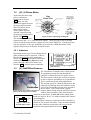
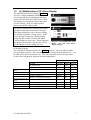
Each control slider operates
in the same manner. The
slider is initially at the zero
point on the bar. If it is
moved to the right, then the
Figure 14. PWM Control Slider
set point is changed in the
forward direction, whilst
moving it to the left changes
the set point in the reverse
direction. The level set by
Figure 13. Regen control slider
the slider is reflected in the
window on the top left of the
slider. For finer control over the set point value, buttons that increment or decrement
the value in single steps are placed to the right of the set point window. Pressing the
‘Zero’ button instantly resets the slider back to the zero point on the bar. The window
to the top right of the bar shows the actual level that the controller is at.
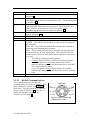
There is a fourth slider (Figure 13) that is used to control the current level for
regenerative braking. When driving the motor, the ‘Regen’ button can be pressed at
any time to begin braking regeneratively. This also zeroes any of the drive signals.
Regen will only operate whilst the button is depressed. Releasing the button will
leave the motor free to coast. Clicking on the ‘Regen Lock’ checkbox will put the
controller into regen mode permanently until the box is unchecked. Similar to the
other sliders, there is also a display window with up/down buttons that change the set
point in single step increments/decrements.
5.2
Configuration
There are many parameters that can be modified
within the controller to configure its operation
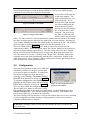
for a specific motor or situation. To download
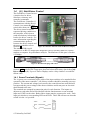
the current configuration from the motor
controller, select Config – Download Config
from MC from the menu as shown in Figure 15.
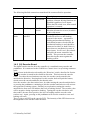
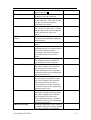
To edit this configuration select Config – Edit
Config from the window menu and the Config
Figure 15. The Config menu in the
Edit window will open as shown in Figure 16.
program main window.
Once you have edited the configuration, hit the
‘Record and Close’ button to close the Config
Edit window and return to the main program window. In the Config menu select
Upload Config to MC. Once this has completed successfully, your changes will
have been permanently recorded in the controller.
The Open Config from file and Save Config to file options allow you to save and load
custom configurations without having to retype parameter values every time the
controller configuration is changed.
WARNING Changing settings incorrectly may damage the power controller and
associated parts.
© Tritium Pty Ltd 2003
12