1
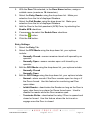
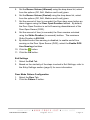
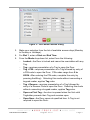
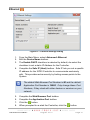
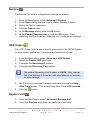
2. 3. 4. 5. 6. 7. 8. With the Door Tab selected, in the Door Name textbox, assign a suitable name (maximum 16 characters). Select the Entry Reader using the drop-down list. Make your selection from the list of displayed Readers. Select the Exit Reader using the drop-down list. Make your selection from the list of displayed Readers. Add the Door to the Anti-passback (APB) Zone, by selecting the Enable APB checkbox. If necessary, de-select the Enable Door checkbox. Click the button. Click the OK button. Entry Settings 1. Select the Entry Tab. 2. Select the RTE Mode using the drop-down list, your options include: Normally Closed—sensor remains closed until opened by an operator. Normally Open—sensor remains open until closed by an operator. 3. Edit the DOS Mode using the drop-down list, your options include: Normally Closed Normally Open 4. Edit the DOS Usage using the drop-down list, your options include: Normal—alarm sounds if the Door remains open too long or if the Doors forced. Use this feature for monitoring real Door open states. Inhibit Reader—deactivates the Reader as long as the Door is open; also there is no alarm for Doors forced open. Used to disable the reader while the Door remains open. Terminate Strike—deactivates the relay if Door is opened and closed or forced. Use this feature where the lock must reengage once the Door is closed. ISC306-0-0-GB-01 August 2010 Page 5